OPEN-SOURCE SCRIPT
Aktualisiert Custom Candle Highlighter (NY Time)
### Overview
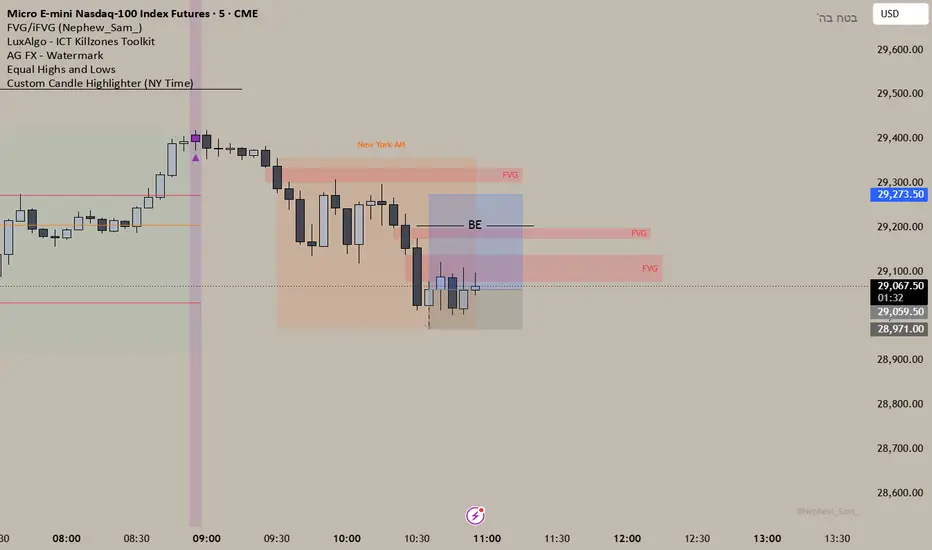
This lightweight utility script highlights exactly two specific candles during the trading day based on your custom time inputs. It is designed for traders who track specific key economic releases, market opens, or daily institutional windows.
### Features
* **Precise NY Time Tracking:** The script converts candle times to the New York timezone (`America/New_York`), meaning it automatically adjusts for U.S. Daylight Saving Time (DST). It will remain accurate regardless of your local chart timezone display.
* **Dual Time Inputs:** Easily set two independent times (Hour and Minute) directly from the indicator settings panel without changing the code.
* **Highly Visible Triggers:** When a candle matches your set time, the script highlights it using three visual anchors:
1. Changes the candle body color to Yellow.
2. Applies a soft Yellow background slot behind the candle.
3. Places a tiny green triangle underneath the candle for absolute clarity.
### Important Usage Notes (Best Settings)
* **Timeframe Requirement:** To capture exact minutes (e.g., 08:55 AM), you **must** use this indicator on lower-interval timeframes like the **1-minute (1m)** chart. If you are on a 1-hour chart, individual minute triggers will not paint.
* **Inputs:** Access the settings gear icon to adjust the hours (0-23 format) and minutes (0-59 format) for both the morning and afternoon session targets.
Feel free to leave a comment or drop a like if you find this script useful for your daily routine!
This lightweight utility script highlights exactly two specific candles during the trading day based on your custom time inputs. It is designed for traders who track specific key economic releases, market opens, or daily institutional windows.
### Features
* **Precise NY Time Tracking:** The script converts candle times to the New York timezone (`America/New_York`), meaning it automatically adjusts for U.S. Daylight Saving Time (DST). It will remain accurate regardless of your local chart timezone display.
* **Dual Time Inputs:** Easily set two independent times (Hour and Minute) directly from the indicator settings panel without changing the code.
* **Highly Visible Triggers:** When a candle matches your set time, the script highlights it using three visual anchors:
1. Changes the candle body color to Yellow.
2. Applies a soft Yellow background slot behind the candle.
3. Places a tiny green triangle underneath the candle for absolute clarity.
### Important Usage Notes (Best Settings)
* **Timeframe Requirement:** To capture exact minutes (e.g., 08:55 AM), you **must** use this indicator on lower-interval timeframes like the **1-minute (1m)** chart. If you are on a 1-hour chart, individual minute triggers will not paint.
* **Inputs:** Access the settings gear icon to adjust the hours (0-23 format) and minutes (0-59 format) for both the morning and afternoon session targets.
Feel free to leave a comment or drop a like if you find this script useful for your daily routine!
Versionshinweise
Changed the colors to purple, I like it more Open-source Skript
Ganz im Sinne von TradingView hat dieser Autor sein/ihr Script als Open-Source veröffentlicht. Auf diese Weise können nun auch andere Trader das Script rezensieren und die Funktionalität überprüfen. Vielen Dank an den Autor! Sie können das Script kostenlos verwenden, aber eine Wiederveröffentlichung des Codes unterliegt unseren Hausregeln.

Haftungsausschluss
Die Informationen und Veröffentlichungen sind nicht als Finanz-, Anlage-, Handels- oder andere Arten von Ratschlägen oder Empfehlungen gedacht, die von TradingView bereitgestellt oder gebilligt werden, und stellen diese nicht dar. Lesen Sie mehr in den Nutzungsbedingungen.
Open-source Skript
Ganz im Sinne von TradingView hat dieser Autor sein/ihr Script als Open-Source veröffentlicht. Auf diese Weise können nun auch andere Trader das Script rezensieren und die Funktionalität überprüfen. Vielen Dank an den Autor! Sie können das Script kostenlos verwenden, aber eine Wiederveröffentlichung des Codes unterliegt unseren Hausregeln.
Haftungsausschluss
Die Informationen und Veröffentlichungen sind nicht als Finanz-, Anlage-, Handels- oder andere Arten von Ratschlägen oder Empfehlungen gedacht, die von TradingView bereitgestellt oder gebilligt werden, und stellen diese nicht dar. Lesen Sie mehr in den Nutzungsbedingungen.