OPEN-SOURCE SCRIPT
Hopiplaka Goldbach Swings
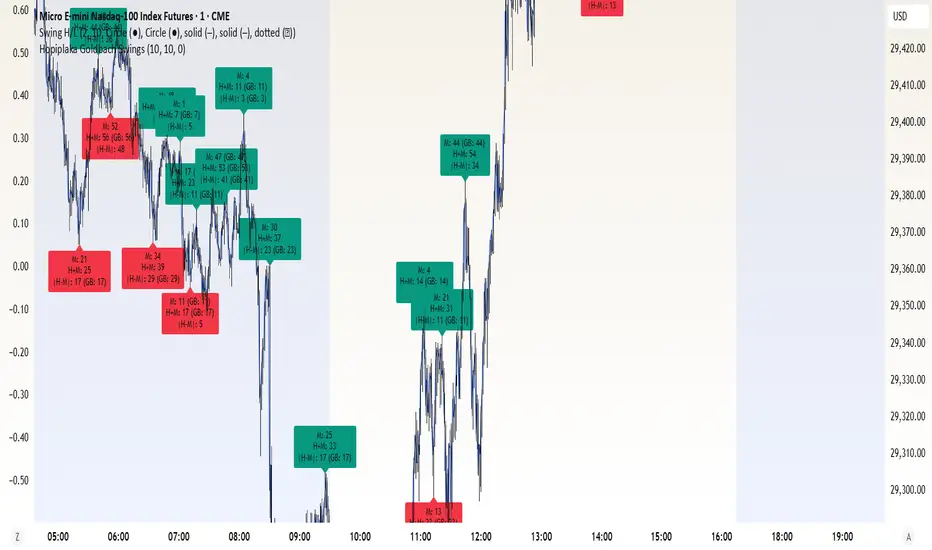
Core Functionality
Swing Detection: Uses Left and Right Buffer inputs to identify pivot highs and lows using ta.pivothigh() and ta.pivotlow().
Three Reference Points: For every potential swing, it calculates:
Minute: minute(time)
Hour + Minute: hour(time) + minute(time)
|Hour - Minute|: abs(hour(time) - minute(time))
Goldbach/CE Master List: Checks all three references against the master list: 0, 3, 7, 11, 14, 17, 23, 29, 35, 41, 44, 47, 50, 53, 56, 59, 65, 71, 77, 83, 89, 97, 100.
Tolerance: A user-defined tolerance (0 or 1) allows for near-matches.
Display Rules
Conditional Labels: By default, labels only appear if at least one reference point matches a Goldbach number. I've added a toggle to show all swings in gray if you wish to see non-matching pivots.
Color Coding:
Green: Swing High with a Goldbach match.
Red: Swing Low with a Goldbach match.
Gray: Swings with no match (only if "Show All" is enabled).
Inverse Rule (> 60): If a matched Goldbach number is greater than 60, the label displays its complement to 100 (e.g., 89 is displayed as 11). The original reference value (e.g., 89) is still shown for context.
Usage Notes
The script is an overlay, meaning it draws directly on the price chart.
It uses the chart's current timezone to calculate hours and minutes.
You can adjust the Left/Right Buffer to fine-tune the "strength" of the swings (larger buffers result in fewer, more significant pivots)
Swing Detection: Uses Left and Right Buffer inputs to identify pivot highs and lows using ta.pivothigh() and ta.pivotlow().
Three Reference Points: For every potential swing, it calculates:
Minute: minute(time)
Hour + Minute: hour(time) + minute(time)
|Hour - Minute|: abs(hour(time) - minute(time))
Goldbach/CE Master List: Checks all three references against the master list: 0, 3, 7, 11, 14, 17, 23, 29, 35, 41, 44, 47, 50, 53, 56, 59, 65, 71, 77, 83, 89, 97, 100.
Tolerance: A user-defined tolerance (0 or 1) allows for near-matches.
Display Rules
Conditional Labels: By default, labels only appear if at least one reference point matches a Goldbach number. I've added a toggle to show all swings in gray if you wish to see non-matching pivots.
Color Coding:
Green: Swing High with a Goldbach match.
Red: Swing Low with a Goldbach match.
Gray: Swings with no match (only if "Show All" is enabled).
Inverse Rule (> 60): If a matched Goldbach number is greater than 60, the label displays its complement to 100 (e.g., 89 is displayed as 11). The original reference value (e.g., 89) is still shown for context.
Usage Notes
The script is an overlay, meaning it draws directly on the price chart.
It uses the chart's current timezone to calculate hours and minutes.
You can adjust the Left/Right Buffer to fine-tune the "strength" of the swings (larger buffers result in fewer, more significant pivots)
Open-source Skript
Ganz im Sinne von TradingView hat dieser Autor sein/ihr Script als Open-Source veröffentlicht. Auf diese Weise können nun auch andere Trader das Script rezensieren und die Funktionalität überprüfen. Vielen Dank an den Autor! Sie können das Script kostenlos verwenden, aber eine Wiederveröffentlichung des Codes unterliegt unseren Hausregeln.

Haftungsausschluss
Die Informationen und Veröffentlichungen sind nicht als Finanz-, Anlage-, Handels- oder andere Arten von Ratschlägen oder Empfehlungen gedacht, die von TradingView bereitgestellt oder gebilligt werden, und stellen diese nicht dar. Lesen Sie mehr in den Nutzungsbedingungen.
Open-source Skript
Ganz im Sinne von TradingView hat dieser Autor sein/ihr Script als Open-Source veröffentlicht. Auf diese Weise können nun auch andere Trader das Script rezensieren und die Funktionalität überprüfen. Vielen Dank an den Autor! Sie können das Script kostenlos verwenden, aber eine Wiederveröffentlichung des Codes unterliegt unseren Hausregeln.
Haftungsausschluss
Die Informationen und Veröffentlichungen sind nicht als Finanz-, Anlage-, Handels- oder andere Arten von Ratschlägen oder Empfehlungen gedacht, die von TradingView bereitgestellt oder gebilligt werden, und stellen diese nicht dar. Lesen Sie mehr in den Nutzungsbedingungen.