Aktualisiert
Sweep + Reclaim | S&D Fakeout
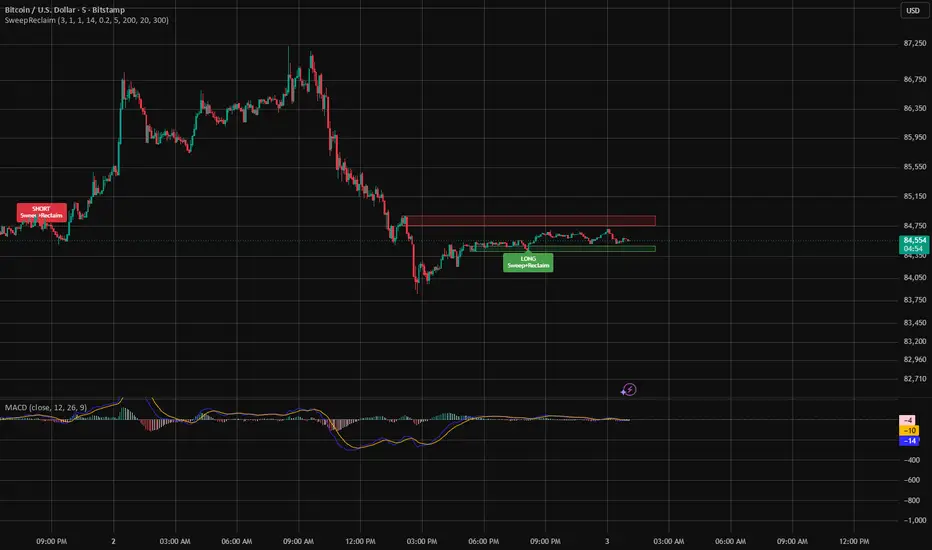
Sweep + Reclaim | S&D Fakeout
Trade the fakeout, not the breakout.
Most breakouts fail. This indicator finds fresh supply and demand zones, then waits for price to sweep liquidity through the zone and reclaim it — the classic stop-hunt reversal — before flagging a trade.
How it works
Zone detection — A supply/demand zone is drawn when a tight base (a few small, overlapping candles) breaks out with a strong displacement candle.
Liquidity sweep — The indicator watches for a wick through the zone's edge that closes back inside. That's trapped traders.
Reclaim trigger — A LONG or SHORT label fires when price closes back through the far edge of the zone with a strong-bodied candle, confirming the fakeout.
What you see
🟩 Green boxes = demand zones (potential longs)
🟥 Red boxes = supply zones (potential shorts)
LONG / SHORT labels = completed sweep + reclaim
Zones are removed once triggered, broken, or expired — only live, actionable zones stay on your chart
Built-in filters
EMA-200 trend filter (on by default): longs only above the EMA, shorts only below — no fighting the trend
Zones expire after 300 bars; max 20 zones kept on screen to avoid clutter
All parameters adjustable: base size, displacement strength, sweep tolerance, reclaim window
Alerts included
Set TradingView alerts on "Sweep+Reclaim LONG" and "Sweep+Reclaim SHORT" to get notified the moment a signal prints — no screen-watching required.
Suggested use
Works on any timeframe; designed around 1H–4H. This is a setup detector, not a standalone buy/sell signal — use the reclaim candle's structure for entries, place stops beyond the sweep extreme, target at least 2:1 reward-to-risk, and always backtest on your symbol and timeframe before trading live.
Educational tool only — not financial advice. No indicator predicts the market.
Two tips for publishing: pick a clean screenshot showing a LONG and a SHORT label with their zones as your preview image, and publish it as open-source so people can see the logic — transparency gets more trust (and more followers) than invite-only.
Trade the fakeout, not the breakout.
Most breakouts fail. This indicator finds fresh supply and demand zones, then waits for price to sweep liquidity through the zone and reclaim it — the classic stop-hunt reversal — before flagging a trade.
How it works
Zone detection — A supply/demand zone is drawn when a tight base (a few small, overlapping candles) breaks out with a strong displacement candle.
Liquidity sweep — The indicator watches for a wick through the zone's edge that closes back inside. That's trapped traders.
Reclaim trigger — A LONG or SHORT label fires when price closes back through the far edge of the zone with a strong-bodied candle, confirming the fakeout.
What you see
🟩 Green boxes = demand zones (potential longs)
🟥 Red boxes = supply zones (potential shorts)
LONG / SHORT labels = completed sweep + reclaim
Zones are removed once triggered, broken, or expired — only live, actionable zones stay on your chart
Built-in filters
EMA-200 trend filter (on by default): longs only above the EMA, shorts only below — no fighting the trend
Zones expire after 300 bars; max 20 zones kept on screen to avoid clutter
All parameters adjustable: base size, displacement strength, sweep tolerance, reclaim window
Alerts included
Set TradingView alerts on "Sweep+Reclaim LONG" and "Sweep+Reclaim SHORT" to get notified the moment a signal prints — no screen-watching required.
Suggested use
Works on any timeframe; designed around 1H–4H. This is a setup detector, not a standalone buy/sell signal — use the reclaim candle's structure for entries, place stops beyond the sweep extreme, target at least 2:1 reward-to-risk, and always backtest on your symbol and timeframe before trading live.
Educational tool only — not financial advice. No indicator predicts the market.
Two tips for publishing: pick a clean screenshot showing a LONG and a SHORT label with their zones as your preview image, and publish it as open-source so people can see the logic — transparency gets more trust (and more followers) than invite-only.
Versionshinweise
Trade the fakeout, not the breakout.Most breakouts fail. This indicator finds fresh supply and demand zones, then waits for price to sweep liquidity through the zone and reclaim it — the classic stop-hunt reversal — before flagging a trade.
How it works
Zone detection — A supply/demand zone is drawn when a tight base (a few small, overlapping candles) breaks out with a strong displacement candle.
Liquidity sweep — The indicator watches for a wick through the zone's edge that closes back inside. That's trapped traders.
Reclaim trigger — A LONG or SHORT label fires when price closes back through the far edge of the zone with a strong-bodied candle, confirming the fakeout.
What you see
🟩 Green boxes = demand zones (potential longs)
🟥 Red boxes = supply zones (potential shorts)
LONG / SHORT labels = completed sweep + reclaim
Zones are removed once triggered, broken, or expired — only live, actionable zones stay on your chart
Built-in filters
EMA-200 trend filter (on by default): longs only above the EMA, shorts only below — no fighting the trend
Zones expire after 300 bars; max 20 zones kept on screen to avoid clutter
All parameters adjustable: base size, displacement strength, sweep tolerance, reclaim window
Alerts included
Set TradingView alerts on "Sweep+Reclaim LONG" and "Sweep+Reclaim SHORT" to get notified the moment a signal prints — no screen-watching required.
Suggested use
Works on any timeframe; designed around 1H–4H. This is a setup detector, not a standalone buy/sell signal — use the reclaim candle's structure for entries, place stops beyond the sweep extreme, target at least 2:1 reward-to-risk, and always backtest on your symbol and timeframe before trading live.
Educational tool only — not financial advice. No indicator predicts the market.

Haftungsausschluss
Die Informationen und Veröffentlichungen sind nicht als Finanz-, Anlage-, Handels- oder andere Arten von Ratschlägen oder Empfehlungen gedacht, die von TradingView bereitgestellt oder gebilligt werden, und stellen diese nicht dar. Lesen Sie mehr in den Nutzungsbedingungen.
Haftungsausschluss
Die Informationen und Veröffentlichungen sind nicht als Finanz-, Anlage-, Handels- oder andere Arten von Ratschlägen oder Empfehlungen gedacht, die von TradingView bereitgestellt oder gebilligt werden, und stellen diese nicht dar. Lesen Sie mehr in den Nutzungsbedingungen.