OPEN-SOURCE SCRIPT
NQ8020-GC0802
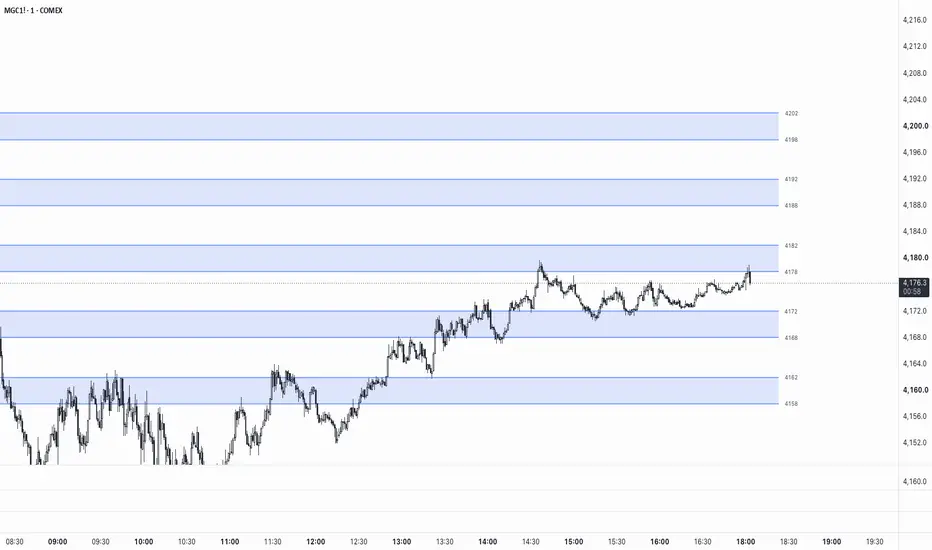
Round-Level Zones — Auto NQ/GC Support & Resistance Map
This indicator automatically maps out horizontal reaction zones around round-number price levels for Nasdaq (NQ/MNQ) and Gold (GC/MGC) futures, adjusting its logic to match the instrument you're viewing.
How it works
The script detects the symbol you're on and applies the appropriate round-level structure:
Zones re-center automatically as price moves, giving you a consistent, always-current map of nearby round-number levels without manually drawing lines on each instrument.
Features
Why round numbers matter
Round price levels tend to attract order flow — stops, limit orders, and psychological decision points cluster around them. Having these zones pre-mapped can help with spotting potential reaction areas, planning entries/exits, or keeping round-number context visible without cluttering the chart with manual drawings.
Usage notes
Designed specifically for the round-number structures of NQ/MNQ (hundreds) and GC/MGC (tens). This is a visual reference tool only and does not generate buy/sell signals — always combine with your own strategy, market structure analysis, and risk management.
This indicator automatically maps out horizontal reaction zones around round-number price levels for Nasdaq (NQ/MNQ) and Gold (GC/MGC) futures, adjusting its logic to match the instrument you're viewing.
How it works
The script detects the symbol you're on and applies the appropriate round-level structure:
- NQ / MNQ → zones are drawn from xx80 to xx20 around each round hundred (e.g. a zone at the 24,000 level runs from 24,020 down to 23,980)
- GC / MGC → zones are drawn from xx8 to xx2 around each round ten (e.g. a zone at 3350 runs from 3352 down to 3348)
Zones re-center automatically as price moves, giving you a consistent, always-current map of nearby round-number levels without manually drawing lines on each instrument.
Features
- Works on both NQ/MNQ and GC/MGC — no separate indicators or settings to switch
- Adjustable number of zones displayed above/below price (1–50)
- Customizable zone fill color, border line color, style (solid/dashed/dotted), and width
- Optional price labels on each zone boundary
- Adjustable right-side offset and left-extension of lines
- On-chart warning if applied to an unsupported symbol
Why round numbers matter
Round price levels tend to attract order flow — stops, limit orders, and psychological decision points cluster around them. Having these zones pre-mapped can help with spotting potential reaction areas, planning entries/exits, or keeping round-number context visible without cluttering the chart with manual drawings.
Usage notes
Designed specifically for the round-number structures of NQ/MNQ (hundreds) and GC/MGC (tens). This is a visual reference tool only and does not generate buy/sell signals — always combine with your own strategy, market structure analysis, and risk management.
Open-source Skript
Ganz im Sinne von TradingView hat dieser Autor sein/ihr Script als Open-Source veröffentlicht. Auf diese Weise können nun auch andere Trader das Script rezensieren und die Funktionalität überprüfen. Vielen Dank an den Autor! Sie können das Script kostenlos verwenden, aber eine Wiederveröffentlichung des Codes unterliegt unseren Hausregeln.

Haftungsausschluss
Die Informationen und Veröffentlichungen sind nicht als Finanz-, Anlage-, Handels- oder andere Arten von Ratschlägen oder Empfehlungen gedacht, die von TradingView bereitgestellt oder gebilligt werden, und stellen diese nicht dar. Lesen Sie mehr in den Nutzungsbedingungen.
Open-source Skript
Ganz im Sinne von TradingView hat dieser Autor sein/ihr Script als Open-Source veröffentlicht. Auf diese Weise können nun auch andere Trader das Script rezensieren und die Funktionalität überprüfen. Vielen Dank an den Autor! Sie können das Script kostenlos verwenden, aber eine Wiederveröffentlichung des Codes unterliegt unseren Hausregeln.
Haftungsausschluss
Die Informationen und Veröffentlichungen sind nicht als Finanz-, Anlage-, Handels- oder andere Arten von Ratschlägen oder Empfehlungen gedacht, die von TradingView bereitgestellt oder gebilligt werden, und stellen diese nicht dar. Lesen Sie mehr in den Nutzungsbedingungen.