Aktualisiert
DC Filter TSI + SuperTrend v6 SANJEEV
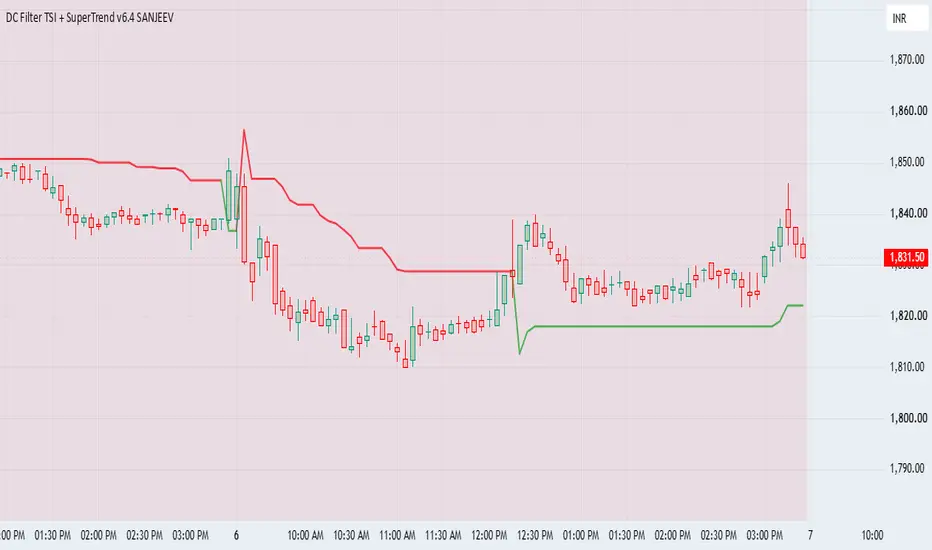
Script Title
`DC Filter TSI + SuperTrend v6 | Dominance Cycle Adaptive Trading`
*Short Description - 250 chars*
Adaptive trading system using Ehlers Dominance Cycle to filter market regimes. Combines TSI-EMA crossovers with Adaptive SuperTrend. Avoids chop. Built for 5min NIFTY/BANKNIFTY. Shows DC status, No-Trade zones, and Buy/Sell alerts.
*Full Description for Publishing*
**DC Filter TSI + SuperTrend v6**
An adaptive momentum + trend following indicator for Intraday trading, especially 5min charts.
**The Problem This Solves:**
Most indicators give false signals in sideways/choppy markets. This script uses John Ehlers Dominance Cycle to detect market cycle length and avoid trading when the market is "dead" or too slow.
**How It Works:**
1. **Dominance Cycle Detection**: Measures the dominant cycle of price using Ehlers DC. This tells us if the market is Fast, Normal, Slow, or Dead.
2. **DC Filter**: When DC > 30 bars, background turns RED = No Trade Zone. Skip signals in chop.
3. **Adaptive TSI-EMA**: Uses TSI crossover above/below signal line for momentum. Only takes trades in direction of SuperTrend.
4. **Adaptive SuperTrend**: ATR-based trailing stop that acts as trend filter and dynamic SL.
**How To Use - 5min NIFTY/BANKNIFTY:**
- **Trade Only When**: Top-right panel shows "Fast - Trade" or "Normal - Trade"
- **Long**: Green SuperTrend + TSI crosses UP + BUY arrow + Price above ST
- **Short**: Red SuperTrend + TSI crosses DOWN + SELL arrow + Price below ST
- **Avoid**: Red background = DC > 30. Market is too slow/choppy
**Inputs:**
- `Ehlers DC Length`: Base cycle length. Default 10
- `Max DC to Trade`: DC threshold to block trades. Default 30
- `TSI Fast Length`: Momentum speed. Tune lower for fast DC, higher for slow DC
- `ATR Length` & `Multiplier`: Controls SuperTrend sensitivity
**Features:**
- Real-time DC Status Panel
- Visual No-Trade Zone
- Buy/Sell Arrows with Alerts
- Works best on 5min - 15min timeframes
- v6 Pine Script, no repaint
Created for traders who want to trade with the cycle, not against it.
*Tags to use*
`dominance cycle, ehlers, tsi, supertrend, adaptive, nifty, banknifty, intraday, 5min, momentum, filter, cycle, trading system`
*Category*
`Indicators > Momentum`
`DC Filter TSI + SuperTrend v6 | Dominance Cycle Adaptive Trading`
*Short Description - 250 chars*
Adaptive trading system using Ehlers Dominance Cycle to filter market regimes. Combines TSI-EMA crossovers with Adaptive SuperTrend. Avoids chop. Built for 5min NIFTY/BANKNIFTY. Shows DC status, No-Trade zones, and Buy/Sell alerts.
*Full Description for Publishing*
**DC Filter TSI + SuperTrend v6**
An adaptive momentum + trend following indicator for Intraday trading, especially 5min charts.
**The Problem This Solves:**
Most indicators give false signals in sideways/choppy markets. This script uses John Ehlers Dominance Cycle to detect market cycle length and avoid trading when the market is "dead" or too slow.
**How It Works:**
1. **Dominance Cycle Detection**: Measures the dominant cycle of price using Ehlers DC. This tells us if the market is Fast, Normal, Slow, or Dead.
2. **DC Filter**: When DC > 30 bars, background turns RED = No Trade Zone. Skip signals in chop.
3. **Adaptive TSI-EMA**: Uses TSI crossover above/below signal line for momentum. Only takes trades in direction of SuperTrend.
4. **Adaptive SuperTrend**: ATR-based trailing stop that acts as trend filter and dynamic SL.
**How To Use - 5min NIFTY/BANKNIFTY:**
- **Trade Only When**: Top-right panel shows "Fast - Trade" or "Normal - Trade"
- **Long**: Green SuperTrend + TSI crosses UP + BUY arrow + Price above ST
- **Short**: Red SuperTrend + TSI crosses DOWN + SELL arrow + Price below ST
- **Avoid**: Red background = DC > 30. Market is too slow/choppy
**Inputs:**
- `Ehlers DC Length`: Base cycle length. Default 10
- `Max DC to Trade`: DC threshold to block trades. Default 30
- `TSI Fast Length`: Momentum speed. Tune lower for fast DC, higher for slow DC
- `ATR Length` & `Multiplier`: Controls SuperTrend sensitivity
**Features:**
- Real-time DC Status Panel
- Visual No-Trade Zone
- Buy/Sell Arrows with Alerts
- Works best on 5min - 15min timeframes
- v6 Pine Script, no repaint
Created for traders who want to trade with the cycle, not against it.
*Tags to use*
`dominance cycle, ehlers, tsi, supertrend, adaptive, nifty, banknifty, intraday, 5min, momentum, filter, cycle, trading system`
*Category*
`Indicators > Momentum`
Versionshinweise
🙏 MASSIVE THANK YOU TO THE COMMUNITY! 🙏
@af2zx @zzp00712 Busheng0618 and everyone who boosted this script - I really appreciate the support!
Because of you, this script is getting seen by 1000s more traders this week.
🚀 **STRATEGY UPDATE** 🚀
I'm coding the STRATEGY + BACKTEST version of DC Filter RSI + ST right now.
It will have:
1. Built-in SL/TP
2. Winrate + PF stats for NIFTY/BANKNIFTY 5min & 15min
3. Alerts for Buy/Sell + DC No-Trade Zone
Drop a comment: What timeframe and symbol do YOU want me to backtest first? 👇
Follow me so you don't miss the drop. Will be posted here in 24-48h.
Not financial advice. Trade safe.
Versionshinweise
//version=6indicator("DC Filter TSI + SuperTrend v6", overlay=true, max_lines_count=500, max_labels_count=500)
// === INPUTS ===
grp1 = "Dominance Cycle"
dcLen = input.int(10, "Ehlers DC Length", minval=5, group=grp1)
dcFilter = input.int(30, "Max DC to Trade", minval=10, group=grp1)
useDCFilter = input.bool(true, "Use DC Filter", group=grp1)
grp2 = "Indicator Settings"
tsiLen = input.int(12, "TSI Fast Length", minval=2, group=grp2)
tsiSig = input.int(7, "TSI Signal", minval=1, group=grp2)
stMult = input.float(3.0, "ATR Multiplier", step=0.1, group=grp2)
atrLen = input.int(10, "ATR Length", minval=2, group=grp2)
// === DOMINANCE CYCLE CALCULATION - EHLERS ===
var float hp = na
src = hl2
alpha = 0.707 * math.sin(2 * math.pi / dcLen)
hp := alpha * src * src + (1 - alpha) * nz(hp[1]) - math.pow(alpha, 2) * nz(hp[2])
hp := math.max(0.1, hp)
dc = math.min(80.0, math.max(8.0, math.sqrt(hp)))
// === TSI - FIXED LENGTH ===
mom = src - src[1]
amom = math.abs(mom)
s1 = ta.ema(mom, tsiLen)
s2 = ta.ema(s1, tsiLen)
s3 = ta.ema(amom, tsiLen)
s4 = ta.ema(s3, tsiLen)
tsi = s4!= 0.0? 100.0 * s2 / s4 : 0.0
tsisig = ta.ema(tsi, tsiSig)
// === SUPERTREND - FIXED LENGTH ===
[superTrend, direction] = ta.supertrend(stMult, atrLen)
// === PLOTS - THESE FIX CE10246 ===
stColor = direction < 0? color.red : color.lime
plot(superTrend, "SuperTrend", color=stColor, linewidth=2)
plotchar(na, "DC Value", "", location.top) // dummy plot so TV sees indicator
// Background for No Trade Zone
bgcolor(useDCFilter and dc > dcFilter? color.new(color.red, 90) : na)
// === SIGNALS ===
tradeAllowed = not useDCFilter or dc < dcFilter
longCond = ta.crossover(tsi, tsisig) and tsi > 0 and close > superTrend and tradeAllowed
shortCond = ta.crossunder(tsi, tsisig) and tsi < 0 and close < superTrend and tradeAllowed
plotshape(longCond, "Buy", shape.triangleup, location.belowbar, color.lime, size=size.normal, text="BUY")
plotshape(shortCond, "Sell", shape.triangledown, location.abovebar, color.red, size=size.normal, text="SELL")
// === ALERTS ===
alertcondition(longCond, "DC Buy", "DC Buy: {{ticker}} {{interval}}")
alertcondition(shortCond, "DC Sell", "DC Sell: {{ticker}} {{interval}}")
// === INFO PANEL ===
var table info = table.new(position.top_right, 1, 1, border_width=1)
if barstate.islastconfirmedhistory
dcStatus = dc < 18? "Fast - Trade" : dc < 28? "Normal - Trade" : dc < 32? "Slow - Caution" : "Dead - AVOID"
txt = "DC: " + str.tostring(dc, "#.##") + " bars\n" + "Status: " + dcStatus
table.cell(info, 0, 0, txt, text_color=color.white, bgcolor=color.new(color.black, 70))
Versionshinweise
// ===== Show TSI in separate pane =====plot(tsi, "TSI Line", color=color.new(color.orange, 0), linewidth=2)
hline(0, "Zero Line", color=color.gray, linestyle=hline.style_dashed)
hline(25, "Overbought", color=color.red, linestyle=hline.style_dotted)
hline(-25, "Oversold", color=color.green, linestyle=hline.style_dotted)
Versionshinweise
DC Filter + TSI + SuperTrend all in one pane.Red background = High Dominance Cycle, avoid trades.
Green/Red SuperTrend = Trend.
Orange/Aqua = TSI Momentum.
Versionshinweise
DC Filter TSI + SuperTrend v6 SANJEEV [UPDATED]UPDATE v6.1: Fixed TSI plotting issue. Now shows properly in bottom pane.
This indicator combines 3 powerful filters to find clean trend trades:
1. **Ehlers Dominance Cycle Filter**: Red background = High market cycle. Avoid trades.
2. **True Strength Index TSI**: Orange line = Momentum. Aqua line = Signal.
3. **SuperTrend**: Green line on candles = Uptrend. Red line on candles = Downtrend.
**How to Use:**
- **Long**: SuperTrend Green + TSI crosses above Signal + No Red background
- **Short**: SuperTrend Red + TSI crosses below Signal + No Red background
Inputs: DC Length, TSI Length, ATR Multiplier are adjustable.
Created by SANJEEV.
For educational purpose only. Not financial advice.
Versionshinweise
DC Filter TSI + SuperTrend v6 SANJEEV [UPDATED]UPDATE v6.1: Fixed TSI plotting issue. Now shows properly in bottom pane.
This indicator combines 3 powerful filters to find clean trend trades:
1. **Ehlers Dominance Cycle Filter**: Red background = High market cycle. Avoid trades.
2. **True Strength Index TSI**: Orange line = Momentum. Aqua line = Signal.
3. **SuperTrend**: Green line on candles = Uptrend. Red line on candles = Downtrend.
**How to Use:**
- **Long**: SuperTrend Green + TSI crosses above Signal + No Red background
- **Short**: SuperTrend Red + TSI crosses below Signal + No Red background
Inputs: DC Length, TSI Length, ATR Multiplier are adjustable.
Created by SANJEEV.
For educational purpose only. Not financial advice.

Haftungsausschluss
Die Informationen und Veröffentlichungen sind nicht als Finanz-, Anlage-, Handels- oder andere Arten von Ratschlägen oder Empfehlungen gedacht, die von TradingView bereitgestellt oder gebilligt werden, und stellen diese nicht dar. Lesen Sie mehr in den Nutzungsbedingungen.
Haftungsausschluss
Die Informationen und Veröffentlichungen sind nicht als Finanz-, Anlage-, Handels- oder andere Arten von Ratschlägen oder Empfehlungen gedacht, die von TradingView bereitgestellt oder gebilligt werden, und stellen diese nicht dar. Lesen Sie mehr in den Nutzungsbedingungen.