Aktualisiert
GEX Levels for NQ/NDX/QQQ Gamma Exposure
DESCRIPTION
━━━━━━━━━━━━━━━━━━━━━━━━━━━━
A professional framework for Gamma Exposure analysis on NASDAQ-100 instruments.
━━━━━━━━━━━━━━━━━━━━━━━━━━━━
WHAT THIS INDICATOR DOES
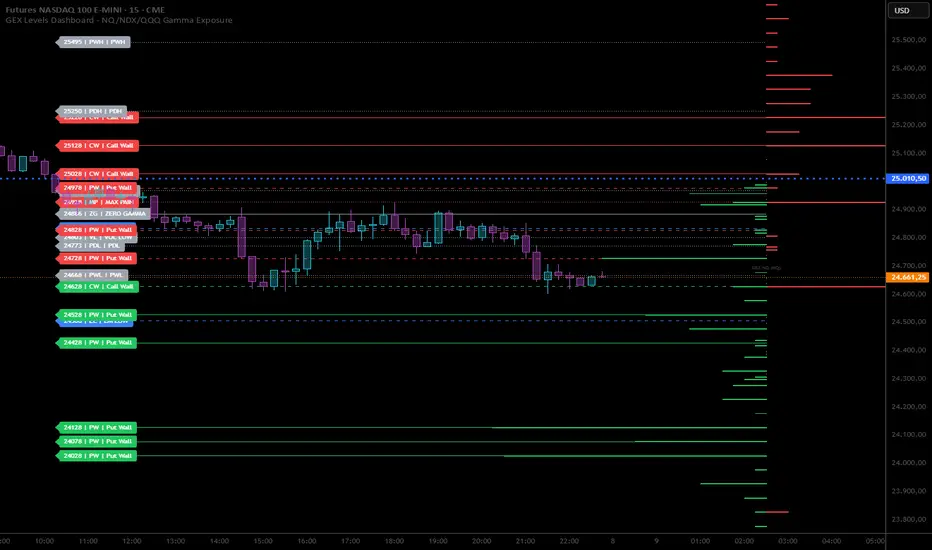
This indicator visualizes key strategic levels derived from Gamma Exposure (GEX) analysis — the zones where dealer hedging flows create measurable support and resistance.
What you see:
- Call Walls — resistance zones where dealers hedge against upside
- Put Walls — support zones where dealers hedge against downside
- Zero Gamma — the structural pivot between mean-reversion and trend
- Expected Move bands — statistical range boundaries
- GEX Histogram — gamma distribution profile directly on chart
━━━━━━━━━━━━━━━━━━━━━━━━━━━━
WORKS OUT OF THE BOX
The indicator ships with pre-loaded 5DTE weekly GEX levels — add it to your chart and you'll see levels immediately. No setup, no copy/paste needed. We refresh the built-in data every week.
If you have access to more frequent data (0DTE, intraday), paste it into the GEX Data field in settings — your data always takes priority. Clear the field to fall back to the built-in weekly levels.
Pre-loaded PDH/PDL reflect the session at time of update. Fresh daily structure levels require pasting updated data.
Daily 0DTE data updates available soon via invite-only version — DM for early access.
━━━━━━━━━━━━━━━━━━━━━━━━━━━━
KEY FEATURES
▸ Ticker Switcher
Select NQ, NDX, or QQQ directly in settings.
Data converts automatically (NQ-NDX spread: 40 pts, QQQ ≈ NDX/40).
One script, three instruments.
▸ GEX Profile Histogram
See gamma distribution as horizontal bars on your chart.
Instantly spot where positioning clusters.
▸ Color Themes
Choose between Boreal, Classic, or Lady Trader palettes.
▸ Level Toggles
Show/hide level groups independently:
GEX Levels | System Levels | Structure Levels
▸ Rich Tooltips
Hover for details: GEX values, Call/Put ratio, Hold/Break probabilities.
▸ Flip Detection
When price crosses a level, it automatically updates role and style (solid → dashed).
▸ GEX Threshold Filter
Hide weak levels below a minimum magnitude to focus on significant zones.
▸ Smart Level Distribution
Levels are equally split above/below spot, with closest levels always protected from max limit.
▸ Alert System
Get notified when price crosses key GEX levels. Alerts are pre-configured for the built-in 5DTE levels.
━━━━━━━━━━━━━━━━━━━━━━━━━━━━
HOW TO READ THE LEVELS
Each line represents a zone where price reaction is statistically probable:
- Thick solid lines = level not yet crossed
- Dashed lines = level flipped (price crossed through)
- Cyan/Teal or Green = potential support (Put Walls)
- Pink/Red = potential resistance (Call Walls)
- Gray = structural levels (Zero Gamma, Vol Bands, PDH/PDL)
The indicator shows structure, not predictions.
Use it to identify where the market is likely to react — not which direction it will go.
━━━━━━━━━━━━━━━━━━━━━━━━━━━━
PRO TIP: CONFLUENCE
This tool is most powerful when combined with your own analysis.
Highest-probability setups occur when GEX levels align with:
Price action zones (support/resistance, order blocks)
Volume Profile (HVN/LVN, VWAP)
Technical structure (prior highs/lows, trend lines)
One level alone is information. Confluence is edge.
━━━━━━━━━━━━━━━━━━━━━━━━━━━━
DISCLAIMER
This tool is for informational and educational purposes only.
It does not constitute financial advice. Trading involves significant risk.
Past structure does not guarantee future behavior.
━━━━━━━━━━━━━━━━━━━━━━━━━━━━
DATA FORMAT REFERENCE (for DIY users)
The GEX Data input field accepts a formatted string: L:levels|P:profile
— L: section = level lines on the chart
— P: section = GEX profile bars (horizontal histogram)
— Separated by |P:
LEVELS (L: section):
strike,type,label,tooltip,magnitude — separated by semicolons
— strike: price in NQ terms (integer)
— type: CW (Call Wall), PW (Put Wall), ZG (Zero Gamma), MP (Max Pain), EH/EL (Expected Move), VH/VL (Vol Bands), PDH/PDL/PWH/PWL (Structure)
— label: display name
— tooltip: hover text (use ~ for line breaks)
— magnitude: GEX in millions (0 for non-GEX levels)
PROFILE (P: section):
strike,score,sign — separated by semicolons
— score: -10 to 10
— sign: 1 = call-dominant, -1 = put-dominant
DIY workflow:
— Get a delayed options chain (any broker or public data provider)
— Filter to target expiry
— For each strike: Gamma via Black-Scholes, then GEX = Gamma × OI × 100 × Spot²
— Rank by magnitude, normalize scores 0-10
— Paste into Settings → GEX Data
Latest Levels Update 2026-03-08 - 5DTE Exp
━━━━━━━━━━━━━━━━━━━━━━━━━━━━
A professional framework for Gamma Exposure analysis on NASDAQ-100 instruments.
━━━━━━━━━━━━━━━━━━━━━━━━━━━━
WHAT THIS INDICATOR DOES
This indicator visualizes key strategic levels derived from Gamma Exposure (GEX) analysis — the zones where dealer hedging flows create measurable support and resistance.
What you see:
- Call Walls — resistance zones where dealers hedge against upside
- Put Walls — support zones where dealers hedge against downside
- Zero Gamma — the structural pivot between mean-reversion and trend
- Expected Move bands — statistical range boundaries
- GEX Histogram — gamma distribution profile directly on chart
━━━━━━━━━━━━━━━━━━━━━━━━━━━━
WORKS OUT OF THE BOX
The indicator ships with pre-loaded 5DTE weekly GEX levels — add it to your chart and you'll see levels immediately. No setup, no copy/paste needed. We refresh the built-in data every week.
If you have access to more frequent data (0DTE, intraday), paste it into the GEX Data field in settings — your data always takes priority. Clear the field to fall back to the built-in weekly levels.
Pre-loaded PDH/PDL reflect the session at time of update. Fresh daily structure levels require pasting updated data.
Daily 0DTE data updates available soon via invite-only version — DM for early access.
━━━━━━━━━━━━━━━━━━━━━━━━━━━━
KEY FEATURES
▸ Ticker Switcher
Select NQ, NDX, or QQQ directly in settings.
Data converts automatically (NQ-NDX spread: 40 pts, QQQ ≈ NDX/40).
One script, three instruments.
▸ GEX Profile Histogram
See gamma distribution as horizontal bars on your chart.
Instantly spot where positioning clusters.
▸ Color Themes
Choose between Boreal, Classic, or Lady Trader palettes.
▸ Level Toggles
Show/hide level groups independently:
GEX Levels | System Levels | Structure Levels
▸ Rich Tooltips
Hover for details: GEX values, Call/Put ratio, Hold/Break probabilities.
▸ Flip Detection
When price crosses a level, it automatically updates role and style (solid → dashed).
▸ GEX Threshold Filter
Hide weak levels below a minimum magnitude to focus on significant zones.
▸ Smart Level Distribution
Levels are equally split above/below spot, with closest levels always protected from max limit.
▸ Alert System
Get notified when price crosses key GEX levels. Alerts are pre-configured for the built-in 5DTE levels.
━━━━━━━━━━━━━━━━━━━━━━━━━━━━
HOW TO READ THE LEVELS
Each line represents a zone where price reaction is statistically probable:
- Thick solid lines = level not yet crossed
- Dashed lines = level flipped (price crossed through)
- Cyan/Teal or Green = potential support (Put Walls)
- Pink/Red = potential resistance (Call Walls)
- Gray = structural levels (Zero Gamma, Vol Bands, PDH/PDL)
The indicator shows structure, not predictions.
Use it to identify where the market is likely to react — not which direction it will go.
━━━━━━━━━━━━━━━━━━━━━━━━━━━━
PRO TIP: CONFLUENCE
This tool is most powerful when combined with your own analysis.
Highest-probability setups occur when GEX levels align with:
Price action zones (support/resistance, order blocks)
Volume Profile (HVN/LVN, VWAP)
Technical structure (prior highs/lows, trend lines)
One level alone is information. Confluence is edge.
━━━━━━━━━━━━━━━━━━━━━━━━━━━━
DISCLAIMER
This tool is for informational and educational purposes only.
It does not constitute financial advice. Trading involves significant risk.
Past structure does not guarantee future behavior.
━━━━━━━━━━━━━━━━━━━━━━━━━━━━
DATA FORMAT REFERENCE (for DIY users)
The GEX Data input field accepts a formatted string: L:levels|P:profile
— L: section = level lines on the chart
— P: section = GEX profile bars (horizontal histogram)
— Separated by |P:
LEVELS (L: section):
strike,type,label,tooltip,magnitude — separated by semicolons
— strike: price in NQ terms (integer)
— type: CW (Call Wall), PW (Put Wall), ZG (Zero Gamma), MP (Max Pain), EH/EL (Expected Move), VH/VL (Vol Bands), PDH/PDL/PWH/PWL (Structure)
— label: display name
— tooltip: hover text (use ~ for line breaks)
— magnitude: GEX in millions (0 for non-GEX levels)
PROFILE (P: section):
strike,score,sign — separated by semicolons
— score: -10 to 10
— sign: 1 = call-dominant, -1 = put-dominant
DIY workflow:
— Get a delayed options chain (any broker or public data provider)
— Filter to target expiry
— For each strike: Gamma via Black-Scholes, then GEX = Gamma × OI × 100 × Spot²
— Rank by magnitude, normalize scores 0-10
— Paste into Settings → GEX Data
Latest Levels Update 2026-03-08 - 5DTE Exp
Versionshinweise
Weekly 5dte levels updated at 26.03.15Versionshinweise
Last update: 2026-03-23 | Expiry: 5DTE | Next update: ~2026-03-29Versionshinweise
Bux Fix on NQ/NDX conversionVersionshinweise
Last update: 2026-03-29 | Expiry: 5DTE | Next update: ~2026-04-05Versionshinweise
26.04.05 Weekly 5DTE levels updateVersionshinweise
2026-04-12 Latest 5DTE Weekly Levels UpdatedVersionshinweise
Weekly updated at 2026-04-19Versionshinweise
2026-04-27 weekly updateVersionshinweise
2026.05.04 Weekly 5dte updateVersionshinweise
2026-05-11 Weekly 5DTE updateVersionshinweise
v7.2 — Feature parity with the ES/SPX/SPY indicatorThis release brings the NQ/NDX/QQQ indicator up to the same feature
set as the ES/SPX/SPY one. Existing users keep the same indicator on
their charts — just refresh after the Update Publication to get the
new tools.
What's new
• Breakout Structure (BOS): automatic BOdl / BOds markers with +FVG
annotations on H1, H4, D, W and M timeframes.
• Session Boxes: visual ranges for Asia / Europe / Pre-Open / RTH /
Opening Range / Close.
• Session AVWAP: VWAP anchored to each session open, plus optional
per-session deviation bands.
• Confluence Zones: highlights clusters of multiple levels (GEX +
system + structure) inside ±5% of prev-day ATR.
• Smarter alerts: the alert system now reads from the live BOS levels
so the price triggers stay in sync with the weekly publish — no
more hand-coded thresholds.
What's unchanged
• Display Ticker (NQ / NDX / QQQ) auto-scales every level (NDX =
futures − spread, QQQ = (futures − spread) / 40).
• Built-in weekly 5-DTE NQ levels stay the default; paste a custom
string in "Live GEX Override" to use your own snapshot.
• All filters (Max Levels, Show Only Near Price, Min GEX Threshold)
remain available and unchanged.
Versionshinweise
2026-05-18- weekly 5DTE updateVersionshinweise
2026-06-01- Weekly 5DTE Lev UpdateVersionshinweise
2026-06-08 weekly 5DTE updateVersionshinweise
2026-06-22- Weekly 5DTE GEX levels updatedVersionshinweise
• Wall flip state (per wall, single state per side):- CW non-flipped → 2 consecutive 5m closes ABOVE strike → flipped
- CW flipped → 2 consecutive 5m closes BELOW strike → restored
- PW symmetric
The 5m close stream is fetched via request.security("5") so the rule
behaves identically on a 1m, 5m, or 1h display chart.
• Visual treatment of flipped walls:
- Color preserved (CW = nature pink, PW = nature cyan). No more cross-
fade between colorPos/colorNeg based on price position.
- Line width drops by 1 (min 1) — "weakened in its current role".
- Label gains a "↺" suffix; tooltip explains "Flipped Res → Sup (2× 5m
close beyond)" or "Flipped Sup → Res", vs "Resistance" / "Support"
in the normal state.
• New "Label Side" input (Colors & Style group) — choose Left or Right.
Right anchors the label past the profile bars so it overlaps neither
candles nor profile. Left is the historical placement (default).
• Default line width 1 → 2 so the flipped width-1 cue is visible out of
the box without forcing the user to bump their style.
• All horizontal levels (walls, system, structure) now render with
extend=extend.both — visually connects the Right-side label to the line
crossing the chart.
5DTE Levels are updated at 2026-06-27
Versionshinweise
Weekly 5DTE Updated at 2026-07-06Versionshinweise
Weekly 5DTE updated 2026-07-13Versionshinweise
Bug fix: QQQ level scaling — plus a bonus, today's 0DTE levels baked into the default, valid until market close on 2026-07-21Versionshinweise
Minor Bug FixesVersionshinweise
IOS/Mobile encoding problem (uppercase/lowercase) issue solvedVersionshinweise
2026-08-03 Weekly levels 5DTE updateVersionshinweise
Charm Magnet is now displayed on ChartVersionshinweise
TLADe GEX Levels 3.5.0 (13 September 2026) — NQ/NDX/QQQLabels
- One name per level: "29230 Put Wall", "29189 Zero Gamma", "29323 EM High Globex". No more code + name.
- Structure levels read "Previous Day High", not "Prior".
- Session AVWAP labels moved next to the other labels (Label Side setting) and read "29410.25 AVWAP Asia". They used to hide under the price axis.
- Breakout labels now carry direction and timeframe: "▲ BO L H1 29410.25", "▼▼ BO S H4", "▲▲▲ BO L D" (▲▲▲▲ W, ▲▲▲▲▲ M).
Behaviour
- "Current day" is the last futures day on the chart (18:00 to 17:00 ET), not the last 30 hours. AVWAPs and session boxes no longer disappear on weekends and holidays.
- Breakouts are detected and invalidated on closed bars of their own timeframe. A long BO H1 stays alive until a bearish H1 bar closes below it. The previous version tested the developing bar in realtime and killed a daily breakout on any 1-minute close.
- PDH/PDL/PWH/PWL come from the same closed-bar series: always yesterday's, on history too.
- Confluence band is a percentage of the EM range (default 7% = ±3.5%) instead of a fixed 5 points. No EM in the data, no zones.
- Breakout Structure has a group switch and a "Keep last N per timeframe" setting (default 2).
- Nothing is drawn on timeframes above 1H unless "Draw on timeframes above 1H" is on.
- New level codes EHR / ELR = EM High / Low RTH (the expected move re-anchored at the 09:30 open), drawn when the data carries them. EM High/Low are now labelled "Globex".
- Alerts on GEX and system levels: a close crossing a Call/Put Wall, Zero Gamma, Max Pain, EM or Vol Band fires once per bar close. Breakout alerts unchanged. Each family has its own switch. Create the alert with "Any alert() function call".
- NQ to NDX spread: no built-in default any more. If the data string has no S: value, strikes stay in NQ points instead of being shifted by a stale number. The QQQ ratio still comes from R: and, when missing, levels stay hidden with a warning.
Defaults
- On: Call/Put Walls, System (ZG, Max Pain, EM, Vol Bands), Delta Flip, GEX Profile Bars, Session AVWAPs.
- Off: Structure, Charm Magnet, Session Boxes, Confluence Zones, Breakout Structure (1H/4H/D preselected when you turn the group on), Alerts.
- Weekly seed data updated to 13 September 2026.
Unchanged
- Wall flip: two consecutive 5-minute closes beyond the strike, colour = nature, "↺" suffix.
Versionshinweise
Left Anchor (new): "Bars back" (as before) or "Day start". With Day start, lines and labels on the left begin at the first bar of the futures day (18:00 ET) and stay there. No more raising Line Left Extension during the session to keep the labels from walking right.Line Extension (new): Auto / None / Right / Both. Auto draws the line from the label to the GEX profile when Label Side is Left, and across the whole chart when Label Side is Right, so the label stays attached to its line. Pick Both if you want the lines across the whole chart as in the previous version, or None / Right to force the other two.
Label Transparency is now two settings: Walls (Call/Put Wall boxes) and System (Zero Gamma, Max Pain, EM, Vol Bands, structure). Raise Walls, keep System at 0, and Zero Gamma stays readable when it sits under a wall.
Line Left Extension has a tooltip and is ignored when Left Anchor is Day start.
Nothing changes in the levels, the data string or the AVWAP. Existing settings keep their values; Label Transparency starts at 0 in both new fields.
Versionshinweise
Weekly data updated 2026-09-21Versionshinweise
BugFux - EM RTH is now visible againVersionshinweise
TLADe GEX Levels 3.6.1 (ES/SPX/SPY and NQ/NDX/QQQ)NEW
• Publication label: the chart now shows which TLADe publication your levels come from ("TLADe levels: date, session, time ET"). It turns red and says STALE when a newer publication should already exist: paste the latest string from the terminal.
• Worldlines H1: the terminal's H1 AVWAP displacement worldlines, now on TradingView. On by default, with Bull / Bear colours and labels on active lines (Settings > Worldlines H1).
• GEX Profile transparency: a new Transparency input under GEX Profile Style, to lighten the profile bars on busy charts.
FIXED
• Session AVWAPs (Asia, EU, US, Prev Day) now match the terminal exactly. Before, all four lines stopped accumulating between 16:00 and 18:00 ET while the market was still trading until 17:00, so they could drift from the terminal by a few points (up to about 4.6 pt on Prev Day).
UPDATED
• Built-in sample string refreshed with today's 5DTE levels. Paste your live string in Live GEX Override as usual.
Versionshinweise
3.6.2- iPhone / iPad: a data string pasted from the TradingView mobile app now
loads correctly. The app stored it encoded, so walls and levels did not
show and the update badge stayed on STALE.
- The status box (top right) now shows the indicator version, so you can
tell at a glance whether you are up to date.
- Built-in sample data refreshed.
To update: remove the indicator from your chart and add it again, then
paste the latest string from the TLADe Terminal (Indicators page).

Haftungsausschluss
Die Informationen und Veröffentlichungen sind nicht als Finanz-, Anlage-, Handels- oder andere Arten von Ratschlägen oder Empfehlungen gedacht, die von TradingView bereitgestellt oder gebilligt werden, und stellen diese nicht dar. Lesen Sie mehr in den Nutzungsbedingungen.
Haftungsausschluss
Die Informationen und Veröffentlichungen sind nicht als Finanz-, Anlage-, Handels- oder andere Arten von Ratschlägen oder Empfehlungen gedacht, die von TradingView bereitgestellt oder gebilligt werden, und stellen diese nicht dar. Lesen Sie mehr in den Nutzungsbedingungen.