Aktualisiert
[ A L P H A X ] PRIME Signal Entry/Exit Intelligence Dashboard
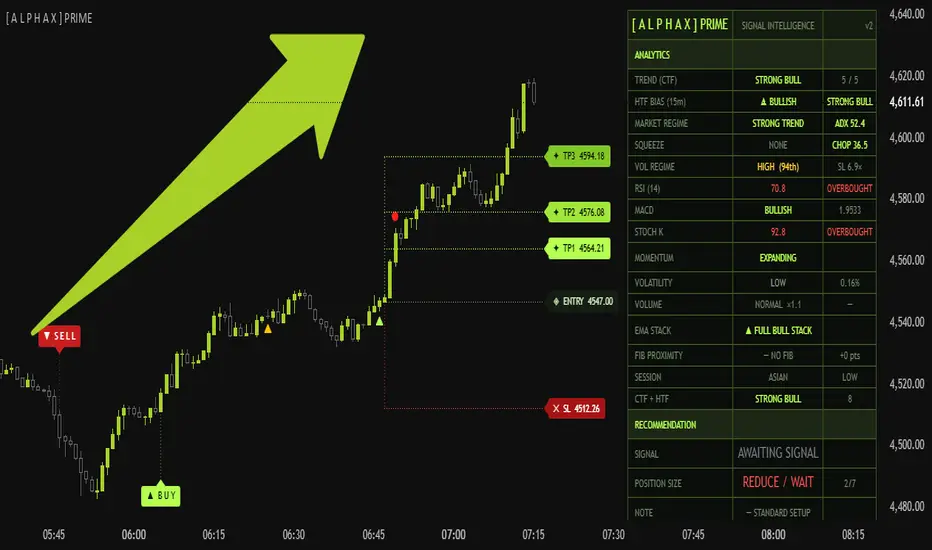
AlphaX Prime — Precision Signal Engine with Adaptive Trade Management, Multi-Layer Intelligence & Smart Dashboard
AlphaX Prime is a professional-grade, invite-only signal and trade management system built for traders who demand institutional-level precision without the noise. It operates as a complete trade lifecycle engine — from initial signal detection through active trade management, target progression, and intelligent exit — all governed by a proprietary dual-engine signal architecture and a real-time intelligence dashboard that tells you not just when to act, but how to act.
Built and tuned primarily for XAUUSD (Gold) on fast intraday timeframes, AlphaX Prime delivers clean, high-confidence signals with a full trade structure drawn automatically on your chart the moment a trade opens.
━━━━━━━━━━━━━━━━━━━━━━━━━━━━━━━━━━━━━━━━
📸 Visual Overview

━━━━━━━━━━━━━━━━━━━━━━━━━━━━━━━━━━━━━━━━
🔬 The Dual Signal Engine
AlphaX Prime runs two independent signal layers simultaneously, each with its own precision calibration.
CORE Signals — Primary Entries
The Core engine fires the primary directional signal. When a qualifying setup is detected, a labelled ▲ B U Y or ▼ S E L L marker is placed on the chart, connected to the signal candle via a dotted line for clean visual separation. Simultaneously, the full trade structure is drawn automatically — entry price, stop loss, and up to three take-profit levels as live horizontal lines extending from your entry bar, each with a price-tagged label.
The Core engine includes a Momentum Stretch Filter — any signal firing on an abnormally large candle is either blocked or placed in a pending state until the market demonstrates sufficient recovery, preventing entries into over-extended bars.
Prime Reentry Signals — In-Trend Continuation
After a Core signal establishes directional context, the Reentry engine monitors for continuation opportunities within a configurable window. Reentries appear as small triangles (▲ below bar for long, ▼ above bar for short) and are gated by directional alignment with the active Core signal, a configurable maximum reentries per direction, the same Momentum Stretch Filter used by the Core engine, and a separate precision sensitivity control independently tunable from the Core.
When a reentry fires while a Core trade is still open, the system seamlessly closes the previous structure and opens a fresh one from the new entry price with recalculated ATR-based levels.
━━━━━━━━━━━━━━━━━━━━━━━━━━━━━━━━━━━━━━━━
📐 Automatic Trade Structure
Every signal — Core or Reentry — generates a complete trade structure drawn live on your chart the moment it opens.
━━━━━━━━━━━━━━━━━━━━━━━━━━━━━━━━━━━━━━━━
🎯 Flexible TP/SL Resolution
AlphaX Prime gives you precise control over how targets and stops are evaluated.
━━━━━━━━━━━━━━━━━━━━━━━━━━━━━━━━━━━━━━━━
⏱ Session Filter
Each trading session carries distinct volatility characteristics. AlphaX Prime lets you enable or disable signal generation per session independently.
When the session filter is active and the current bar falls outside your enabled windows, no new signals fire — the dashboard displays ⏸ OFF-SESSION in the Note row.
━━━━━━━━━━━━━━━━━━━━━━━━━━━━━━━━━━━━━━━━
🧠 Smart Dashboard — Signal Intelligence
The live Smart Dashboard is AlphaX Prime's command center. It refreshes on every bar — including during bar replay — and synthesises multi-indicator, multi-timeframe data into clear, actionable guidance. It is divided into four functional blocks.
━━━━━━━━━━━━━━━━━━━━━━━━━━━━━━━━━━━━━━━━
Block 1 — Analytics i
A real-time read of market conditions across nine dimensions, updated live on every bar.
━━━━━━━━━━━━━━━━━━━━━━━━━━━━━━━━━━━━━━━━
Block 2 — Recommendation (always visible)
The dashboard synthesises everything into three direct outputs on every bar.
━━━━━━━━━━━━━━━━━━━━━━━━━━━━━━━━━━━━━━━━
Block 3 — Target Outlook (visible while in an active trade)
Live probability assessment for each active target, updated bar-by-bar as the trade progresses.
━━━━━━━━━━━━━━━━━━━━━━━━━━━━━━━━━━━━━━━━
Block 4 — Entry Quality & Context (visible while in an active trade)
A post-entry assessment of the setup quality, scored at the moment of entry and displayed throughout the trade.
━━━━━━━━━━━━━━━━━━━━━━━━━━━━━━━━━━━━━━━━
🏆 Trade Scenarios — Ranked Setups & Decision Framework
Use these six scenarios as your decision protocol every time AlphaX Prime fires a signal. Each scenario maps directly to what the dashboard is showing you and tells you exactly how to respond.
━━━━━━━━━━━━━━━━━━━━━━━━━━━━━━━━━━━━━━━━
🥇 Rank 1 — The Prime Setup
All conditions aligned. Maximum conviction. Full position.
Dashboard reads:
What it means: The Core engine has fired a signal aligning perfectly with the current timeframe trend, the higher timeframe trend, expanding momentum, and above-average volume. The entry bar is clean — not overextended, not exhausted. This is the setup you build your session around.
How to trade it: Enter at full size. Run all three TP targets if active. Hold your full position until TP1 hits, then use live TP progress on the dashboard to decide whether to scale out at TP2 or hold for TP3. Do not exit early unless the Note row switches to ⚡ MOMENTUM FADING and TP2 shows UNCERTAIN simultaneously.
━━━━━━━━━━━━━━━━━━━━━━━━━━━━━━━━━━━━━━━━
🥈 Rank 2 — The Valid Aligned Setup
Strong signal with minor reservation. Standard position.
Dashboard reads:
What it means: The signal is valid and the HTF bias supports the direction, but either momentum is not fully expanding, volume is not elevated, or the CTF score is moderate. A reliable setup — just not a full-conviction one.
How to trade it: Take the entry. If POSITION SIZE shows HALF SIZE, reduce accordingly. Target TP1 and TP2 — treat TP3 as a bonus rather than a plan. If NOTE shows ⚡ MOMENTUM FADING before TP1, tighten your stop rather than exiting entirely — fading momentum can recover.
━━━━━━━━━━━━━━━━━━━━━━━━━━━━━━━━━━━━━━━━
🥉 Rank 3 — The Clean Reentry
In-trend continuation with a confirmed healthy pullback.
Dashboard reads:
What it means: The Reentry engine has detected a healthy pullback within an established trend — price retraced meaningfully while structure held above key EMAs, then returned a valid signal in the trend direction. Lower risk than the initial Core entry because the trend is already proven.
How to trade it: Enter at the signal. Trade structure is freshly recalculated from the new entry price. Trust TP1 and TP2. If the original Core trade already hit TP1 before this reentry, be aware you are later in the trend — prioritise taking profit earlier if dashboard MOMENTUM is not expanding.
━━━━━━━━━━━━━━━━━━━━━━━━━━━━━━━━━━━━━━━━
4 — The HTF Supported Setup
HTF backs the signal but current timeframe is mixed. Reduced size required.
Dashboard reads:
What it means: The higher timeframe trend supports the signal direction but the current timeframe trend score is not cleanly confirming it. Either the EMAs are mixed, MACD momentum is not expanding, or RSI is in neutral territory.
How to trade it: Half size only. Target TP1 as your primary exit — TP3 is not realistic here. If NOTE shows ⚠ HTF DIVERGENCE, consider skipping and waiting for the next signal. Never scale up on this setup regardless of how the trade looks intrabar.
━━━━━━━━━━━━━━━━━━━━━━━━━━━━━━━━━━━━━━━━
5 — The Counter-Trend Signal
Signal fires against the dominant trend. Skip or minimum size only.
Dashboard reads:
What it means: The signal direction conflicts with the broader trend picture. Either the CTF trend score strongly disagrees, the HTF bias is against the trade, or momentum and volume are not supporting the move.
How to trade it: The safest action is to skip entirely. If you act: minimum size, TP1 only, tight mental stop. If NOTE shows ⚠ OVEREXTENDED BAR, the Momentum Stretch Filter may have already deferred entry to a pending recovery state — wait for recovery confirmation before doing anything.
━━━━━━━━━━━━━━━━━━━━━━━━━━━━━━━━━━━━━━━━
6 — Off-Session / No-Trade Condition
No valid setup present. Stand aside.
Dashboard reads:
What it means: Either no signal has fired, or the current session is disabled in your Session Filter settings. No new trade should be opened.
How to trade it: Do not trade. Use this time to monitor the Analytics block — watch whether CTF+HTF score is building in your preferred direction so you are positioned mentally for the next signal. If you are already in a trade from a prior session, continue managing it normally — the Session Filter only blocks new entries.
━━━━━━━━━━━━━━━━━━━━━━━━━━━━━━━━━━━━━━━━
📋 Reading the Dashboard Mid-Trade
Once you are in a trade, the dashboard becomes your active management tool.
━━━━━━━━━━━━━━━━━━━━━━━━━━━━━━━━━━━━━━━━
⚡ Key Features
━━━━━━━━━━━━━━━━━━━━━━━━━━━━━━━━━━━━━━━━
⚙ Settings Reference
AlphaX Prime — Core Signals
Core Signal — Direct Entry
Core — TP/SL Hit Logic
AlphaX Prime — Reentry Signals
Session Filter
Dashboard
Label Style
━━━━━━━━━━━━━━━━━━━━━━━━━━━━━━━━━━━━━━━━
🔔 Alert Conditions
All messages include {{ticker}}, {{interval}}, and {{close}} or {{open}} for clean webhook and bot integration.
━━━━━━━━━━━━━━━━━━━━━━━━━━━━━━━━━━━━━━━━
🎯 Default Settings — Optimised For
AlphaX Prime's defaults are calibrated for XAUUSD (Gold) on the 1-minute timeframe.
For other instruments:
━━━━━━━━━━━━━━━━━━━━━━━━━━━━━━━━━━━━━━━━
👥 Who This Is For
━━━━━━━━━━━━━━━━━━━━━━━━━━━━━━━━━━━━━━━━
📝 Notes
━━━━━━━━━━━━━━━━━━━━━━━━━━━━━━━━━━━━━━━━
⚠ Disclaimer
This indicator is a technical analysis and trade visualisation tool provided for educational and informational purposes only. It does not constitute financial advice or a recommendation to buy or sell any financial instrument. All signals are generated from historical and real-time price data using proprietary mathematical calculations — their accuracy or profitability is not guaranteed. Past performance does not guarantee future results. Always conduct your own analysis, apply proper risk management, and consult a licensed financial advisor before making any trading decisions. The author accepts no responsibility for any losses incurred from the use of this indicator.
━━━━━━━━━━━━━━━━━━━━━━━━━━━━━━━━━━━━━━━━
Built for traders who treat trading as a discipline, not a gamble.
AlphaX Prime is a professional-grade, invite-only signal and trade management system built for traders who demand institutional-level precision without the noise. It operates as a complete trade lifecycle engine — from initial signal detection through active trade management, target progression, and intelligent exit — all governed by a proprietary dual-engine signal architecture and a real-time intelligence dashboard that tells you not just when to act, but how to act.
Built and tuned primarily for XAUUSD (Gold) on fast intraday timeframes, AlphaX Prime delivers clean, high-confidence signals with a full trade structure drawn automatically on your chart the moment a trade opens.
━━━━━━━━━━━━━━━━━━━━━━━━━━━━━━━━━━━━━━━━
📸 Visual Overview
━━━━━━━━━━━━━━━━━━━━━━━━━━━━━━━━━━━━━━━━
🔬 The Dual Signal Engine
AlphaX Prime runs two independent signal layers simultaneously, each with its own precision calibration.
CORE Signals — Primary Entries
The Core engine fires the primary directional signal. When a qualifying setup is detected, a labelled ▲ B U Y or ▼ S E L L marker is placed on the chart, connected to the signal candle via a dotted line for clean visual separation. Simultaneously, the full trade structure is drawn automatically — entry price, stop loss, and up to three take-profit levels as live horizontal lines extending from your entry bar, each with a price-tagged label.
The Core engine includes a Momentum Stretch Filter — any signal firing on an abnormally large candle is either blocked or placed in a pending state until the market demonstrates sufficient recovery, preventing entries into over-extended bars.
Prime Reentry Signals — In-Trend Continuation
After a Core signal establishes directional context, the Reentry engine monitors for continuation opportunities within a configurable window. Reentries appear as small triangles (▲ below bar for long, ▼ above bar for short) and are gated by directional alignment with the active Core signal, a configurable maximum reentries per direction, the same Momentum Stretch Filter used by the Core engine, and a separate precision sensitivity control independently tunable from the Core.
When a reentry fires while a Core trade is still open, the system seamlessly closes the previous structure and opens a fresh one from the new entry price with recalculated ATR-based levels.
━━━━━━━━━━━━━━━━━━━━━━━━━━━━━━━━━━━━━━━━
📐 Automatic Trade Structure
Every signal — Core or Reentry — generates a complete trade structure drawn live on your chart the moment it opens.
- ◈ ENTRY — the open of the entry bar, labeled with exact price
- ✕ SL — stop loss calculated as a configurable ATR multiple from entry (default: 6× ATR)
- ✦ TP1, TP2, TP3 — three independent take-profit levels at configurable ATR multiples (defaults: 3×, 5×, 8×)
- Vertical dotted connectors between entry and SL, and entry and top TP — instant visual risk/reward read at a glance
- All lines extend rightward as the trade progresses with live price labels updating at the right edge
- When a trade closes, the entire structure fades and is replaced by the next trade's fresh levels
━━━━━━━━━━━━━━━━━━━━━━━━━━━━━━━━━━━━━━━━
🎯 Flexible TP/SL Resolution
AlphaX Prime gives you precise control over how targets and stops are evaluated.
- Active Profit Targets — run TP1 only, TP1+TP2, or all three simultaneously
- Confirm on Bar Close — TP and SL only trigger when the bar closes at or beyond the level, eliminating wick-triggered false exits
- Instant Stop Trigger — SL fires immediately on intrabar touch, useful for hard stop scalping setups
- Same-Bar Conflict Resolution — choose Conservative (SL wins) or Optimistic (TP wins) when both levels are hit on the same bar
- Lock Original Stop Level — keep the stop fixed throughout the trade; when disabled, stop moves to breakeven after TP1 is hit
- Exit on Opposite Core Signal — automatically closes an open trade when the Core engine fires in the opposite direction
━━━━━━━━━━━━━━━━━━━━━━━━━━━━━━━━━━━━━━━━
⏱ Session Filter
Each trading session carries distinct volatility characteristics. AlphaX Prime lets you enable or disable signal generation per session independently.
- Asian — 00:00–08:00 UTC
- London — 08:00–13:00 UTC
- London / NY Overlap — 13:00–17:00 UTC (highest liquidity)
- NY Afternoon — 17:00–21:00 UTC (disabled by default)
- NY Close — 21:00–00:00 UTC
When the session filter is active and the current bar falls outside your enabled windows, no new signals fire — the dashboard displays ⏸ OFF-SESSION in the Note row.
━━━━━━━━━━━━━━━━━━━━━━━━━━━━━━━━━━━━━━━━
🧠 Smart Dashboard — Signal Intelligence
The live Smart Dashboard is AlphaX Prime's command center. It refreshes on every bar — including during bar replay — and synthesises multi-indicator, multi-timeframe data into clear, actionable guidance. It is divided into four functional blocks.
━━━━━━━━━━━━━━━━━━━━━━━━━━━━━━━━━━━━━━━━
Block 1 — Analytics i
A real-time read of market conditions across nine dimensions, updated live on every bar.
- TREND (CTF) — current timeframe trend score (0–5) classified as Strong Bull / Mild Bull / Neutral / Mild Bear / Strong Bear
- HTF BIAS — automatically selected higher timeframe (e.g. 15m when on 1m, 4H when on 1H) with trend classification and bias score from −3 to +3
- RSI (14) — numerical value and zone: Overbought / Bullish / Neutral / Bearish / Oversold
- MACD — directional sentiment (Bullish ↑ / Bullish / Bearish / Bearish ↓) and histogram value
- STOCH K — value and zone: Overbought / Rising / Falling / Oversold
- MOMENTUM — Expanding / Stable / Fading based on MACD histogram velocity
- VOLATILITY — High / Normal / Low based on ATR as a percentage of price
- REL. VOLUME — volume ratio vs the 20-bar average (HIGH ×N / NORMAL / DRY)
- EMA STACK — Full Bull Stack / Full Bear Stack / Mixed Stack based on price vs EMA 20/50/200 alignment
- CTF + HTF — combined score ranging from −3 to +8, classified Strong Bull through Strong Bear
━━━━━━━━━━━━━━━━━━━━━━━━━━━━━━━━━━━━━━━━
Block 2 — Recommendation (always visible)
The dashboard synthesises everything into three direct outputs on every bar.
- SIGNAL — the current trade verdict:
✦ STRONG LONG — HTF ALIGNED
✦ STRONG SHORT — HTF ALIGNED
↑ VALID LONG / ↓ VALID SHORT
↑ HTF SUPPORTED LONG / ↓ HTF SUPPORTED SHORT
⚠ COUNTER-TREND
AWAITING SIGNAL - POSITION SIZE — FULL SIZE / HALF SIZE / REDUCE / WAIT — driven by a 7-point internal score evaluating trend alignment, HTF alignment, momentum, volume, and market extension
- NOTE — contextual situational warning:
⚠ OVEREXTENDED BAR
⏸ OFF-SESSION
⚡ MOMENTUM FADING
⚠ HTF DIVERGENCE
✔ CONFIRMED VOLUME
— STANDARD SETUP
━━━━━━━━━━━━━━━━━━━━━━━━━━━━━━━━━━━━━━━━
Block 3 — Target Outlook (visible while in an active trade)
Live probability assessment for each active target, updated bar-by-bar as the trade progresses.
- TP1 / TP2 / TP3 — each shows LIKELY ✓ or UNCERTAIN / LOW PROB, a live percentage progress toward that target, and its ATR distance from entry
- Likelihood is calculated from ATR distance, momentum state, trend score, HTF alignment, volume confirmation, and live progress percentage
- Progress percentages update in real time as price moves toward or away from each target
━━━━━━━━━━━━━━━━━━━━━━━━━━━━━━━━━━━━━━━━
Block 4 — Entry Quality & Context (visible while in an active trade)
A post-entry assessment of the setup quality, scored at the moment of entry and displayed throughout the trade.
- ENTRY QUALITY — rated PRIME / HIGH / MODERATE / LOW / POOR with a raw score out of 14
- ENTRY CONTEXT — explains the quality rating: FRESH SETUP / CLEAN REENTRY / SHALLOW PULL / DEEP PULL ⚠ / EXHAUSTED ⚠ / STANDARD / REENTRY
- CORE vs REENTRY — identifies whether this is a Core signal entry or a Reentry trade
━━━━━━━━━━━━━━━━━━━━━━━━━━━━━━━━━━━━━━━━
🏆 Trade Scenarios — Ranked Setups & Decision Framework
Use these six scenarios as your decision protocol every time AlphaX Prime fires a signal. Each scenario maps directly to what the dashboard is showing you and tells you exactly how to respond.
━━━━━━━━━━━━━━━━━━━━━━━━━━━━━━━━━━━━━━━━
🥇 Rank 1 — The Prime Setup
All conditions aligned. Maximum conviction. Full position.
Dashboard reads:
- SIGNAL: ✦ STRONG LONG — HTF ALIGNED (or STRONG SHORT)
- POSITION SIZE: FULL SIZE
- NOTE: ✔ CONFIRMED VOLUME or — STANDARD SETUP
- ENTRY QUALITY: PRIME or HIGH
- ENTRY CONTEXT: FRESH SETUP
- TP1: LIKELY ✓ | TP2: LIKELY ✓
- CTF + HTF score: 6 or above
What it means: The Core engine has fired a signal aligning perfectly with the current timeframe trend, the higher timeframe trend, expanding momentum, and above-average volume. The entry bar is clean — not overextended, not exhausted. This is the setup you build your session around.
How to trade it: Enter at full size. Run all three TP targets if active. Hold your full position until TP1 hits, then use live TP progress on the dashboard to decide whether to scale out at TP2 or hold for TP3. Do not exit early unless the Note row switches to ⚡ MOMENTUM FADING and TP2 shows UNCERTAIN simultaneously.
━━━━━━━━━━━━━━━━━━━━━━━━━━━━━━━━━━━━━━━━
🥈 Rank 2 — The Valid Aligned Setup
Strong signal with minor reservation. Standard position.
Dashboard reads:
- SIGNAL: ↑ VALID LONG — HTF OK (or ↓ VALID SHORT — HTF OK)
- POSITION SIZE: FULL SIZE or HALF SIZE
- NOTE: — STANDARD SETUP or ⚡ MOMENTUM FADING
- ENTRY QUALITY: HIGH or MODERATE
- TP1: LIKELY ✓ | TP2: UNCERTAIN
- CTF + HTF score: 4 or 5
What it means: The signal is valid and the HTF bias supports the direction, but either momentum is not fully expanding, volume is not elevated, or the CTF score is moderate. A reliable setup — just not a full-conviction one.
How to trade it: Take the entry. If POSITION SIZE shows HALF SIZE, reduce accordingly. Target TP1 and TP2 — treat TP3 as a bonus rather than a plan. If NOTE shows ⚡ MOMENTUM FADING before TP1, tighten your stop rather than exiting entirely — fading momentum can recover.
━━━━━━━━━━━━━━━━━━━━━━━━━━━━━━━━━━━━━━━━
🥉 Rank 3 — The Clean Reentry
In-trend continuation with a confirmed healthy pullback.
Dashboard reads:
- SIGNAL: ✦ STRONG LONG — HTF ALIGNED (or VALID LONG)
- ENTRY CONTEXT: CLEAN REENTRY
- POSITION SIZE: FULL SIZE or HALF SIZE
- NOTE: — STANDARD SETUP or ✔ CONFIRMED VOLUME
- ENTRY QUALITY: HIGH or MODERATE
- TP1: LIKELY ✓
What it means: The Reentry engine has detected a healthy pullback within an established trend — price retraced meaningfully while structure held above key EMAs, then returned a valid signal in the trend direction. Lower risk than the initial Core entry because the trend is already proven.
How to trade it: Enter at the signal. Trade structure is freshly recalculated from the new entry price. Trust TP1 and TP2. If the original Core trade already hit TP1 before this reentry, be aware you are later in the trend — prioritise taking profit earlier if dashboard MOMENTUM is not expanding.
━━━━━━━━━━━━━━━━━━━━━━━━━━━━━━━━━━━━━━━━
4 — The HTF Supported Setup
HTF backs the signal but current timeframe is mixed. Reduced size required.
Dashboard reads:
- SIGNAL: ↑ HTF SUPPORTED LONG (or ↓ HTF SUPPORTED SHORT)
- POSITION SIZE: HALF SIZE
- NOTE: ⚠ HTF DIVERGENCE or — STANDARD SETUP
- ENTRY QUALITY: MODERATE or LOW
- CTF Trend score: 2 or 3 (NEUTRAL or MILD)
What it means: The higher timeframe trend supports the signal direction but the current timeframe trend score is not cleanly confirming it. Either the EMAs are mixed, MACD momentum is not expanding, or RSI is in neutral territory.
How to trade it: Half size only. Target TP1 as your primary exit — TP3 is not realistic here. If NOTE shows ⚠ HTF DIVERGENCE, consider skipping and waiting for the next signal. Never scale up on this setup regardless of how the trade looks intrabar.
━━━━━━━━━━━━━━━━━━━━━━━━━━━━━━━━━━━━━━━━
5 — The Counter-Trend Signal
Signal fires against the dominant trend. Skip or minimum size only.
Dashboard reads:
- SIGNAL: ⚠ COUNTER-TREND
- POSITION SIZE: REDUCE / WAIT
- NOTE: ⚠ OVEREXTENDED BAR or ⚡ MOMENTUM FADING
- ENTRY QUALITY: LOW or POOR
- ENTRY CONTEXT: EXHAUSTED ⚠
What it means: The signal direction conflicts with the broader trend picture. Either the CTF trend score strongly disagrees, the HTF bias is against the trade, or momentum and volume are not supporting the move.
How to trade it: The safest action is to skip entirely. If you act: minimum size, TP1 only, tight mental stop. If NOTE shows ⚠ OVEREXTENDED BAR, the Momentum Stretch Filter may have already deferred entry to a pending recovery state — wait for recovery confirmation before doing anything.
━━━━━━━━━━━━━━━━━━━━━━━━━━━━━━━━━━━━━━━━
6 — Off-Session / No-Trade Condition
No valid setup present. Stand aside.
Dashboard reads:
- SIGNAL: AWAITING SIGNAL
- NOTE: ⏸ OFF-SESSION
- POSITION SIZE: REDUCE / WAIT
What it means: Either no signal has fired, or the current session is disabled in your Session Filter settings. No new trade should be opened.
How to trade it: Do not trade. Use this time to monitor the Analytics block — watch whether CTF+HTF score is building in your preferred direction so you are positioned mentally for the next signal. If you are already in a trade from a prior session, continue managing it normally — the Session Filter only blocks new entries.
━━━━━━━━━━━━━━━━━━━━━━━━━━━━━━━━━━━━━━━━
📋 Reading the Dashboard Mid-Trade
Once you are in a trade, the dashboard becomes your active management tool.
- TP progress climbing + MOMENTUM: EXPANDING + all targets LIKELY ✓ — hold your full position. The trade is performing. Do not close early.
- TP1 LIKELY ✓ but TP2 UNCERTAIN — consider partial exit at TP1. Move stop to breakeven if Lock Original Stop Level is OFF.
- NOTE switches to ⚡ MOMENTUM FADING before TP1 — tighten your stop. The move may stall. Be ready to exit on the next unfavorable bar close.
- ENTRY QUALITY shows LOW or POOR — do not add to the position. Take TP1 if reached and step aside.
- REL. VOLUME drops to DRY mid-trade — conviction is fading. Prioritise TP1 over TP3.
- Opposite Core signal fires — system closes your trade automatically if Exit on Opposite Core Signal is enabled. Evaluate the fresh dashboard before taking the new direction.
━━━━━━━━━━━━━━━━━━━━━━━━━━━━━━━━━━━━━━━━
⚡ Key Features
- 🔬 Dual precision signal engine — Core entries and Prime Reentries, independently calibrated with separate sensitivity controls
- 📐 Automatic trade structure — Entry, SL, TP1/TP2/TP3 drawn live with price labels from the moment of entry
- 🧠 Smart Dashboard — 9-dimension Analytics, live Recommendation, real-time Target Outlook, and Entry Quality scoring, all updating on every bar
- 📡 Adaptive HTF context — automatically selects the appropriate higher timeframe based on your current chart timeframe, no manual input required
- ⏱ Session-aware signal gating — enable or disable each of five trading sessions independently
- 🔄 Seamless reentry management — automatic handoff from prior trade structure to fresh levels on every reentry signal
- 🛡 Momentum Stretch Filter — prevents entries on overextended bars with configurable recovery zone threshold
- 🎯 Flexible TP/SL resolution — bar-close confirmation, instant SL trigger, same-bar conflict control, and breakeven lock
- 📊 Position size guidance — FULL / HALF / REDUCE updated live on every bar based on a 7-factor internal scoring model
- 🔔 14 alert conditions — Core signals, Reentry signals, trade opens, TP1/TP2/TP3 hits, SL hits, and opposite-signal closes, all with ticker and interval placeholders
- ⚙ Fully configurable — sensitivity, ATR multipliers, sessions, TP targets, label offsets, and dashboard position all adjustable from the settings panel
━━━━━━━━━━━━━━━━━━━━━━━━━━━━━━━━━━━━━━━━
⚙ Settings Reference
AlphaX Prime — Core Signals
- Precision Level — sensitivity of the Core signal engine (default: 2.3)
- Show Core Signal Labels — toggle the ▲ B U Y / ▼ S E L L labels
Core Signal — Direct Entry
- Enable Core Signal Entry — toggle Core signal trade management on/off
- Volatility Period — ATR period for stop and target calculations (default: 14)
- Stop Distance Multiplier — ATR multiple for the stop loss (default: 6.0)
- Active Profit Targets — TP1 only / TP1+TP2 / TP1+TP2+TP3
- Target 1 / 2 / 3 Distance Multiplier — ATR multiples per target (defaults: 3 / 5 / 8)
- Show Entry Stop/Target Lines — toggle live trade structure lines
- Lock Original Stop Level — fix stop vs move to breakeven at TP1
- Exit on Opposite Core Signal — auto-close on counter-signal
- Enable Momentum Stretch Filter — block signals on overextended bars
- Stretch Lookback / Threshold — define overextended conditions (default: 8 bars, 3× average range)
- Recovery Zone % — minimum pullback required to activate a deferred pending entry (default: 44%)
Core — TP/SL Hit Logic
- Same-Bar Conflict Resolution — Conservative (SL wins) or Optimistic (TP wins)
- Confirm on Bar Close — TP/SL triggers on bar close only
- Instant Stop Trigger — SL fires on intrabar touch when enabled
- Show Take Profit Levels — toggle TP lines
AlphaX Prime — Reentry Signals
- Enable Prime Reentries — toggle the Reentry layer
- Reentry Precision Level — independent sensitivity (default: 1.2)
- Reentry Confirmation Window — bars after Core signal during which Reentries are valid (default: 100)
- Max Reentries Per Direction — maximum Reentry signals per Core direction (default: 2)
- Show Reentry Labels — toggle Reentry triangles
- Enable Momentum Stretch Filter (Reentry) — same filter applied to Reentry signals independently
Session Filter
- Enable Session Filter — master toggle
- Asian / London / London-NY Overlap / NY Afternoon / NY Close — individual session toggles
Dashboard
- Show Dashboard — master toggle
- Show Advanced Analytics — toggle the full Analytics block
- Dashboard Position — Top Right / Top Left / Bottom Right / Bottom Left
Label Style
- Buy Label Offset (ATR mult) — distance below signal candle low for the ▲ B U Y label (default: 3.8)
- Sell Label Offset (ATR mult) — distance above signal candle high for the ▼ S E L L label (default: 3.8)
━━━━━━━━━━━━━━━━━━━━━━━━━━━━━━━━━━━━━━━━
🔔 Alert Conditions
- Core BUY Signal / Core SELL Signal
- Reentry BUY / Reentry SELL
- Long Trade Opened / Short Trade Opened
- Long Closed (Opposite Signal) / Short Closed (Opposite Signal)
- Stop Loss Hit — Long / Stop Loss Hit — Short
- TP1 Hit — Long / TP1 Hit — Short
- TP2 Hit — Long / TP2 Hit — Short
- TP3 Hit — Long / TP3 Hit — Short
All messages include {{ticker}}, {{interval}}, and {{close}} or {{open}} for clean webhook and bot integration.
━━━━━━━━━━━━━━━━━━━━━━━━━━━━━━━━━━━━━━━━
🎯 Default Settings — Optimised For
AlphaX Prime's defaults are calibrated for XAUUSD (Gold) on the 1-minute timeframe.
- Core Precision 2.3 and Reentry Precision 1.2 tuned to gold's intraday volatility profile
- Stop at 6× ATR and targets at 3×/5×/8× give a favourable risk/reward on gold's typical intraday ranges
- Momentum Stretch Filter at 3× average range prevents entries into gold's characteristic spike-and-stall moves
- Recovery Zone at 44% filters premature reentries after spikes, requiring meaningful recovery before activation
- Session Filter defaults: all sessions on except NY Afternoon — gold's weakest follow-through period
For other instruments:
- Higher timeframes (5m, 15m) — increase Precision Level to 3.0–4.0, increase ATR multipliers proportionally
- Forex majors — reduce Precision Level to 1.8–2.0, tighten Stop Distance to 4–5× ATR
- Indices (NAS100, US30) — use defaults or increase Stop Distance to 7–8× ATR for wider swings
- Fewer signals — increase Precision Level, raise Stretch Threshold, reduce Max Reentries
- More signals — decrease Precision Level, disable Momentum Stretch Filter
━━━━━━━━━━━━━━━━━━━━━━━━━━━━━━━━━━━━━━━━
👥 Who This Is For
- 🥇 Gold (XAUUSD) intraday traders — built from the ground up for gold's volatility, session structure, and range behaviour
- 📉 Forex and index traders — applicable across all major pairs and index CFDs with minor setting adjustments
- 🧠 Traders who want structure, not just signals — AlphaX Prime gives you the full trade: entry, stop, targets, management guidance, and live scoring — not just a dot on a chart
- 📊 Decision-driven traders — the Ranked Setup framework turns the dashboard from an information display into a decision protocol
- 📈 Traders working toward consistency — Position Size guidance and Entry Quality scoring prevent overcommitting on weak setups and undercommitting on strong ones
- ⚠ Traders who overtrade — the Session Filter, Momentum Stretch Filter, and Counter-Trend classification are built to keep you out as often as they put you in
━━━━━━━━━━━━━━━━━━━━━━━━━━━━━━━━━━━━━━━━
📝 Notes
- AlphaX Prime is an invite-only script — access is granted exclusively through the author
- Session detection uses UTC/GMT time — all session window labels in settings refer to UTC hours
- All trade levels are calculated from the open of the entry bar, not the signal bar close — levels are realistic and replicable
- The dashboard operates in live mode and updates on every bar including during TradingView bar replay
- All signals are confirmed on bar close by default — no repainting
- Uses max_labels_count=500 and max_lines_count=500 — on very active instruments at low timeframes, oldest drawings are automatically removed by TradingView's rendering limits
━━━━━━━━━━━━━━━━━━━━━━━━━━━━━━━━━━━━━━━━
⚠ Disclaimer
This indicator is a technical analysis and trade visualisation tool provided for educational and informational purposes only. It does not constitute financial advice or a recommendation to buy or sell any financial instrument. All signals are generated from historical and real-time price data using proprietary mathematical calculations — their accuracy or profitability is not guaranteed. Past performance does not guarantee future results. Always conduct your own analysis, apply proper risk management, and consult a licensed financial advisor before making any trading decisions. The author accepts no responsibility for any losses incurred from the use of this indicator.
━━━━━━━━━━━━━━━━━━━━━━━━━━━━━━━━━━━━━━━━
Built for traders who treat trading as a discipline, not a gamble.
Versionshinweise
[ A L P H A X ] PRIME v2 - What’s newNew Engines Added
- Volatility Adaptation: Dynamic TP/SL distances based on ATR percentile (adds VOL REGIME dashboard row; +1 quality point in normal volatility).
- Market Regime Engine: BB/KC squeeze detection + ADX + Choppiness Index (adds MARKET REGIME + SQUEEZE dashboard rows; -3 to +3 quality points impact).
- Volume Confirmation Engine: Spike/dry-volume detection + divergence context (adds VOLUME dashboard row with divergence; -2 to +3 quality points impact).
- Fibonacci Proximity: Golden pocket + key fib zone detection (adds FIB PROXIMITY dashboard row; 0 to +2 quality points impact).
- Session Quality: Displays current session + quality context (adds SESSION dashboard row; display-only).
- Signal Quality Expanded: Scoring expanded from /14 → /20 for higher signal granularity.
- Dashboard Expanded (Advanced Mode): Dashboard increased from 27 → 35 rows with additional analytics blocks.
Alerts upgrade (major)
- New alerts added: 3 Squeeze Release alerts (Bull, Bear, Any).
- Selectable alert toggles: Added tick boxes so users can enable/disable each alert type from settings (core, reentry, trade open/close, SL, TP1/TP2/TP3, squeeze release).
- Single alert setup: Alerts now support one unified setup via “Any alert() function call”, and it will trigger based on whichever alert toggles the user enabled (includes a dynamic message listing which alert(s) fired).
Risk & UX improvements
Regime-aware warnings: Added risk notes/visual warnings aligned with detected market regime to help avoid lower-quality conditions.
Versionshinweise
AlphaX Prime — V2 Major Update Release Notes🚀 What's New in V2
✦ GOLDEN SNIPER ENTRIES — New Signal Type
The most significant addition in this update. Sniper Entries are a completely new precision signal layer that works on top of your existing Core and Reentry signals.
How it works:
After a Core signal fires, the Sniper system monitors market conditions and waits for a specific high-probability pullback window to develop. When that window completes and conditions realign, a gold triangle appears — signalling a precision entry opportunity within the established trend direction.
- 🟡 Gold triangle up = Sniper Buy opportunity
- 🟡 Gold triangle down = Sniper Sell opportunity
- 🔴 Small red dot = Sniper Emergency Exit signal
About the Emergency Exit dot:
When a red dot appears on an active Sniper trade, it is flagging that momentum conditions have reached an extreme level in the opposite direction. This is an optional early exit signal — purely at the trader's discretion.
You do NOT have to exit at the red dot. Your original Stop Loss and Take Profit levels remain fully active. The red dot simply gives you the option to lock in profits or cut exposure early if you prefer a conservative approach. Many traders will choose to hold through the dot and target TP2 or TP3 — that is completely valid.
Settings available:
- Enable/Disable Sniper Reentries
- Show/Hide Sniper Labels
- Max Sniper Reentries Per Direction (default: 2)
- Upper Sensitivity threshold
- Lower Sensitivity threshold
- The sensitivity thresholds use an internal scaling system. The values shown in settings are not the raw levels — this is intentional to keep the internal methodology proprietary.
⚙️ MOMENTUM FILTER — New Signal Gate
A new optional filter has been added to the Core Signal engine. When enabled, this filter analyses internal momentum conditions at the moment a Core signal fires. If conditions indicate the market is in an overextended state at signal time, the filter will hold the signal and wait for momentum to reset and re-confirm before triggering the entry.
How the hold works:
- Signal fires → momentum is overextended → signal is held (not shown yet)
- System monitors momentum reset cycle
- When momentum completes its reset and re-aligns → signal fires at the better location
- If reset does not complete within the Confirmation Window → signal is skipped entirely
- Important behaviour during a hold:
- While a signal is being held, any opposite-direction signals are automatically suppressed. The system is committed to waiting for the held signal to either confirm or expire — it will not flip direction mid-hold.
Opposite Core signal cancels the hold:
If a new Core signal fires in the opposite direction while a signal is being held, the held signal is immediately cancelled. The system recognises the trend has shifted and adapts accordingly.
⚠️ Default setting: DISABLED
Testing showed that this filter produces mixed results depending on market conditions and timeframe. On trending instruments it can meaningfully improve entry timing. On ranging or choppy conditions it can filter out valid signals.
Recommendation: Leave disabled by default. Enable it during your own testing on your specific instrument and timeframe. Find your own sweet spot with the Confirmation Window setting — a wider window gives more time for the reset to complete, a tighter window is more selective.
Settings available:
- Enable/Disable Momentum Filter (default: OFF)
- Upper Threshold
- Lower Threshold
- Signal Smoothing
- Confirmation Window in bars (default: 28)
- As with the Sniper thresholds, the values displayed in settings use an internal scaling system to keep the methodology proprietary.
📊 DASHBOARD — TP Target Hit Tracking
The Target Outlook section in the dashboard has been improved with persistent hit tracking.
Previous behaviour: TP progress percentage would exceed 100% after a target was hit, causing confusing readings like "105%" or "120%".
New behaviour:
- Once TP1 is reached → dashboard permanently shows "✦ HIT" and "REACHED" for that target for the remainder of the trade
- TP2 and TP3 continue showing live progress percentage until they are individually hit
- If price reverses after hitting TP1, TP1 still shows as HIT — the tracking is locked in
- All hit flags reset cleanly when the trade closes and a new trade opens
🔔 ALERTS — New Alert Types Added
Four new alert conditions have been added:
- Sniper BUY -Fires when a Sniper Buy entry triggers
- Sniper SELL -Fires when a Sniper Sell entry triggers
- Sniper Emergency Exit (Long) -Fires when the red dot appears on an active long Sniper trade
- Sniper Emergency Exit (Short) -Fires when the red dot appears on an active short Sniper trade
- All new alerts are individually toggleable in the Alerts settings group and are included in the unified alert message system.
📋 SETTINGS STRUCTURE CHANGES
Two new settings groups have been added:
ALPHAX PRIME - Sniper Reentries
Located after the Prime Reentry Signals group. Contains all Sniper configuration.
ALPHAX PRIME - Momentum Oscillator Filter
Located after the Core Signal Direct Entry group. Contains all Momentum Filter configuration. Disabled by default.
💡 Recommended Usage
Core BUY / SELL --> Primary trend signals Main trade entries
Prime Reentries Trend continuation --> Scale-in within established trend
🟡 Sniper Entries --> Precision pullback entries Tighter entries after pullbacks reset
🔴 Emergency Exit dot --> Optional early exit Discretionary — hold or exit to your preference
📌 Notes
- The Momentum Filter and Sniper system both use proprietary internal calculations. Settings values displayed in the panel are intentionally scaled — this is by design to protect the methodology
- Sniper entries inherit the same Stop Loss and Take Profit levels as Core signals — no separate trade levels are needed
- All existing features from V1 are fully preserved — this is a purely additive update
- The Sniper system respects Core signal direction — it will never fire a Sniper in the opposite direction to the last confirmed Core signal
AlphaX Prime V2 — Built for precision. Designed for discretion.
Versionshinweise
minor sniper signal updateVersionshinweise
Minor changesVersionshinweise
 XAUUSD Better Quality Default settings for xauusd 1 min
Broker matters - choose Pepperstone feed
Versionshinweise
On default Signals are not blocked, pay attention to the overall dashboard when squeezingVersionshinweise
[ A L P H A X ] PRIME — UpdateWhat’s new
Refined add-on signal engine — Smarter secondary entry opportunities after a main signal, with improved timing filters and risk controls.
Stretch protection — Optional filter to pause add-on signals once price has already reached a selected profit milestone from the core trade.
Smarter exit handling — Emergency exit logic now waits for a favorable close before triggering, helping avoid exits at a loss.
Leaner trade desk dashboard — Removed low-value clutter; focused on signal guidance, position sizing, target outlook, and live add-on status.
Actionable recommendations — Dashboard now provides clearer size and action notes based on current trade and add-on context.
Updated defaults — Tuned for broader session coverage and more practical out-of-the-box use.
Improvements
Removed legacy re-entry layer to reduce overlap and simplify the workflow.
Cleaner settings layout with shorter group labels.
Target outlook shows progress and probability in a more readable format.
Alerts
Full alert support for core signals, add-on entries, add-on exits, trade management, and squeeze events.
Versionshinweise
New — Post-Target Exit Alert AlphaX Prime can now highlight a high-value exit opportunity once a trade is already well into profit. After the position has run past its second target and is working toward the final target, Prime watches for the moment conditions suggest the move is losing steam. When that happens, it drops a single gold marker on the chart — a clear "this is a strong point to consider closing the full position" cue.
It's guidance, not a forced action: you stay in control and decide whether to bank profits early or let the trade aim for the final target. The signal appears only once per trade to keep the chart clean and the message unambiguous, and it comes with its own alert so you never miss it.

🌐 alphax.trading
Institutional Grade Signals --> Engineered for Retail
💎ᴠɪᴘ tradingview.com/v/TaXohZvb/
[ A L P H A X ] PRIME - Premium Signal Engine
🔢 alphax.trading/resources/calculators
AlphaX Calculators
Institutional Grade Signals --> Engineered for Retail
💎ᴠɪᴘ tradingview.com/v/TaXohZvb/
[ A L P H A X ] PRIME - Premium Signal Engine
🔢 alphax.trading/resources/calculators
AlphaX Calculators
Haftungsausschluss
Die Informationen und Veröffentlichungen sind nicht als Finanz-, Anlage-, Handels- oder andere Arten von Ratschlägen oder Empfehlungen gedacht, die von TradingView bereitgestellt oder gebilligt werden, und stellen diese nicht dar. Lesen Sie mehr in den Nutzungsbedingungen.
🌐 alphax.trading
Institutional Grade Signals --> Engineered for Retail
💎ᴠɪᴘ tradingview.com/v/TaXohZvb/
[ A L P H A X ] PRIME - Premium Signal Engine
🔢 alphax.trading/resources/calculators
AlphaX Calculators
Institutional Grade Signals --> Engineered for Retail
💎ᴠɪᴘ tradingview.com/v/TaXohZvb/
[ A L P H A X ] PRIME - Premium Signal Engine
🔢 alphax.trading/resources/calculators
AlphaX Calculators
Haftungsausschluss
Die Informationen und Veröffentlichungen sind nicht als Finanz-, Anlage-, Handels- oder andere Arten von Ratschlägen oder Empfehlungen gedacht, die von TradingView bereitgestellt oder gebilligt werden, und stellen diese nicht dar. Lesen Sie mehr in den Nutzungsbedingungen.