OPEN-SOURCE SCRIPT
Auto-Basis ES to SPX
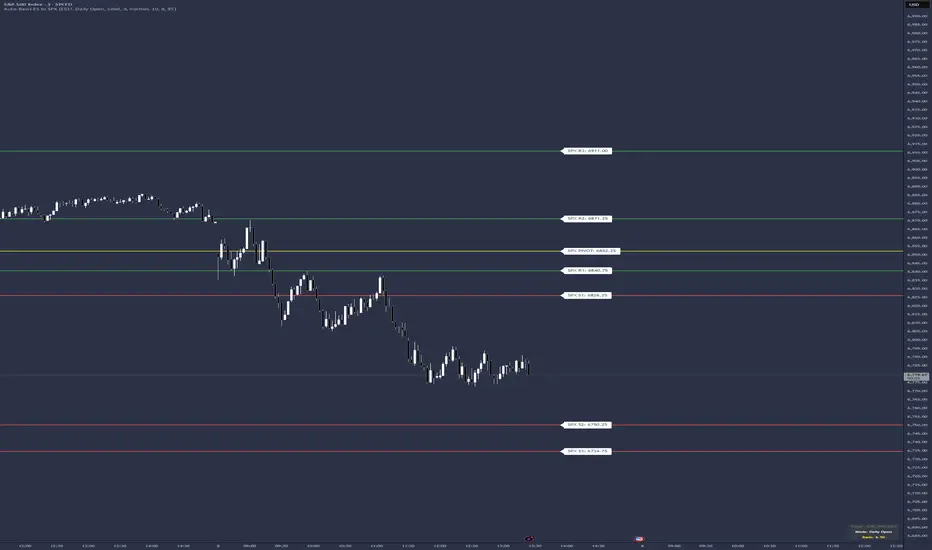
This indicator is a specialized utility for traders who analyze market structure using ES (S&P 500 E-mini Futures) levels but execute or monitor trades on the SPX (S&P 500 Cash Index).
Because futures contracts trade at a premium or discount to the cash index (the "Basis"), ES levels cannot be plotted directly on an SPX chart without significant manual math. This script automates that conversion by calculating the spread between a user-defined ES contract and the SPX index, applying that offset to your levels instantly.
How to Use
Input Levels: Paste your ES levels into the "Paste ES levels here" text area. The script recognizes the following format:
Pivot Level: 6150.25
Resistance Levels: 6165.50, 6180.75
Support Levels: 6140.25, 6125.00
Select Your Contract: Under the "ES Contract Ticker" setting, you can choose which contract to use for the basis calculation. It defaults to the front-month continuous contract (CME_MINI:ES1!), but can be changed to specific quarterly contracts (e.g., ESH2026).
Choose Basis Mode:
Daily Open: Capture and lock the spread at the 9:30 AM EST market open. This provides static, non-moving levels for the duration of the session.
Live: Continuously updates the spread, allowing levels to drift in real-time as the futures-to-cash relationship fluctuates.
Key Features
Automated Numbering: Automatically parses your input to label levels as R1, R2, R3... and S1, S2, S3... sequentially.
Customizable Line Styles: Choose between Solid, Dashed, or Dotted lines and adjust the thickness to fit your chart's theme.
Visual Zones: Toggle "Show Zones" to display a shaded area (adjustable in ticks) around each level for better context on supply and demand areas.
High-Contrast Labels: Labels default to Normal size with Black Text on a White Background, positioned to the right of the price action for maximum readability.
Information Dashboard: A small table in the Bottom Right displays the active Ticker, Basis Mode, and the current mathematical offset being applied.
Because futures contracts trade at a premium or discount to the cash index (the "Basis"), ES levels cannot be plotted directly on an SPX chart without significant manual math. This script automates that conversion by calculating the spread between a user-defined ES contract and the SPX index, applying that offset to your levels instantly.
How to Use
Input Levels: Paste your ES levels into the "Paste ES levels here" text area. The script recognizes the following format:
Pivot Level: 6150.25
Resistance Levels: 6165.50, 6180.75
Support Levels: 6140.25, 6125.00
Select Your Contract: Under the "ES Contract Ticker" setting, you can choose which contract to use for the basis calculation. It defaults to the front-month continuous contract (CME_MINI:ES1!), but can be changed to specific quarterly contracts (e.g., ESH2026).
Choose Basis Mode:
Daily Open: Capture and lock the spread at the 9:30 AM EST market open. This provides static, non-moving levels for the duration of the session.
Live: Continuously updates the spread, allowing levels to drift in real-time as the futures-to-cash relationship fluctuates.
Key Features
Automated Numbering: Automatically parses your input to label levels as R1, R2, R3... and S1, S2, S3... sequentially.
Customizable Line Styles: Choose between Solid, Dashed, or Dotted lines and adjust the thickness to fit your chart's theme.
Visual Zones: Toggle "Show Zones" to display a shaded area (adjustable in ticks) around each level for better context on supply and demand areas.
High-Contrast Labels: Labels default to Normal size with Black Text on a White Background, positioned to the right of the price action for maximum readability.
Information Dashboard: A small table in the Bottom Right displays the active Ticker, Basis Mode, and the current mathematical offset being applied.
Open-source Skript
Ganz im Sinne von TradingView hat dieser Autor sein/ihr Script als Open-Source veröffentlicht. Auf diese Weise können nun auch andere Trader das Script rezensieren und die Funktionalität überprüfen. Vielen Dank an den Autor! Sie können das Script kostenlos verwenden, aber eine Wiederveröffentlichung des Codes unterliegt unseren Hausregeln.

Tatanka Trading | Auction Market Theory tools for futures
Haftungsausschluss
Die Informationen und Veröffentlichungen sind nicht als Finanz-, Anlage-, Handels- oder andere Arten von Ratschlägen oder Empfehlungen gedacht, die von TradingView bereitgestellt oder gebilligt werden, und stellen diese nicht dar. Lesen Sie mehr in den Nutzungsbedingungen.
Open-source Skript
Ganz im Sinne von TradingView hat dieser Autor sein/ihr Script als Open-Source veröffentlicht. Auf diese Weise können nun auch andere Trader das Script rezensieren und die Funktionalität überprüfen. Vielen Dank an den Autor! Sie können das Script kostenlos verwenden, aber eine Wiederveröffentlichung des Codes unterliegt unseren Hausregeln.
Tatanka Trading | Auction Market Theory tools for futures
Haftungsausschluss
Die Informationen und Veröffentlichungen sind nicht als Finanz-, Anlage-, Handels- oder andere Arten von Ratschlägen oder Empfehlungen gedacht, die von TradingView bereitgestellt oder gebilligt werden, und stellen diese nicht dar. Lesen Sie mehr in den Nutzungsbedingungen.