Dynamic Volatility Filter [QuantAlgo]
More exclusive indicators from QuantAlgo
Subscribe to QuantAlgo Essential for $49.99/month to get exclusive indicators by this author. You pay right on TradingView and can use them on your charts straight away.
Explore QuantAlgo Essential🟢 Overview
Dynamic Volatility Filter is a trend-following indicator built on an adaptive volatility threshold rather than fixed bands or moving average crossovers. It quantifies the realized volatility of recent price movement to establish a dynamic noise floor that price must overcome before the line responds, anchoring a filtered trend line that only shifts when a directional move exceeds the prevailing volatility regime, helping traders separate statistically significant trend change from noise-driven fluctuation across every timeframe and market.

🟢 How It Works
The foundation of the indicator is a rolling volatility estimate derived from the Average True Range over a configurable lookback window, scaled by a noise multiplier to produce the threshold used in all line logic:
Pine Script®
This threshold functions as a deviation barrier the line will not cross until price movement breaches it. On each bar the filter measures the displacement between price and the current line position, and only when that displacement exceeds the volatility threshold does the line update:
Pine Script®
The line remains stationary through movement that falls within the volatility envelope and only commits once displacement clears the threshold. Rather than converging directly onto price, the line advances by a fraction of the residual distance governed by the catch-up coefficient, producing a damped response instead of an instantaneous one. Lower catch-up values introduce deliberate lag that requires a move to persist before the line follows, while higher values tighten the track to price.
Direction state is derived from the line's own first difference, comparing its current position against the prior bar:
Pine Script®
Because the line holds flat whenever displacement stays inside the threshold, those periods register no direction change. With Show Neutral enabled the state resets to neutral during these pauses, and with it disabled the line retains its last directional reading until the next threshold breach.

🟢 Signal Interpretation
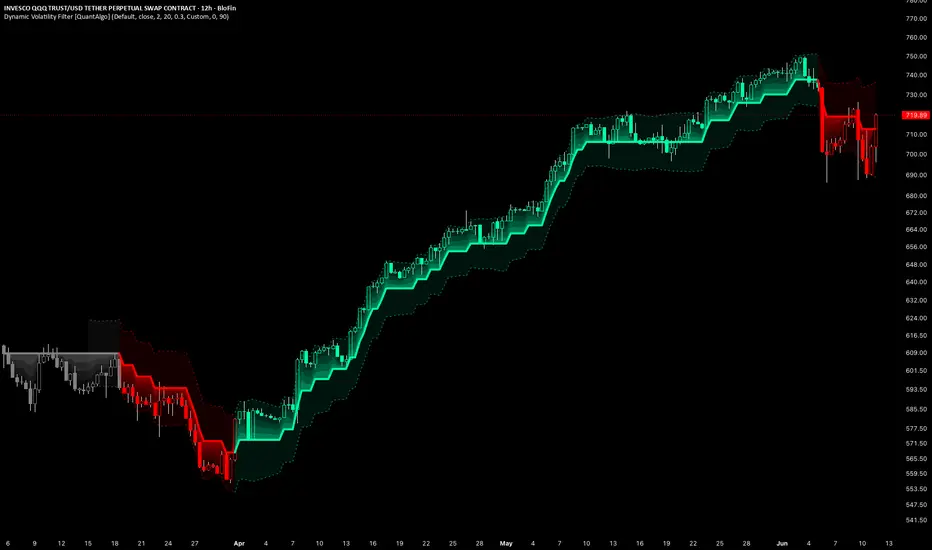
▶ Bullish Trend (Green): When the filter line registers positive displacement against its prior position, the indicator enters bullish mode with green coloring applied across the line, gradient fill, and volatility bands. This state persists through pullbacks contained within the threshold, since direction only updates when the line moves. The transition into green marks a potential long/buy opportunity, with pullbacks toward the line during an established bullish reading offering potential continuation entries.
▶ Bearish Trend (Red): When the filter line registers negative displacement against its prior position, the indicator enters bearish mode with red coloring across all visual elements. The reading holds bearish until price clears the volatility threshold in the opposite direction. The transition into red marks a potential short/sell opportunity, with rallies back toward the line during an established bearish reading offering potential continuation entries on the downside.
▶ Neutral (Gray): When Show Neutral is enabled, the line and fills turn gray during flat stretches where price stays inside the threshold and the line holds still. This state signals an absence of confirmed direction and is best treated as a stand-aside condition, where waiting for the line to commit back to green or red avoids entering during indecisive, range-bound conditions.

🟢 Features
▶ Preconfigured Presets: Three parameter sets cover different trading approaches. "Default" targets swing trading on 4-hour and daily charts with a balanced threshold that filters moderate noise while staying responsive to genuine regime shifts. "Fast Response" lowers the volatility barrier and shortens the lookback for intraday charts where the line needs to adapt to shorter-duration moves. "Smooth Trend" raises the threshold and slows the catch-up for position trading on daily and weekly timeframes, where the cost of a false flip exceeds the cost of a delayed one. Selecting a preset overrides the individual noise, period, and catch-up inputs.

▶ Built-in Alerts: Three alert conditions cover all directional states. "Bullish Trend Signal" fires on the bar where the trend confirms bullish. "Bearish Trend Signal" fires on the bar where it confirms bearish. "Any Trend Change" combines both into a single condition for traders who want a unified notification regardless of direction.

▶ Visual Customization: Six color presets (Classic, Aqua, Cosmic, Cyber, Neon, and Custom) apply coordinated bullish and bearish color schemes across the line, gradient fill, volatility bands, and optional bar and background coloring. The volatility bands plot one threshold above and below the line to frame the deviation envelope price must breach, and can be hidden for a clean line-only view. Bar coloring tints price candles with the active trend color at a configurable transparency level, and background coloring extends the directional tint across the full chart pane. Both are disabled by default and controlled independently.

*Recommendation: Layer the Dynamic Volatility Filter with complementary analysis rather than treating it as a standalone decision tool. Combine direction changes with volume context, since expanding volume on a flip bar suggests the move has broader participation behind it, and read transitions against key structural levels, as a flip occurring near major support or resistance carries more weight than one in open space. Pairing this script with volume, open interest, CVD, market structure, and mean reversion indicators from our QuantAlgo toolkit can further validate directional bias before entry.
Dynamic Volatility Filter is a trend-following indicator built on an adaptive volatility threshold rather than fixed bands or moving average crossovers. It quantifies the realized volatility of recent price movement to establish a dynamic noise floor that price must overcome before the line responds, anchoring a filtered trend line that only shifts when a directional move exceeds the prevailing volatility regime, helping traders separate statistically significant trend change from noise-driven fluctuation across every timeframe and market.
🟢 How It Works
The foundation of the indicator is a rolling volatility estimate derived from the Average True Range over a configurable lookback window, scaled by a noise multiplier to produce the threshold used in all line logic:
This threshold functions as a deviation barrier the line will not cross until price movement breaches it. On each bar the filter measures the displacement between price and the current line position, and only when that displacement exceeds the volatility threshold does the line update:
The line remains stationary through movement that falls within the volatility envelope and only commits once displacement clears the threshold. Rather than converging directly onto price, the line advances by a fraction of the residual distance governed by the catch-up coefficient, producing a damped response instead of an instantaneous one. Lower catch-up values introduce deliberate lag that requires a move to persist before the line follows, while higher values tighten the track to price.
Direction state is derived from the line's own first difference, comparing its current position against the prior bar:
Because the line holds flat whenever displacement stays inside the threshold, those periods register no direction change. With Show Neutral enabled the state resets to neutral during these pauses, and with it disabled the line retains its last directional reading until the next threshold breach.
🟢 Signal Interpretation
▶ Bullish Trend (Green): When the filter line registers positive displacement against its prior position, the indicator enters bullish mode with green coloring applied across the line, gradient fill, and volatility bands. This state persists through pullbacks contained within the threshold, since direction only updates when the line moves. The transition into green marks a potential long/buy opportunity, with pullbacks toward the line during an established bullish reading offering potential continuation entries.
▶ Bearish Trend (Red): When the filter line registers negative displacement against its prior position, the indicator enters bearish mode with red coloring across all visual elements. The reading holds bearish until price clears the volatility threshold in the opposite direction. The transition into red marks a potential short/sell opportunity, with rallies back toward the line during an established bearish reading offering potential continuation entries on the downside.
▶ Neutral (Gray): When Show Neutral is enabled, the line and fills turn gray during flat stretches where price stays inside the threshold and the line holds still. This state signals an absence of confirmed direction and is best treated as a stand-aside condition, where waiting for the line to commit back to green or red avoids entering during indecisive, range-bound conditions.
🟢 Features
▶ Preconfigured Presets: Three parameter sets cover different trading approaches. "Default" targets swing trading on 4-hour and daily charts with a balanced threshold that filters moderate noise while staying responsive to genuine regime shifts. "Fast Response" lowers the volatility barrier and shortens the lookback for intraday charts where the line needs to adapt to shorter-duration moves. "Smooth Trend" raises the threshold and slows the catch-up for position trading on daily and weekly timeframes, where the cost of a false flip exceeds the cost of a delayed one. Selecting a preset overrides the individual noise, period, and catch-up inputs.
▶ Built-in Alerts: Three alert conditions cover all directional states. "Bullish Trend Signal" fires on the bar where the trend confirms bullish. "Bearish Trend Signal" fires on the bar where it confirms bearish. "Any Trend Change" combines both into a single condition for traders who want a unified notification regardless of direction.
▶ Visual Customization: Six color presets (Classic, Aqua, Cosmic, Cyber, Neon, and Custom) apply coordinated bullish and bearish color schemes across the line, gradient fill, volatility bands, and optional bar and background coloring. The volatility bands plot one threshold above and below the line to frame the deviation envelope price must breach, and can be hidden for a clean line-only view. Bar coloring tints price candles with the active trend color at a configurable transparency level, and background coloring extends the directional tint across the full chart pane. Both are disabled by default and controlled independently.
*Recommendation: Layer the Dynamic Volatility Filter with complementary analysis rather than treating it as a standalone decision tool. Combine direction changes with volume context, since expanding volume on a flip bar suggests the move has broader participation behind it, and read transitions against key structural levels, as a flip occurring near major support or resistance carries more weight than one in open space. Pairing this script with volume, open interest, CVD, market structure, and mean reversion indicators from our QuantAlgo toolkit can further validate directional bias before entry.

🟢 Access our best trading & investing tools: joinquantalgo.com/plans
🟢 Free Special Edition indicators: joinquantalgo.com/special-editions
🟢 Discord: discord.gg/hJaFyGEAyX
🟢 Free Special Edition indicators: joinquantalgo.com/special-editions
🟢 Discord: discord.gg/hJaFyGEAyX
Haftungsausschluss
Die Informationen und Veröffentlichungen sind nicht als Finanz-, Anlage-, Handels- oder andere Arten von Ratschlägen oder Empfehlungen gedacht, die von TradingView bereitgestellt oder gebilligt werden, und stellen diese nicht dar. Lesen Sie mehr in den Nutzungsbedingungen.
🟢 Access our best trading & investing tools: joinquantalgo.com/plans
🟢 Free Special Edition indicators: joinquantalgo.com/special-editions
🟢 Discord: discord.gg/hJaFyGEAyX
🟢 Free Special Edition indicators: joinquantalgo.com/special-editions
🟢 Discord: discord.gg/hJaFyGEAyX
Haftungsausschluss
Die Informationen und Veröffentlichungen sind nicht als Finanz-, Anlage-, Handels- oder andere Arten von Ratschlägen oder Empfehlungen gedacht, die von TradingView bereitgestellt oder gebilligt werden, und stellen diese nicht dar. Lesen Sie mehr in den Nutzungsbedingungen.