Universal Futures Lot Calculator
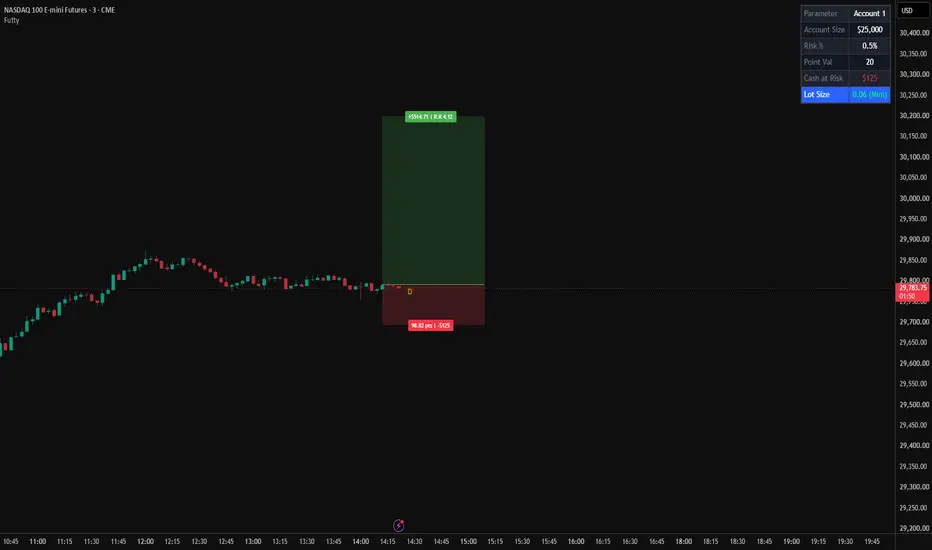
Universal Futures Lot Calculator (Futty)
🎯 Smart Position Sizing & Risk Management for Futures Traders
Universal Futures Lot Calculator (Futty) is a position-sizing and risk-management tool designed to help futures traders calculate their position size based on account equity, risk percentage, entry price, and stop-loss distance.
Instead of manually calculating how many contracts to trade for every setup, Futty does the mathematics directly on your TradingView chart. It displays your calculated position size, planned monetary risk, potential reward, and risk-to-reward ratio in an easy-to-read information table.
Whether you trade equity index futures, micro contracts, currencies, cryptocurrencies, energies, metals, agricultural commodities, or interest-rate futures, Futty brings your trade-planning calculations into one place.
⭐ What Makes Futty Special?
1. Automatic Instrument Point-Value Mapping
Futty includes predefined point-value mappings for a broad selection of futures contracts. When you open a supported futures chart, the indicator automatically selects its configured point value.
This helps eliminate the need to manually enter the point value for every supported instrument.
Supported contracts include standard and micro equity index futures, precious metals, energy, agricultural commodities, currency futures, cryptocurrency futures, and Treasury futures.
Important: Automatic mapping is based on the TradingView ticker symbol. If a symbol is not supported or its ticker differs from the configured symbol, the calculation may not work correctly.
2. Risk-Based Position Sizing
Set your account size and the percentage of capital you are willing to risk on a trade.
Futty calculates your planned monetary risk and estimates the number of contracts based on the distance between your entry price and stop-loss price.
Example:
- Account size: $25,000
- Risk per trade: 0.5%
- Planned risk: $125
- Entry-to-stop distance: 10 points
The indicator uses the instrument's configured point value to calculate the theoretical position size.
This makes it easier to maintain a consistent risk-based approach across instruments with different contract specifications.
3. Manage Two Accounts Simultaneously
Trading multiple accounts?
Enable the second account to calculate position sizes for two accounts independently.
You can configure a different account size and risk percentage for each account. The information table displays both accounts side by side, helping you compare their calculated risk and position sizes without manually repeating the calculations.
4. Visual Entry, Stop-Loss & Take-Profit Planning
Futty brings your trade plan to life directly on the chart.
The indicator displays:
- Entry level: A horizontal reference line.
- Stop-loss zone: A red shaded area representing the distance between entry and stop loss.
- Take-profit zone: A green shaded area representing the distance between entry and take profit.
- Stop-loss information: Displays the stop distance in points and the planned monetary risk.
- Take-profit information: Displays the estimated monetary reward and risk-to-reward ratio.
These visual elements help you assess your planned trade before execution.
5. Risk-to-Reward Calculation
Futty calculates the distance from entry to stop loss and compares it with the distance from entry to take profit.
For example:
- Stop-loss distance: 10 points
- Take-profit distance: 20 points
- Risk-to-reward ratio: 1:2
The projected monetary reward is calculated from the planned risk and the risk-to-reward ratio.
This allows you to evaluate the potential reward relative to the risk before placing a trade.
6. Customizable Information Table
The built-in table displays your key trade-planning information in one place.
Depending on whether the second account is enabled, the table shows:
- Account size
- Risk percentage
- Configured point value
- Planned monetary risk
- Calculated position size
You can customize the table's position and text size to suit your chart layout.
🌎 Supported Markets & Instruments
Futty includes predefined point-value mappings for the following futures contracts.
📈 Equity Index Futures
- ES1! — E-mini S&P 500
- MES1! — Micro E-mini S&P 500
- NQ1! — E-mini Nasdaq-100
- MNQ1! — Micro E-mini Nasdaq-100
- RTY1! — E-mini Russell 2000
- M2K1! — Micro E-mini Russell 2000
- YM1! — E-mini Dow Jones
- MYM1! — Micro E-mini Dow Jones
- NKD1! — Nikkei 225 futures
🥇 Precious Metals
- GC1! — Gold
- MGC1! — Micro Gold
- SI1! — Silver
- SIL1! — Micro Silver
- HG1! — Copper
- MHG1! — Micro Copper
- PL1! — Platinum
⚡ Energy Futures
- CL1! — Crude Oil
- MCL1! — Micro Crude Oil
- QM1! — E-mini Crude Oil
- NG1! — Natural Gas
- QG1! — E-mini Natural Gas
- MNG1! — Micro Henry Hub Natural Gas
- RB1! — RBOB Gasoline
- HO1! — Heating Oil
🌾 Agricultural & Soft Commodity Futures
- ZC1! — Corn
- ZW1! — Wheat
- ZS1! — Soybeans
- ZM1! — Soybean Meal
- ZL1! — Soybean Oil
- CT1! — Cotton
- CC1! — Cocoa
- SB1! — Sugar
- KC1! — Coffee
- KE1! — Hard Red Winter Wheat
- ZO1! — Oats
🐄 Livestock Futures
- HE1! — Lean Hogs
- LE1! — Live Cattle
- GF1! — Feeder Cattle
💱 Currency Futures
- 6A1! — Australian Dollar
- 6B1! — British Pound
- 6C1! — Canadian Dollar
- 6E1! — Euro FX
- 6J1! — Japanese Yen
- 6S1! — Swiss Franc
- E71! — Euro FX micro
- M6E1! — Micro Euro FX
- M6A1! — Micro Australian Dollar
- 6M1! — Mexican Peso
- 6N1! — New Zealand Dollar
- M6B1! — Micro British Pound
- M6C1! — Micro Canadian Dollar
- M6S1! — Micro Swiss Franc
- M6J1! — Micro Japanese Yen
₿ Cryptocurrency Futures
- BTC1! — Bitcoin futures
- MBT1! — Micro Bitcoin futures
- ETH1! — Ether futures
- MET1! — Micro Ether futures
📊 Volatility Futures
- VX1! — Cboe Volatility Index (VIX) futures
🏦 U.S. Treasury Futures
- ZT1! — 2-Year Treasury Note
- ZF1! — 5-Year Treasury Note
- ZN1! — 10-Year Treasury Note
- TN1! — 10-Year Treasury Note futures
- ZB1! — 30-Year Treasury Bond
- UB1! — Ultra U.S. Treasury Bond
Coverage note: The contracts listed above are those explicitly mapped in the current script. Actual availability and ticker naming depend on your TradingView data provider. The point-value mappings should be verified against the relevant exchange specifications before live trading.
🛠️ How to Use Futty
Step 1: Open a Supported Futures Chart
Open a futures chart on TradingView using a supported ticker symbol, such as ES1!, NQ1!, MNQ1!, GC1!, or CL1!.
Futty uses the chart's ticker symbol to identify its configured point value.
Step 2: Configure Your Account
Open the indicator settings and enter:
- Account size
- Risk percentage per trade
For example, enter a $25,000 account and a risk percentage of 0.5% to establish a planned risk budget of $125 per trade.
Step 3: Set Your Trade Levels
Enter your planned:
- Entry price
- Stop-loss price
- Take-profit price
The indicator uses the entry-to-stop distance to calculate the theoretical contract quantity and uses the target distance to calculate the risk-to-reward ratio and projected reward.
Step 4: Review the Position Size
Check the information table for:
- Your configured account size
- Risk percentage
- Instrument point value
- Planned monetary risk
- Calculated contract quantity
Use these values to plan your trade before submitting an order.
Step 5: Enable Account 2 If Needed
If you manage two accounts, enable the second account in the settings.
Enter its account size and risk percentage to calculate its position size separately.
Step 6: Customize the Table
Choose a suitable table position and text size from the settings to keep your chart organized.
👤 Who Is This Indicator For?
Futty may be useful for:
- Futures day traders
- Scalpers trading index futures
- Traders comparing standard and micro contracts
- Traders using predefined stop-loss levels
- Traders managing two accounts with different risk parameters
- Traders who want their position-sizing calculations visible on TradingView
It can complement discretionary trading strategies, price-action trading, market-profile analysis, order-flow trading, and other approaches that use predefined entry and stop-loss levels.
Futty calculates position size from your inputs; it does not generate trade signals or determine where you should enter or exit a market.
⚠️ Important Notes & Limitations
- Futures only: The current predefined mappings are intended for the listed futures contracts. Do not assume that spot forex, CFDs, stocks, or other instruments are supported.
- Ticker-dependent: The script identifies contracts using exact ticker-symbol matches. Different symbol formats or broker prefixes may not be recognized.
- Verify contract specifications: Point values, tick values, quotation conventions, and contract multipliers can vary. Always confirm the correct specifications for your selected instrument and data feed.
- Fractional contracts: The calculated position size can be fractional. Many futures brokers accept only whole contracts, so you must determine an appropriate executable quantity.
- Execution costs: The calculation does not account for commissions, exchange fees, slippage, spread, or currency-conversion costs.
- No order execution: Futty is a chart-based calculator. It does not place, modify, or manage orders.
- Not financial advice: The indicator is an educational and trade-planning tool. It does not guarantee profits or limit actual losses to the displayed amount.
Always verify the calculated quantity and planned risk before placing an order.
Final Thoughts
Futty — Universal Futures Lot Calculator brings position sizing, planned risk, projected reward, and trade-level visualization together in one TradingView indicator.
The goal is simple: spend less time calculating contract quantities manually and more time planning trades with a consistent, risk-aware process.
Plan your risk. Calculate your size. Trade with clarity.
🎯 Smart Position Sizing & Risk Management for Futures Traders
Universal Futures Lot Calculator (Futty) is a position-sizing and risk-management tool designed to help futures traders calculate their position size based on account equity, risk percentage, entry price, and stop-loss distance.
Instead of manually calculating how many contracts to trade for every setup, Futty does the mathematics directly on your TradingView chart. It displays your calculated position size, planned monetary risk, potential reward, and risk-to-reward ratio in an easy-to-read information table.
Whether you trade equity index futures, micro contracts, currencies, cryptocurrencies, energies, metals, agricultural commodities, or interest-rate futures, Futty brings your trade-planning calculations into one place.
⭐ What Makes Futty Special?
1. Automatic Instrument Point-Value Mapping
Futty includes predefined point-value mappings for a broad selection of futures contracts. When you open a supported futures chart, the indicator automatically selects its configured point value.
This helps eliminate the need to manually enter the point value for every supported instrument.
Supported contracts include standard and micro equity index futures, precious metals, energy, agricultural commodities, currency futures, cryptocurrency futures, and Treasury futures.
Important: Automatic mapping is based on the TradingView ticker symbol. If a symbol is not supported or its ticker differs from the configured symbol, the calculation may not work correctly.
2. Risk-Based Position Sizing
Set your account size and the percentage of capital you are willing to risk on a trade.
Futty calculates your planned monetary risk and estimates the number of contracts based on the distance between your entry price and stop-loss price.
Example:
- Account size: $25,000
- Risk per trade: 0.5%
- Planned risk: $125
- Entry-to-stop distance: 10 points
The indicator uses the instrument's configured point value to calculate the theoretical position size.
This makes it easier to maintain a consistent risk-based approach across instruments with different contract specifications.
3. Manage Two Accounts Simultaneously
Trading multiple accounts?
Enable the second account to calculate position sizes for two accounts independently.
You can configure a different account size and risk percentage for each account. The information table displays both accounts side by side, helping you compare their calculated risk and position sizes without manually repeating the calculations.
4. Visual Entry, Stop-Loss & Take-Profit Planning
Futty brings your trade plan to life directly on the chart.
The indicator displays:
- Entry level: A horizontal reference line.
- Stop-loss zone: A red shaded area representing the distance between entry and stop loss.
- Take-profit zone: A green shaded area representing the distance between entry and take profit.
- Stop-loss information: Displays the stop distance in points and the planned monetary risk.
- Take-profit information: Displays the estimated monetary reward and risk-to-reward ratio.
These visual elements help you assess your planned trade before execution.
5. Risk-to-Reward Calculation
Futty calculates the distance from entry to stop loss and compares it with the distance from entry to take profit.
For example:
- Stop-loss distance: 10 points
- Take-profit distance: 20 points
- Risk-to-reward ratio: 1:2
The projected monetary reward is calculated from the planned risk and the risk-to-reward ratio.
This allows you to evaluate the potential reward relative to the risk before placing a trade.
6. Customizable Information Table
The built-in table displays your key trade-planning information in one place.
Depending on whether the second account is enabled, the table shows:
- Account size
- Risk percentage
- Configured point value
- Planned monetary risk
- Calculated position size
You can customize the table's position and text size to suit your chart layout.
🌎 Supported Markets & Instruments
Futty includes predefined point-value mappings for the following futures contracts.
📈 Equity Index Futures
- ES1! — E-mini S&P 500
- MES1! — Micro E-mini S&P 500
- NQ1! — E-mini Nasdaq-100
- MNQ1! — Micro E-mini Nasdaq-100
- RTY1! — E-mini Russell 2000
- M2K1! — Micro E-mini Russell 2000
- YM1! — E-mini Dow Jones
- MYM1! — Micro E-mini Dow Jones
- NKD1! — Nikkei 225 futures
🥇 Precious Metals
- GC1! — Gold
- MGC1! — Micro Gold
- SI1! — Silver
- SIL1! — Micro Silver
- HG1! — Copper
- MHG1! — Micro Copper
- PL1! — Platinum
⚡ Energy Futures
- CL1! — Crude Oil
- MCL1! — Micro Crude Oil
- QM1! — E-mini Crude Oil
- NG1! — Natural Gas
- QG1! — E-mini Natural Gas
- MNG1! — Micro Henry Hub Natural Gas
- RB1! — RBOB Gasoline
- HO1! — Heating Oil
🌾 Agricultural & Soft Commodity Futures
- ZC1! — Corn
- ZW1! — Wheat
- ZS1! — Soybeans
- ZM1! — Soybean Meal
- ZL1! — Soybean Oil
- CT1! — Cotton
- CC1! — Cocoa
- SB1! — Sugar
- KC1! — Coffee
- KE1! — Hard Red Winter Wheat
- ZO1! — Oats
🐄 Livestock Futures
- HE1! — Lean Hogs
- LE1! — Live Cattle
- GF1! — Feeder Cattle
💱 Currency Futures
- 6A1! — Australian Dollar
- 6B1! — British Pound
- 6C1! — Canadian Dollar
- 6E1! — Euro FX
- 6J1! — Japanese Yen
- 6S1! — Swiss Franc
- E71! — Euro FX micro
- M6E1! — Micro Euro FX
- M6A1! — Micro Australian Dollar
- 6M1! — Mexican Peso
- 6N1! — New Zealand Dollar
- M6B1! — Micro British Pound
- M6C1! — Micro Canadian Dollar
- M6S1! — Micro Swiss Franc
- M6J1! — Micro Japanese Yen
₿ Cryptocurrency Futures
- BTC1! — Bitcoin futures
- MBT1! — Micro Bitcoin futures
- ETH1! — Ether futures
- MET1! — Micro Ether futures
📊 Volatility Futures
- VX1! — Cboe Volatility Index (VIX) futures
🏦 U.S. Treasury Futures
- ZT1! — 2-Year Treasury Note
- ZF1! — 5-Year Treasury Note
- ZN1! — 10-Year Treasury Note
- TN1! — 10-Year Treasury Note futures
- ZB1! — 30-Year Treasury Bond
- UB1! — Ultra U.S. Treasury Bond
Coverage note: The contracts listed above are those explicitly mapped in the current script. Actual availability and ticker naming depend on your TradingView data provider. The point-value mappings should be verified against the relevant exchange specifications before live trading.
🛠️ How to Use Futty
Step 1: Open a Supported Futures Chart
Open a futures chart on TradingView using a supported ticker symbol, such as ES1!, NQ1!, MNQ1!, GC1!, or CL1!.
Futty uses the chart's ticker symbol to identify its configured point value.
Step 2: Configure Your Account
Open the indicator settings and enter:
- Account size
- Risk percentage per trade
For example, enter a $25,000 account and a risk percentage of 0.5% to establish a planned risk budget of $125 per trade.
Step 3: Set Your Trade Levels
Enter your planned:
- Entry price
- Stop-loss price
- Take-profit price
The indicator uses the entry-to-stop distance to calculate the theoretical contract quantity and uses the target distance to calculate the risk-to-reward ratio and projected reward.
Step 4: Review the Position Size
Check the information table for:
- Your configured account size
- Risk percentage
- Instrument point value
- Planned monetary risk
- Calculated contract quantity
Use these values to plan your trade before submitting an order.
Step 5: Enable Account 2 If Needed
If you manage two accounts, enable the second account in the settings.
Enter its account size and risk percentage to calculate its position size separately.
Step 6: Customize the Table
Choose a suitable table position and text size from the settings to keep your chart organized.
👤 Who Is This Indicator For?
Futty may be useful for:
- Futures day traders
- Scalpers trading index futures
- Traders comparing standard and micro contracts
- Traders using predefined stop-loss levels
- Traders managing two accounts with different risk parameters
- Traders who want their position-sizing calculations visible on TradingView
It can complement discretionary trading strategies, price-action trading, market-profile analysis, order-flow trading, and other approaches that use predefined entry and stop-loss levels.
Futty calculates position size from your inputs; it does not generate trade signals or determine where you should enter or exit a market.
⚠️ Important Notes & Limitations
- Futures only: The current predefined mappings are intended for the listed futures contracts. Do not assume that spot forex, CFDs, stocks, or other instruments are supported.
- Ticker-dependent: The script identifies contracts using exact ticker-symbol matches. Different symbol formats or broker prefixes may not be recognized.
- Verify contract specifications: Point values, tick values, quotation conventions, and contract multipliers can vary. Always confirm the correct specifications for your selected instrument and data feed.
- Fractional contracts: The calculated position size can be fractional. Many futures brokers accept only whole contracts, so you must determine an appropriate executable quantity.
- Execution costs: The calculation does not account for commissions, exchange fees, slippage, spread, or currency-conversion costs.
- No order execution: Futty is a chart-based calculator. It does not place, modify, or manage orders.
- Not financial advice: The indicator is an educational and trade-planning tool. It does not guarantee profits or limit actual losses to the displayed amount.
Always verify the calculated quantity and planned risk before placing an order.
Final Thoughts
Futty — Universal Futures Lot Calculator brings position sizing, planned risk, projected reward, and trade-level visualization together in one TradingView indicator.
The goal is simple: spend less time calculating contract quantities manually and more time planning trades with a consistent, risk-aware process.
Plan your risk. Calculate your size. Trade with clarity.

Haftungsausschluss
Die Informationen und Veröffentlichungen sind nicht als Finanz-, Anlage-, Handels- oder andere Arten von Ratschlägen oder Empfehlungen gedacht, die von TradingView bereitgestellt oder gebilligt werden, und stellen diese nicht dar. Lesen Sie mehr in den Nutzungsbedingungen.
Haftungsausschluss
Die Informationen und Veröffentlichungen sind nicht als Finanz-, Anlage-, Handels- oder andere Arten von Ratschlägen oder Empfehlungen gedacht, die von TradingView bereitgestellt oder gebilligt werden, und stellen diese nicht dar. Lesen Sie mehr in den Nutzungsbedingungen.