OPEN-SOURCE SCRIPT
edgeful - iFVG - inverse fair value gaps
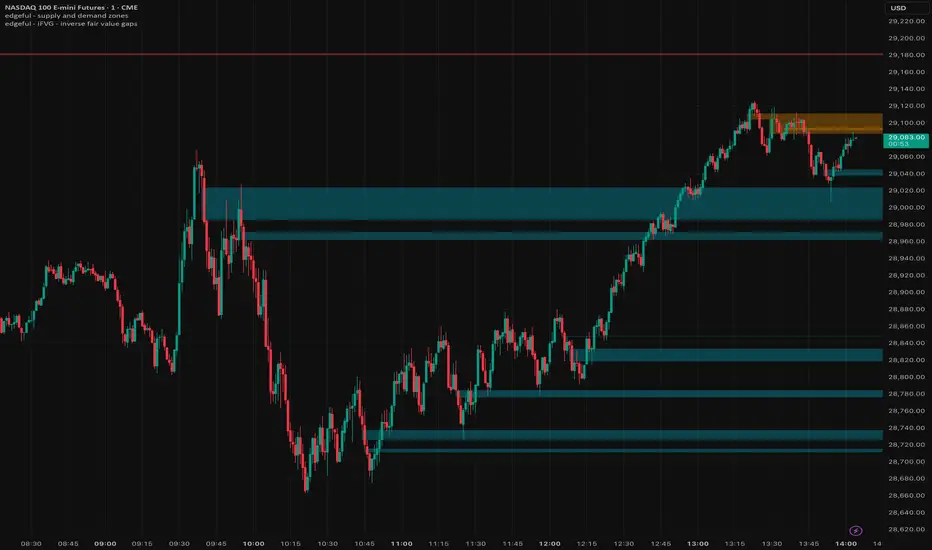
edgeful – iFVG (Inverse Fair Value Gaps)
What it is, in plain English
This indicator plots Inverse Fair Value Gap zones on your chart — areas where a previous price imbalance failed, flipped polarity, and now (in theory) acts as the opposite kind of pressure. It's an ICT/SMC concept: a Fair Value Gap that gets violated isn't dead — it becomes a "trap" zone that the market often respects from the other side.
The indicator does three things, in sequence:
1. Finds every standard 3-candle Fair Value Gap as it forms.
2. Watches each one, waiting to see if price comes back and breaks through it.
3. Flips any broken FVG into an iFVG with the opposite polarity, drawing a new box in a different color.
It also keeps the chart clean by removing zones that are too old or that get fully invalidated, and it can fire alerts when new iFVGs form.
---
The core concept it's built on
A Fair Value Gap (FVG)
An FVG is a three-candle pattern where the wicks of candle 1 and candle 3 don't touch each other — leaving a literal gap in price that was never "traded through." It represents a moment of one-sided urgency where buyers (or sellers) ran price so fast that intermediate prices were skipped.
- Bullish FVG: an upward gap, where candle 3's low is above candle 1's high. The space between them is unfilled bullish imbalance — often acts as support if revisited.
- Bearish FVG: a downward gap, where candle 3's high is below candle 1's low. The space is unfilled bearish imbalance — often acts as resistance if revisited.
The ICT/SMC narrative is that institutions tend to revisit and "fill" these gaps to rebalance order flow before continuing the move.
An Inverse FVG (iFVG)
Here's where this indicator earns its name. The iFVG idea says:
When a Fair Value Gap is decisively broken through instead of merely respected, its meaning inverts. The trapped participants on the wrong side of that broken zone now defend the opposite direction.
So:
- A bullish FVG that gets broken to the downside becomes a bearish iFVG — the area where buyers got trapped now acts as resistance.
- A bearish FVG that gets broken to the upside becomes a bullish iFVG — the area where sellers got trapped now acts as support.
The iFVG occupies the exact same price coordinates as the original FVG. What changes is its polarity — and how a trader treats it.
---
How the indicator detects an FVG
On every confirmed bar, it looks at the last three candles and checks the classic textbook pattern:
- Bullish FVG: the current candle's low is above the high of two candles ago, and the middle candle's close also broke above that two-bars-ago high (a confirmation that real upward displacement happened, not just a wick).
- Bearish FVG: the mirror — current candle's high is below the low of two candles ago, with the middle candle's close confirming the downward break.
There's an optional Min FVG Size % filter. If you set it above zero, the gap has to be at least that percentage of price to count. Set to 0, every qualifying 3-candle gap is detected. This is useful on lower timeframes where tiny micro-gaps would otherwise clutter the chart.
There's also an optional Session filter — when enabled, only FVGs that form inside the chosen session window (default NY 09:30–16:00, America/New_York) are tracked. Anything outside is ignored.
When an FVG is detected, the indicator records its high, low, direction (bull/bear), and the timestamp of the first candle of the formation. If the "Show Original FVGs" toggle is on, it also draws a translucent box over the gap.
---
How it tracks mitigation
Once an FVG exists, every new bar checks whether price has violated it. You choose how strict that check is:
- Close mode (default): the candle's close must move beyond the far side of the zone. Bullish FVG mitigates only when a bar closes below its bottom; bearish FVG mitigates only when a bar closes above its top. This is more conservative — it ignores wicks.
- Wick mode: the candle's wick is enough. Bullish FVG mitigates when any low pierces below the bottom; bearish FVG mitigates when any high pierces above the top. This is more sensitive — every tag counts.
While an FVG is not yet mitigated, its box keeps getting extended to the right edge of the chart, so it remains visible as a live zone. The "Extend Boxes (bars)" input controls how far ahead the right edge of the box is drawn.
---
The flip from FVG to iFVG
The moment an FVG is mitigated, the indicator does this:
1. Deletes the original FVG box from the chart.
2. Creates a new iFVG record with the same exact price coordinates (same top, same bottom, same starting timestamp) but with the direction reversed.
3. Draws a new box in the iFVG color palette (cyan for bullish iFVG, orange for bearish iFVG by default), distinct from the FVG colors (blue/red), so you can visually tell at a glance which zones are "fresh imbalances" vs. which are "flipped traps."
If you keep "Show Original FVGs" off (the default), you never see the FVG itself — you only see iFVGs at the moment they're born. This keeps the chart focused on the zones the indicator is actually designed to highlight.
---
What happens to iFVGs after they form
iFVGs aren't permanent either. The indicator continues to watch them with the same mitigation logic:
- A bullish iFVG (acting as support) is invalidated when price closes or wicks below its lower boundary.
- A bearish iFVG (acting as resistance) is invalidated when price closes or wicks above its upper boundary.
When an iFVG is invalidated, it's deleted — there's no further flip. The cycle is one-way: FVG → iFVG → gone.
While an iFVG is still alive, its box keeps extending to the right, just like the FVG box did.
---
Housekeeping: the "Max Zone Age" filter
A common problem with FVG-style indicators is chart clutter — every stale zone from days or weeks ago lingers forever. This indicator solves that with Max Zone Age (bars), default 500.
If any zone (FVG or iFVG) is older than that many bars and still hasn't been mitigated, it's silently removed. No iFVG is spawned in that case — old, ignored zones just expire without ceremony.
This means the chart only ever shows zones that are recent enough to plausibly matter to current price action.
---
How a trader would actually use it
The intended workflow:
1. Watch for an iFVG zone to appear — this signals that an imbalance was just broken, and the market may now defend the opposite side.
2. Wait for price to retrace back into the iFVG — the entry trigger.
3. Use it as a directional bias:
- Bullish iFVG (cyan) = look for longs from this zone.
- Bearish iFVG (orange) = look for shorts from this zone.
4. Treat invalidation as a hard stop: if price closes (or wicks, depending on your mode) cleanly through the far side of the iFVG, the trade thesis is dead.
iFVGs are often used in multi-timeframe confluence: an HTF iFVG (say, 1H) lining up with an LTF entry pattern (5m order block, sweep, etc.) is the classic ICT setup.
---
Built-in alerts
Two alert conditions fire automatically:
- Bullish iFVG Created — fires the bar a bearish FVG flips into a bullish iFVG (new potential support).
- Bearish iFVG Created — fires the bar a bullish FVG flips into a bearish iFVG (new potential resistance).
Useful if you want to be pinged when a fresh trap zone is born without staring at the chart.
---
Practical notes
- All detection happens on confirmed bars only, so the zones don't repaint mid-bar.
- Boxes use bar-time coordinates (not bar-index), which means the indicator works correctly on long historical charts without hitting TradingView's lookback distance limit.
- Default settings: NY session filter is off (detects everywhere), close-based mitigation, original FVGs hidden, iFVGs shown, 500-bar extension, 500-bar max age.
- Colors are fully customizable for both FVG and iFVG, bull and bear.
---
TL;DR
It finds 3-candle imbalances, watches them, and when one gets broken, it draws a flipped version on the same spot — because broken imbalances often become the opposite kind of magnet/barrier. It's a clean, automated implementation of the ICT "iFVG" concept with mitigation modes, session filtering, age limits, and alerts so you don't have to draw any of this by hand.
What it is, in plain English
This indicator plots Inverse Fair Value Gap zones on your chart — areas where a previous price imbalance failed, flipped polarity, and now (in theory) acts as the opposite kind of pressure. It's an ICT/SMC concept: a Fair Value Gap that gets violated isn't dead — it becomes a "trap" zone that the market often respects from the other side.
The indicator does three things, in sequence:
1. Finds every standard 3-candle Fair Value Gap as it forms.
2. Watches each one, waiting to see if price comes back and breaks through it.
3. Flips any broken FVG into an iFVG with the opposite polarity, drawing a new box in a different color.
It also keeps the chart clean by removing zones that are too old or that get fully invalidated, and it can fire alerts when new iFVGs form.
---
The core concept it's built on
A Fair Value Gap (FVG)
An FVG is a three-candle pattern where the wicks of candle 1 and candle 3 don't touch each other — leaving a literal gap in price that was never "traded through." It represents a moment of one-sided urgency where buyers (or sellers) ran price so fast that intermediate prices were skipped.
- Bullish FVG: an upward gap, where candle 3's low is above candle 1's high. The space between them is unfilled bullish imbalance — often acts as support if revisited.
- Bearish FVG: a downward gap, where candle 3's high is below candle 1's low. The space is unfilled bearish imbalance — often acts as resistance if revisited.
The ICT/SMC narrative is that institutions tend to revisit and "fill" these gaps to rebalance order flow before continuing the move.
An Inverse FVG (iFVG)
Here's where this indicator earns its name. The iFVG idea says:
When a Fair Value Gap is decisively broken through instead of merely respected, its meaning inverts. The trapped participants on the wrong side of that broken zone now defend the opposite direction.
So:
- A bullish FVG that gets broken to the downside becomes a bearish iFVG — the area where buyers got trapped now acts as resistance.
- A bearish FVG that gets broken to the upside becomes a bullish iFVG — the area where sellers got trapped now acts as support.
The iFVG occupies the exact same price coordinates as the original FVG. What changes is its polarity — and how a trader treats it.
---
How the indicator detects an FVG
On every confirmed bar, it looks at the last three candles and checks the classic textbook pattern:
- Bullish FVG: the current candle's low is above the high of two candles ago, and the middle candle's close also broke above that two-bars-ago high (a confirmation that real upward displacement happened, not just a wick).
- Bearish FVG: the mirror — current candle's high is below the low of two candles ago, with the middle candle's close confirming the downward break.
There's an optional Min FVG Size % filter. If you set it above zero, the gap has to be at least that percentage of price to count. Set to 0, every qualifying 3-candle gap is detected. This is useful on lower timeframes where tiny micro-gaps would otherwise clutter the chart.
There's also an optional Session filter — when enabled, only FVGs that form inside the chosen session window (default NY 09:30–16:00, America/New_York) are tracked. Anything outside is ignored.
When an FVG is detected, the indicator records its high, low, direction (bull/bear), and the timestamp of the first candle of the formation. If the "Show Original FVGs" toggle is on, it also draws a translucent box over the gap.
---
How it tracks mitigation
Once an FVG exists, every new bar checks whether price has violated it. You choose how strict that check is:
- Close mode (default): the candle's close must move beyond the far side of the zone. Bullish FVG mitigates only when a bar closes below its bottom; bearish FVG mitigates only when a bar closes above its top. This is more conservative — it ignores wicks.
- Wick mode: the candle's wick is enough. Bullish FVG mitigates when any low pierces below the bottom; bearish FVG mitigates when any high pierces above the top. This is more sensitive — every tag counts.
While an FVG is not yet mitigated, its box keeps getting extended to the right edge of the chart, so it remains visible as a live zone. The "Extend Boxes (bars)" input controls how far ahead the right edge of the box is drawn.
---
The flip from FVG to iFVG
The moment an FVG is mitigated, the indicator does this:
1. Deletes the original FVG box from the chart.
2. Creates a new iFVG record with the same exact price coordinates (same top, same bottom, same starting timestamp) but with the direction reversed.
3. Draws a new box in the iFVG color palette (cyan for bullish iFVG, orange for bearish iFVG by default), distinct from the FVG colors (blue/red), so you can visually tell at a glance which zones are "fresh imbalances" vs. which are "flipped traps."
If you keep "Show Original FVGs" off (the default), you never see the FVG itself — you only see iFVGs at the moment they're born. This keeps the chart focused on the zones the indicator is actually designed to highlight.
---
What happens to iFVGs after they form
iFVGs aren't permanent either. The indicator continues to watch them with the same mitigation logic:
- A bullish iFVG (acting as support) is invalidated when price closes or wicks below its lower boundary.
- A bearish iFVG (acting as resistance) is invalidated when price closes or wicks above its upper boundary.
When an iFVG is invalidated, it's deleted — there's no further flip. The cycle is one-way: FVG → iFVG → gone.
While an iFVG is still alive, its box keeps extending to the right, just like the FVG box did.
---
Housekeeping: the "Max Zone Age" filter
A common problem with FVG-style indicators is chart clutter — every stale zone from days or weeks ago lingers forever. This indicator solves that with Max Zone Age (bars), default 500.
If any zone (FVG or iFVG) is older than that many bars and still hasn't been mitigated, it's silently removed. No iFVG is spawned in that case — old, ignored zones just expire without ceremony.
This means the chart only ever shows zones that are recent enough to plausibly matter to current price action.
---
How a trader would actually use it
The intended workflow:
1. Watch for an iFVG zone to appear — this signals that an imbalance was just broken, and the market may now defend the opposite side.
2. Wait for price to retrace back into the iFVG — the entry trigger.
3. Use it as a directional bias:
- Bullish iFVG (cyan) = look for longs from this zone.
- Bearish iFVG (orange) = look for shorts from this zone.
4. Treat invalidation as a hard stop: if price closes (or wicks, depending on your mode) cleanly through the far side of the iFVG, the trade thesis is dead.
iFVGs are often used in multi-timeframe confluence: an HTF iFVG (say, 1H) lining up with an LTF entry pattern (5m order block, sweep, etc.) is the classic ICT setup.
---
Built-in alerts
Two alert conditions fire automatically:
- Bullish iFVG Created — fires the bar a bearish FVG flips into a bullish iFVG (new potential support).
- Bearish iFVG Created — fires the bar a bullish FVG flips into a bearish iFVG (new potential resistance).
Useful if you want to be pinged when a fresh trap zone is born without staring at the chart.
---
Practical notes
- All detection happens on confirmed bars only, so the zones don't repaint mid-bar.
- Boxes use bar-time coordinates (not bar-index), which means the indicator works correctly on long historical charts without hitting TradingView's lookback distance limit.
- Default settings: NY session filter is off (detects everywhere), close-based mitigation, original FVGs hidden, iFVGs shown, 500-bar extension, 500-bar max age.
- Colors are fully customizable for both FVG and iFVG, bull and bear.
---
TL;DR
It finds 3-candle imbalances, watches them, and when one gets broken, it draws a flipped version on the same spot — because broken imbalances often become the opposite kind of magnet/barrier. It's a clean, automated implementation of the ICT "iFVG" concept with mitigation modes, session filtering, age limits, and alerts so you don't have to draw any of this by hand.
Open-source Skript
Ganz im Sinne von TradingView hat dieser Autor sein/ihr Script als Open-Source veröffentlicht. Auf diese Weise können nun auch andere Trader das Script rezensieren und die Funktionalität überprüfen. Vielen Dank an den Autor! Sie können das Script kostenlos verwenden, aber eine Wiederveröffentlichung des Codes unterliegt unseren Hausregeln.

45+ invite-only TradingView indicators available with your edgeful membership. sign up now for instant access.
Haftungsausschluss
Die Informationen und Veröffentlichungen sind nicht als Finanz-, Anlage-, Handels- oder andere Arten von Ratschlägen oder Empfehlungen gedacht, die von TradingView bereitgestellt oder gebilligt werden, und stellen diese nicht dar. Lesen Sie mehr in den Nutzungsbedingungen.
Open-source Skript
Ganz im Sinne von TradingView hat dieser Autor sein/ihr Script als Open-Source veröffentlicht. Auf diese Weise können nun auch andere Trader das Script rezensieren und die Funktionalität überprüfen. Vielen Dank an den Autor! Sie können das Script kostenlos verwenden, aber eine Wiederveröffentlichung des Codes unterliegt unseren Hausregeln.
45+ invite-only TradingView indicators available with your edgeful membership. sign up now for instant access.
Haftungsausschluss
Die Informationen und Veröffentlichungen sind nicht als Finanz-, Anlage-, Handels- oder andere Arten von Ratschlägen oder Empfehlungen gedacht, die von TradingView bereitgestellt oder gebilligt werden, und stellen diese nicht dar. Lesen Sie mehr in den Nutzungsbedingungen.