OPEN-SOURCE SCRIPT
CDT Clock + Trade Timer
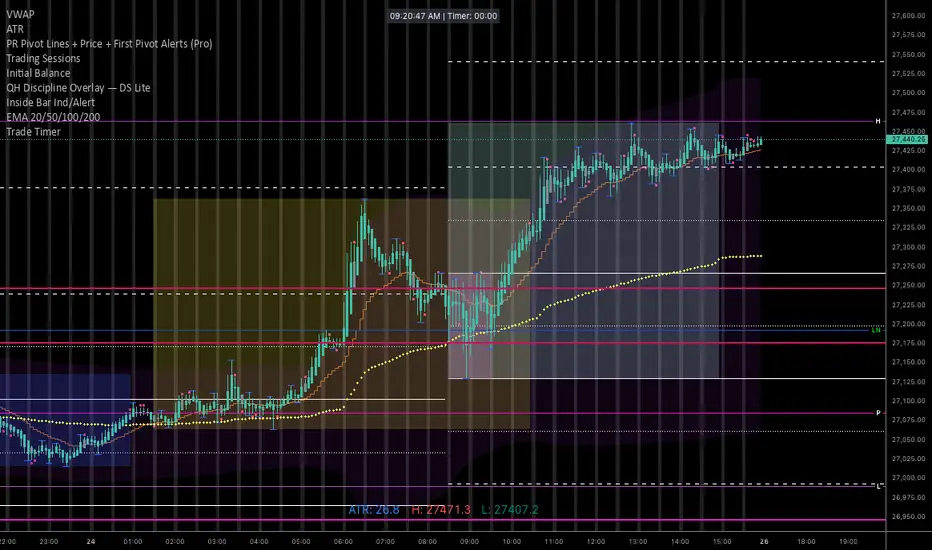
To keep it organized in your TradingView library, you’ll want a description that reminds you exactly how the logic works (especially the CDT offset and the manual timer).
Here is a concise description you can paste into the "Description" field when you save the script:
NQ Execution Clock & Patience Timer (CDT)
Overview:
A specialized execution tool designed for NQ/ES futures trading. This indicator provides a high-visibility digital clock synced to Central Daylight Time (CDT) and a manual "Trade Timer" to help manage trade duration and psychology during liquidity sweeps.
Key Features:
Live CDT Clock: Hardcoded to UTC-5 to stay synced with Chicago/San Antonio market hours.
Manual Trade Stopwatch: A "Start Trade Timer" toggle in the settings allows you to track exactly how many minutes/seconds you have been in a position.
Psychology Support: Specifically built to prevent early exits by providing a visual counter for the "10-minute rule" during NQ runs.
Customizable UI: Options to reposition the clock (Top Right, Bottom Left, etc.) and adjust font size/color to fit any chart layout.
Instructions:
Check "START TRADE TIMER" in the inputs as soon as your limit order is filled.
Uncheck to reset once the trade is closed.
Here is a concise description you can paste into the "Description" field when you save the script:
NQ Execution Clock & Patience Timer (CDT)
Overview:
A specialized execution tool designed for NQ/ES futures trading. This indicator provides a high-visibility digital clock synced to Central Daylight Time (CDT) and a manual "Trade Timer" to help manage trade duration and psychology during liquidity sweeps.
Key Features:
Live CDT Clock: Hardcoded to UTC-5 to stay synced with Chicago/San Antonio market hours.
Manual Trade Stopwatch: A "Start Trade Timer" toggle in the settings allows you to track exactly how many minutes/seconds you have been in a position.
Psychology Support: Specifically built to prevent early exits by providing a visual counter for the "10-minute rule" during NQ runs.
Customizable UI: Options to reposition the clock (Top Right, Bottom Left, etc.) and adjust font size/color to fit any chart layout.
Instructions:
Check "START TRADE TIMER" in the inputs as soon as your limit order is filled.
Uncheck to reset once the trade is closed.
Open-source Skript
Ganz im Sinne von TradingView hat dieser Autor sein/ihr Script als Open-Source veröffentlicht. Auf diese Weise können nun auch andere Trader das Script rezensieren und die Funktionalität überprüfen. Vielen Dank an den Autor! Sie können das Script kostenlos verwenden, aber eine Wiederveröffentlichung des Codes unterliegt unseren Hausregeln.

Haftungsausschluss
Die Informationen und Veröffentlichungen sind nicht als Finanz-, Anlage-, Handels- oder andere Arten von Ratschlägen oder Empfehlungen gedacht, die von TradingView bereitgestellt oder gebilligt werden, und stellen diese nicht dar. Lesen Sie mehr in den Nutzungsbedingungen.
Open-source Skript
Ganz im Sinne von TradingView hat dieser Autor sein/ihr Script als Open-Source veröffentlicht. Auf diese Weise können nun auch andere Trader das Script rezensieren und die Funktionalität überprüfen. Vielen Dank an den Autor! Sie können das Script kostenlos verwenden, aber eine Wiederveröffentlichung des Codes unterliegt unseren Hausregeln.
Haftungsausschluss
Die Informationen und Veröffentlichungen sind nicht als Finanz-, Anlage-, Handels- oder andere Arten von Ratschlägen oder Empfehlungen gedacht, die von TradingView bereitgestellt oder gebilligt werden, und stellen diese nicht dar. Lesen Sie mehr in den Nutzungsbedingungen.