OPEN-SOURCE SCRIPT
CQ_(-)_Current Candle Highlight
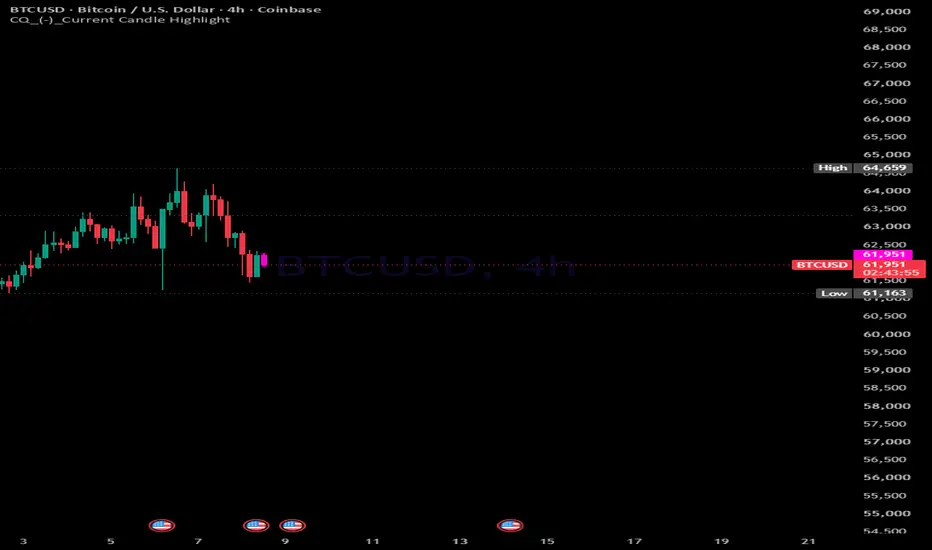
CQ_(-)_Current Candle Highlight
Author: CQuevedo345
User Manual
================================================================
OVERVIEW
================================================================
This indicator highlights the current (in-progress / last) candle
on the chart with a customizable glow, colored body, wick, and a
"NOW" label so it stands out from historical price action at a
glance. It also includes an optional highlight for the candle
immediately before the current one, using its own independent
teal/red (or custom) bullish/bearish colors.
Nothing about price, signals, or trend direction is calculated;
this is a pure visual aid for locating the active candle and the
one that just closed.
================================================================
FEATURE LIST
================================================================
1) CURRENT CANDLE HIGHLIGHT
- Recolors the live/last candle's body, wick, and border.
- Adds a soft multi-layer "glow halo" box around the candle.
- Adds a small "NOW" label above the candle's high.
- Colors are drawn from one of five built-in palettes (see
below); direction (bullish/bearish) automatically selects
the correct color from the chosen palette.
2) PREVIOUS CANDLE HIGHLIGHT
- Independently highlights the candle that comes right before
the current one (the last fully closed candle before "NOW").
- Colors are fully user-selectable, defaulting to:
Bullish -> Teal
Bearish -> Red
- Can optionally recolor that candle's wick/border to match, or
leave the wick/border unchanged (body color only).
- Automatically follows the chart forward: as new bars form,
the highlight always tracks the candle just before the newest
one - no manual adjustment needed.
- Can be toggled on/off independently of the current-candle
highlight.
3) FIVE COLOR PALETTES (for the current-candle highlight)
- Inferno - blazing orange/red volcanic tones
- Neon City - cyberpunk electric cyan/magenta
- Arctic Storm - icy blue/white high-contrast
- Toxic Green - radioactive lime/chartreuse (default)
- Ultraviolet - deep purple to violet spectrum
Each palette defines a distinct bullish and bearish color for
the body, border/wick, and glow.
================================================================
INPUT SETTINGS
================================================================
--- Settings ---
Show Highlight
Master on/off switch for the current-candle highlight (glow,
body, wick, border, and NOW label).
Color Palette
Choose which of the five palettes is used for the current
candle's colors.
Body Fill Opacity (0-100)
Controls how solid/transparent the current candle's body fill
is. Higher values = more opaque.
Color Wicks & Border
When on, the current candle's wick and border are colored to
match the palette. When off, only the body fill is colored.
Glow Halo Boxes
Toggles the soft glow effect drawn behind/around the current
candle.
Glow Layers (1-5)
Number of concentric glow layers drawn. More layers = a
thicker, more gradual glow falloff.
Glow Alpha per Layer (1-30)
Controls how visible/intense each glow layer is. Higher values
= stronger glow.
Show 'NOW' Label
Toggles the small "NOW" text label shown above the current
candle.
--- Previous Candle Highlight ---
Highlight Previous Candle
Master on/off switch for highlighting the candle immediately
before the current one.
Bullish Color / Bearish Color
User-selectable colors applied to the previous candle depending
on whether it closed bullish (close >= open) or bearish
(close < open). Default: Teal (bullish) / Red (bearish).
Color Previous Wick & Border
When on, the previous candle's wick and border are also colored
to match its bullish/bearish color. When off, only the body is
colored.
================================================================
HOW IT WORKS (BEHIND THE SCENES)
================================================================
- The current-candle highlight (glow, body box, wick line, and
label) is only drawn while the script is evaluating the actual
last bar on the chart (barstate.islast). These drawn objects are
deleted and redrawn each time a new bar closes, so the highlight
always follows the live candle.
- The previous-candle highlight uses the candle's own bar index
compared against the chart's last bar index, so it automatically
"moves forward" one candle at a time as new bars are added,
without needing to track or delete old drawings.
- Both highlights use plotcandle() overrides, so they recolor the
actual candles on the chart rather than drawing separate shapes
on top of them.
================================================================
TIPS
================================================================
- If you only want the previous-candle highlight (e.g., to clearly
mark the last fully closed candle) and not the current one, turn
off "Show Highlight" and leave "Highlight Previous Candle" on.
- If the glow feels too strong or distracting, lower "Glow Alpha
per Layer" or reduce "Glow Layers" rather than disabling it
outright.
- Pick a palette (or previous-candle colors) with enough contrast
against your chart background/candle theme for the highlight to
remain visible.
================================================================
VERSION NOTES
================================================================
- Added: user-selectable Previous Candle Highlight (independent
teal/red bullish/bearish colors, optional wick/border coloring,
and its own on/off toggle).
Author: CQuevedo345
User Manual
================================================================
OVERVIEW
================================================================
This indicator highlights the current (in-progress / last) candle
on the chart with a customizable glow, colored body, wick, and a
"NOW" label so it stands out from historical price action at a
glance. It also includes an optional highlight for the candle
immediately before the current one, using its own independent
teal/red (or custom) bullish/bearish colors.
Nothing about price, signals, or trend direction is calculated;
this is a pure visual aid for locating the active candle and the
one that just closed.
================================================================
FEATURE LIST
================================================================
1) CURRENT CANDLE HIGHLIGHT
- Recolors the live/last candle's body, wick, and border.
- Adds a soft multi-layer "glow halo" box around the candle.
- Adds a small "NOW" label above the candle's high.
- Colors are drawn from one of five built-in palettes (see
below); direction (bullish/bearish) automatically selects
the correct color from the chosen palette.
2) PREVIOUS CANDLE HIGHLIGHT
- Independently highlights the candle that comes right before
the current one (the last fully closed candle before "NOW").
- Colors are fully user-selectable, defaulting to:
Bullish -> Teal
Bearish -> Red
- Can optionally recolor that candle's wick/border to match, or
leave the wick/border unchanged (body color only).
- Automatically follows the chart forward: as new bars form,
the highlight always tracks the candle just before the newest
one - no manual adjustment needed.
- Can be toggled on/off independently of the current-candle
highlight.
3) FIVE COLOR PALETTES (for the current-candle highlight)
- Inferno - blazing orange/red volcanic tones
- Neon City - cyberpunk electric cyan/magenta
- Arctic Storm - icy blue/white high-contrast
- Toxic Green - radioactive lime/chartreuse (default)
- Ultraviolet - deep purple to violet spectrum
Each palette defines a distinct bullish and bearish color for
the body, border/wick, and glow.
================================================================
INPUT SETTINGS
================================================================
--- Settings ---
Show Highlight
Master on/off switch for the current-candle highlight (glow,
body, wick, border, and NOW label).
Color Palette
Choose which of the five palettes is used for the current
candle's colors.
Body Fill Opacity (0-100)
Controls how solid/transparent the current candle's body fill
is. Higher values = more opaque.
Color Wicks & Border
When on, the current candle's wick and border are colored to
match the palette. When off, only the body fill is colored.
Glow Halo Boxes
Toggles the soft glow effect drawn behind/around the current
candle.
Glow Layers (1-5)
Number of concentric glow layers drawn. More layers = a
thicker, more gradual glow falloff.
Glow Alpha per Layer (1-30)
Controls how visible/intense each glow layer is. Higher values
= stronger glow.
Show 'NOW' Label
Toggles the small "NOW" text label shown above the current
candle.
--- Previous Candle Highlight ---
Highlight Previous Candle
Master on/off switch for highlighting the candle immediately
before the current one.
Bullish Color / Bearish Color
User-selectable colors applied to the previous candle depending
on whether it closed bullish (close >= open) or bearish
(close < open). Default: Teal (bullish) / Red (bearish).
Color Previous Wick & Border
When on, the previous candle's wick and border are also colored
to match its bullish/bearish color. When off, only the body is
colored.
================================================================
HOW IT WORKS (BEHIND THE SCENES)
================================================================
- The current-candle highlight (glow, body box, wick line, and
label) is only drawn while the script is evaluating the actual
last bar on the chart (barstate.islast). These drawn objects are
deleted and redrawn each time a new bar closes, so the highlight
always follows the live candle.
- The previous-candle highlight uses the candle's own bar index
compared against the chart's last bar index, so it automatically
"moves forward" one candle at a time as new bars are added,
without needing to track or delete old drawings.
- Both highlights use plotcandle() overrides, so they recolor the
actual candles on the chart rather than drawing separate shapes
on top of them.
================================================================
TIPS
================================================================
- If you only want the previous-candle highlight (e.g., to clearly
mark the last fully closed candle) and not the current one, turn
off "Show Highlight" and leave "Highlight Previous Candle" on.
- If the glow feels too strong or distracting, lower "Glow Alpha
per Layer" or reduce "Glow Layers" rather than disabling it
outright.
- Pick a palette (or previous-candle colors) with enough contrast
against your chart background/candle theme for the highlight to
remain visible.
================================================================
VERSION NOTES
================================================================
- Added: user-selectable Previous Candle Highlight (independent
teal/red bullish/bearish colors, optional wick/border coloring,
and its own on/off toggle).
Open-source Skript
Ganz im Sinne von TradingView hat dieser Autor sein/ihr Script als Open-Source veröffentlicht. Auf diese Weise können nun auch andere Trader das Script rezensieren und die Funktionalität überprüfen. Vielen Dank an den Autor! Sie können das Script kostenlos verwenden, aber eine Wiederveröffentlichung des Codes unterliegt unseren Hausregeln.

Haftungsausschluss
Die Informationen und Veröffentlichungen sind nicht als Finanz-, Anlage-, Handels- oder andere Arten von Ratschlägen oder Empfehlungen gedacht, die von TradingView bereitgestellt oder gebilligt werden, und stellen diese nicht dar. Lesen Sie mehr in den Nutzungsbedingungen.
Open-source Skript
Ganz im Sinne von TradingView hat dieser Autor sein/ihr Script als Open-Source veröffentlicht. Auf diese Weise können nun auch andere Trader das Script rezensieren und die Funktionalität überprüfen. Vielen Dank an den Autor! Sie können das Script kostenlos verwenden, aber eine Wiederveröffentlichung des Codes unterliegt unseren Hausregeln.
Haftungsausschluss
Die Informationen und Veröffentlichungen sind nicht als Finanz-, Anlage-, Handels- oder andere Arten von Ratschlägen oder Empfehlungen gedacht, die von TradingView bereitgestellt oder gebilligt werden, und stellen diese nicht dar. Lesen Sie mehr in den Nutzungsbedingungen.