OPEN-SOURCE SCRIPT
Aktualisiert Trader Riaz Lot Size Calculator (Universal Visual Edition)
### Overview
The Trader Riaz Lot Size Calculator is a professional-grade risk management overlay built entirely in Pine Script v6. It solves one of the biggest challenges traders face: calculating precise position sizes instantly before entering a trade.
Many brokers use vastly different contract sizes for Forex pairs, metals, indices, and oil, making manual lot size math slow and prone to errors. This indicator automates the process completely and works flawlessly across all major brokers.
### Key Features
* 🌍 Multi-Asset Engine: Works perfectly on Forex majors/crosses, Gold (XAU), Silver (XAG), Crude Oil (WTI/BRENT), and Indices (NAS100, US30).
* 📐 Draggable Visual Chart Lines: Turn on visual mode to generate dynamic, interactive Entry and Stop Loss lines directly on your chart workspace. Slide them to your structural market levels, and your required lot size updates in real time!
* 💱 Live Multi-Currency Conversion: If your account is in USD but you trade a JPY, CAD, or EUR quote pair, the indicator pulls live FX conversion rates in the background to keep cash-at-risk projections 100% precise.
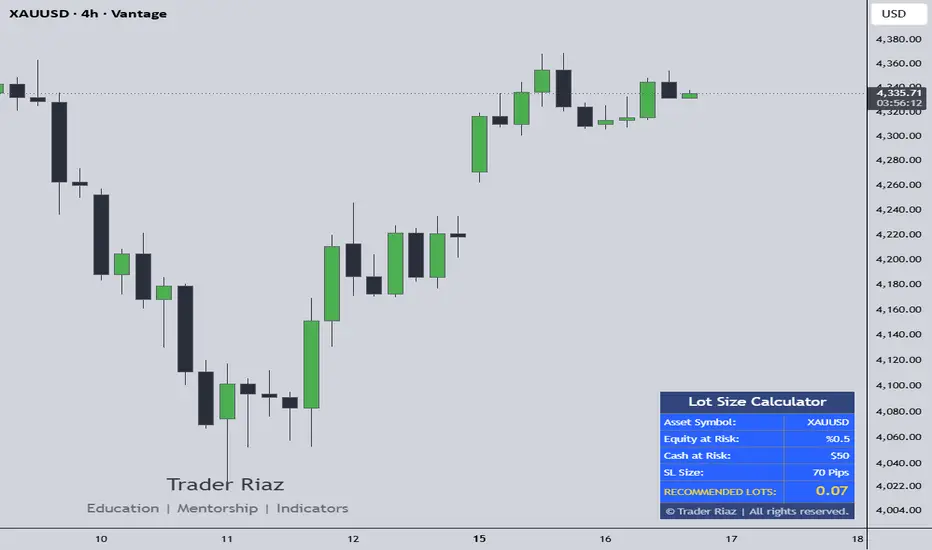
* 🖥️ Clean UI Dashboard: Displays Asset Symbol, Equity at Risk (%), Cash at Risk ($), exact Stop Loss size, and your final RECOMMENDED LOTS in a highly scannable screen corner panel.
### How To Use This Indicator
1. Load the script onto any chart asset (e.g., GBP/JPY or XAU/USD).
2. Open the Indicator Settings menu.
3. In the 'Account Settings' group, type your current Account Balance and the exact Risk Percentage (e.g., 1.0%) you want to risk on the setup.
4. Choose your calculation mode:
* Mode A (Visual Lines): Check the 'Use Visual Chart Lines' box. Dotted lines will appear on your screen. Left-click and hold to drag the gray line to your entry price, and the red line to your stop-loss price.
* Mode B (Manual Input): Uncheck the visual lines box and simply type your exact Stop Loss size in pips into the manual trade settings field.
5. Read the 'RECOMMENDED LOTS' output on your dashboard panel and execute that exact volume inside your trading terminal.
### Disclaimer
This indicator is strictly a mathematical positioning tool designed to assist with risk management. It does not provide buy/sell signals or execution advice. Always cross-verify position sizing metrics with your specific broker's margin requirements before executing live contracts.
Thank you,
Trader Riaz
The Trader Riaz Lot Size Calculator is a professional-grade risk management overlay built entirely in Pine Script v6. It solves one of the biggest challenges traders face: calculating precise position sizes instantly before entering a trade.
Many brokers use vastly different contract sizes for Forex pairs, metals, indices, and oil, making manual lot size math slow and prone to errors. This indicator automates the process completely and works flawlessly across all major brokers.
### Key Features
* 🌍 Multi-Asset Engine: Works perfectly on Forex majors/crosses, Gold (XAU), Silver (XAG), Crude Oil (WTI/BRENT), and Indices (NAS100, US30).
* 📐 Draggable Visual Chart Lines: Turn on visual mode to generate dynamic, interactive Entry and Stop Loss lines directly on your chart workspace. Slide them to your structural market levels, and your required lot size updates in real time!
* 💱 Live Multi-Currency Conversion: If your account is in USD but you trade a JPY, CAD, or EUR quote pair, the indicator pulls live FX conversion rates in the background to keep cash-at-risk projections 100% precise.
* 🖥️ Clean UI Dashboard: Displays Asset Symbol, Equity at Risk (%), Cash at Risk ($), exact Stop Loss size, and your final RECOMMENDED LOTS in a highly scannable screen corner panel.
### How To Use This Indicator
1. Load the script onto any chart asset (e.g., GBP/JPY or XAU/USD).
2. Open the Indicator Settings menu.
3. In the 'Account Settings' group, type your current Account Balance and the exact Risk Percentage (e.g., 1.0%) you want to risk on the setup.
4. Choose your calculation mode:
* Mode A (Visual Lines): Check the 'Use Visual Chart Lines' box. Dotted lines will appear on your screen. Left-click and hold to drag the gray line to your entry price, and the red line to your stop-loss price.
* Mode B (Manual Input): Uncheck the visual lines box and simply type your exact Stop Loss size in pips into the manual trade settings field.
5. Read the 'RECOMMENDED LOTS' output on your dashboard panel and execute that exact volume inside your trading terminal.
### Disclaimer
This indicator is strictly a mathematical positioning tool designed to assist with risk management. It does not provide buy/sell signals or execution advice. Always cross-verify position sizing metrics with your specific broker's margin requirements before executing live contracts.
Thank you,
Trader Riaz
Versionshinweise
Bug fixed:* It was miscalculating the lot sizes for some forex pairs
* now fixed
Versionshinweise
* Previously showing another indicator* Now removed
* Just this indicator is only on the chart
* Nothing more bug fixed
Open-source Skript
Ganz im Sinne von TradingView hat dieser Autor sein/ihr Script als Open-Source veröffentlicht. Auf diese Weise können nun auch andere Trader das Script rezensieren und die Funktionalität überprüfen. Vielen Dank an den Autor! Sie können das Script kostenlos verwenden, aber eine Wiederveröffentlichung des Codes unterliegt unseren Hausregeln.

Haftungsausschluss
Die Informationen und Veröffentlichungen sind nicht als Finanz-, Anlage-, Handels- oder andere Arten von Ratschlägen oder Empfehlungen gedacht, die von TradingView bereitgestellt oder gebilligt werden, und stellen diese nicht dar. Lesen Sie mehr in den Nutzungsbedingungen.
Open-source Skript
Ganz im Sinne von TradingView hat dieser Autor sein/ihr Script als Open-Source veröffentlicht. Auf diese Weise können nun auch andere Trader das Script rezensieren und die Funktionalität überprüfen. Vielen Dank an den Autor! Sie können das Script kostenlos verwenden, aber eine Wiederveröffentlichung des Codes unterliegt unseren Hausregeln.
Haftungsausschluss
Die Informationen und Veröffentlichungen sind nicht als Finanz-, Anlage-, Handels- oder andere Arten von Ratschlägen oder Empfehlungen gedacht, die von TradingView bereitgestellt oder gebilligt werden, und stellen diese nicht dar. Lesen Sie mehr in den Nutzungsbedingungen.