OPEN-SOURCE SCRIPT
Actualizado Auction Market Theory Levels
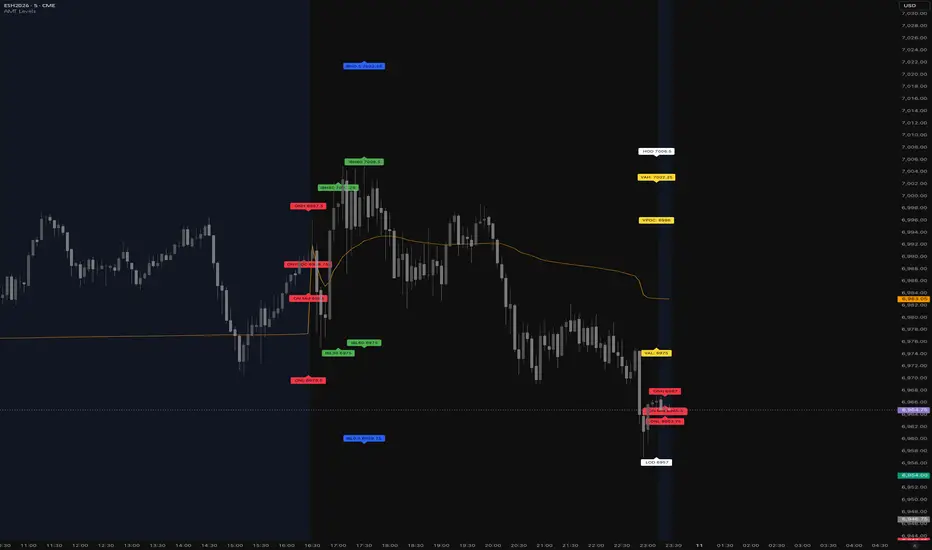
Auction Market Theory Indicator
TradingView Pine Script v6 indicator that plots Auction Market Theory (AMT) session levels for RTH/ETH, including value area, VPOC, initial balance extensions, and session VWAP, with Bookmap cloud notes logging.
Features
## Inputs
Getting started
1. Open TradingView and create a new Pine Script.
2. Paste the contents of [src/auction-market-theory.pine](src/auction-market-theory.pine).
3. Save and add the indicator to a chart.
Notes
Bookmap Cloud Notes output
The script logs and alerts a CSV-style line compatible with Bookmap Cloud Notes. Each line follows this format:
"SYMBOL",PRICE,NOTE,FG_COLOR,BG_COLOR,ALIGN,DIAMETER,LINE
Example (from the script):
"ESH6.CMEbmd",5243.25,ONVPOC,#000000,#ff0066,left,1,TRUE
Alerts → email → local Bookmap Cloud Notes
TradingView alerts can be configured to send these CSV lines to your email address. A simple Python script can then read the email and publish the notes locally to Bookmap Cloud Notes.
Suggested flow:
1. Create a TradingView alert for this indicator.
2. Use the alert message template to output the payload (the script already builds the message in `msg`).
3. Configure the alert to send to your email.
4. Run a local Python reader that parses the incoming email and forwards the CSV lines to your Bookmap Cloud Notes endpoint.
TradingView Pine Script v6 indicator that plots Auction Market Theory (AMT) session levels for RTH/ETH, including value area, VPOC, initial balance extensions, and session VWAP, with Bookmap cloud notes logging.
Features
- RTH and ETH session detection with configurable session times.
- RTH levels: HOD/LOD, IB30, IB60, IB0.5, IB1.5, IB2.
- Value Area (VAH/VAL) and VPOC computed from a session volume profile histogram.
- ETH levels: ONH/ONL/ONMID/ONVPOC.
- Session VWAP overlay.
- Optional labels and/or lines, with ability to extend lines to the right.
- Previous session level carry-forward.
- Bookmap CSV-style logging and alert payload formatting.
## Inputs
- Sessions: `RTH session time`, `ETH session time`.
- Levels toggles: `Show HOD and LOD`, `Show IB`, `Show IB30`, `Show IB60`, `Show IB1.5`, `Show IB2`, `Show ONH, ONL, ONVPOC, ONMID`, `Show VAH and VAL`, `Show VPOC`.
- Value Area: `Value Area %`, `Number of Histograms`.
- Display: `Show price labels`, `Show Lines at price levels`, `Extend lines to the right`, `Session VWAP`, `VWAP color`.
- Lookback: `Look back time in hours for previous sessions`.
- Logging: `Symbol Prefix` for Bookmap datafeed output.
Getting started
1. Open TradingView and create a new Pine Script.
2. Paste the contents of [src/auction-market-theory.pine](src/auction-market-theory.pine).
3. Save and add the indicator to a chart.
Notes
- The indicator is designed to run on intraday timeframes with session boundaries.
- VPOC/VAH/VAL are calculated from a volume profile histogram built from session bars.
- Alerts emit a CSV-style payload containing AMT levels for Bookmap.
Bookmap Cloud Notes output
The script logs and alerts a CSV-style line compatible with Bookmap Cloud Notes. Each line follows this format:
"SYMBOL",PRICE,NOTE,FG_COLOR,BG_COLOR,ALIGN,DIAMETER,LINE
Example (from the script):
"ESH6.CMEbmd",5243.25,ONVPOC,#000000,#ff0066,left,1,TRUE
Alerts → email → local Bookmap Cloud Notes
TradingView alerts can be configured to send these CSV lines to your email address. A simple Python script can then read the email and publish the notes locally to Bookmap Cloud Notes.
Suggested flow:
1. Create a TradingView alert for this indicator.
2. Use the alert message template to output the payload (the script already builds the message in `msg`).
3. Configure the alert to send to your email.
4. Run a local Python reader that parses the incoming email and forwards the CSV lines to your Bookmap Cloud Notes endpoint.
Notas de prensa
Auction Market Theory IndicatorTradingView Pine Script v6 indicator that plots Auction Market Theory (AMT) session levels for RTH/ETH, including value area, VPOC, initial balance extensions, and session VWAP, with Bookmap cloud notes logging.
Features
- RTH and ETH session detection with configurable session times.
- RTH levels: HOD/LOD, IB30, IB60, IB0.5, IB1.5, IB2.
- Value Area (VAH/VAL) and VPOC computed from a session volume profile histogram.
- ETH levels: ONH/ONL/ONMID/ONVPOC.
- Session VWAP overlay.
- Optional labels and/or lines, with ability to extend lines to the right.
- Previous session level carry-forward.
- Bookmap CSV-style logging and alert payload formatting.
## Inputs
- Sessions: `RTH session time`, `ETH session time`.
- Levels toggles: `Show HOD and LOD`, `Show IB`, `Show IB30`, `Show IB60`, `Show IB1.5`, `Show IB2`, `Show ONH, ONL, ONVPOC, ONMID`, `Show VAH and VAL`, `Show VPOC`.
- Value Area: `Value Area %`, `Number of Histograms`.
- Display: `Show price labels`, `Show Lines at price levels`, `Extend lines to the right`, `Session VWAP`, `VWAP color`.
- Lookback: `Look back time in hours for previous sessions`.
- Logging: `Symbol Prefix` for Bookmap datafeed output.
Getting started
1. Open TradingView and create a new Pine Script.
2. Paste the contents of [src/auction-market-theory.pine](src/auction-market-theory.pine).
3. Save and add the indicator to a chart.
Notes
- The indicator is designed to run on intraday timeframes with session boundaries.
- VPOC/VAH/VAL are calculated from a volume profile histogram built from session bars.
- Alerts emit a CSV-style payload containing AMT levels for Bookmap.
Bookmap Cloud Notes output
The script logs and alerts a CSV-style line compatible with Bookmap Cloud Notes. Each line follows this format:
"SYMBOL",PRICE,NOTE,FG_COLOR,BG_COLOR,ALIGN,DIAMETER,LINE
Example (from the script):
"ESH6.CMEbmd",5243.25,ONVPOC,#000000,#ff0066,left,1,TRUE
Alerts → email → local Bookmap Cloud Notes
TradingView alerts can be configured to send these CSV lines to your email address. A simple Python script can then read the email and publish the notes locally to Bookmap Cloud Notes.
Suggested flow:
1. Create a TradingView alert for this indicator.
2. Use the alert message template to output the payload (the script already builds the message in `msg`).
3. Configure the alert to send to your email.
4. Run a local Python reader that parses the incoming email and forwards the CSV lines to your Bookmap Cloud Notes endpoint.
Notas de prensa
Auction Market Theory IndicatorTradingView Pine Script v6 indicator that plots Auction Market Theory (AMT) session levels for RTH/ETH, including value area, VPOC, initial balance extensions, and session VWAP, with Bookmap cloud notes logging.
Features
- RTH and ETH session detection with configurable session times.
- RTH levels: HOD/LOD, IB30, IB60, IB0.5, IB1.5, IB2.
- Value Area (VAH/VAL) and VPOC computed from a session volume profile histogram.
- ETH levels: ONH/ONL/ONMID/ONVPOC.
- Session VWAP overlay.
- Optional labels and/or lines, with ability to extend lines to the right.
- Previous session level carry-forward.
- Bookmap CSV-style logging and alert payload formatting.
## Inputs
- Sessions: `RTH session time`, `ETH session time`.
- Levels toggles: `Show HOD and LOD`, `Show IB`, `Show IB30`, `Show IB60`, `Show IB1.5`, `Show IB2`, `Show ONH, ONL, ONVPOC, ONMID`, `Show VAH and VAL`, `Show VPOC`.
- Value Area: `Value Area %`, `Number of Histograms`.
- Display: `Show price labels`, `Show Lines at price levels`, `Extend lines to the right`, `Session VWAP`, `VWAP color`.
- Lookback: `Look back time in hours for previous sessions`.
- Logging: `Symbol Prefix` for Bookmap datafeed output.
Getting started
1. Open TradingView and create a new Pine Script.
2. Paste the contents of [src/auction-market-theory.pine](src/auction-market-theory.pine).
3. Save and add the indicator to a chart.
Notes
- The indicator is designed to run on intraday timeframes with session boundaries.
- VPOC/VAH/VAL are calculated from a volume profile histogram built from session bars.
- Alerts emit a CSV-style payload containing AMT levels for Bookmap.
Bookmap Cloud Notes output
The script logs and alerts a CSV-style line compatible with Bookmap Cloud Notes. Each line follows this format:
"SYMBOL",PRICE,NOTE,FG_COLOR,BG_COLOR,ALIGN,DIAMETER,LINE
Example (from the script):
"ESH6.CMEbmd",5243.25,ONVPOC,#000000,#ff0066,left,1,TRUE
Alerts → email → local Bookmap Cloud Notes
TradingView alerts can be configured to send these CSV lines to your email address. A simple Python script can then read the email and publish the notes locally to Bookmap Cloud Notes.
Suggested flow:
1. Create a TradingView alert for this indicator.
2. Use the alert message template to output the payload (the script already builds the message in `msg`).
3. Configure the alert to send to your email.
4. Run a local Python reader that parses the incoming email and forwards the CSV lines to your Bookmap Cloud Notes endpoint.
Notas de prensa
Auction Market Theory IndicatorFixes:
- Remove labels duplication
- VPOC calculation index error
Notas de prensa
Feature:
- add color selection to configuration
Fix:
- Labels and lines were not reset properly, add colors to config
Notas de prensa
Fix:- ON labels not reset correctly
Script de código abierto
Fiel al espíritu de TradingView, el creador de este script lo ha convertido en código abierto, para que los traders puedan revisar y verificar su funcionalidad. ¡Enhorabuena al autor! Aunque puede utilizarlo de forma gratuita, recuerde que cualquier republicación del código está sujeta a nuestras Normas internas.

Exención de responsabilidad
La información y las publicaciones no constituyen, ni deben considerarse como, asesoramiento o recomendaciones financieras, de inversión, de trading u otro tipo, proporcionadas o respaldadas por TradingView. Obtenga más información en Condiciones de uso.
Script de código abierto
Fiel al espíritu de TradingView, el creador de este script lo ha convertido en código abierto, para que los traders puedan revisar y verificar su funcionalidad. ¡Enhorabuena al autor! Aunque puede utilizarlo de forma gratuita, recuerde que cualquier republicación del código está sujeta a nuestras Normas internas.
Exención de responsabilidad
La información y las publicaciones no constituyen, ni deben considerarse como, asesoramiento o recomendaciones financieras, de inversión, de trading u otro tipo, proporcionadas o respaldadas por TradingView. Obtenga más información en Condiciones de uso.