OPEN-SOURCE SCRIPT
HA Zero-Wick Screener (20 Symbols)
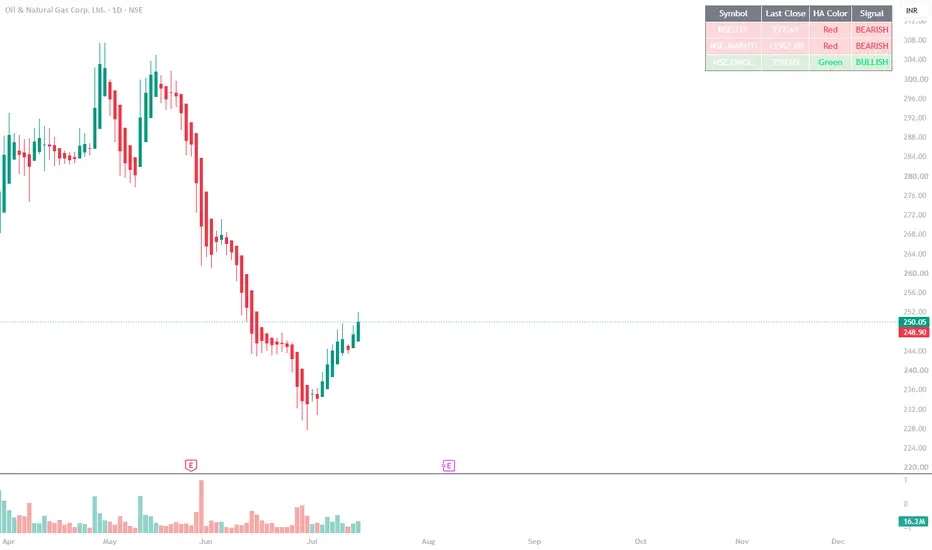
Heikin Ashi terms:
Bullish setup: Previous HA candle is green (bullish) with no lower wick (HA_Open = HA_Low, i.e., a "clean" green candle), AND current HA candle is also green and closes above the previous candle's close.
Bearish setup: Previous HA candle is red (bearish) with no upper wick (HA_Open = HA_High, i.e., a "clean" red candle), AND current HA candle is also red and closes below the previous candle's close.
Before I write the Pine Script, let me check a couple of things with you.Q: For the 'no wick' condition, how strict should it be?
A: Exactly zero wick (HA_Open = HA_Low/High exactly)Q: What format do you want the final output in?
A: Pine Script strategy/indicator with a screener table (shows on chart)Q: Do you want this to scan a fixed watchlist of symbols you input, or work as an indicator applied per-chart (and you use TradingView's built-in Screener with 'Add indicator' filter)?
A: Fixed list of symbols typed into the script (table shows all at once)Show moreNow I'll build a Pine Script indicator that:
Lets you type in a list of symbols (editable in settings, plus an on-chart way to note which ones you're tracking)
Computes Heikin Ashi values for each symbol using request.security
Checks your exact bullish/bearish wick conditions
Displays everything in a clean table on the chart
A few technical notes before the code:
Exact zero wick on Heikin Ashi is rare on live/unclosed candles (HA smooths values), so I'll check it on the last closed bar to get true zero-wick detection, and I'll also add a tiny epsilon-safe comparison purely to avoid floating point rounding issues (not a "tolerance" for the pattern itself — this is standard practice for equality checks in Pine).
TradingView limits request.security calls — a table-based multi-symbol screener can safely hold around 40 symbols per script. I'll set it up so you can easily edit the list.
I'll show: Symbol, Last Close, Signal (Bullish/Bearish/None), and the candle color for context.
Let me write this now.Ran 2 commands, created a file, read a fileRan 2 commands, created a file, read a fileHow to use it:
Open TradingView → Pine Editor → paste the script → "Add to Chart."
Click the gear icon (settings) on the indicator → edit the Symbols field (comma-separated, e.g. NSE:RELIANCE,NSE:TCS,...) to add/remove tickers.
Choose your Timeframe (defaults to Daily) and toggle "Show only rows with a signal" to filter the table down to just Bullish/Bearish hits.
How the logic works:
Bullish: previous HA candle is green with HA_Open == HA_Low (zero lower wick) AND current HA candle is green AND current HA close > previous HA close.
Bearish: previous HA candle is red with HA_Open == HA_High (zero upper wick) AND current HA candle is red AND current HA close < previous HA close.
Table shows Symbol, Last Close, HA candle color, and Signal, color-coded (green row = bullish, red row = bearish).
Important limitations to know:
TradingView caps request.security calls per script at 40. The script above has 10 example symbols — you can extend up to 40 total before it'll throw an error. If you need more, you'd need multiple copies of the script or TradingView's actual Stock Screener with a custom Pine screener script (separate product from indicators, works differently).
Exact-zero-wick is a strict condition — on many stocks this will rarely trigger since HA candles usually have at least a tiny wick. If you find signals are too rare, you may want to loosen this later (I can add a small tolerance % as an input if needed).
This works as a chart overlay, not inside TradingView's native "Screener" UI panel — it's a table drawn on whatever chart you apply it to, showing all your symbols regardless of which chart is open.
Bullish setup: Previous HA candle is green (bullish) with no lower wick (HA_Open = HA_Low, i.e., a "clean" green candle), AND current HA candle is also green and closes above the previous candle's close.
Bearish setup: Previous HA candle is red (bearish) with no upper wick (HA_Open = HA_High, i.e., a "clean" red candle), AND current HA candle is also red and closes below the previous candle's close.
Before I write the Pine Script, let me check a couple of things with you.Q: For the 'no wick' condition, how strict should it be?
A: Exactly zero wick (HA_Open = HA_Low/High exactly)Q: What format do you want the final output in?
A: Pine Script strategy/indicator with a screener table (shows on chart)Q: Do you want this to scan a fixed watchlist of symbols you input, or work as an indicator applied per-chart (and you use TradingView's built-in Screener with 'Add indicator' filter)?
A: Fixed list of symbols typed into the script (table shows all at once)Show moreNow I'll build a Pine Script indicator that:
Lets you type in a list of symbols (editable in settings, plus an on-chart way to note which ones you're tracking)
Computes Heikin Ashi values for each symbol using request.security
Checks your exact bullish/bearish wick conditions
Displays everything in a clean table on the chart
A few technical notes before the code:
Exact zero wick on Heikin Ashi is rare on live/unclosed candles (HA smooths values), so I'll check it on the last closed bar to get true zero-wick detection, and I'll also add a tiny epsilon-safe comparison purely to avoid floating point rounding issues (not a "tolerance" for the pattern itself — this is standard practice for equality checks in Pine).
TradingView limits request.security calls — a table-based multi-symbol screener can safely hold around 40 symbols per script. I'll set it up so you can easily edit the list.
I'll show: Symbol, Last Close, Signal (Bullish/Bearish/None), and the candle color for context.
Let me write this now.Ran 2 commands, created a file, read a fileRan 2 commands, created a file, read a fileHow to use it:
Open TradingView → Pine Editor → paste the script → "Add to Chart."
Click the gear icon (settings) on the indicator → edit the Symbols field (comma-separated, e.g. NSE:RELIANCE,NSE:TCS,...) to add/remove tickers.
Choose your Timeframe (defaults to Daily) and toggle "Show only rows with a signal" to filter the table down to just Bullish/Bearish hits.
How the logic works:
Bullish: previous HA candle is green with HA_Open == HA_Low (zero lower wick) AND current HA candle is green AND current HA close > previous HA close.
Bearish: previous HA candle is red with HA_Open == HA_High (zero upper wick) AND current HA candle is red AND current HA close < previous HA close.
Table shows Symbol, Last Close, HA candle color, and Signal, color-coded (green row = bullish, red row = bearish).
Important limitations to know:
TradingView caps request.security calls per script at 40. The script above has 10 example symbols — you can extend up to 40 total before it'll throw an error. If you need more, you'd need multiple copies of the script or TradingView's actual Stock Screener with a custom Pine screener script (separate product from indicators, works differently).
Exact-zero-wick is a strict condition — on many stocks this will rarely trigger since HA candles usually have at least a tiny wick. If you find signals are too rare, you may want to loosen this later (I can add a small tolerance % as an input if needed).
This works as a chart overlay, not inside TradingView's native "Screener" UI panel — it's a table drawn on whatever chart you apply it to, showing all your symbols regardless of which chart is open.
Script de código abierto
Fiel al espíritu de TradingView, el creador de este script lo ha convertido en código abierto, para que los traders puedan revisar y verificar su funcionalidad. ¡Enhorabuena al autor! Aunque puede utilizarlo de forma gratuita, recuerde que cualquier republicación del código está sujeta a nuestras Normas internas.

Exención de responsabilidad
La información y las publicaciones no constituyen, ni deben considerarse como, asesoramiento o recomendaciones financieras, de inversión, de trading u otro tipo, proporcionadas o respaldadas por TradingView. Obtenga más información en Condiciones de uso.
Script de código abierto
Fiel al espíritu de TradingView, el creador de este script lo ha convertido en código abierto, para que los traders puedan revisar y verificar su funcionalidad. ¡Enhorabuena al autor! Aunque puede utilizarlo de forma gratuita, recuerde que cualquier republicación del código está sujeta a nuestras Normas internas.
Exención de responsabilidad
La información y las publicaciones no constituyen, ni deben considerarse como, asesoramiento o recomendaciones financieras, de inversión, de trading u otro tipo, proporcionadas o respaldadas por TradingView. Obtenga más información en Condiciones de uso.