OPEN-SOURCE SCRIPT
HMA Pro Flow [Mladen] + Signals
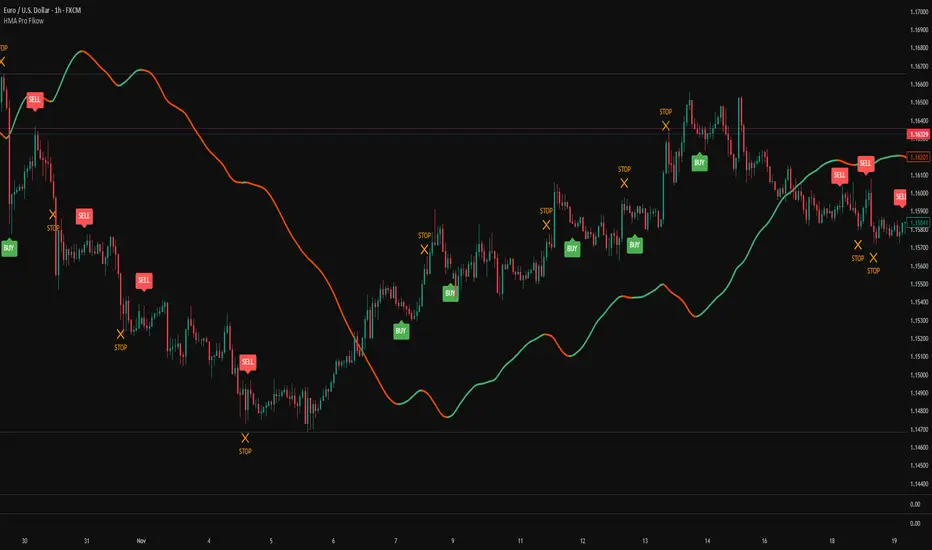
This indicator is an enhanced version of the classic Hull Moving Average (HMA), based on the logic developed by Mladen. It improves upon the standard HMA by allowing users to adjust the "speed" of the curve using a custom Divisor, and it integrates a secondary Trend Filter to generate high-probability entries and distinct exit signals.
The script is designed to help traders identify the trend direction while filtering out noise during choppy markets.
How It Works
1. The "Mladen" Calculation
The standard Hull Moving Average uses a fixed formula involving a divisor of 2 (n/2). This script exposes that divisor as a variable input.
2. Dual-HMA System
This indicator runs two separate HMA calculations simultaneously:
Entry HMA (Fast): Reacts quickly to price changes to generate immediate signals.
Trend Filter (Slow): A longer-term HMA used to determine the overall market bias.
Signal Logic
The indicator generates three types of signals based on the alignment of the Fast Entry HMA and the Slow Trend Filter.
🟢 BUY Signal (Green Label)
Condition: The Fast HMA turns green (rising) AND the Trend Filter is also green (rising).
Meaning: Momentum and Trend are aligned. Safe to enter Long.
🔴 SELL Signal (Red Label)
Condition: The Fast HMA turns red (falling) AND the Trend Filter is also red (falling).
Meaning: Momentum and Trend are aligned. Safe to enter Short.
❌ STOP / CLOSE Signal (Orange 'X')
Condition: The Fast HMA changes color, but it conflicts with the Trend Filter.
Example (Long): You are in a Buy trade. The Fast HMA turns Red, but the Trend Filter is still Green.
Meaning: This is likely a pullback, not a reversal. The indicator suggests closing the current position (Stop) but does not issue a signal to reverse into a new position. This prevents getting trapped in counter-trend trades.
Settings
Entry HMA Settings
Entry Period: Length of the fast signal line (Default: 14).
Entry Divisor: Controls smoothness. Lower values (e.g., 0.1) result in a very smooth line; higher values result in sharper turns.
Trend Filter Settings
Use Trend Filter: If unchecked, the indicator acts like a standard HMA (Buying/Selling on every color change).
Filter Period: Length of the slow trend line (Default: 300).
Show Filter: Toggles the visibility of the thick trend line on the chart.
Visuals
Toggle visibility for Buy, Sell, and Stop signals individually to keep your chart clean.
Credits
Original HMA logic by Alan Hull.
Variable divisor concept adapted from Mladen's work on MT4/MT5.
Custom pine scripting for trend filtering and signal logic - Vdubus
The script is designed to help traders identify the trend direction while filtering out noise during choppy markets.
How It Works
1. The "Mladen" Calculation
The standard Hull Moving Average uses a fixed formula involving a divisor of 2 (n/2). This script exposes that divisor as a variable input.
2. Dual-HMA System
This indicator runs two separate HMA calculations simultaneously:
Entry HMA (Fast): Reacts quickly to price changes to generate immediate signals.
Trend Filter (Slow): A longer-term HMA used to determine the overall market bias.
Signal Logic
The indicator generates three types of signals based on the alignment of the Fast Entry HMA and the Slow Trend Filter.
🟢 BUY Signal (Green Label)
Condition: The Fast HMA turns green (rising) AND the Trend Filter is also green (rising).
Meaning: Momentum and Trend are aligned. Safe to enter Long.
🔴 SELL Signal (Red Label)
Condition: The Fast HMA turns red (falling) AND the Trend Filter is also red (falling).
Meaning: Momentum and Trend are aligned. Safe to enter Short.
❌ STOP / CLOSE Signal (Orange 'X')
Condition: The Fast HMA changes color, but it conflicts with the Trend Filter.
Example (Long): You are in a Buy trade. The Fast HMA turns Red, but the Trend Filter is still Green.
Meaning: This is likely a pullback, not a reversal. The indicator suggests closing the current position (Stop) but does not issue a signal to reverse into a new position. This prevents getting trapped in counter-trend trades.
Settings
Entry HMA Settings
Entry Period: Length of the fast signal line (Default: 14).
Entry Divisor: Controls smoothness. Lower values (e.g., 0.1) result in a very smooth line; higher values result in sharper turns.
Trend Filter Settings
Use Trend Filter: If unchecked, the indicator acts like a standard HMA (Buying/Selling on every color change).
Filter Period: Length of the slow trend line (Default: 300).
Show Filter: Toggles the visibility of the thick trend line on the chart.
Visuals
Toggle visibility for Buy, Sell, and Stop signals individually to keep your chart clean.
Credits
Original HMA logic by Alan Hull.
Variable divisor concept adapted from Mladen's work on MT4/MT5.
Custom pine scripting for trend filtering and signal logic - Vdubus
Script de código abierto
Fiel al espíritu de TradingView, el creador de este script lo ha convertido en código abierto, para que los traders puedan revisar y verificar su funcionalidad. ¡Enhorabuena al autor! Aunque puede utilizarlo de forma gratuita, recuerde que cualquier republicación del código está sujeta a nuestras Normas internas.

Exención de responsabilidad
La información y las publicaciones no constituyen, ni deben considerarse como, asesoramiento o recomendaciones financieras, de inversión, de trading u otro tipo, proporcionadas o respaldadas por TradingView. Obtenga más información en Condiciones de uso.
Script de código abierto
Fiel al espíritu de TradingView, el creador de este script lo ha convertido en código abierto, para que los traders puedan revisar y verificar su funcionalidad. ¡Enhorabuena al autor! Aunque puede utilizarlo de forma gratuita, recuerde que cualquier republicación del código está sujeta a nuestras Normas internas.
Exención de responsabilidad
La información y las publicaciones no constituyen, ni deben considerarse como, asesoramiento o recomendaciones financieras, de inversión, de trading u otro tipo, proporcionadas o respaldadas por TradingView. Obtenga más información en Condiciones de uso.