Trend Friend - Swing Trade & Scalp Signals - Stocks Crypto Forex
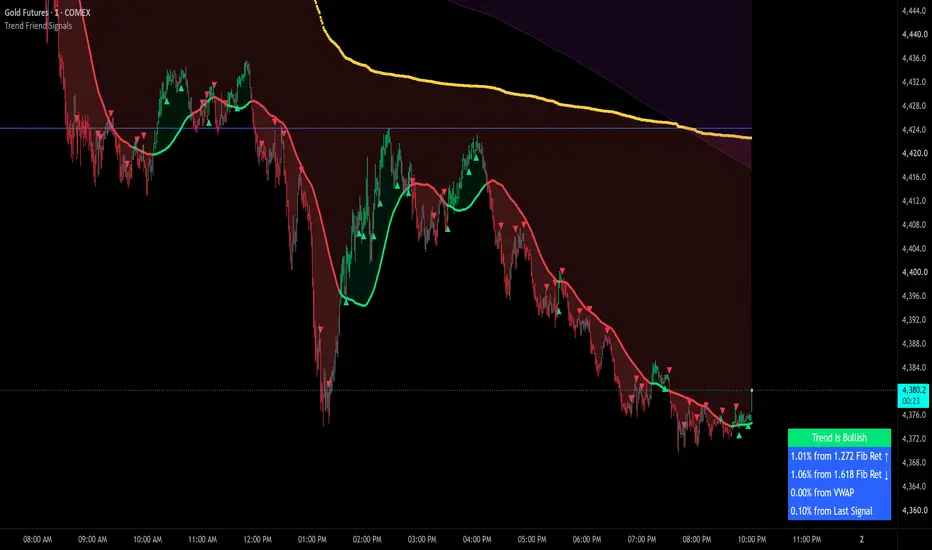
Trend Friend - Swing Trade & Scalp Signals prints a buy or sell arrow only when many independent checks all line up on the same candle. One hot candle or one overbought reading is never enough to trigger a signal, and that is the whole point - the more checks that agree at once, the stronger the case that the move is real.
You get three trading modes to match your style, a risk filter that keeps your signals on the right side of the trend, two fully adjustable trend moving averages with clouds, a VWAP line and cloud, automatic fibonacci levels, a long term bounce zone, candles colored by signal direction, chop and low volume warnings, and a live table that tracks your position and the key levels around price so you can make decisions fast without doing chart math in your head.

-------------------------------------------------------------------
How the Signals Are Calculated
Every candle is run through a set of custom formulas that each score a different part of market behavior:
A buy arrow only prints when the bullish checks agree on one candle, and a sell arrow only prints when the bearish checks agree. On top of the entry checks, a set of proprietary rejection filters blocks signals on weak candles, such as candles with long rejection wicks or moves that are already stretched too far, and chop or low volume conditions block most signal types because signals given in dead or sideways markets fail more often.
Signals also alternate one at a time. After a buy signal, the next signal can only be a sell, and after a sell, the next can only be a buy, which keeps the chart clean and makes each arrow a clear turning point. The exact formulas, thresholds and lookback lengths behind the signals are proprietary and are what make this script worth protecting, but the categories above are what those formulas measure.
-------------------------------------------------------------------
Trading Modes
Three modes control how sensitive the signal engine is, and each one also has a Less Signals checkbox for a more selective version, so you get six variations to choose from.
If you want more signals on any mode, drop to a lower timeframe. If you want fewer, go up a timeframe. Try each mode on a few charts to find the one that matches your trading style.
-------------------------------------------------------------------
Signal Filtering
Only Give Low Risk Signals (on by default) - Uses Trend MA #1 and #2 as the trend direction and only lets signals through when the trend agrees with the signal direction. When the trend is bullish (price above the trend MAs and MA #1 above MA #2) only buy signals can print. When the trend is bearish, only sell signals can print. When the trend is undecided, no signals print at all and the candles paint the neutral color so you know to stand aside. Keep in mind at least one of the trend MAs must be turned on for this filter to work.
External Indicator Filters - You can use up to three other indicators on your chart as signal filters. Each filter reads a value from the other indicator: 1 means bullish, -1 means bearish and 0 means no trades. When filters are on, signals only come through when every enabled filter agrees with the signal direction. Some of our other indicators include a compatible output named Trend Direction To Send To External Indicators that is built for this feature, and any indicator that outputs a 1, -1 or 0 value will work. If a filter is set to a source that does not output those values, an error message shows on the chart and signals pause until you fix the source.
Trade Direction Output - This indicator also sends out its own 1, -1 or 0 value, so other indicators with filtering can use this script's direction as a filter. That lets you chain signal indicators together so you only get signals when they agree.
Note: the low risk filter and the external indicator filters cannot be on at the same time. If both are on, an error message shows on the chart and no signals appear until you turn one of them off.

-------------------------------------------------------------------
On-Chart Features

Trend MA Lines & Clouds - Two fully adjustable trend moving averages, each with its own on/off toggle, a type selector (EMA, SMA, HMA, VWMA, WMA or RMA) and a length input. The defaults are a 15 SMA and a 60 SMA. The lines and the clouds between them and price paint green when price is above and red when price is below, so you can read the trend at a glance. These two MAs are also what drive the trend label, the risk label and the low risk signal filter. For best results, set the lengths to time based intervals, so on a 1 minute chart a length of 15 covers 15 minutes of data and 60 covers an hour of data.
VWAP Line & Cloud - The VWAP is the average price paid weighted by volume, and price tends to respect it as support and resistance. It shows as a dotted line with a cloud to price that paints green when price is above it and red when price is below.
Auto Fibonacci Levels - Fibonacci retracement and extension levels are levels many traders watch for bounces and reversals, and this script draws them automatically from the previous period's high and low. The previous high and low themselves show as white lines, and those are big levels to watch. You can set the source period to the previous day, week (the default), month, quarter or year, and the percentage table shows how far price is from the next level above and below so you always know how much room a trade has.
Bounce Zone - A purple cloud built from two very long term moving averages, the EMA 1000 and EMA 2000. When price is trending above the zone and drops down into it, expect it to act as support. When price is trending below and rises into it, expect resistance. Price often chops around inside the zone while the market decides on a direction, and breakouts from it tend to move fast, so it pays to know where this cloud sits on your chart.
Candle Coloring by Signal Direction - By default the candles paint by the current signal state: the bullish color from a buy signal until the next sell signal, and the bearish color from a sell signal until the next buy signal. This helps you hold positions without second guessing every small candle against you. When a filter mode is on, candles paint the neutral color any time conditions are not lined up, which makes it easy to see when the script wants you flat. For the colors to show correctly, make sure you go into your chart settings (gear icon top right) and turn off body, wicks and borders in the Symbol tab.
Chop & Low Volume Warnings - Warning labels appear at the top of the chart when price action measures as choppy or when recent volume is far below the historical norm for that chart. Most signal types are blocked while a warning is active, and if you are already in a trade when one appears, keep a close eye on it and be ready to exit.
Percentage Updates Table - A live table with an adjustable position and color that tracks everything for you:
-------------------------------------------------------------------
How to Trade with This Indicator
-------------------------------------------------------------------
Alerts
Set these up through TradingView's alert menu so you do not have to watch the chart all day, and they can also be routed to trading bots if you automate your entries. Make sure to set the alert trigger to Once Per Bar Close if you only want alerts on locked in signals.
-------------------------------------------------------------------
Higher Timeframe Data, Signal Confirmation and Repainting
Signals form on the live bar and lock in at the close. All of the signal checks run on the current, still forming candle, which is what makes early entries possible. While that candle is open, an arrow can appear and then disappear if conditions change before the close. The moment the candle closes with a signal showing, that signal is locked in permanently. A signal on a closed bar can never be removed, moved or repainted afterward, so every arrow you see on closed bars is a confirmed signal that printed in real time and stayed.
If you only want confirmed entries, wait for the candle to close with the arrow still showing before you enter, and set your alerts to Once Per Bar Close. If you enter before the close, keep in mind the arrow can still disappear if the candle changes before it closes, so back those early entries with good volume and your own technical analysis.
Higher timeframe data. The only higher timeframe data this script requests is the previous period's high and low for the fibonacci levels. It always pulls the last fully completed period (the previous day, week, month, quarter or year), which is locked historical data, so the fibonacci levels never repaint. They only move when a new period begins and the levels shift to the newly completed period's high and low. The script does not use lookahead to read future data anywhere.
Live values on the open bar. The moving averages, VWAP, candle colors, trend label and table values update in real time on the open candle the same way any standard indicator does. Once a candle closes, its values are final and never change.
-------------------------------------------------------------------
Settings Overview
-------------------------------------------------------------------
Markets and Timeframes
This indicator works on all markets, including stocks, crypto, forex and futures, and on all timeframes. The best results come from high volume tickers with a lot of price action, because the signals need many conditions to line up on a single candle and quiet markets rarely provide that. Very long timeframes may not give signals if there is not enough historical data for the calculations.
It also works on symbols that have no volume data at all, such as indices. On those symbols the low volume warning clears automatically so signals can come through, but the signal types that need volume data to calculate cannot fire there.
-------------------------------------------------------------------
Important Notes and Limitations
You get three trading modes to match your style, a risk filter that keeps your signals on the right side of the trend, two fully adjustable trend moving averages with clouds, a VWAP line and cloud, automatic fibonacci levels, a long term bounce zone, candles colored by signal direction, chop and low volume warnings, and a live table that tracks your position and the key levels around price so you can make decisions fast without doing chart math in your head.
-------------------------------------------------------------------
How the Signals Are Calculated
Every candle is run through a set of custom formulas that each score a different part of market behavior:
- Momentum - whether price is speeding up or losing steam in one direction
- Directional Pressure - whether buyers or sellers have control of the recent bars
- Volume Behavior - whether there is enough activity behind the move to trust it
- Candle Structure & Patterns - the size and shape of the candle compared to recent candles, including engulfing moves and multi-candle runs
- Trend Positioning - where price sits compared to several internal trend measures
A buy arrow only prints when the bullish checks agree on one candle, and a sell arrow only prints when the bearish checks agree. On top of the entry checks, a set of proprietary rejection filters blocks signals on weak candles, such as candles with long rejection wicks or moves that are already stretched too far, and chop or low volume conditions block most signal types because signals given in dead or sideways markets fail more often.
Signals also alternate one at a time. After a buy signal, the next signal can only be a sell, and after a sell, the next can only be a buy, which keeps the chart clean and makes each arrow a clear turning point. The exact formulas, thresholds and lookback lengths behind the signals are proprietary and are what make this script worth protecting, but the categories above are what those formulas measure.
-------------------------------------------------------------------
Trading Modes
Three modes control how sensitive the signal engine is, and each one also has a Less Signals checkbox for a more selective version, so you get six variations to choose from.
- Scalp Mode (default) - The most signals with the earliest entries and exits. Built for catching moves quickly.
- Swing Mode - Fewer signals with longer holds. Filters out some of the noise.
- Long Swing Mode - The fewest signals with the longest holds. Built for extended moves.
If you want more signals on any mode, drop to a lower timeframe. If you want fewer, go up a timeframe. Try each mode on a few charts to find the one that matches your trading style.
-------------------------------------------------------------------
Signal Filtering
Only Give Low Risk Signals (on by default) - Uses Trend MA #1 and #2 as the trend direction and only lets signals through when the trend agrees with the signal direction. When the trend is bullish (price above the trend MAs and MA #1 above MA #2) only buy signals can print. When the trend is bearish, only sell signals can print. When the trend is undecided, no signals print at all and the candles paint the neutral color so you know to stand aside. Keep in mind at least one of the trend MAs must be turned on for this filter to work.
External Indicator Filters - You can use up to three other indicators on your chart as signal filters. Each filter reads a value from the other indicator: 1 means bullish, -1 means bearish and 0 means no trades. When filters are on, signals only come through when every enabled filter agrees with the signal direction. Some of our other indicators include a compatible output named Trend Direction To Send To External Indicators that is built for this feature, and any indicator that outputs a 1, -1 or 0 value will work. If a filter is set to a source that does not output those values, an error message shows on the chart and signals pause until you fix the source.
Trade Direction Output - This indicator also sends out its own 1, -1 or 0 value, so other indicators with filtering can use this script's direction as a filter. That lets you chain signal indicators together so you only get signals when they agree.
Note: the low risk filter and the external indicator filters cannot be on at the same time. If both are on, an error message shows on the chart and no signals appear until you turn one of them off.
-------------------------------------------------------------------
On-Chart Features
Trend MA Lines & Clouds - Two fully adjustable trend moving averages, each with its own on/off toggle, a type selector (EMA, SMA, HMA, VWMA, WMA or RMA) and a length input. The defaults are a 15 SMA and a 60 SMA. The lines and the clouds between them and price paint green when price is above and red when price is below, so you can read the trend at a glance. These two MAs are also what drive the trend label, the risk label and the low risk signal filter. For best results, set the lengths to time based intervals, so on a 1 minute chart a length of 15 covers 15 minutes of data and 60 covers an hour of data.
VWAP Line & Cloud - The VWAP is the average price paid weighted by volume, and price tends to respect it as support and resistance. It shows as a dotted line with a cloud to price that paints green when price is above it and red when price is below.
Auto Fibonacci Levels - Fibonacci retracement and extension levels are levels many traders watch for bounces and reversals, and this script draws them automatically from the previous period's high and low. The previous high and low themselves show as white lines, and those are big levels to watch. You can set the source period to the previous day, week (the default), month, quarter or year, and the percentage table shows how far price is from the next level above and below so you always know how much room a trade has.
Bounce Zone - A purple cloud built from two very long term moving averages, the EMA 1000 and EMA 2000. When price is trending above the zone and drops down into it, expect it to act as support. When price is trending below and rises into it, expect resistance. Price often chops around inside the zone while the market decides on a direction, and breakouts from it tend to move fast, so it pays to know where this cloud sits on your chart.
Candle Coloring by Signal Direction - By default the candles paint by the current signal state: the bullish color from a buy signal until the next sell signal, and the bearish color from a sell signal until the next buy signal. This helps you hold positions without second guessing every small candle against you. When a filter mode is on, candles paint the neutral color any time conditions are not lined up, which makes it easy to see when the script wants you flat. For the colors to show correctly, make sure you go into your chart settings (gear icon top right) and turn off body, wicks and borders in the Symbol tab.
Chop & Low Volume Warnings - Warning labels appear at the top of the chart when price action measures as choppy or when recent volume is far below the historical norm for that chart. Most signal types are blocked while a warning is active, and if you are already in a trade when one appears, keep a close eye on it and be ready to exit.
Percentage Updates Table - A live table with an adjustable position and color that tracks everything for you:
- Trend Label - Bullish, Bearish or Undecisive with chop likely, based on your trend MAs
- Fib Distance - The percentage to the next fibonacci level above and below, with the level names
- VWAP Distance - The percentage between price and the VWAP
- % From Last Signal - Live gain or loss since the most recent signal. When a filter mode is on, this row measures from the most recent signal you can actually see on the chart, so the number always matches what you are looking at
- My Long / Short Entry - Type your real entry price into the settings and the table tracks your live P&L, so no more switching screens between your chart and your broker
- Risk Label - Shows when both filter modes are off and rates the current signal Low, Medium or High Risk by comparing the signal direction to the trend. Waiting for low risk signals helps keep you out of trades against the trend
- Margin Multiplier - Set your margin level in the settings and every percentage in the table gets multiplied by it, so the numbers reflect your actual account
-------------------------------------------------------------------
How to Trade with This Indicator
- Trade in the direction of the trend. The safest longs come when price is above both trend MAs with MA #1 above MA #2, and the safest shorts are the reverse. The low risk filter automates this for you.
- Take signals near key levels. Arrows that print close to a trend MA, the VWAP or a fibonacci level, or a combination of them, are the ones worth acting on.
- Check the table before you enter. If the next fibonacci level is very close, the move may not have enough room left to be worth the risk.
- Use the opposite signal as your exit cue. A sell arrow during a long, or a buy arrow during a short, is your signal to take profit or get out.
- When price is between the two trend MAs, play them as support and resistance and plan for price to travel from one to the other.
- Watch for squeezes. When the trend MAs pinch together after a wide gap and price breaks out with a matching signal, the moves that follow are often fast and large.
- Stand aside during warnings. When the chop or low volume label is up, wait for volume to come back and for price to pick a clear direction before taking new trades.
-------------------------------------------------------------------
Alerts
- Buy Signal
- Sell Signal
- Low Risk Buy Signal
- Low Risk Sell Signal
- Crossing Trend MA #1
Set these up through TradingView's alert menu so you do not have to watch the chart all day, and they can also be routed to trading bots if you automate your entries. Make sure to set the alert trigger to Once Per Bar Close if you only want alerts on locked in signals.
-------------------------------------------------------------------
Higher Timeframe Data, Signal Confirmation and Repainting
Signals form on the live bar and lock in at the close. All of the signal checks run on the current, still forming candle, which is what makes early entries possible. While that candle is open, an arrow can appear and then disappear if conditions change before the close. The moment the candle closes with a signal showing, that signal is locked in permanently. A signal on a closed bar can never be removed, moved or repainted afterward, so every arrow you see on closed bars is a confirmed signal that printed in real time and stayed.
If you only want confirmed entries, wait for the candle to close with the arrow still showing before you enter, and set your alerts to Once Per Bar Close. If you enter before the close, keep in mind the arrow can still disappear if the candle changes before it closes, so back those early entries with good volume and your own technical analysis.
Higher timeframe data. The only higher timeframe data this script requests is the previous period's high and low for the fibonacci levels. It always pulls the last fully completed period (the previous day, week, month, quarter or year), which is locked historical data, so the fibonacci levels never repaint. They only move when a new period begins and the levels shift to the newly completed period's high and low. The script does not use lookahead to read future data anywhere.
Live values on the open bar. The moving averages, VWAP, candle colors, trend label and table values update in real time on the open candle the same way any standard indicator does. Once a candle closes, its values are final and never change.
-------------------------------------------------------------------
Settings Overview
- Signal Settings - Trading mode (Scalp, Swing or Long Swing), the Less Signals checkbox and the Only Give Low Risk Signals toggle
- External Indicator Filters - Three filter slots, each with an on/off toggle and a source selector
- Personal Trades & Margin - Long entry price, short entry price and the margin multiplier for the table
- Fibonacci - On/off toggle and the source period (previous day, week, month, quarter or year)
- Signal Arrows - Buy and sell arrows on/off, arrow size (small or medium) and arrow colors
- Candle Color - Signal direction candle coloring on/off plus the bullish, bearish and neutral colors
- Info Tables - Percentage table on/off, table position and background color
- Trend MA Lines & Clouds - Each MA's on/off toggle, type, length and the line and cloud colors
- VWAP Line & Cloud - On/off toggle, line color and cloud colors
- Bounce Zone - On/off toggle, line color and cloud color
-------------------------------------------------------------------
Markets and Timeframes
This indicator works on all markets, including stocks, crypto, forex and futures, and on all timeframes. The best results come from high volume tickers with a lot of price action, because the signals need many conditions to line up on a single candle and quiet markets rarely provide that. Very long timeframes may not give signals if there is not enough historical data for the calculations.
It also works on symbols that have no volume data at all, such as indices. On those symbols the low volume warning clears automatically so signals can come through, but the signal types that need volume data to calculate cannot fire there.
-------------------------------------------------------------------
Important Notes and Limitations
- For the candle coloring to display, go to your chart settings (gear icon top right) and in the Symbol tab turn off body, wicks and borders.
- The Only Give Low Risk Signals setting and the external indicator filters cannot be used at the same time. If both are on, an error shows on the chart and no signals appear until one is turned off.
- The low risk filter needs at least one trend MA turned on. If both trend MAs are off, a message on the chart will tell you to turn one on.
- An external filter set to a source that does not output 1, -1 or 0 shows an error message and pauses signals until the source is corrected.
- Markets with low volume and little price action may give few or weak signals, so use high volume tickers for best results.
- No indicator is right all of the time, and past results never guarantee future performance. The signals are decision tools, not promises, so always use your own judgment and manage your risk on every trade.
Disponible en el Espacio de pago
Este indicador solo está disponible para suscriptores de Premium Indicator Suite. Suscríbase para acceder a este y otros scripts de TrendFriendIndicators.

Trend Friend - Professionally Built Trading Indicators For All Your Favorite Markets
Get Access To Our Pro Indicator Suites > friendofthetrend.com/pricing/
Join Our Trading Group - facebook.com/groups/stockandcryptotradingstrategies
Get Access To Our Pro Indicator Suites > friendofthetrend.com/pricing/
Join Our Trading Group - facebook.com/groups/stockandcryptotradingstrategies
Exención de responsabilidad
La información y las publicaciones no constituyen, ni deben considerarse como, asesoramiento o recomendaciones financieras, de inversión, de trading u otro tipo, proporcionadas o respaldadas por TradingView. Obtenga más información en Condiciones de uso.
Disponible en el Espacio de pago
Este indicador solo está disponible para suscriptores de Premium Indicator Suite. Suscríbase para acceder a este y otros scripts de TrendFriendIndicators.
Trend Friend - Professionally Built Trading Indicators For All Your Favorite Markets
Get Access To Our Pro Indicator Suites > friendofthetrend.com/pricing/
Join Our Trading Group - facebook.com/groups/stockandcryptotradingstrategies
Get Access To Our Pro Indicator Suites > friendofthetrend.com/pricing/
Join Our Trading Group - facebook.com/groups/stockandcryptotradingstrategies
Exención de responsabilidad
La información y las publicaciones no constituyen, ni deben considerarse como, asesoramiento o recomendaciones financieras, de inversión, de trading u otro tipo, proporcionadas o respaldadas por TradingView. Obtenga más información en Condiciones de uso.