OPEN-SOURCE SCRIPT
Liquidity Sweep Engine Auto Targets [JPT]
🔷 OVERVIEW
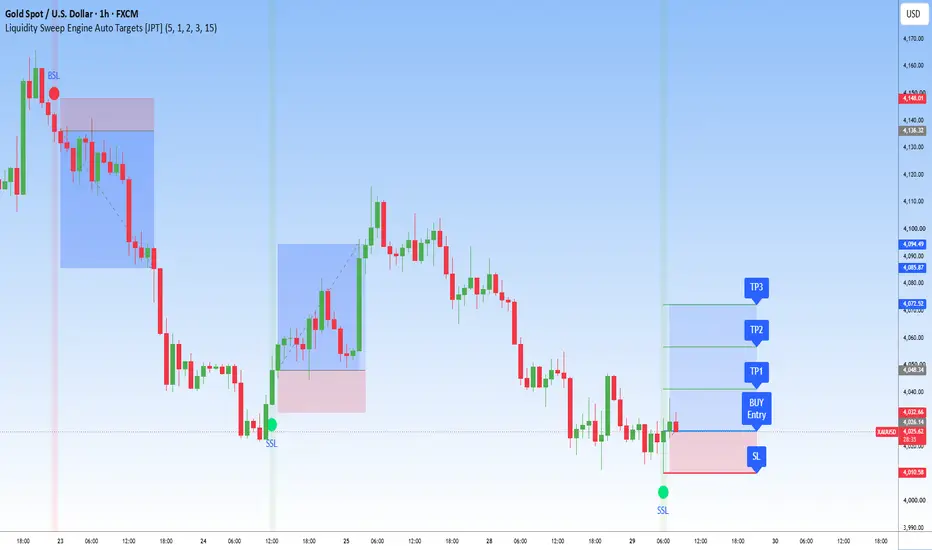
Liquidity Sweep Engine Auto Targets [JPT] is an original Pine Script v5 indicator that detects liquidity sweep events using confirmed swing highs and swing lows. Once a valid sweep is identified, the indicator automatically builds a complete trade framework by plotting the Entry, Stop Loss, and multiple Take Profit levels directly on the chart.
The goal is to simplify market structure analysis and provide a clear visual trade plan without requiring manual calculations.
🔷 HOW IT WORKS
The indicator continuously monitors confirmed swing highs and swing lows to identify potential liquidity grabs.
Buy Setup
A bullish setup is generated when price sweeps below a previous swing low and closes back above the swept level (optional close confirmation).
After confirmation, the indicator automatically calculates:
• Entry Price
• Stop Loss
• TP1
• TP2
• TP3
Sell Setup
A bearish setup is generated when price sweeps above a previous swing high and closes back below the swept level.
The indicator then projects:
• Entry Price
• Stop Loss
• TP1
• TP2
• TP3
using user-defined Risk:Reward ratios.
🔷 VISUAL FEATURES
• Buy-side Liquidity Sweep labels
• Sell-side Liquidity Sweep labels
• Automatic Entry line
• Automatic Stop Loss line
• Three configurable Take Profit levels
• Historical trade setup visualization
• Risk-to-Reward projection
• Optional background highlighting
• Configurable line length
• Customizable colors
🔷 AUTO TARGET ENGINE
The built-in Auto Target Engine calculates trade objectives using the selected Risk:Reward values.
Supported target structure:
• TP1 = 1R (default)
• TP2 = 2R
• TP3 = 3R
Users may customize each target independently from the settings panel.
🔷 SIGNAL FILTERS
To reduce false signals, the indicator includes:
• Confirmed swing pivot detection
• Optional close confirmation
• Market structure-based liquidity detection
These filters are designed to help identify higher-quality liquidity sweep events.
🔷 INPUTS
Available settings include:
• Swing Length
• Close Confirmation
• Target Line Length
• TP1 Risk:Reward
• TP2 Risk:Reward
• TP3 Risk:Reward
• Label Visibility
• Line Colors
• Background Highlight
🔷 ALERTS
Built-in alerts are available for:
• Buy-side Liquidity Sweep
• Sell-side Liquidity Sweep
These alerts can be connected to TradingView's notification system.
🔷 COMMON WORKFLOW
A typical workflow is:
1. Wait for a confirmed liquidity sweep.
2. Allow the signal candle to close (if Close Confirmation is enabled).
3. Review the automatically plotted Entry, Stop Loss, and Take Profit levels.
4. Combine the setup with your own market structure, trend analysis, or additional confirmation before making any trading decisions.
🔷 MARKETS
This indicator can be used on:
• XAUUSD & GOLD
• Forex
• Stocks
• Cryptocurrency
• Futures
• Indices
• Commodities
It is compatible with multiple timeframes and may be adapted to different trading styles.
🔷 BEST PRACTICES
Many traders choose to combine liquidity sweeps with:
• Market Structure
• Break of Structure (BOS)
• Change of Character (CHoCH)
• Fair Value Gaps (FVG)
• Order Blocks
• Higher Timeframe Trend
These concepts are optional and can provide additional context when evaluating a setup.
🔷 DISCLAIMER
This indicator is provided as a chart analysis tool for educational and informational purposes only. It identifies trade setups according to its programmed rules and does not predict future price movements or guarantee trading results. Users should always perform their own analysis, apply sound risk management, and consider additional market factors before making trading decisions.
Liquidity Sweep Engine Auto Targets [JPT] is an original Pine Script v5 indicator that detects liquidity sweep events using confirmed swing highs and swing lows. Once a valid sweep is identified, the indicator automatically builds a complete trade framework by plotting the Entry, Stop Loss, and multiple Take Profit levels directly on the chart.
The goal is to simplify market structure analysis and provide a clear visual trade plan without requiring manual calculations.
🔷 HOW IT WORKS
The indicator continuously monitors confirmed swing highs and swing lows to identify potential liquidity grabs.
Buy Setup
A bullish setup is generated when price sweeps below a previous swing low and closes back above the swept level (optional close confirmation).
After confirmation, the indicator automatically calculates:
• Entry Price
• Stop Loss
• TP1
• TP2
• TP3
Sell Setup
A bearish setup is generated when price sweeps above a previous swing high and closes back below the swept level.
The indicator then projects:
• Entry Price
• Stop Loss
• TP1
• TP2
• TP3
using user-defined Risk:Reward ratios.
🔷 VISUAL FEATURES
• Buy-side Liquidity Sweep labels
• Sell-side Liquidity Sweep labels
• Automatic Entry line
• Automatic Stop Loss line
• Three configurable Take Profit levels
• Historical trade setup visualization
• Risk-to-Reward projection
• Optional background highlighting
• Configurable line length
• Customizable colors
🔷 AUTO TARGET ENGINE
The built-in Auto Target Engine calculates trade objectives using the selected Risk:Reward values.
Supported target structure:
• TP1 = 1R (default)
• TP2 = 2R
• TP3 = 3R
Users may customize each target independently from the settings panel.
🔷 SIGNAL FILTERS
To reduce false signals, the indicator includes:
• Confirmed swing pivot detection
• Optional close confirmation
• Market structure-based liquidity detection
These filters are designed to help identify higher-quality liquidity sweep events.
🔷 INPUTS
Available settings include:
• Swing Length
• Close Confirmation
• Target Line Length
• TP1 Risk:Reward
• TP2 Risk:Reward
• TP3 Risk:Reward
• Label Visibility
• Line Colors
• Background Highlight
🔷 ALERTS
Built-in alerts are available for:
• Buy-side Liquidity Sweep
• Sell-side Liquidity Sweep
These alerts can be connected to TradingView's notification system.
🔷 COMMON WORKFLOW
A typical workflow is:
1. Wait for a confirmed liquidity sweep.
2. Allow the signal candle to close (if Close Confirmation is enabled).
3. Review the automatically plotted Entry, Stop Loss, and Take Profit levels.
4. Combine the setup with your own market structure, trend analysis, or additional confirmation before making any trading decisions.
🔷 MARKETS
This indicator can be used on:
• XAUUSD & GOLD
• Forex
• Stocks
• Cryptocurrency
• Futures
• Indices
• Commodities
It is compatible with multiple timeframes and may be adapted to different trading styles.
🔷 BEST PRACTICES
Many traders choose to combine liquidity sweeps with:
• Market Structure
• Break of Structure (BOS)
• Change of Character (CHoCH)
• Fair Value Gaps (FVG)
• Order Blocks
• Higher Timeframe Trend
These concepts are optional and can provide additional context when evaluating a setup.
🔷 DISCLAIMER
This indicator is provided as a chart analysis tool for educational and informational purposes only. It identifies trade setups according to its programmed rules and does not predict future price movements or guarantee trading results. Users should always perform their own analysis, apply sound risk management, and consider additional market factors before making trading decisions.
Script de código abierto
Fiel al espíritu de TradingView, el creador de este script lo ha convertido en código abierto, para que los traders puedan revisar y verificar su funcionalidad. ¡Enhorabuena al autor! Aunque puede utilizarlo de forma gratuita, recuerde que cualquier republicación del código está sujeta a nuestras Normas internas.

📈 FREE TELEGRAM CHANNEL
🥇 Free Daily Forex, Gold & BTC Trade Signals
📚 Daily Trading Lessons & Technical Analysis
Learn, improve, and follow the market with us — completely FREE.
📲 Join Now: t.me/JosProTrader_050
🥇 Free Daily Forex, Gold & BTC Trade Signals
📚 Daily Trading Lessons & Technical Analysis
Learn, improve, and follow the market with us — completely FREE.
📲 Join Now: t.me/JosProTrader_050
Exención de responsabilidad
La información y las publicaciones no constituyen, ni deben considerarse como, asesoramiento o recomendaciones financieras, de inversión, de trading u otro tipo, proporcionadas o respaldadas por TradingView. Obtenga más información en Condiciones de uso.
Script de código abierto
Fiel al espíritu de TradingView, el creador de este script lo ha convertido en código abierto, para que los traders puedan revisar y verificar su funcionalidad. ¡Enhorabuena al autor! Aunque puede utilizarlo de forma gratuita, recuerde que cualquier republicación del código está sujeta a nuestras Normas internas.
📈 FREE TELEGRAM CHANNEL
🥇 Free Daily Forex, Gold & BTC Trade Signals
📚 Daily Trading Lessons & Technical Analysis
Learn, improve, and follow the market with us — completely FREE.
📲 Join Now: t.me/JosProTrader_050
🥇 Free Daily Forex, Gold & BTC Trade Signals
📚 Daily Trading Lessons & Technical Analysis
Learn, improve, and follow the market with us — completely FREE.
📲 Join Now: t.me/JosProTrader_050
Exención de responsabilidad
La información y las publicaciones no constituyen, ni deben considerarse como, asesoramiento o recomendaciones financieras, de inversión, de trading u otro tipo, proporcionadas o respaldadas por TradingView. Obtenga más información en Condiciones de uso.