Actualizado
Power Trend Detector Pro [LevelUp]
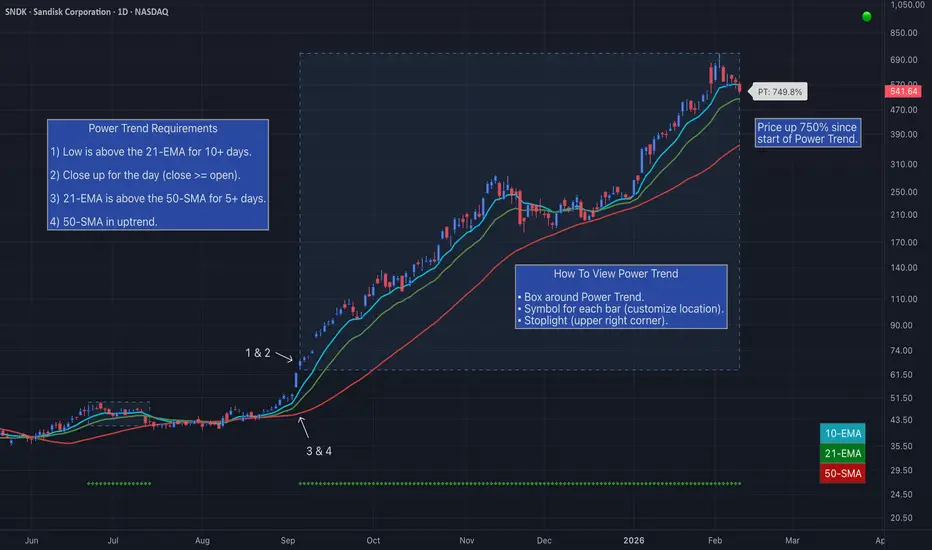
A Power Trend signals that a stronger-than-usual market uptrend is underway. The concept comes from Investor's Business Daily (IBD), specifically the Market School program developed to reflect the trading principles of IBD founder William O'Neil.
The rules defining a Power Trend were established by Mike Webster, Justin Nielsen, and Charles Harris during their work with O'Neil at IBD. They meticulously studied major uptrends, identifying common technical characteristics across the most powerful market advances. From that research came a precise set of rules marking when a Power Trend begins and ends.
For traders, recognizing when a Power Trend is active provides valuable context for position sizing and risk management. Simply put, it helps you decide when to be more aggressive — or more cautious — with your trades.
By definition, a Power Trend is calculated using a major index such as the Nasdaq Composite (IXIC) as its data source. This indicator extends that concept by allowing any security to serve as the data source — meaning the same precise rules that define a Power Trend in the broader market can now be applied directly to any stock, ETF, crypto, index, etc. The result is a quantifiable signal for identifying when any security is in a strong, sustained uptrend.
🔹—— What Starts A Power Trend? ——🔹
▪ Low is above the 21-EMA for at least 10 days.
▪ 21-EMA is above the 50-SMA for at least five days.
▪ 50-SMA is in an uptrend.
▪ Close up for the day (close >= open).
🔹—— What Ends A Power Trend? ——🔹
▪ 21-EMA crosses under 50-SMA.
▪ Close 10% below recent high and below the 50-SMA.
🔹—— Show Power Trend Status ——🔹
With this indicator there are three ways to highlight Power Trends, each is shown in the chart that follows:

For traders who prefer a clean chart, the stoplight display is a simple and effective option. Rather than overlaying additional lines or labels, it communicates Power Trend status through a single colored indicator — green, yellow, or gray.
▪ Green - Power Trend is active.
▪ Yellow - Power Trend is active, however, price is below the 50-SMA, signaling a potential weakening of the trend.
▪ Gray - Power Trend is off.

🔹—— Progress Towards New Power Trend ——🔹
One unique feature of the Power Trend indicator is that you can track the progress towards the start of a new Power Trend. See the chart below for more details.

🔹—— Additional Examples Of Power Trends ——🔹


🔹—— Alerts On Start & End Of A Power Trend ——🔹
In addition to the visual signals, the indicator supports alerts so you are notified the moment a Power Trend starts or ends. Alerts can be set on any symbol — whether you are monitoring the Nasdaq Composite for broader market conditions or tracking an individual stock or ETF for a potential trading signal.

🔹—— Key Features ——🔹
▪ Three options to highlight active Power Trends:
• Box around Power Trend.
• Stoplight with configurable location.
• Custom symbol for each bar in an active Power Trend.
▪ Show recent high price, configurable font size and color.
▪ Custom alerts on the start and/or end of a Power Trend.
The rules defining a Power Trend were established by Mike Webster, Justin Nielsen, and Charles Harris during their work with O'Neil at IBD. They meticulously studied major uptrends, identifying common technical characteristics across the most powerful market advances. From that research came a precise set of rules marking when a Power Trend begins and ends.
For traders, recognizing when a Power Trend is active provides valuable context for position sizing and risk management. Simply put, it helps you decide when to be more aggressive — or more cautious — with your trades.
By definition, a Power Trend is calculated using a major index such as the Nasdaq Composite (IXIC) as its data source. This indicator extends that concept by allowing any security to serve as the data source — meaning the same precise rules that define a Power Trend in the broader market can now be applied directly to any stock, ETF, crypto, index, etc. The result is a quantifiable signal for identifying when any security is in a strong, sustained uptrend.
🔹—— What Starts A Power Trend? ——🔹
▪ Low is above the 21-EMA for at least 10 days.
▪ 21-EMA is above the 50-SMA for at least five days.
▪ 50-SMA is in an uptrend.
▪ Close up for the day (close >= open).
🔹—— What Ends A Power Trend? ——🔹
▪ 21-EMA crosses under 50-SMA.
▪ Close 10% below recent high and below the 50-SMA.
🔹—— Show Power Trend Status ——🔹
With this indicator there are three ways to highlight Power Trends, each is shown in the chart that follows:
For traders who prefer a clean chart, the stoplight display is a simple and effective option. Rather than overlaying additional lines or labels, it communicates Power Trend status through a single colored indicator — green, yellow, or gray.
▪ Green - Power Trend is active.
▪ Yellow - Power Trend is active, however, price is below the 50-SMA, signaling a potential weakening of the trend.
▪ Gray - Power Trend is off.
🔹—— Progress Towards New Power Trend ——🔹
One unique feature of the Power Trend indicator is that you can track the progress towards the start of a new Power Trend. See the chart below for more details.
🔹—— Additional Examples Of Power Trends ——🔹
🔹—— Alerts On Start & End Of A Power Trend ——🔹
In addition to the visual signals, the indicator supports alerts so you are notified the moment a Power Trend starts or ends. Alerts can be set on any symbol — whether you are monitoring the Nasdaq Composite for broader market conditions or tracking an individual stock or ETF for a potential trading signal.
🔹—— Key Features ——🔹
▪ Three options to highlight active Power Trends:
• Box around Power Trend.
• Stoplight with configurable location.
• Custom symbol for each bar in an active Power Trend.
▪ Show recent high price, configurable font size and color.
▪ Custom alerts on the start and/or end of a Power Trend.
Notas de prensa
Version 10.0New Power Trend Exit Options
An active Power Trend now supports an additional exit rule: close below the 10-EMA, 21-EMA, or 50-SMA, giving you more control over how quickly you react to weakening momentum.
Stats Table for Active Power Trend
See exactly where things stand while a Power Trend is active: days in the trend, % change since it started, % off the recent high, the highest gain reached so far, and how far price sits from your optional exit MA.
View Stats of Past Power Trends
Hover over any closed Power Trend to see the full story: how many days it lasted, which exit rule triggered, the highest gain it reached, and how far price had pulled back from the high by the time it exited. This offers a quick way to review what worked and what didn't.
Power Trend Pine Screener Updates
The Power Trend indicator now surfaces key stats directly in TradingView's Pine Screener.
▪ Days in Power Trend, ATR % and percent change values (day/week/month/YTD).
▪ Days in Power Trend lets you search and sort by trend age, making it easy to identify both emerging setups and established momentum leaders.
Disponible en el Espacio de pago
Este indicador solo está disponible para suscriptores de TrendPro Suite — Find Your Edge. Suscríbase para acceder a este y otros scripts de LevelUpTools.

Join traders in over 40 countries and LevelUp!
tradingview.com/spaces/LevelUpTools/
tradingview.com/spaces/LevelUpTools/
Exención de responsabilidad
La información y las publicaciones no constituyen, ni deben considerarse como, asesoramiento o recomendaciones financieras, de inversión, de trading u otro tipo, proporcionadas o respaldadas por TradingView. Obtenga más información en Condiciones de uso.
Disponible en el Espacio de pago
Este indicador solo está disponible para suscriptores de TrendPro Suite — Find Your Edge. Suscríbase para acceder a este y otros scripts de LevelUpTools.
Join traders in over 40 countries and LevelUp!
tradingview.com/spaces/LevelUpTools/
tradingview.com/spaces/LevelUpTools/
Exención de responsabilidad
La información y las publicaciones no constituyen, ni deben considerarse como, asesoramiento o recomendaciones financieras, de inversión, de trading u otro tipo, proporcionadas o respaldadas por TradingView. Obtenga más información en Condiciones de uso.