SmartFlow Position Sizer Pro
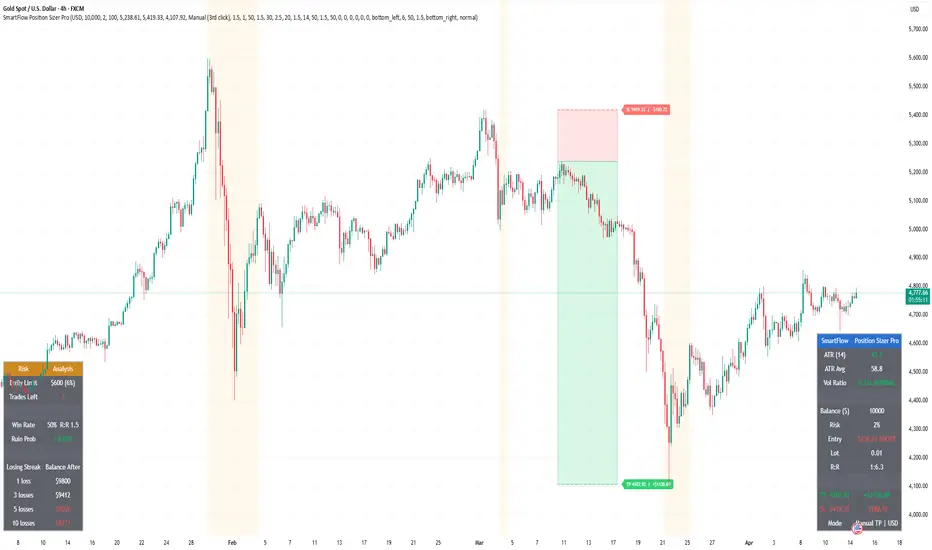
═══════════════════════════════════════
█ HOW IT WORKS
Click three points on the chart:
- 1st click — Entry Price
- 2nd click — Stop Loss
- 3rd click — Take Profit
All three lines are draggable after placement. The indicator works in future (empty) chart areas, allowing you to plan trades before price arrives. Long/Short direction is auto-detected from the Entry vs SL position.
═══════════════════════════════════════
█ FEATURES
Position Sizing
- Automatic lot calculation: Balance × Risk% / (SL Distance × Contract Size)
- Rounds down to 0.01 to never exceed your risk limit
- Supports any instrument: Gold, Forex, Crypto, Indices
Take Profit Modes
- Manual — use 3rd click position, drag to adjust
- R:R Auto — TP calculated from SL distance × R:R ratio
- Partial TP — split exits across TP1/TP2/TP3 with custom allocation percentages and independent R:R targets
ATR Volatility Engine
- Current ATR vs average ATR comparison with Vol Ratio display
- Automatic lot reduction when volatility exceeds a configurable threshold
- Visual background warning during high volatility periods
- Customizable ATR period, average period, and threshold multiplier
Trailing SL Simulation
- Shows where a trailing stop loss would sit based on ATR × multiplier from current price
- Visualized as a separate dotted line — does not interfere with your SL/TP zones
Risk Analysis (Separate Table)
- Max Daily Loss — tracks your daily drawdown cap and shows remaining trades before hitting the limit. Essential for prop firm traders (FTMO, MFF, etc.)
- Ruin Probability — Balsara-based calculation using your win rate, average R:R, and risk percentage. Color-coded: green (< 10%), red (> 10%)
- Losing Streak Simulation — projected account balance after 1, 3, 5, and 10 consecutive losses at your current risk level
Multi-Currency Accounts
- Supports USD, EUR, GBP, JPY, AUD, CHF
- Live FX conversion via request.security() — all P&L, daily limits, and balance projections displayed in your account currency
Multi-Position Risk
- Add up to 2 additional positions manually to calculate combined risk exposure
- Combined risk % shown with warning when exceeding daily limit
Trade Journal
- Formatted trade summary label on chart: symbol, direction, entry, SL, TP, lot, risk, P&L, R:R
═══════════════════════════════════════
█ LOT CALCULATION
Lot = (Balance × Risk%) / (SL Distance × Contract Size)
For non-USD accounts, balance is converted to USD for calculation, then P&L is converted back to account currency using live FX rates.
When ATR volatility exceeds the threshold, lot size is automatically reduced by the configured percentage (default: 50% reduction).
═══════════════════════════════════════
█ CHART DISPLAY
- White line — Entry price with lot size
- Red zone + label — SL area with loss amount in account currency
- Green zone + label — TP area with profit amount (single or TP1/TP2/TP3)
- Orange dotted line — Trailing SL simulation (when enabled)
- Trade table — ATR, trade info, P&L (position configurable)
- Risk table — Daily limit, ruin probability, losing streak (position configurable)
═══════════════════════════════════════
█ SETTINGS OVERVIEW
- Account: Currency, Balance, Risk %, Contract Size
- TP Mode: Manual / R:R Auto / Partial TP (TP1-TP3 with R:R and allocation %)
- ATR: Period, Average Period, High Vol Threshold, Lot Reduction %
- Trailing SL: ATR Multiplier
- Risk Analysis: Max Daily Loss %, Win Rate, Avg R:R
- Multi-Position: Up to 2 additional entries with lot and SL
- Display: Table positions, text size, zone visibility
═══════════════════════════════════════
█ NOTES
- All drawing positions use time-based coordinates — works in future chart areas
- Designed for MT5/MT4 lot sizing — adjust Contract Size for your broker
- Partial TP allocations use R:R-based levels; lot is split proportionally with rounding protection
- Alerts available for high volatility entry and normalization
- Tip: Disable magnet mode (press A) before adding the indicator to avoid price snapping during clicks
Script que requiere invitación
Solo los usuarios autorizados por el autor pueden acceder a este script. Para utilizarlo, deberá solicitar y obtener permiso. Normalmente, este permiso se concede una vez realizado el pago. Para obtener más información, siga las instrucciones del autor que figuran a continuación o póngase en contacto directamente con SmartFlow2026.
TradingView NO recomienda pagar por un script ni utilizarlo a menos que confíe plenamente en su autor y comprenda cómo funciona. También puede encontrar alternativas gratuitas y de código abierto en nuestros scripts de la comunidad.
Instrucciones del autor

Lock in 60% discount for life.
whop.com/smartflow-indicators/smartflow-pro/
Exención de responsabilidad
Script que requiere invitación
Solo los usuarios autorizados por el autor pueden acceder a este script. Para utilizarlo, deberá solicitar y obtener permiso. Normalmente, este permiso se concede una vez realizado el pago. Para obtener más información, siga las instrucciones del autor que figuran a continuación o póngase en contacto directamente con SmartFlow2026.
TradingView NO recomienda pagar por un script ni utilizarlo a menos que confíe plenamente en su autor y comprenda cómo funciona. También puede encontrar alternativas gratuitas y de código abierto en nuestros scripts de la comunidad.
Instrucciones del autor
Lock in 60% discount for life.
whop.com/smartflow-indicators/smartflow-pro/