OPEN-SOURCE SCRIPT
Bid-Ask Imbalance Proxy [DYNA]
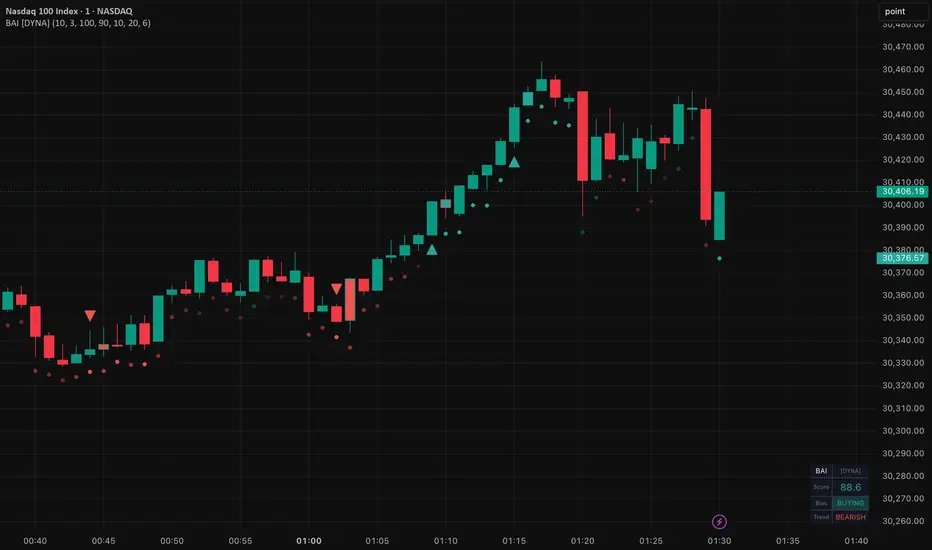
Bid-Ask Imbalance Proxy estimates order flow direction by analyzing where each bar closes within its high-low range, weighted by volume. When price consistently closes near the highs on strong volume, buyers are in control. When it closes near the lows, sellers dominate. The result is a clean imbalance score displayed directly on the price chart, giving you an instant read on who is winning.
Most traders rely on price alone to judge supply and demand, but price can move on thin volume or misleading wicks. This indicator adds a volume-weighted layer that reveals whether the closes actually confirm the move. It includes a trend filter, signal cooldown, and live dashboard -- all designed for scalpers who need fast, actionable signals without chart clutter. It works on any instrument with volume data and does not require Level 2, order book, or DOM access.
Key Features
How It Works
The indicator calculates a Close Location Value (CLV) for each bar, measuring where the close sits between the low and the high. A close at the high scores +1, a close at the low scores -1, and a close at the midpoint scores 0. This value is multiplied by the bar's volume and summed over a lookback window, then normalized by total volume. The result is rescaled to -100 to +100 for visual clarity.
On the chart, you see a continuous strip of colored circles below the candles -- green when buying pressure leads, red when selling pressure takes over. The brightness of each circle reflects the strength of the imbalance. When the imbalance score pushes past the dynamic percentile threshold AND the trend filter confirms, a triangle marker appears on the bar: green triangle below for buys, red triangle above for sells.
The trend filter uses a simple moving average (default 20 period). Buy markers only appear when price is above the SMA; sell markers only when price is below. Filtering signals to the prevailing trend is designed to screen out lower-quality against-trend events. The cooldown prevents the same signal from repeating every bar during sustained imbalance -- each marker represents a distinct trading opportunity.

Green circles show buying flow, red circles show selling flow. Triangle markers highlight trend-aligned extreme imbalance events. Dashboard in the bottom-right shows current score and bias.
Settings
The Lookback Period (default 10) controls how many bars contribute to the imbalance score. Shorter lookbacks react faster and suit scalping; longer lookbacks smooth the reading. Signal Smoothing (default 3) sets the internal EMA period.
Percentile Lookback (default 100) and Upper/Lower Percentile (default 90/10) define the dynamic extreme thresholds. At 90/10, roughly 10% of bars qualify as extreme in each direction. Widen to 95/5 for fewer, higher-conviction signals; narrow to 80/20 for more frequent alerts.
The Trend Filter (default ON, SMA 20) gates markers to the trend direction only. Signal Cooldown (default 6 bars) prevents same-direction clustering -- on a 5-min chart, this means at least 30 minutes between consecutive buy or sell markers. All visual elements (flow strip, markers, bar coloring, trend line, dashboard) can be toggled independently.
Alerts
To set up alerts: click the TradingView Alerts button, select "Bid-Ask Imbalance Proxy [DYNA]" from the indicator dropdown, choose "Any alert() function call" as the condition, and set your preferred notification method.
Best Practices
Part of the DYNA Ecosystem
Bid-Ask Imbalance Proxy is a free indicator built with the same design standards as the DYNA premium suite. For complete trade management with automatic stop loss, break-even, trailing stops, and multi-target systems, explore the full DYNA indicator collection.
Disclaimer
This indicator is a technical analysis tool, not financial advice. Past performance does not guarantee future results. Always use proper position sizing and risk management.
Created by Varun Nidhi · varunnidhi.com
A free DYNA indicator — self-contained, no repainting.
Most traders rely on price alone to judge supply and demand, but price can move on thin volume or misleading wicks. This indicator adds a volume-weighted layer that reveals whether the closes actually confirm the move. It includes a trend filter, signal cooldown, and live dashboard -- all designed for scalpers who need fast, actionable signals without chart clutter. It works on any instrument with volume data and does not require Level 2, order book, or DOM access.
Key Features
- Flow Strip -- A heatmap-like strip of colored circles below price. Green = buying pressure, red = selling pressure. Brightness scales with imbalance strength, so you see the intensity at a glance.
- Trend-Filtered Extreme Markers -- Triangle markers fire only when imbalance is extreme AND price is trending in the same direction (above SMA for buys, below SMA for sells). Eliminates low-quality against-trend signals.
- Signal Cooldown -- After a marker fires, same-direction signals are suppressed for a configurable number of bars. Prevents the clustering noise that makes most oscillators unusable for scalping.
- Dynamic Percentile Thresholds -- Extreme levels are computed as rolling percentiles (default 90th/10th) rather than fixed values, so the indicator adapts automatically to changing volatility.
- Live Dashboard -- A compact panel on the chart showing the current imbalance score, bias state (BUYING/SELLING/NEUTRAL), and trend direction.
- Confirmed-Bar Alerts -- Alerts fire on the confirmed (closed) bar to avoid false signals from incomplete candles. Only trend-aligned, cooldown-passed signals trigger alerts.
How It Works
The indicator calculates a Close Location Value (CLV) for each bar, measuring where the close sits between the low and the high. A close at the high scores +1, a close at the low scores -1, and a close at the midpoint scores 0. This value is multiplied by the bar's volume and summed over a lookback window, then normalized by total volume. The result is rescaled to -100 to +100 for visual clarity.
On the chart, you see a continuous strip of colored circles below the candles -- green when buying pressure leads, red when selling pressure takes over. The brightness of each circle reflects the strength of the imbalance. When the imbalance score pushes past the dynamic percentile threshold AND the trend filter confirms, a triangle marker appears on the bar: green triangle below for buys, red triangle above for sells.
The trend filter uses a simple moving average (default 20 period). Buy markers only appear when price is above the SMA; sell markers only when price is below. Filtering signals to the prevailing trend is designed to screen out lower-quality against-trend events. The cooldown prevents the same signal from repeating every bar during sustained imbalance -- each marker represents a distinct trading opportunity.
Green circles show buying flow, red circles show selling flow. Triangle markers highlight trend-aligned extreme imbalance events. Dashboard in the bottom-right shows current score and bias.
Settings
The Lookback Period (default 10) controls how many bars contribute to the imbalance score. Shorter lookbacks react faster and suit scalping; longer lookbacks smooth the reading. Signal Smoothing (default 3) sets the internal EMA period.
Percentile Lookback (default 100) and Upper/Lower Percentile (default 90/10) define the dynamic extreme thresholds. At 90/10, roughly 10% of bars qualify as extreme in each direction. Widen to 95/5 for fewer, higher-conviction signals; narrow to 80/20 for more frequent alerts.
The Trend Filter (default ON, SMA 20) gates markers to the trend direction only. Signal Cooldown (default 6 bars) prevents same-direction clustering -- on a 5-min chart, this means at least 30 minutes between consecutive buy or sell markers. All visual elements (flow strip, markers, bar coloring, trend line, dashboard) can be toggled independently.
Alerts
- Extreme Buying Imbalance -- Fires when the imbalance score exceeds the upper percentile threshold on a confirmed bar, with trend alignment and cooldown met. "Bid-Ask Imbalance Proxy [DYNA]: Extreme buying pressure detected -- trend-aligned, above dynamic threshold."
- Extreme Selling Imbalance -- Fires when the imbalance score drops below the lower percentile threshold on a confirmed bar, with trend alignment and cooldown met. "Bid-Ask Imbalance Proxy [DYNA]: Extreme selling pressure detected -- trend-aligned, below dynamic threshold."
To set up alerts: click the TradingView Alerts button, select "Bid-Ask Imbalance Proxy [DYNA]" from the indicator dropdown, choose "Any alert() function call" as the condition, and set your preferred notification method.
Best Practices
- Keep the trend filter ON. Against-trend signals tend to be lower quality; the trend filter removes them so you focus on imbalance that aligns with the prevailing direction.
- Use extreme markers near key support or resistance for higher-conviction setups. A buy marker at support suggests strong demand; the same marker in the middle of a range is less meaningful.
- Treat extreme markers as momentum confirmation, not standalone entries. Pairing them with structure and tight stops helps keep losers small relative to winners.
- Watch the flow strip for shifts. A sustained run of bright green circles turning red often precedes a reversal before any marker fires.
- On lower timeframes (1-3 min), reduce the lookback to 5-7 for faster signals. On higher timeframes (1H+), increase it to 15-20 for a smoother view.
- The indicator works best on instruments with real trade volume (crypto exchanges, equity markets). Tick volume on some forex feeds may produce less reliable readings.
Part of the DYNA Ecosystem
Bid-Ask Imbalance Proxy is a free indicator built with the same design standards as the DYNA premium suite. For complete trade management with automatic stop loss, break-even, trailing stops, and multi-target systems, explore the full DYNA indicator collection.
Disclaimer
This indicator is a technical analysis tool, not financial advice. Past performance does not guarantee future results. Always use proper position sizing and risk management.
Created by Varun Nidhi · varunnidhi.com
A free DYNA indicator — self-contained, no repainting.
Script de código abierto
Fiel al espíritu de TradingView, el creador de este script lo ha convertido en código abierto, para que los traders puedan revisar y verificar su funcionalidad. ¡Enhorabuena al autor! Aunque puede utilizarlo de forma gratuita, recuerde que cualquier republicación del código está sujeta a nuestras Normas internas.

Exención de responsabilidad
La información y las publicaciones no constituyen, ni deben considerarse como, asesoramiento o recomendaciones financieras, de inversión, de trading u otro tipo, proporcionadas o respaldadas por TradingView. Obtenga más información en Condiciones de uso.
Script de código abierto
Fiel al espíritu de TradingView, el creador de este script lo ha convertido en código abierto, para que los traders puedan revisar y verificar su funcionalidad. ¡Enhorabuena al autor! Aunque puede utilizarlo de forma gratuita, recuerde que cualquier republicación del código está sujeta a nuestras Normas internas.
Exención de responsabilidad
La información y las publicaciones no constituyen, ni deben considerarse como, asesoramiento o recomendaciones financieras, de inversión, de trading u otro tipo, proporcionadas o respaldadas por TradingView. Obtenga más información en Condiciones de uso.