OPEN-SOURCE SCRIPT
maXXit Fibu Level Trigger [V6 1.1]
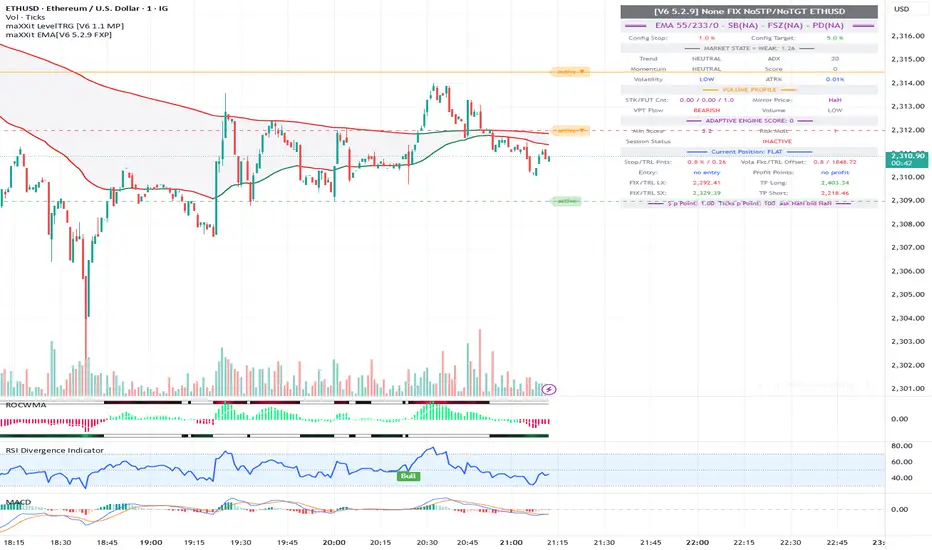
# maXXit Level Trigger [V6] — Overview
**Platform:** TradingView Pine Script v6 · Overlay indicator
---
## What does the Level Trigger do?
The Level Trigger automates trade entries and exits based on a freely configurable price level. False breakouts are filtered by an **N-closes confirmation** — only after N consecutive candles close through the level is an action triggered. The trigger fires json alerts to an external webhook server connected to a broker api (IBKR, OANDA, IG-Markets).
If the signal generation is based on future contracts (highly recommended), the mirror instruments are mapped through configurable parameters inside the script to the preconfigured broker api. The trigger does not fire position entries or exits inside Tradingview directly. A simple textmessage can also be sent.
---
## Flow (State Machine)
```
1. ARMING — Price touches the trigger level from the opposite side (intrabar)
2. ENTRY — N closes back through the level → BUY / SELL alert
3. POSITION — Stop and TP monitor the open position
4. EXIT — SL or TP fires → closing order alert
```
---
## Features
| Feature | Description |
|---|---|
| **Long & Short** | Both directions configurable |
| **N-Closes (1–3)** | Number of confirming closes required for each step |
| **Trigger-level stop** | N closes back through the trigger level = automatic stop exit. Active only when no Absolute SL is set. |
| **Absolute stop loss** | A separate SL level — fires immediately on intrabar touch, no close confirmation. When set, the trigger-level stop is deactivated. |
| **Take Profit** | Two-step exit: TP reached → reversal confirmed with N closes |
| **TP Touch mode** | Alternative: exit fires directly on intrabar touch of the TP level |
| **Trailing stop** | Auto-stop locks at the old TP level when TP is raised mid-trade |
| **JSON alerts** | Direct broker integration (IBKR, OANDA, IG Markets) |
| **Symbol mapping** | Pre-defined instrument parameters for 15+ futures/CFDs |
| **Lock to Symbol** | Trigger stays bound to the selected instrument across chart changes |
| **Position Lock** | Preserves position state when parameters are changed mid-trade |
---
## Stop Loss Logic — Three-tier hierarchy
The indicator uses a priority-based stop system. Only one tier is active at a time:
| Priority | Condition | Stop mechanism | Trigger |
|---|---|---|---|
| **1 — Absolute SL** | SL Level > 0 | Fixed price level | Intrabar touch — immediate, no close needed |
| **2 — Auto-SL (TP lock)** | TP reached → auto_sl set | Old TP level becomes new stop | N consecutive closes through the level |
| **3 — Trigger-level stop** | No SL, no auto_sl | N closes back through trigger | N consecutive closes |
### How tiers interact
- When **Absolute SL is set**: tiers 2 and 3 are deactivated. Only the intrabar stop is active.
- When **TP is reached**: the TP level locks as a trailing stop (`auto_sl`). The Absolute SL can now be removed — `auto_sl` takes over with N-close confirmation, behaving exactly like the original trigger-level stop did.
- When **neither SL nor auto_sl is active**: the trigger level itself acts as the stop (N closes back through it).
### After a stop fires
The trigger does not re-arm automatically. To re-activate, set a new Trigger Level value (changing the level resets all state).
---
## Worked Example — LONG, N = 2 closes
**Setup:** Direction = LONG · Trigger = 5000 · TP = 5100 · Closes required = 2
### Phase 1 — Entry
| Event | What happens |
|---|---|
| Price drops below 5000 (intrabar) | Trigger **arms** — indicator starts watching |
| Price rises, 2 consecutive closes above 5000 | **Entry alert fired** → BUY order sent · stop activates at 5000 |
| Price drops back, 2 closes below 5000 (before TP) | **Stop exit** → SELL alert · trigger deactivates |
### Phase 2a — TP exit (price reverses after TP)
| Event | What happens |
|---|---|
| Price rises through 5100 | TP **step 1**: level reached — indicator waits for reversal |
| Price falls back, 2 consecutive closes below 5100 | **TP exit alert** → SELL order sent · position closed |
### Phase 2b — Trailing stop (price keeps running above TP)
| Event | What happens |
|---|---|
| Price rises through 5100 | TP step 1 fires — stop **locks at 5100** (yellow line) |
| Price continues above 5100 — no reversal | Position stays open · stop remains at 5100 |
| User raises TP to 5200 | `tp_armed` resets · stop stays locked at old 5100 level |
| Price reaches 5200 | Stop locks at 5200 — old 5100 stop replaced |
| Price falls, 2 closes below 5200 | **Stop exit alert** → SELL order sent · position closed |
> The locked stop (old TP level) works exactly like the trigger-level stop: N consecutive closes through the level fire the exit. The Absolute SL input can be cleared once the stop is locked — it is no longer needed.
---
## Visual Display
- **Trigger line** — gray (idle) · orange (armed) · red (position open = active stop level)
- **SL line** — shows absolute stop level with synchronized state label
- **TP line** — green (active) · yellow (TP armed, waiting for reversal)
- **Labels** — current state: IDLE / ARMED ↑↓ / active ▲▼ / fired
**Platform:** TradingView Pine Script v6 · Overlay indicator
---
## What does the Level Trigger do?
The Level Trigger automates trade entries and exits based on a freely configurable price level. False breakouts are filtered by an **N-closes confirmation** — only after N consecutive candles close through the level is an action triggered. The trigger fires json alerts to an external webhook server connected to a broker api (IBKR, OANDA, IG-Markets).
If the signal generation is based on future contracts (highly recommended), the mirror instruments are mapped through configurable parameters inside the script to the preconfigured broker api. The trigger does not fire position entries or exits inside Tradingview directly. A simple textmessage can also be sent.
---
## Flow (State Machine)
```
1. ARMING — Price touches the trigger level from the opposite side (intrabar)
2. ENTRY — N closes back through the level → BUY / SELL alert
3. POSITION — Stop and TP monitor the open position
4. EXIT — SL or TP fires → closing order alert
```
---
## Features
| Feature | Description |
|---|---|
| **Long & Short** | Both directions configurable |
| **N-Closes (1–3)** | Number of confirming closes required for each step |
| **Trigger-level stop** | N closes back through the trigger level = automatic stop exit. Active only when no Absolute SL is set. |
| **Absolute stop loss** | A separate SL level — fires immediately on intrabar touch, no close confirmation. When set, the trigger-level stop is deactivated. |
| **Take Profit** | Two-step exit: TP reached → reversal confirmed with N closes |
| **TP Touch mode** | Alternative: exit fires directly on intrabar touch of the TP level |
| **Trailing stop** | Auto-stop locks at the old TP level when TP is raised mid-trade |
| **JSON alerts** | Direct broker integration (IBKR, OANDA, IG Markets) |
| **Symbol mapping** | Pre-defined instrument parameters for 15+ futures/CFDs |
| **Lock to Symbol** | Trigger stays bound to the selected instrument across chart changes |
| **Position Lock** | Preserves position state when parameters are changed mid-trade |
---
## Stop Loss Logic — Three-tier hierarchy
The indicator uses a priority-based stop system. Only one tier is active at a time:
| Priority | Condition | Stop mechanism | Trigger |
|---|---|---|---|
| **1 — Absolute SL** | SL Level > 0 | Fixed price level | Intrabar touch — immediate, no close needed |
| **2 — Auto-SL (TP lock)** | TP reached → auto_sl set | Old TP level becomes new stop | N consecutive closes through the level |
| **3 — Trigger-level stop** | No SL, no auto_sl | N closes back through trigger | N consecutive closes |
### How tiers interact
- When **Absolute SL is set**: tiers 2 and 3 are deactivated. Only the intrabar stop is active.
- When **TP is reached**: the TP level locks as a trailing stop (`auto_sl`). The Absolute SL can now be removed — `auto_sl` takes over with N-close confirmation, behaving exactly like the original trigger-level stop did.
- When **neither SL nor auto_sl is active**: the trigger level itself acts as the stop (N closes back through it).
### After a stop fires
The trigger does not re-arm automatically. To re-activate, set a new Trigger Level value (changing the level resets all state).
---
## Worked Example — LONG, N = 2 closes
**Setup:** Direction = LONG · Trigger = 5000 · TP = 5100 · Closes required = 2
### Phase 1 — Entry
| Event | What happens |
|---|---|
| Price drops below 5000 (intrabar) | Trigger **arms** — indicator starts watching |
| Price rises, 2 consecutive closes above 5000 | **Entry alert fired** → BUY order sent · stop activates at 5000 |
| Price drops back, 2 closes below 5000 (before TP) | **Stop exit** → SELL alert · trigger deactivates |
### Phase 2a — TP exit (price reverses after TP)
| Event | What happens |
|---|---|
| Price rises through 5100 | TP **step 1**: level reached — indicator waits for reversal |
| Price falls back, 2 consecutive closes below 5100 | **TP exit alert** → SELL order sent · position closed |
### Phase 2b — Trailing stop (price keeps running above TP)
| Event | What happens |
|---|---|
| Price rises through 5100 | TP step 1 fires — stop **locks at 5100** (yellow line) |
| Price continues above 5100 — no reversal | Position stays open · stop remains at 5100 |
| User raises TP to 5200 | `tp_armed` resets · stop stays locked at old 5100 level |
| Price reaches 5200 | Stop locks at 5200 — old 5100 stop replaced |
| Price falls, 2 closes below 5200 | **Stop exit alert** → SELL order sent · position closed |
> The locked stop (old TP level) works exactly like the trigger-level stop: N consecutive closes through the level fire the exit. The Absolute SL input can be cleared once the stop is locked — it is no longer needed.
---
## Visual Display
- **Trigger line** — gray (idle) · orange (armed) · red (position open = active stop level)
- **SL line** — shows absolute stop level with synchronized state label
- **TP line** — green (active) · yellow (TP armed, waiting for reversal)
- **Labels** — current state: IDLE / ARMED ↑↓ / active ▲▼ / fired
Script de código abierto
Fiel al espíritu de TradingView, el creador de este script lo ha convertido en código abierto, para que los traders puedan revisar y verificar su funcionalidad. ¡Enhorabuena al autor! Aunque puede utilizarlo de forma gratuita, recuerde que cualquier republicación del código está sujeta a nuestras Normas internas.

maXXit consulting
Exención de responsabilidad
La información y las publicaciones no constituyen, ni deben considerarse como, asesoramiento o recomendaciones financieras, de inversión, de trading u otro tipo, proporcionadas o respaldadas por TradingView. Obtenga más información en Condiciones de uso.
Script de código abierto
Fiel al espíritu de TradingView, el creador de este script lo ha convertido en código abierto, para que los traders puedan revisar y verificar su funcionalidad. ¡Enhorabuena al autor! Aunque puede utilizarlo de forma gratuita, recuerde que cualquier republicación del código está sujeta a nuestras Normas internas.
maXXit consulting
Exención de responsabilidad
La información y las publicaciones no constituyen, ni deben considerarse como, asesoramiento o recomendaciones financieras, de inversión, de trading u otro tipo, proporcionadas o respaldadas por TradingView. Obtenga más información en Condiciones de uso.