TM.KEYLEVELS [TradersMove]
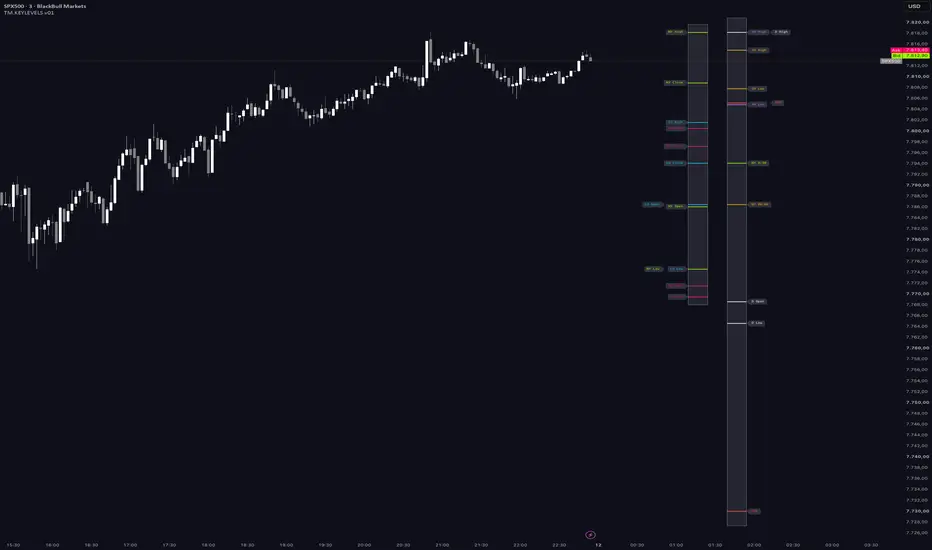
KEEP YOUR CHART CLEAN
TM.KEYLEVELS is a session and level map for TradingView that does not paint over your candles. Every level you would normally draw across the whole chart — Asia / London / New York Open, High, Low, Close, Opening Range, Killzone High / Low, previous Day / Week / Month High / Low, developing 1H / 4H / Daily / Weekly High / Low, Daily Open, Weekly Open, NY Midnight Open, NY 08:30 — is parked in two lanes to the right of the last bar. Price stays readable. The levels stay one glance away.
On the chart itself you only get what has a time dimension: sessions as Lines or Box, Opening Range windows with history, and up to five time zones (Killzone / Avoid). Everything else lives in the lanes until you ask for it — or until AUTO brings a nearby level to the last candle.
This is the initial OpenSource release (v01). Defaults are a starting point. Read the lane, session-chart and zone sections before you trade from the labels. If you find an error or something that does not look right, please report it — v01 is the first public build and we want every miss on the list.
Pine Script v6 · overlay · standalone (no library import) · every session in its own market time · OpenSource · Mozilla Public License 2.0.
WHAT YOU SEE ON THE CHART
Two lanes, right of the last candle:
Both boxes size themselves to the enabled levels. Overlapping labels step sideways. Lanes exist on the last bar only — the script stays light.
On the candles:
WHY THIS IS DIFFERENT
1. Lanes, not a grid.
Most key-level scripts draw PDH, NY open, 4H high and six session lines across the full width. After a week the chart is a fence. TM.KEYLEVELS puts those levels next to the current price and leaves the candles alone.
2. AUTO — the level comes to you.
You do not paint every PDH and 4H High across the candles "just in case". Leave them in the lane. Switch AUTO on. When price walks into a level (wick ± ATR or % buffer), a dashed bridge lights up from the last candle to that line in the box. Walk away, and it vanishes. No permanent grid. The chart tells you only when it matters.
3. Sessions are levels, not background.
A session is Open, Close, High, Low — four reaction points. TM.KEYLEVELS treats them that way: as lines or boxes that grow live, as lane entries, as alert targets. Opening Range and Killzone High / Low follow the same rule.
4. Every session in its own market time. No conversion, no DST drift.
London is 08:00–16:30 Europe/London. New York is 09:30–16:00 America/New_York. Tokyo is 09:00–18:00 Asia/Tokyo. The Killzones are in New York time, because that is how ICT defines them. You never translate a session into your local clock — and that matters more than it sounds: the US and Europe do not switch daylight saving on the same date. A New York session typed in Berlin time is one hour wrong for two to three weeks every spring and one week every autumn. Defined in New York time, it is right every day of the year, wherever you sit.
What we ship vs what you change. Asia and London do not depend on the instrument — leave them. New York defaults to NYSE cash 09:30–16:00 (15:30–22:00 on a Berlin clock while both sides are on DST). That is cash, not futures. Index and commodity futures, ICT models and the US data window usually want 08:30–16:00 New York — change only that one session. The NY 08:30 keylevel is already that print and does not follow the session window. Forex traders who want the full NY overlap can type 08:00–17:00 New York.
Two levels are pinned on purpose: NY Midnight Open (00:00 America/New_York — the ICT "true day open") and NY 08:30 (US data releases / futures cash pre-open). They are New York facts, not session settings.
5. System Timezone is a fallback, not a master switch.
The timezone at the top of the settings looks like the one clock everything follows. It is not. By default nothing reads it. Asia, London, New York and the zone group each have their own timezone, already set to the market. The top picker is there for one job: when you want a window in your own clock.
Set it to your zone (Exchange follows the symbol; Custom takes any IANA name, e.g. Europe/Zurich). Then, on the group you want local, switch Timezone to System and type that window as you see it. Mix freely — London stays in London time, your lunch Avoid in Berlin time. Leave every group on its market zone and the top picker stays unused. That is the intended default, not a leftover.
The DST caveat from point 4 still applies to any window you type in local time. The script does not hide it.
6. Readable labels.
Session labels left, key-level labels right. Every lane level carries a tooltip with name and exact price — lines included. Overlaps step outward. Session-chart and Opening Range labels have their own size under [SS]. Opening Range chart labels can be hidden.
7. Alerts that name the level.
Level-touch alerts fire once when the bar reaches a level that already existed before that bar — a developing High alerts on the retest, not while it is being made. Message: level names + price. Opening Range break fires on the close through ORH / ORL. Both via alert() plus named conditions in the alert dialog.
8. Cheap to run.
Six request.security calls. Sessions on 1H+ charts come from one 60-minute request. Lanes are drawn on the last bar only.
HOW TO USE IT
Quick start
Reading the lanes
One question: where are the reaction points relative to the current price? Close = in play. Far = context. A session High lining up with PDH or a 4H High across the two boxes is confluence you did not have to draw. AUTO is that question answered on the candles: only the in-play level gets a bridge.
Zones
Default zones are the ICT windows in New York time. London KZ 02:00–05:00 ships on. NY AM KZ, NY Lunch (Avoid), NY PM KZ and Asia KZ ship off. Rename, move, or switch a slot to Avoid for lunch, news, or your own no-trade windows. Killzone High / Low become lane levels only when Killzone H/L in Session Box is on. Keep the fill alpha high — the zone is a hint, not a wall.
Alerts, first time
Local time, if you prefer it
You do not have to think in three clocks. To run everything in your own time:
Leave any group on its market zone if you only want some windows local. Remember the DST caveat: a New York window typed in European time drifts for a few weeks each year. That is the price of local time; the script does not hide it.
Timeframes
Intraday is home. On 1H+ sessions come from a 60-minute request and the Opening Range switches off. Midnight Open and NY 08:30 are intraday only. Daily / Weekly / Monthly levels work everywhere.
EXAMPLES
1. London Opening Range — window, history, dotted ORH / ORL

2. Kill Zones active

3. Extend left — origin print to the box / last candle, same price as the lane

4. AUTO proximity — dashed bridge when price is in play at a lane level

CONFLUENCE — USE TM.KEYLEVELS WITH SOMETHING THAT SEES REGIME
TM.KEYLEVELS is location. It tells you where price may react, not which way.
Stack: regime tool = side, TM.KEYLEVELS = where, your trigger = when. If price is not at a level, there is no trade to filter.
WHO IT IS FOR
It is not a signal pack and not a strategy. There are no arrows. A level is a place, not an instruction.
INITIAL RELEASE
v01 is the first OpenSource build. Settings, defaults and edge cases (weekends, broker daily sessions, DST) are still being proven in the wild. Please report errors, wrong levels or unclear settings so they can be fixed in the next version.
DISCLAIMER
TM.KEYLEVELS is a visual overlay. It does not place orders, manage risk, or guarantee results. Session and higher-timeframe levels depend on your data feed's session definition and on the session windows you set. Use on any market and timeframe at your own risk. This is not investment advice.
© TradersMove - 1% per day — your Move to Success
TM.KEYLEVELS is a session and level map for TradingView that does not paint over your candles. Every level you would normally draw across the whole chart — Asia / London / New York Open, High, Low, Close, Opening Range, Killzone High / Low, previous Day / Week / Month High / Low, developing 1H / 4H / Daily / Weekly High / Low, Daily Open, Weekly Open, NY Midnight Open, NY 08:30 — is parked in two lanes to the right of the last bar. Price stays readable. The levels stay one glance away.
On the chart itself you only get what has a time dimension: sessions as Lines or Box, Opening Range windows with history, and up to five time zones (Killzone / Avoid). Everything else lives in the lanes until you ask for it — or until AUTO brings a nearby level to the last candle.
This is the initial OpenSource release (v01). Defaults are a starting point. Read the lane, session-chart and zone sections before you trade from the labels. If you find an error or something that does not look right, please report it — v01 is the first public build and we want every miss on the list.
Pine Script v6 · overlay · standalone (no library import) · every session in its own market time · OpenSource · Mozilla Public License 2.0.
WHAT YOU SEE ON THE CHART
Two lanes, right of the last candle:
- Session Box [SB] — Asia, London, New York: Open, Close, High, Low, optional Equilibrium (EQ), Opening Range High / Low, optional Killzone High / Low. Labels sit left of the box, in the session colour. Hover a line or label for name + price.
- Keylevels Box [KB] — TF1 / TF2 developing High / Low (default 1H and 4H), Daily and Weekly developing High / Low, previous Day / Week / Month High / Low, NY 08:30 open (own colour), Daily Open, Weekly Open, NY Midnight Open (00:00 New York). Labels sit right of the box. Extend left draws each lane level from the bar that created it to the box — not infinitely left.
Both boxes size themselves to the enabled levels. Overlapping labels step sideways. Lanes exist on the last bar only — the script stays light.
On the candles:
- Session Chart [SS] — Lines = Open / High / Low grow with the session, Close at the end. Box (default) = High / Low rectangle. Per session: Frame colour, Frame style (default dotted), Background. History 1–20 (default 15) when Current session only is off. Chart label size is independent of the lane labels.
- Opening Range — first N minutes (5 / 15 / 30 / custom) as a filled window, dotted ORH / ORL through the rest of the session, same levels in the Session Box. Windows repeat into history. Chart OR labels can be switched off under [SS]. Chart TF must be ≤ the OR minutes.
- Time zones [ZN] — up to five windows. Killzone = solid border; High / Low can go into the Session Box (off by default). Avoid = dashed border, and the Session Box border takes the zone colour while active — a quiet "not now".
- AUTO — proximity (off by default, turn it on) — when price trades near a lane level that has no chart line of its own, a short dashed bridge appears from the last candle to the box. Far levels stay parked. Near levels come to you. Distance is ATR(14) or a percent of price. When price leaves the buffer, the bridge disappears. The chart stays empty until a level is actually in play.
- Optional Chart lines for previous Day / Week / Month and the Opens — from the origin print to the last candle, same price as the box. Not a historical staircase.
WHY THIS IS DIFFERENT
1. Lanes, not a grid.
Most key-level scripts draw PDH, NY open, 4H high and six session lines across the full width. After a week the chart is a fence. TM.KEYLEVELS puts those levels next to the current price and leaves the candles alone.
2. AUTO — the level comes to you.
You do not paint every PDH and 4H High across the candles "just in case". Leave them in the lane. Switch AUTO on. When price walks into a level (wick ± ATR or % buffer), a dashed bridge lights up from the last candle to that line in the box. Walk away, and it vanishes. No permanent grid. The chart tells you only when it matters.
3. Sessions are levels, not background.
A session is Open, Close, High, Low — four reaction points. TM.KEYLEVELS treats them that way: as lines or boxes that grow live, as lane entries, as alert targets. Opening Range and Killzone High / Low follow the same rule.
4. Every session in its own market time. No conversion, no DST drift.
London is 08:00–16:30 Europe/London. New York is 09:30–16:00 America/New_York. Tokyo is 09:00–18:00 Asia/Tokyo. The Killzones are in New York time, because that is how ICT defines them. You never translate a session into your local clock — and that matters more than it sounds: the US and Europe do not switch daylight saving on the same date. A New York session typed in Berlin time is one hour wrong for two to three weeks every spring and one week every autumn. Defined in New York time, it is right every day of the year, wherever you sit.
What we ship vs what you change. Asia and London do not depend on the instrument — leave them. New York defaults to NYSE cash 09:30–16:00 (15:30–22:00 on a Berlin clock while both sides are on DST). That is cash, not futures. Index and commodity futures, ICT models and the US data window usually want 08:30–16:00 New York — change only that one session. The NY 08:30 keylevel is already that print and does not follow the session window. Forex traders who want the full NY overlap can type 08:00–17:00 New York.
Two levels are pinned on purpose: NY Midnight Open (00:00 America/New_York — the ICT "true day open") and NY 08:30 (US data releases / futures cash pre-open). They are New York facts, not session settings.
5. System Timezone is a fallback, not a master switch.
The timezone at the top of the settings looks like the one clock everything follows. It is not. By default nothing reads it. Asia, London, New York and the zone group each have their own timezone, already set to the market. The top picker is there for one job: when you want a window in your own clock.
Set it to your zone (Exchange follows the symbol; Custom takes any IANA name, e.g. Europe/Zurich). Then, on the group you want local, switch Timezone to System and type that window as you see it. Mix freely — London stays in London time, your lunch Avoid in Berlin time. Leave every group on its market zone and the top picker stays unused. That is the intended default, not a leftover.
The DST caveat from point 4 still applies to any window you type in local time. The script does not hide it.
6. Readable labels.
Session labels left, key-level labels right. Every lane level carries a tooltip with name and exact price — lines included. Overlaps step outward. Session-chart and Opening Range labels have their own size under [SS]. Opening Range chart labels can be hidden.
7. Alerts that name the level.
Level-touch alerts fire once when the bar reaches a level that already existed before that bar — a developing High alerts on the retest, not while it is being made. Message: level names + price. Opening Range break fires on the close through ORH / ORL. Both via alert() plus named conditions in the alert dialog.
8. Cheap to run.
Six request.security calls. Sessions on 1H+ charts come from one 60-minute request. Lanes are drawn on the last bar only.
HOW TO USE IT
Quick start
- 1. Add TM.KEYLEVELS to an intraday chart (M1 – M15 is home).
- 2. Leave the timezones alone. Each session already runs in its own market time. Asia and London stay as shipped. New York is NYSE cash 09:30–16:00 — set it to 08:30–16:00 if you trade futures / ICT.
- 3. Leave the lanes at default. New York is already on the chart (Box layout, history kept). Turn Chart on for Asia / London if you want those sessions on the candles too.
- 4. Under [SS] Session Chart pick Lines or Box and set History / label size.
- 5. Turn on Opening Range for the session you trade. Chart TF must be ≤ the OR minutes. Switch Opening Range labels off if the text gets in the way.
- 6. Turn on [DI] AUTO. Leave proximity on ATR. When price nears a lane level, the dashed bridge is your "this one is live" cue.
Reading the lanes
One question: where are the reaction points relative to the current price? Close = in play. Far = context. A session High lining up with PDH or a 4H High across the two boxes is confluence you did not have to draw. AUTO is that question answered on the candles: only the in-play level gets a bridge.
Zones
Default zones are the ICT windows in New York time. London KZ 02:00–05:00 ships on. NY AM KZ, NY Lunch (Avoid), NY PM KZ and Asia KZ ship off. Rename, move, or switch a slot to Avoid for lunch, news, or your own no-trade windows. Killzone High / Low become lane levels only when Killzone H/L in Session Box is on. Keep the fill alpha high — the zone is a hint, not a wall.
Alerts, first time
- 1. Enable the levels you trade (lane checkboxes).
- 2. In [AL] Alerts tick Level touch (Session / Key) and Opening Range break.
- 3. Create alert → condition Any alert() function call.
- 4. Or pick a named condition for a dedicated webhook.
Local time, if you prefer it
You do not have to think in three clocks. To run everything in your own time:
- 1. System → System Timezone: pick your zone. Not listed? Choose Custom and type the IANA name (e.g. Europe/Zurich). Exchange follows the symbol.
- 2. In Asia / London / New York set Timezone to System and type the window as you see it on your clock (e.g. London 0900-1730 for Berlin).
- 3. In Time Zones set Timezone to System and do the same for the five slots.
Leave any group on its market zone if you only want some windows local. Remember the DST caveat: a New York window typed in European time drifts for a few weeks each year. That is the price of local time; the script does not hide it.
Timeframes
Intraday is home. On 1H+ sessions come from a 60-minute request and the Opening Range switches off. Midnight Open and NY 08:30 are intraday only. Daily / Weekly / Monthly levels work everywhere.
EXAMPLES
1. London Opening Range — window, history, dotted ORH / ORL
2. Kill Zones active
3. Extend left — origin print to the box / last candle, same price as the lane
4. AUTO proximity — dashed bridge when price is in play at a lane level
CONFLUENCE — USE TM.KEYLEVELS WITH SOMETHING THAT SEES REGIME
TM.KEYLEVELS is location. It tells you where price may react, not which way.
- Moving averages / trend — MEVO or your own MA stack. Trend says side; TM.KEYLEVELS says where the side is tested.
- Market structure — BOS / CHOCH at a session High or PDH means more than in the middle of nowhere.
- Order flow / SMC — a sweep of the Asia Low into the London Killzone is a setup; the same sweep at random is noise.
- An oscillator — divergence at a lane level, not in a vacuum.
Stack: regime tool = side, TM.KEYLEVELS = where, your trigger = when. If price is not at a level, there is no trade to filter.
WHO IT IS FOR
- Intraday traders who mark sessions, PDH / PDL and the opens every morning — and want the chart back.
- ICT / SMC traders who think in killzones, midnight open and session liquidity.
- Opening-range traders who want window, history, break and alert in one place.
It is not a signal pack and not a strategy. There are no arrows. A level is a place, not an instruction.
INITIAL RELEASE
v01 is the first OpenSource build. Settings, defaults and edge cases (weekends, broker daily sessions, DST) are still being proven in the wild. Please report errors, wrong levels or unclear settings so they can be fixed in the next version.
DISCLAIMER
TM.KEYLEVELS is a visual overlay. It does not place orders, manage risk, or guarantee results. Session and higher-timeframe levels depend on your data feed's session definition and on the session windows you set. Use on any market and timeframe at your own risk. This is not investment advice.
© TradersMove - 1% per day — your Move to Success

TradersMove - To optimize your next trading move.
Exención de responsabilidad
La información y las publicaciones no constituyen, ni deben considerarse como, asesoramiento o recomendaciones financieras, de inversión, de trading u otro tipo, proporcionadas o respaldadas por TradingView. Obtenga más información en Condiciones de uso.
TradersMove - To optimize your next trading move.
Exención de responsabilidad
La información y las publicaciones no constituyen, ni deben considerarse como, asesoramiento o recomendaciones financieras, de inversión, de trading u otro tipo, proporcionadas o respaldadas por TradingView. Obtenga más información en Condiciones de uso.