Actualizado
SR Levels
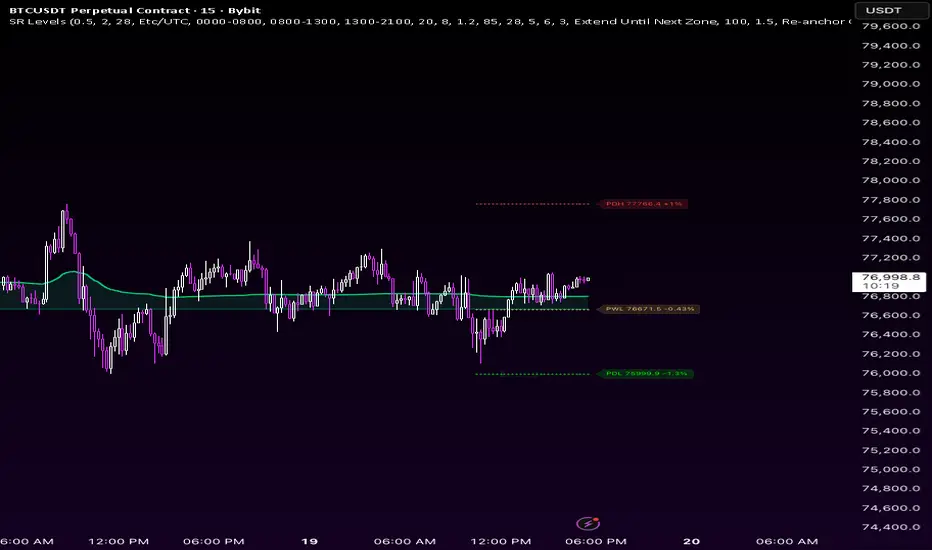
SR Levels — Multi-Timeframe Support & Resistance with SR-Anchored VWAP
OVERVIEW
SR Levels Pro is an overlay indicator that plots higher-timeframe support and resistance levels on your chart with a clean, minimal layout. It focuses on widely used structural levels — previous day/week/month/year highs and lows — plus optional session levels (Asia, London, New York).
The goal is simple: show where price is relative to key reference levels, how far away each level is, and whether volume-weighted price action is accepting or rejecting a level after a touch.
This script is designed for traders who use HTF structure, session context, and level-based decision making on lower timeframes.
KEY FEATURES
• HTF Structure Levels
Previous Day/Week/Month/Year High and Low (PDH, PDL, PWH, PWL, PMH, PML, PYH, PYL)
Each timeframe uses a distinct color for quick identification
• Smart Level Display
Thin cross markers on a short right-side segment — not full-width lines
Optional proximity filter: hide levels until price is within range
Price labels show level name, exact price, and % distance from current price
Example: PDH 77766.4 +1.42%
• Session Levels (Optional, Off by Default)
Previous session high, low, and open for Asia, London, and New York
Customizable session times and timezone
• SR-Anchored VWAP
When price touches an active S/R level, VWAP begins tracking from that anchor
Green VWAP above anchor = potential acceptance
Red VWAP below anchor = potential rejection
Shaded fill between VWAP and anchor shows the acceptance/rejection gap
Auto-deactivates after max bars or when price moves too far from the level
• Optional Signals (Off by Default)
Triangles = bullish/bearish rejection at scored S/R levels
Diamonds = PDH/PDL volume breakouts
Confluence scoring, EMA trend filter, volume filter, and cooldown
Built-in alerts for rejections and breakouts
HOW TO USE
1. Add to any chart (stocks, crypto, forex, futures).
2. Defaults show PDH, PDL, PWH, PWL. Session levels and signals are off.
3. Read right-edge labels for price and % distance from each level.
4. Watch SR-Anchored VWAP when price approaches a level for acceptance vs rejection.
5. Enable signals only if you want entry markers. Adjust score and cooldown for your timeframe.
6. For forex/futures, set Session Timezone and session hours to match your market.
SETTINGS
Core: touch tolerance, visibility range, cross segment length, price labels
HTF: toggle day/week/month/year levels and colors
Session: Asia/London/NY H/L/O with custom times
VWAP: max bars, deactivate distance, bull/bear colors
Signals: master toggle, breakout diamonds, min score, cooldown, filters
ALERTS
• SR: Long Rejection
• SR: Short Rejection
• SR: Bull Breakout (above PDH)
• SR: Bear Breakout (below PDL)
RECOMMENDED TIMEFRAMES
Intraday (1m–15m): PDH/PDL + PWH/PWL, optional sessions
Swing (1H–4H): PWH/PWL + PMH/PML
Position (D/W): PMH/PML + PYH/PYL
DISCLAIMER
This indicator is for educational and informational purposes only. It is not financial advice and does not recommend buying or selling any instrument. Trading involves risk. Past results do not guarantee future performance. Always do your own research and use proper risk management.
NOTES
HTF levels use the prior completed period high/low. Signals are optional and disabled by default. SR-Anchored VWAP accumulates on confirmed bars only.
OVERVIEW
SR Levels Pro is an overlay indicator that plots higher-timeframe support and resistance levels on your chart with a clean, minimal layout. It focuses on widely used structural levels — previous day/week/month/year highs and lows — plus optional session levels (Asia, London, New York).
The goal is simple: show where price is relative to key reference levels, how far away each level is, and whether volume-weighted price action is accepting or rejecting a level after a touch.
This script is designed for traders who use HTF structure, session context, and level-based decision making on lower timeframes.
KEY FEATURES
• HTF Structure Levels
Previous Day/Week/Month/Year High and Low (PDH, PDL, PWH, PWL, PMH, PML, PYH, PYL)
Each timeframe uses a distinct color for quick identification
• Smart Level Display
Thin cross markers on a short right-side segment — not full-width lines
Optional proximity filter: hide levels until price is within range
Price labels show level name, exact price, and % distance from current price
Example: PDH 77766.4 +1.42%
• Session Levels (Optional, Off by Default)
Previous session high, low, and open for Asia, London, and New York
Customizable session times and timezone
• SR-Anchored VWAP
When price touches an active S/R level, VWAP begins tracking from that anchor
Green VWAP above anchor = potential acceptance
Red VWAP below anchor = potential rejection
Shaded fill between VWAP and anchor shows the acceptance/rejection gap
Auto-deactivates after max bars or when price moves too far from the level
• Optional Signals (Off by Default)
Triangles = bullish/bearish rejection at scored S/R levels
Diamonds = PDH/PDL volume breakouts
Confluence scoring, EMA trend filter, volume filter, and cooldown
Built-in alerts for rejections and breakouts
HOW TO USE
1. Add to any chart (stocks, crypto, forex, futures).
2. Defaults show PDH, PDL, PWH, PWL. Session levels and signals are off.
3. Read right-edge labels for price and % distance from each level.
4. Watch SR-Anchored VWAP when price approaches a level for acceptance vs rejection.
5. Enable signals only if you want entry markers. Adjust score and cooldown for your timeframe.
6. For forex/futures, set Session Timezone and session hours to match your market.
SETTINGS
Core: touch tolerance, visibility range, cross segment length, price labels
HTF: toggle day/week/month/year levels and colors
Session: Asia/London/NY H/L/O with custom times
VWAP: max bars, deactivate distance, bull/bear colors
Signals: master toggle, breakout diamonds, min score, cooldown, filters
ALERTS
• SR: Long Rejection
• SR: Short Rejection
• SR: Bull Breakout (above PDH)
• SR: Bear Breakout (below PDL)
RECOMMENDED TIMEFRAMES
Intraday (1m–15m): PDH/PDL + PWH/PWL, optional sessions
Swing (1H–4H): PWH/PWL + PMH/PML
Position (D/W): PMH/PML + PYH/PYL
DISCLAIMER
This indicator is for educational and informational purposes only. It is not financial advice and does not recommend buying or selling any instrument. Trading involves risk. Past results do not guarantee future performance. Always do your own research and use proper risk management.
NOTES
HTF levels use the prior completed period high/low. Signals are optional and disabled by default. SR-Anchored VWAP accumulates on confirmed bars only.
Notas de prensa
CHANGELOG — SR Levels Pro v2025.05.19
| ADDED | Future Structure Zones (Pivot Extension) |
|-------|------------------------------------------|
| Feature | Forward-projected support/resistance based on pivot structure |
| Method | ta.pivothigh/low → capture body close → measure thrust/drop → project same distance forward |
| Why body close | Close = market-accepted value; wick = rejected extreme |
| Short zone | Orange (#FF8800) — projected overhead resistance |
| Long zone | Cyan (#00CCFF) — projected below support |
| Visual | Dashed lines + semi-transparent fill, right-segment only |
| Labels | "FutRes" / "FutSup" at right edge with price + % |
| Trend filter | Optional — only shows when EMA50/200 aligned |
| Alerts | "SR: Near Future Resistance" / "SR: Near Future Support" |
| Inputs | 8 new settings under "Future Structure Zones" group |
UNCHANGED
- HTF levels (PDH/PDL/PWH/PWL/PMH/PML/PYH/PYL)
- Session levels (Asia/London/NY)
- SR-Anchored VWAP
- Scoring engine + signal triangles/diamonds
- All existing alerts
Notas de prensa
Changelog — SR Levels Pro (Latest)Added
Added % distance-to-price on right-side level labels (ex: PDH 13.95 +0.76%).
Added SR-Anchored VWAP with:
automatic anchoring on S/R touch,
bull/bear color state,
auto-deactivate by distance or max bars.
Added Future Structure Zones inputs for deeper context:
Future Reference Depth (older pivots)
Future Move Average Count
Changed
Reworked future zone calculation to use older pivot history + averaged measured moves (better on 1m/low TFs, less “too-close” projections).
Updated HTF default colors to match the requested palette:
PDH red, PDL green, PWH orange, PWL light orange, PMH purple, PML violet, PYH/PYL white.
Set session levels OFF by default (cleaner first load).
Set signals OFF by default (opt-in behavior).
Kept S/R display as thin cross style with short right-side segment only (no full-width extension).
Fixed
Fixed Pine compile issues from recent VWAP/future updates:
invalid plot keyword usage in assignment,
na type assignment issues,
ordering/logic issues in nearest-level and future-level calculations.
Reduced plot-related runtime risk by keeping visual outputs lightweight and controlled.
Notas de prensa
What's NewSR-Anchored VWAP — no more mid-trend cutoffs
New VWAP Lifetime mode: Extend Until Next Zone (default)
VWAP now stays visible and keeps updating until price touches the next S/R level
Removed premature disappear when price moves away from anchor (in extend mode)
Faster zone-to-zone handoff with Re-anchor On New Touch
Future Structure Zones — deeper reference
Future zones now use older pivot history, not just the last 2 pivots
New inputs:
Future Reference Depth (older pivots)
Future Move Average Count
Better future level placement on 1m/low timeframes
Level Labels
Right-edge labels now include % distance from current price
Example: PDH 85.75 +0.76%
Changed Defaults
Session levels: OFF
Signals: OFF
HTF colors updated (PDH red, PDL green, PWH orange, PWL light orange, PMH purple, PML violet, PYH/PYL white)
S/R display remains thin cross style on short right-side segment
Recommended VWAP Settings (Intraday)
VWAP Lifetime: Extend Until Next Zone
VWAP Reset Mode: Re-anchor On New Touch
Min Bars Before Re-anchor: 0
Bug Fixes
Fixed future zone math using too-recent pivots on 1m
Fixed VWAP disappearing before next zone touch
Fixed compile/runtime issues from prior VWAP/future updates

Exención de responsabilidad
La información y las publicaciones no constituyen, ni deben considerarse como, asesoramiento o recomendaciones financieras, de inversión, de trading u otro tipo, proporcionadas o respaldadas por TradingView. Obtenga más información en Condiciones de uso.
Exención de responsabilidad
La información y las publicaciones no constituyen, ni deben considerarse como, asesoramiento o recomendaciones financieras, de inversión, de trading u otro tipo, proporcionadas o respaldadas por TradingView. Obtenga más información en Condiciones de uso.