ATR Stop & Position Size Planner
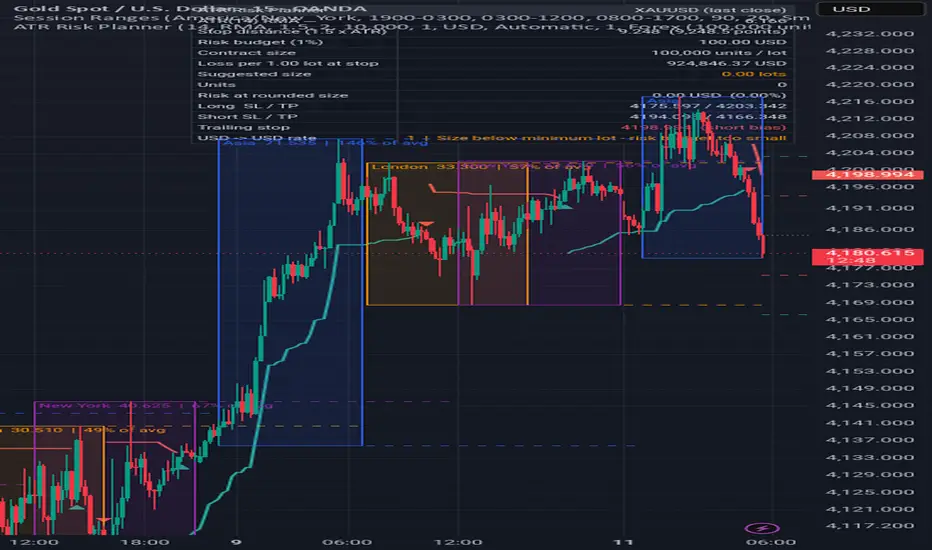
OVERVIEW
This indicator turns the symbol's current volatility into a suggested stop distance and converts your chosen account risk percentage into a position size in lots and units. It handles the steps that are easy to get wrong when sizing CFD, forex, gold or oil positions by hand: contract size per lot, converting quote-currency profit and loss into your account currency, and rounding to your broker's lot step. It also plots an ATR trailing volatility stop with flip markers on confirmed bars.
WHAT MAKES IT DIFFERENT
Most ATR tools stop at drawing bands. This one goes further and works out the full chain on the chart: ATR -> stop distance in price and in pips/points -> money at risk -> loss per 1.00 lot in your account currency -> lot size rounded down to your broker's step -> the risk that actually remains after rounding. Projected stop and target levels for a hypothetical long and short are drawn to the right of the last bar.
HOW IT WORKS
- ATR is the selected moving average (RMA, SMA, EMA or WMA) of the true range over the chosen length.
- Stop distance = ATR x the stop multiplier, measured from the reference price (the bar close).
- Risk budget = account balance x risk %.
- Loss per 1.00 lot at the stop = stop distance x contract size x conversion rate (quote currency to account currency).
- Suggested lots = risk budget / loss per lot, rounded DOWN to the lot step and capped at the maximum lot. The panel then shows the actual risk at that rounded size.
- Conversion uses TradingView's daily currency rate from the symbol's quote currency to your account currency (for example JPY to USD on USDJPY). You can enter a manual rate instead.
- Targets are placed at the chosen R multiple of the stop distance.
- Trailing volatility stop: a close-based stop that ratchets in the trend direction at a distance of ATR x the trailing multiplier and flips when price closes through it.
HOW TO USE
1. Choose the instrument preset that matches your broker's contract size (or select Custom), then set the lot step, minimum lot and maximum lot from your broker's contract specification.
2. Enter your account balance, account currency and risk per trade.
3. Choose an ATR length and stop multiplier that suit your timeframe and style. Wider multipliers give wider stops and smaller positions.
4. Read the panel: stop distance, risk budget, suggested lots/units and the risk remaining after rounding. The projected SL/TP lines show where those levels sit relative to the current price.
5. Always check the suggested size against your trading platform's own margin and risk calculator before you place an order.
INPUTS
ATR stop
- ATR length, ATR smoothing, Stop distance (x ATR), Target (R multiple; 0 hides targets).
- Use last closed bar: while a bar is still forming, the panel uses the last confirmed bar's ATR and close so the numbers do not change tick by tick.
Account & risk
- Account balance, Risk per trade (%), Account currency.
- Quote-to-account conversion: Automatic (TradingView daily rate) or Manual, plus the manual rate (value of 1 unit of the quote currency in account currency).
Contract specification
- Instrument preset: Forex 100,000; Gold 100 oz; Silver 5,000 oz; Crude oil 1,000 bbl; Index/share CFD 1 unit; Symbol point value; or Custom.
- Custom contract size, Lot step, Minimum lot, Maximum lot.
- Pip / point size: 0 = automatic (10 x tick size for 3/5-decimal forex pairs, otherwise tick size). Override it if you use a different convention, for example 0.1 for gold.
Trailing volatility stop
- Show trailing stop, Trailing distance (x ATR), colors, and flip markers.
Display
- Panel on/off, position, text size, which projected levels to show (Both/Long/Short/None) and their colors.
ALERTS
- "Trailing stop flipped to long bias" and "Trailing stop flipped to short bias". Both conditions only trigger on a confirmed bar close.
NON-REPAINTING NOTES
All values on historical bars are final. The trailing stop and flip markers are based on closes, and flips are only marked after the bar closes. With "Use last closed bar" enabled, the panel and projected levels do not move while the current bar forms.
LIMITATIONS
- Contract sizes, lot steps, pip definitions and margin rules differ between brokers and account types. The presets are common conventions, not guarantees. Confirm them with your broker.
- Spread, commission, swap and slippage are not included, so real losses at the stop can be larger than the risk shown.
- The automatic currency conversion uses a daily rate that may differ from your broker's live rate and can change during the day. If no rate is available, the panel shows a warning and uses 1.0 until you set a manual rate.
- When the calculated size is below the minimum lot, the panel shows a warning: trading the minimum lot would risk more than your budget.
- The ATR-based stop is a volatility estimate, not a support or resistance level, and it does not predict where price will go.
This script is for educational and informational purposes only and is not financial advice. Trading CFDs and forex involves significant risk of loss.

Exención de responsabilidad
La información y las publicaciones no constituyen, ni deben considerarse como, asesoramiento o recomendaciones financieras, de inversión, de trading u otro tipo, proporcionadas o respaldadas por TradingView. Obtenga más información en Condiciones de uso.
Exención de responsabilidad
La información y las publicaciones no constituyen, ni deben considerarse como, asesoramiento o recomendaciones financieras, de inversión, de trading u otro tipo, proporcionadas o respaldadas por TradingView. Obtenga más información en Condiciones de uso.