Actualizado
Cyato Grid Basic Buy & Sell [BACKTEST]
Private indicator
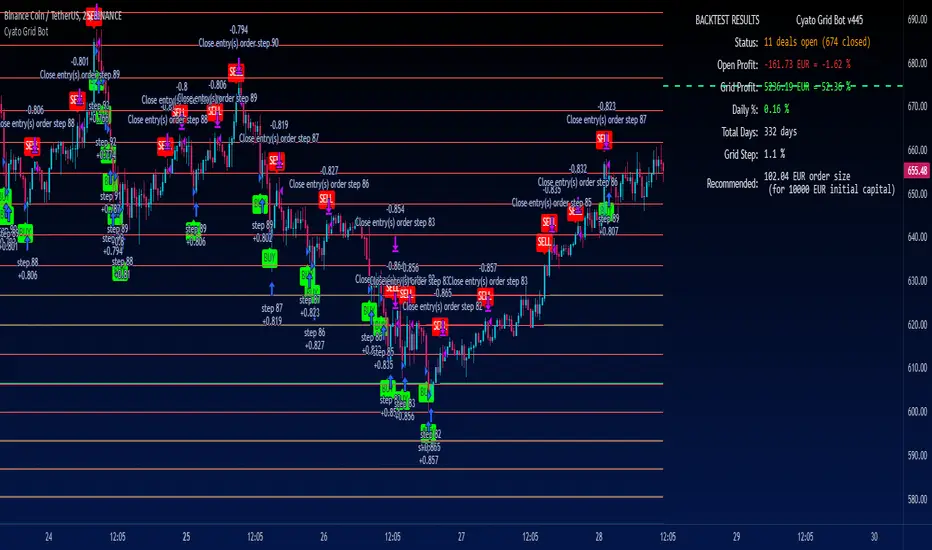
This Grid bot strategy creates buy orders when the price goes down one level or more, and sell order when the price goes up one level or more.
To avoid useless trades, the lastest traded level is disabled until another level is crossed.
To create the grid, one upper level and one lower level is calculated. Those 2 levels are either given by the user using "MANUAL" mode or automatically calculated by an AI. The space between these two levels are then divided equally into several steps, creating the grid. The number of steps is chosen by the user, from 3 to 20.
HOW IT WORKS
This is the Backtest version meaning this is the one you should use with the Strategy Tester (more below).
Select either "MANUAL" or "AI" mode.
When using "MANUAL", you have to configure an upper level and a lower level.
When using "AI", the upper and lower level are automatically calculated from last 7 days high/low plus a 3% deviation. You can configure the timeframe and the deviation.

Select the grid quantity, from 3 to 20.
Example with 3:

Example with 10:

Example with 20:

You can choose between "Once Per Bar Close" or "Once Per Bar" alert type.
"Once Per Bar Close" will wait candle close to confirm a trade.
"Once Per Bar" will trigger a trade if the price crossed a step anytime inside a candle. Note that the backtest will still use bar close price in its calculation.
BACKTESTING
The strategy will buy 1 contract when a BUY signal appears and sell 1 contract when a SELL signal appears.
Here 1 contract = 1 BTC
The strategy can buy up to 20 contracts. Pyramiding is enabled.
The Backtest info panel is here to show how many trades are open in the backtest.

I know very well that a backtest has no value if several trades are left open. That is why I coded a feature to close all open trades at once on the last candle. This feature can be turned on and off.

To get this indicator, use the link in my signature below, thanks!
This Grid bot strategy creates buy orders when the price goes down one level or more, and sell order when the price goes up one level or more.
To avoid useless trades, the lastest traded level is disabled until another level is crossed.
To create the grid, one upper level and one lower level is calculated. Those 2 levels are either given by the user using "MANUAL" mode or automatically calculated by an AI. The space between these two levels are then divided equally into several steps, creating the grid. The number of steps is chosen by the user, from 3 to 20.
HOW IT WORKS
This is the Backtest version meaning this is the one you should use with the Strategy Tester (more below).
Select either "MANUAL" or "AI" mode.
When using "MANUAL", you have to configure an upper level and a lower level.
When using "AI", the upper and lower level are automatically calculated from last 7 days high/low plus a 3% deviation. You can configure the timeframe and the deviation.
Select the grid quantity, from 3 to 20.
Example with 3:
Example with 10:
Example with 20:
You can choose between "Once Per Bar Close" or "Once Per Bar" alert type.
"Once Per Bar Close" will wait candle close to confirm a trade.
"Once Per Bar" will trigger a trade if the price crossed a step anytime inside a candle. Note that the backtest will still use bar close price in its calculation.
BACKTESTING
The strategy will buy 1 contract when a BUY signal appears and sell 1 contract when a SELL signal appears.
Here 1 contract = 1 BTC
The strategy can buy up to 20 contracts. Pyramiding is enabled.
The Backtest info panel is here to show how many trades are open in the backtest.
I know very well that a backtest has no value if several trades are left open. That is why I coded a feature to close all open trades at once on the last candle. This feature can be turned on and off.
To get this indicator, use the link in my signature below, thanks!
Notas de prensa
Core behavior fixesNotas de prensa
AI mode updated:The up/lower step is now calculated using high/lowest of 100 bars of higher data, plus a percent increased range.
Notas de prensa
AI strategy behavior improvements:When the grid moves, the last traded level was reset when it should not.
Notas de prensa
NEW: STOP LOSS FeatureYou can turn it on/off
Make the strategy close all orders if price breaks below step 0 which is one step below step 1
Notas de prensa
You can now choose between a LONG or a SHORT strategyNotas de prensa
Updated info panelNotas de prensa
New input setting to change the order size.Notas de prensa
Added strategy alerts text inputs!How to create Strategy Alerts:
Write your alert messages for EXIT, LONG and SHORT orders in the settings (Backtest section).
Then click add alert, and in the alert message, write the following:
{{strategy.order.alert_message}}
Notas de prensa
bugfixes:The highest step was misbehaving sometimes.
Notas de prensa
Bugfixes with the AI mode.Notas de prensa
Updated Backtest Period settings: we can now select hours and minutes.Notas de prensa
Max number of grid steps increased to 30, but steps above 24th will not be printed on chart due to graphic limitations.Notas de prensa
Configuration panel udpated: smaller and better placement.Added new alert system!
To use it:
1. Write your alert messages in the indicator settings (alert section at the bottom)
2. CLick "Create Alert" as usual, but choose "alert() function calls only"
That's all! You will receive alerts for every event.
Notas de prensa
Max grid quantity increased to 100Max grid quantity plotted on chart increased to 59
That means grid steps above 59th will not be plotted (due to graphic limitations)
AI mode improved. An option was added to use the old AI mode if needed.
Notas de prensa
Fixed multiple entries bug while letting the indicator run with recalculate on every tick setting onNotas de prensa
Bugfix: deals not closing in the backtest when using "recalculate on every" tick in real time.Notas de prensa
Updated inputs, added tooltipsUpdated info panel
Notas de prensa
Order SizeAdded an option to choose from "Fixed", "% of Equity", or "Contracts".
Notas de prensa
Added new Backtest Results panel!You can disable it by going in the style tab -> tables, or by clicking the indicator setting "Backtest Results Table".
Notas de prensa
Backtest orders realtime behavior fix bug: several closing orders on the same candleNotas de prensa
Updated backtesting behavior:- each step is now closed with its corresponding previous step, instead of "First In, First Out".
- order size is now set in the regular backtest properties tab.
Notas de prensa
fix backtest period optionNotas de prensa
Alerts will no longer stop triggering if they are outside of the backtest period.Notas de prensa
Fix backtest bug (multiple orders on same bar)Notas de prensa
.Notas de prensa
RevertNotas de prensa
Updated config panelNotas de prensa
Added Grid step size to the backtest panelAdded Break Even line
Notas de prensa
Fix for real time backtestingNotas de prensa
Updated default settings for easier onboarding.The indicator is now plotting all of the max 100 grid step lines.
Notas de prensa
Added more stop loss features:Backtest
Added optional Upper and Lower Stop Loss with price configuration and action being either "Stop Bot" or "Stop Bot and buy/sell base currency using all equity".
Alerts
Added alerts for both stop losses.
Notas de prensa
Updated alert inputsNotas de prensa
Updated config panelAdded the option to calculate the grid from top to bottom using a percentage of price for each grid.
Notas de prensa
Added an option to prevent trades (and alerts) to trigger before the start of the backtest period input.Notas de prensa
New input 'order type' with two options 'Market' or 'Limit'.Up until now the indicator was using market orders in the backtest and for the alerts it would simply trigger 'buy' or 'sell' when a step is crossed.
With the new 'Limit' orders option, the backtest is using limit orders.
And, in order to automate the strategy, I added a 'Start Date' input. 0n the bar of the start date, an alert is triggered which contains one limit order for each grid step, which can be used to automatically place the limit buys for steps below the price and limit sells for steps above the price.
Then, on each step cross, the indicator will trigger and alert to place an order on the previous step. That way the grid is permanently covered with limit orders.
The alerts can be connected to my website using webhooks and using the alert message syntax I already wrote in the inputs. All you have to do is replace your bot id in the message, and create the alert. It still only takes one alert slot to automate the whole strategy.
Notas de prensa
Added new feature: "Trailing Up" !The grid will automatically create new steps as price climbs up.
Note: When using this feature, the "start from" input must be set to "lower" step!
Notas de prensa
When using trailing up feature, the "grid quantity" is now used to create an additional number of steps above current price at start time.Notas de prensa
Bug fixes when using grid quantity > 28Added an input parameter to limit the amount of default limit orders in the alert (with too many orders, the alert message is too long and the indicator doesn't load)
Notas de prensa
New feature "Take Profit":- Can be turned on/off
- Configure the % (percent) of total profit (net profit + open profit, or also called realized and unrealized PnL)
- Once that % is reached, the strategy will sell by closing all open orders at current price and stop.
Added take profit alert and updated alerts messages placeholders.
Updated open profit calculation in backtest panel.
Notas de prensa
Added Trend Line Filters to filter entries and exits:1 trend line with the external indicator option and 1 MTF trend line.
Small fix regarding take profit: it will now cancel open orders in the backtest.
Notas de prensa
New: Trailing Stop FeatureOnly works with Trailing Up mode activated (in long strategy)
1. Set your stop loss price
2. Activate trailing stop
The stop loss price will follow the lowest price of the grid as it moves up.
Example:
Notas de prensa
bugfixes: start alert Notas de prensa
Fixed a bug with the grid not generating on some timeframes when trailing up activated.Notas de prensa
Updated backtest panel currencyNotas de prensa
Added {grid_step} and {grid_step_percent} placeholders in the alert messages for long and short alerts.Notas de prensa
Updated backtest panel "daily %" color Notas de prensa
Fixed a bug with the limit order strategy starting alert when limiting the number of orders in the alert.Notas de prensa
Visual bug FixNotas de prensa
- Fixed an issue that left open the last step of the grid when price exits the range- Updated backtest panel, improved readability
Notas de prensa
Fixed issues with trailing up optionNotas de prensa
Updated to pine v6In long strategy, the lowest step can only buy, the highest can only sell. This prevent open orders when the price leaves and comes back in the grid. Idem with short strategy.
Notas de prensa
Added {price} placeholder in alerts to get the current price.
Exención de responsabilidad
La información y las publicaciones no constituyen, ni deben considerarse como, asesoramiento o recomendaciones financieras, de inversión, de trading u otro tipo, proporcionadas o respaldadas por TradingView. Obtenga más información en Condiciones de uso.
Exención de responsabilidad
La información y las publicaciones no constituyen, ni deben considerarse como, asesoramiento o recomendaciones financieras, de inversión, de trading u otro tipo, proporcionadas o respaldadas por TradingView. Obtenga más información en Condiciones de uso.