OPEN-SOURCE SCRIPT
Actualizado XAUUSD risk mangment Dashboard
Dual Account Position Sizing Dashboard (XAUUSD / Forex)
Description
Managing risk across multiple accounts can be time-consuming, especially in fast-moving markets like Gold (XAUUSD). This indicator provides a clean, customizable on-chart HUD that calculates precise lot sizes for two separate accounts simultaneously, completely eliminating the need for external calculators.
Key Features:
Dual Account Tracking: Manage two distinct capital pools side-by-side. Set different account balances and risk parameters for each.
Custom Stop Loss Inputs: No more rigid grids. Simply type in the exact Stop Loss point distances your setup requires (e.g., "5, 7, 10, 15"), and the dashboard instantly builds the rows.
Flexible Risk Models: Choose between a Fixed USD amount or a % of Account Balance for your risk per trade.
Fully Customizable UI: Use the built-in color pickers to adjust the transparency, text color, and background of the dashboard to fit seamlessly over your dark or light charts. Choose exactly which corner it snaps to.
Why Position Sizing Matters
Having a solid strategy gives you an edge, but position sizing ensures your survival.
Trade the Structure: Proper sizing allows you to place your Stop Loss exactly where the chart structure invalidates your setup—not just where your wallet dictates. You simply adjust the lot size down to fit the wider stop.
Capital Preservation: Drawdowns are mathematically asymmetric; a 20% loss requires a 25% gain to recover. By strictly capping risk per trade, you protect your equity curve from catastrophic hits.
Emotional Neutrality: Knowing your exact monetary exposure before execution removes anxiety, preventing you from closing winners early or moving stops out of fear.
How to Use
Add the indicator to your chart.
Open the Settings (gear icon) to input your two account balances and desired risk.
Enter your target Stop Loss points as a comma-separated list (e.g., 5, 6, 8, 12).
Read the exact lot size required for your platform directly off the screen.
Description
Managing risk across multiple accounts can be time-consuming, especially in fast-moving markets like Gold (XAUUSD). This indicator provides a clean, customizable on-chart HUD that calculates precise lot sizes for two separate accounts simultaneously, completely eliminating the need for external calculators.
Key Features:
Dual Account Tracking: Manage two distinct capital pools side-by-side. Set different account balances and risk parameters for each.
Custom Stop Loss Inputs: No more rigid grids. Simply type in the exact Stop Loss point distances your setup requires (e.g., "5, 7, 10, 15"), and the dashboard instantly builds the rows.
Flexible Risk Models: Choose between a Fixed USD amount or a % of Account Balance for your risk per trade.
Fully Customizable UI: Use the built-in color pickers to adjust the transparency, text color, and background of the dashboard to fit seamlessly over your dark or light charts. Choose exactly which corner it snaps to.
Why Position Sizing Matters
Having a solid strategy gives you an edge, but position sizing ensures your survival.
Trade the Structure: Proper sizing allows you to place your Stop Loss exactly where the chart structure invalidates your setup—not just where your wallet dictates. You simply adjust the lot size down to fit the wider stop.
Capital Preservation: Drawdowns are mathematically asymmetric; a 20% loss requires a 25% gain to recover. By strictly capping risk per trade, you protect your equity curve from catastrophic hits.
Emotional Neutrality: Knowing your exact monetary exposure before execution removes anxiety, preventing you from closing winners early or moving stops out of fear.
How to Use
Add the indicator to your chart.
Open the Settings (gear icon) to input your two account balances and desired risk.
Enter your target Stop Loss points as a comma-separated list (e.g., 5, 6, 8, 12).
Read the exact lot size required for your platform directly off the screen.
Notas de prensa
Here is a clean, professional description updated with the new futures and triple-account features. It is formatted and ready for you to copy and paste directly into the TradingView publication page.Title: Multi-Account Position Sizing Dashboard (XAUUSD CFDs & Futures)
Description
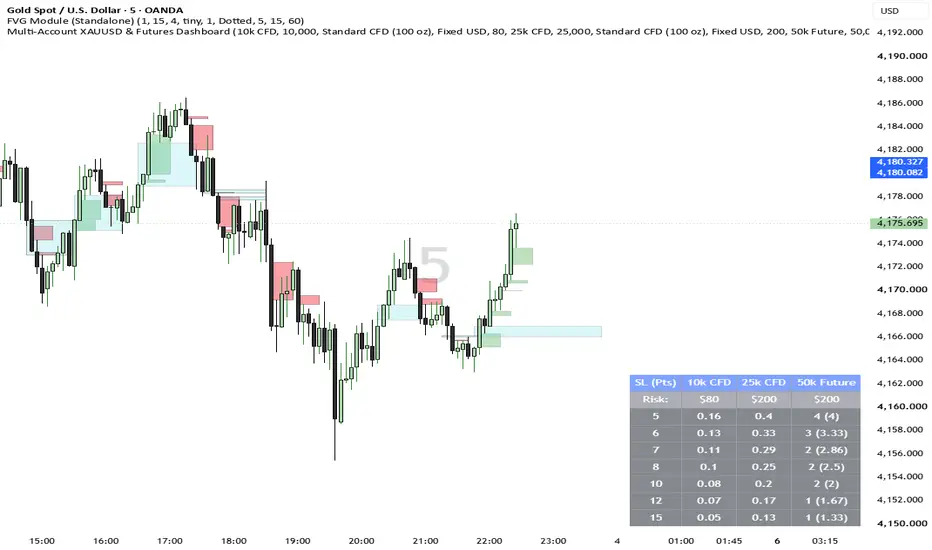
Managing precise risk across multiple trading accounts—especially when mixing CFDs and Futures—can be a logistical nightmare during fast-moving markets. This indicator provides a fully customizable, on-chart HUD that calculates exact position sizes for up to three separate accounts simultaneously, completely eliminating the need for external calculators.
Key Features:
Triple Account Matrix: Track up to three distinct capital pools side-by-side (e.g., a 10k CFD, a 25k CFD, and a 50k Future). You can independently set the balance, risk, and asset type for each, or toggle columns off to keep your chart clean.
CFD & Futures Integration: Seamlessly switch each column between Standard CFDs (100 oz) and Micro Futures (10 oz). The math automatically adjusts to the correct contract multiplier.
Smart Futures Rounding: Because futures require whole contracts, the dashboard automatically rounds down (floors) your position size to ensure you never exceed your strict risk limit. It also displays the raw mathematical decimal in brackets (e.g., 4 (4.82)) so you can see exactly how close you are to the next contract tier.
Custom Stop Loss Targets: No more rigid, useless grids. Simply type in the exact Stop Loss point distances your specific trade requires (e.g., "5, 6.5, 8, 12"), and the dashboard instantly builds the required rows.
Flexible Risk Models: Choose between a Fixed USD amount or a percentage of your Account Balance for your risk per trade.
Fully Customizable UI: Adjust background transparency, text colors, and border styles via the built-in color pickers to match any light or dark chart theme.
Why Precise Position Sizing Matters
Having a profitable system dictates your win rate, but position sizing dictates your survival—especially if you are managing accounts with strict trailing drawdown rules.
Trade the Structure: Proper sizing allows you to place your Stop Loss exactly where the market structure invalidates your setup, rather than forcing a tight stop just to fit a static lot size. You simply lower the lots to fit the wider stop.
Capital Preservation: Drawdowns are mathematically asymmetric. A 10% loss requires an 11% gain to recover, but a 20% loss requires a 25% gain. Capping exact dollar risk per trade ensures a losing streak is just a minor dip, not an account-ending event.
Emotional Neutrality: Knowing your exact monetary exposure before execution removes the anxiety of manual math, preventing you from closing winners early or moving stops out of fear.
How to Use
Add the indicator to your chart.
Open the Settings (gear icon) to configure up to three accounts. Set your balances, toggle between CFDs/Futures, and define your risk.
Enter your target Stop Loss points as a comma-separated list in the General Settings.
Read the exact lot size or contract amount required directly off your screen before executing your trade.
Script de código abierto
Fiel al espíritu de TradingView, el creador de este script lo ha convertido en código abierto, para que los traders puedan revisar y verificar su funcionalidad. ¡Enhorabuena al autor! Aunque puede utilizarlo de forma gratuita, recuerde que cualquier republicación del código está sujeta a nuestras Normas internas.

Exención de responsabilidad
La información y las publicaciones no constituyen, ni deben considerarse como, asesoramiento o recomendaciones financieras, de inversión, de trading u otro tipo, proporcionadas o respaldadas por TradingView. Obtenga más información en Condiciones de uso.
Script de código abierto
Fiel al espíritu de TradingView, el creador de este script lo ha convertido en código abierto, para que los traders puedan revisar y verificar su funcionalidad. ¡Enhorabuena al autor! Aunque puede utilizarlo de forma gratuita, recuerde que cualquier republicación del código está sujeta a nuestras Normas internas.
Exención de responsabilidad
La información y las publicaciones no constituyen, ni deben considerarse como, asesoramiento o recomendaciones financieras, de inversión, de trading u otro tipo, proporcionadas o respaldadas por TradingView. Obtenga más información en Condiciones de uso.