Anchored VWAP
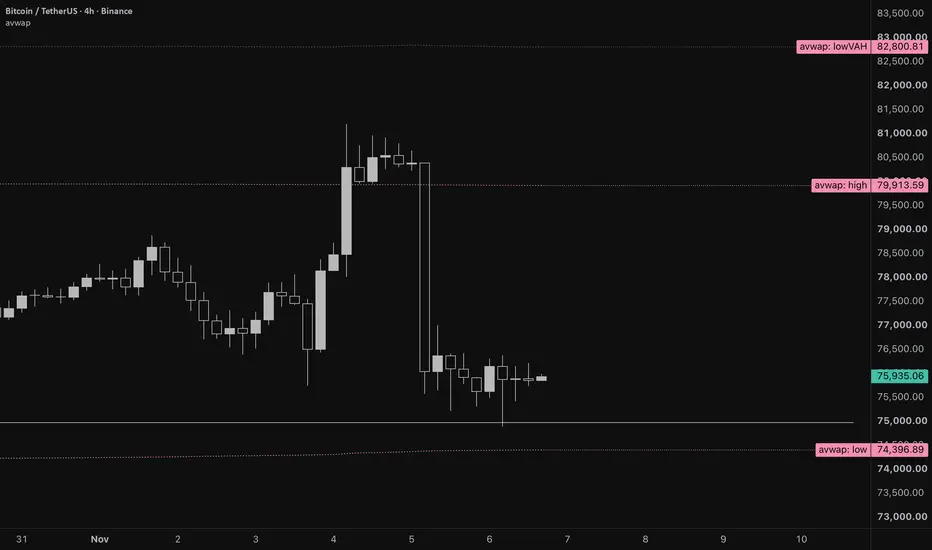
Anchored VWAP with two independent anchors, one for a swing high and one for a swing low. Each anchor starts a volume-weighted average price at a date and time you choose and runs it forward to the current bar. Standard deviation or percentage bands sit around each line. Volume can optionally be pooled across several exchanges.
HOW IT WORKS
Each anchor accumulates volume, price × volume and price² × volume from the anchor bar onward. VWAP is the volume-weighted average price. The bands come from the volume-weighted variance, or from a percentage of VWAP if you prefer. The price source is configurable (default hlc3) and is used from the anchor bar itself with its full volume.
FEATURES
Two anchors, High and Low, each with its own Show toggle, date and time, and anchor candle timeframe.
Snap to extreme: starts the anchor on the exact bar of the highest high (high anchor) or lowest low (low anchor) inside the candle that contains your entered date. With snap off, the anchor starts at the entered time. Ties go to the earliest bar.
Bands: ±1, ±1.5 and ±2 (values editable), each pair switched on or off with one checkbox. Choose Standard Deviation or Percentage mode. In Percentage mode a multiplier of 1 means 1%.
Aggregate exchanges (off by default): pools volume from up to 8 venues, 4 spot and 4 perpetual. Venues and symbols are editable, and {B} is replaced by the chart’s base asset.
Weighting fallback: pooled venue volume first, then the chart symbol’s own volume, then equal weights (an unweighted average, not a true VWAP). This is decided once, at the anchor bar, and never switches later, so a line never mixes two weightings.
Projection lines: draws the latest value of the VWAP and of the visible bands forward past the last bar. The VWAP and the bands have separate checkboxes, colours and line style. These lines are visual only.
HOW TO USE
- Open the settings and go to the HIGH or LOW group.
- Enter the date and time of the swing you want to anchor to.
- Choose the anchor candle timeframe (default 1D) and turn Snap on if you want the exact high or low bar within that candle.
- Turn on Aggregate exchanges if you want pooled volume.
Defaults are set to the dates I use. Replace them with your own and use Defaults > Save as default to keep them. Dates are not symbol-specific, so re-enter them when you change asset.
THINGS TO KNOW
- Snap uses a higher-timeframe request with lookahead to read the anchor candle’s final high and low, so it only draws once that candle has closed. An unclosed candle draws nothing. After the candle closes, the anchor does not move.
- Crypto daily candles open at 00:00 UTC, so a swing late in the evening in North America can fall in the next UTC day.
- An anchor that falls before the first loaded bar is hidden rather than started from the wrong place. This can happen on lower timeframes, where fewer days of history are loaded.
- Anything invalid is simply not drawn: no date set, a future date, non-standard chart types (Renko, range and similar), or zero volume.
- The date picker shows times in the zone TradingView chooses, and the anchor is stored as an exact moment, so it lands on the same bar for everyone.
HOW IT WORKS
Each anchor accumulates volume, price × volume and price² × volume from the anchor bar onward. VWAP is the volume-weighted average price. The bands come from the volume-weighted variance, or from a percentage of VWAP if you prefer. The price source is configurable (default hlc3) and is used from the anchor bar itself with its full volume.
FEATURES
Two anchors, High and Low, each with its own Show toggle, date and time, and anchor candle timeframe.
Snap to extreme: starts the anchor on the exact bar of the highest high (high anchor) or lowest low (low anchor) inside the candle that contains your entered date. With snap off, the anchor starts at the entered time. Ties go to the earliest bar.
Bands: ±1, ±1.5 and ±2 (values editable), each pair switched on or off with one checkbox. Choose Standard Deviation or Percentage mode. In Percentage mode a multiplier of 1 means 1%.
Aggregate exchanges (off by default): pools volume from up to 8 venues, 4 spot and 4 perpetual. Venues and symbols are editable, and {B} is replaced by the chart’s base asset.
Weighting fallback: pooled venue volume first, then the chart symbol’s own volume, then equal weights (an unweighted average, not a true VWAP). This is decided once, at the anchor bar, and never switches later, so a line never mixes two weightings.
Projection lines: draws the latest value of the VWAP and of the visible bands forward past the last bar. The VWAP and the bands have separate checkboxes, colours and line style. These lines are visual only.
HOW TO USE
- Open the settings and go to the HIGH or LOW group.
- Enter the date and time of the swing you want to anchor to.
- Choose the anchor candle timeframe (default 1D) and turn Snap on if you want the exact high or low bar within that candle.
- Turn on Aggregate exchanges if you want pooled volume.
Defaults are set to the dates I use. Replace them with your own and use Defaults > Save as default to keep them. Dates are not symbol-specific, so re-enter them when you change asset.
THINGS TO KNOW
- Snap uses a higher-timeframe request with lookahead to read the anchor candle’s final high and low, so it only draws once that candle has closed. An unclosed candle draws nothing. After the candle closes, the anchor does not move.
- Crypto daily candles open at 00:00 UTC, so a swing late in the evening in North America can fall in the next UTC day.
- An anchor that falls before the first loaded bar is hidden rather than started from the wrong place. This can happen on lower timeframes, where fewer days of history are loaded.
- Anything invalid is simply not drawn: no date set, a future date, non-standard chart types (Renko, range and similar), or zero volume.
- The date picker shows times in the zone TradingView chooses, and the anchor is stored as an exact moment, so it lands on the same bar for everyone.

Exención de responsabilidad
La información y las publicaciones no constituyen, ni deben considerarse como, asesoramiento o recomendaciones financieras, de inversión, de trading u otro tipo, proporcionadas o respaldadas por TradingView. Obtenga más información en Condiciones de uso.
Exención de responsabilidad
La información y las publicaciones no constituyen, ni deben considerarse como, asesoramiento o recomendaciones financieras, de inversión, de trading u otro tipo, proporcionadas o respaldadas por TradingView. Obtenga más información en Condiciones de uso.