Buy Sell Indicator
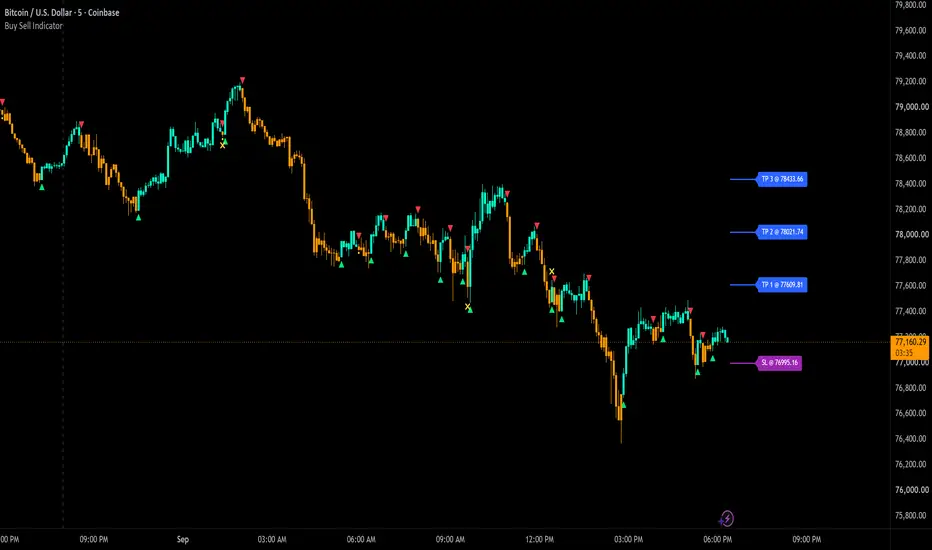
The Buy Sell Indicator reads the price action of every candle to decide whether buyers or sellers are in control of the market, then prints a buy or sell arrow the moment that control changes hands. It manages the trade after the entry too, with an automatic trailing stoploss, three take profit levels and a dedicated trail mode that locks onto your position and blocks all new signals until you turn it off.
Developed by Trend Friend, the signal engine runs entirely on custom price action formulas and volume data. You get four trade modes to match your style from fast scalps to long swings, candles that paint by the current price action direction so you can hold positions without second guessing every candle against you, caution dots that tell you when to wait for confirmation, warning crosses when a fresh signal fails, a low volume warning, and a full set of alerts that can be routed to trading bots.

-------------------------------------------------------------------
How the Signals Are Calculated
The signal engine measures every candle across several categories of price action:
A proprietary scoring system weighs these checks against each other, and the detected direction only flips from bullish to bearish or back when enough checks agree on a single candle. On top of that, a set of rejection filters blocks signals on weak candles, such as small candles, inside bars, candles with long rejection wicks against the move, and moves that barely clear the previous candle. An exceptionally large candle that closes beyond all of the recent highs or lows can flip the direction in any mode, because a move that strong should never be ignored.
Signals also alternate one at a time. After a buy arrow the next arrow can only be a sell, and after a sell the next can only be a buy, so every arrow marks a clear change in direction. The exact formulas, thresholds, weightings and lookback lengths behind these checks are proprietary and are what make this script worth protecting, but the categories above are what those formulas measure.
-------------------------------------------------------------------
Trade Modes
Four modes control how the signal engine confirms a direction change, so you can fine tune it to your trading style.
Three settings adjust the sensitivity further:
Keep in mind that Swing Mode, Long Swing Mode and higher trailing lengths will not perform as well when price is whipsawing up and down, due to the range breaks needed for a signal to come in. So use the longer holding settings when markets are trending and switch to Scalp Mode when the market is chopping around and moving sideways.
-------------------------------------------------------------------
Signal Arrows, Caution Dots, Confirmation Arrows and X Crosses
Buy & Sell Arrows - Arrows print below or above the signal candle. While the candle is still open the arrow shows in a faded color, then it turns solid the moment the candle closes with the signal locked in. The faded arrows are there to encourage you to wait for confirmed signals on candle close. Arrow colors and size (small, medium or large) are adjustable, and the bull and bear arrows can be turned on or off separately if you only want signals in one direction.
Caution Dots - A yellow dot prints next to a signal when the signal candle is smaller than normal. The signal met the entry checks, but the candle behind it is not convincing, so wait for confirming price action before taking that signal and use a tight stoploss for extra safety if you do take it.
Confirmation Arrows - Off by default to keep charts clean. When turned on, a second arrow prints if a confirming candle in the signal direction comes in within 2 candles of a signal that had a caution dot, letting you know the original signal is valid and can be followed.
False Signal X Crosses - When the very next candle completely wipes out a fresh signal, a yellow X marks that failed signal candle so you know to exit that position right away. The X draws on the signal candle itself, which means it shows up one candle after the fact. This is covered in the repainting section below.

-------------------------------------------------------------------
Candle Coloring by Price Action Direction
The candles paint by the current detected price action direction, one color while the market reads bullish and another while it reads bearish. This helps get rid of anxiety when candles come in against your position, because the color tells you the underlying direction has not changed yet, which helps you control your emotions much better during trading. Since the arrows need extra confirmation checks on top of the direction change, the candle color can sometimes flip a candle before the arrow prints, which works as an early heads up that the direction may be changing.
Both colors are adjustable and the coloring can be turned off. For the colors to show up properly, make sure you go to your chart settings (gear icon top right) and turn off body, wicks and borders in the Symbol tab.
-------------------------------------------------------------------
Automatic Trailing Stoploss
How the stop is calculated - The stoploss takes the highest high or lowest low of the past X candles, set by the Stoploss Candle Trail Length, then adds padding based on the average candle height multiplied by the Stoploss Avg Candle Multiple. Use a lower trail length for a tight stop and a higher one for a looser stop. The stop updates on every candle and only tightens in your favor while the position holds, it never loosens.
Stoploss hit display - When price runs your stop, the line and label switch to your chosen hit color and show "Was Hit @" with the exact price where the stop was hit. The hit price stays frozen at that level so you always know exactly where you were stopped out. The display clears on its own when the next signal starts a new trade.
Trailing Stop Mode - This mode locks the chart onto your current position. Wait for a confirmed entry signal, take your position, then turn this setting on. No new signals will print, the candle colors hold the trade direction, the take profit levels pause, and the stop trails behind price until it gets hit. After a hit the stop line freezes at the hit price instead of continuing to trail a dead position. Make sure to turn the mode back off once your stop is hit or you exit, and the line and label return to your normal stoploss color. Try Scalp Mode for an early entry and then turn on Trailing Stop Mode to ride the position as long as possible without any noise from new signals.
The stoploss line, label, colors and price display are all adjustable, and with Show Price turned off the label simply reads "SL".

-------------------------------------------------------------------
Take Profit Levels
Three take profit levels are drawn automatically when a signal locks in at the candle close. Each level is spaced from the signal price using the average candle height multiplied by your setting for that level, with defaults of 3, 6 and 9 average candles, adjustable in steps of .1 to suit your preference. The levels hold their place until the next signal locks in and starts a new trade, and there is an alert for each level getting hit. The lines, labels, color and price display are all adjustable, and with Show Price turned off the labels read "TP 1", "TP 2" and "TP 3".

-------------------------------------------------------------------
Volume Warning
When recent volume is very low compared to the normal volume for that chart, a warning label appears at the top of the chart. Price can whipsaw easily when volume is this low, so I recommend waiting for volume to come back before taking new trades, and if you are already in a trade when the warning appears, keep a close eye on it.
-------------------------------------------------------------------
How to Trade with This Indicator
This indicator does not include any support and resistance tools on purpose. Leaving them out keeps the script lightweight so the signals and candle colors update as fast as possible, and it keeps your chart clean so you can pair it with whatever support and resistance tools you already prefer, since everyone has a different trading style.
-------------------------------------------------------------------
Alerts
Every alert is built to fire reliably on any trigger option you choose when creating the alert. The signal and take profit alerts fire right after their candle closes, so you only get alerted on locked in signals and confirmed level hits, never on a signal that could still disappear. The Stoploss Hit alert fires the moment price crosses your stop on a live candle and only fires once per hit. The Stoploss Updated alert fires whenever the stop tightens, goes quiet after a hit, and starts again with the next trade, so set that one to trigger Once Per Bar. These alerts can also be routed to trading bots if you automate your entries and exits.
-------------------------------------------------------------------
Signal Confirmation and Repainting
No higher timeframe data and no lookahead. This script does not request data from any other timeframe. Every calculation runs on the candles of the chart you are viewing, and the only calendar check is detecting when a new trading day begins, using the chart's own data, so gaps can be identified. The script does not use lookahead to read future data anywhere.
Signals form on the live candle and lock in at the close. All of the checks run on the current, still forming candle, which is what makes early entries possible. While the candle is open, an arrow shows in the faded unconfirmed color and can disappear if conditions change before the candle closes. The moment the candle closes with the arrow showing, that signal is locked in permanently and the arrow turns solid. A signal on a closed candle can never be removed, moved or repainted afterward. If you only want confirmed entries, wait for the close before entering. The caution dots and confirmation arrows behave the same way, forming live and locking at the close.
The X cross is the one element drawn in the past. A false signal can only be identified after the next candle wipes it out, so the yellow X is drawn with a one candle offset to mark the failed signal candle itself. It appears one candle after that signal printed. Nothing else on the chart is drawn in the past.
Live values on the open candle. The candle colors, stoploss and take profit levels update in real time on the open candle the same way any standard indicator does. The stoploss and take profit lines are display elements at the right edge of the chart that always show the current levels. Trailing Stop Mode works on live, real time candles, and reloading the chart re-anchors it to the most recent signal.
-------------------------------------------------------------------
Settings Overview
-------------------------------------------------------------------
Markets and Timeframes
This indicator works on any market with price data, including stocks, crypto, forex and futures, and on all timeframes. Keep in mind the volume warning and the volume based confirmations need volume data to work, so on symbols that do not provide volume data those features cannot function properly and the low volume warning may stay on the chart. High volume tickers with plenty of price action give the best results.
-------------------------------------------------------------------
Important Notes and Limitations
Developed by Trend Friend, the signal engine runs entirely on custom price action formulas and volume data. You get four trade modes to match your style from fast scalps to long swings, candles that paint by the current price action direction so you can hold positions without second guessing every candle against you, caution dots that tell you when to wait for confirmation, warning crosses when a fresh signal fails, a low volume warning, and a full set of alerts that can be routed to trading bots.
-------------------------------------------------------------------
How the Signals Are Calculated
The signal engine measures every candle across several categories of price action:
- Candle Structure - the size of the candle body and each wick, judged against an adaptive average candle size built from rolling historical data, so a large candle on a quiet chart is treated differently than one on a fast moving chart
- Position Against Recent Candles - higher highs, lower lows, and closes beyond the highs or lows of the recent candles, compared across several prior bars
- Reversal Patterns - engulfing candles, tweezer tops and bottoms, doji candles and large rejection wicks
- Market Structure - pivot highs and lows, market structure shifts, breakouts, and gaps at the start of a new trading day
- Momentum - whether price is rising or falling into the current candle
- Volume Behavior - volume spikes compared to recent average volume, used as extra confirmation on entries
A proprietary scoring system weighs these checks against each other, and the detected direction only flips from bullish to bearish or back when enough checks agree on a single candle. On top of that, a set of rejection filters blocks signals on weak candles, such as small candles, inside bars, candles with long rejection wicks against the move, and moves that barely clear the previous candle. An exceptionally large candle that closes beyond all of the recent highs or lows can flip the direction in any mode, because a move that strong should never be ignored.
Signals also alternate one at a time. After a buy arrow the next arrow can only be a sell, and after a sell the next can only be a buy, so every arrow marks a clear change in direction. The exact formulas, thresholds, weightings and lookback lengths behind these checks are proprietary and are what make this script worth protecting, but the categories above are what those formulas measure.
-------------------------------------------------------------------
Trade Modes
Four modes control how the signal engine confirms a direction change, so you can fine tune it to your trading style.
- Super Swing Mode (default) - Runs its own independent set of calculations designed to hold through choppy price action for longer swings while still giving early entries. Great for swing trades or for catching long moves on smaller timeframes.
- Scalp Mode - Compares the current candle to the most recent candles for the earliest entries and exits and the most signals. Best when price is chopping sideways and you want to catch each move.
- Swing Mode - Requires the candle to close beyond the most recent candles, which filters out some of the noise and holds positions longer than Scalp Mode.
- Long Swing Mode - Requires the candle to close beyond a range of recent candles before a signal can print, so it gives the fewest signals and holds positions the longest. Entries and exits will not come in as early due to the larger range breaks needed.
Three settings adjust the sensitivity further:
- Candle Trailing Length - Blocks signals until price makes a new high or low beyond this many previous candles. Increase it to hold swings longer, keep it low for the earliest signals. This setting affects Scalp Mode and Swing Mode. Super Swing Mode ignores it, and Long Swing Mode already uses a longer internal requirement, so it only changes Long Swing Mode if you set it higher than that requirement.
- Candle Size Rejection Multiple - Rejects direction changes when the current candle is smaller than the average candle multiplied by this number. Lower numbers let smaller candles through for the fastest reactions, higher numbers require larger candles and hold positions longer. This setting only affects Scalp Mode and Swing Mode.
- Average Candle Size Rejection On/Off - Only affects Super Swing Mode. When off, Super Swing signals can come in no matter how small the candle is. When on, small candles get filtered out, which avoids some less reliable signals but can also delay entries in some situations.
Keep in mind that Swing Mode, Long Swing Mode and higher trailing lengths will not perform as well when price is whipsawing up and down, due to the range breaks needed for a signal to come in. So use the longer holding settings when markets are trending and switch to Scalp Mode when the market is chopping around and moving sideways.
-------------------------------------------------------------------
Signal Arrows, Caution Dots, Confirmation Arrows and X Crosses
Buy & Sell Arrows - Arrows print below or above the signal candle. While the candle is still open the arrow shows in a faded color, then it turns solid the moment the candle closes with the signal locked in. The faded arrows are there to encourage you to wait for confirmed signals on candle close. Arrow colors and size (small, medium or large) are adjustable, and the bull and bear arrows can be turned on or off separately if you only want signals in one direction.
Caution Dots - A yellow dot prints next to a signal when the signal candle is smaller than normal. The signal met the entry checks, but the candle behind it is not convincing, so wait for confirming price action before taking that signal and use a tight stoploss for extra safety if you do take it.
Confirmation Arrows - Off by default to keep charts clean. When turned on, a second arrow prints if a confirming candle in the signal direction comes in within 2 candles of a signal that had a caution dot, letting you know the original signal is valid and can be followed.
False Signal X Crosses - When the very next candle completely wipes out a fresh signal, a yellow X marks that failed signal candle so you know to exit that position right away. The X draws on the signal candle itself, which means it shows up one candle after the fact. This is covered in the repainting section below.
-------------------------------------------------------------------
Candle Coloring by Price Action Direction
The candles paint by the current detected price action direction, one color while the market reads bullish and another while it reads bearish. This helps get rid of anxiety when candles come in against your position, because the color tells you the underlying direction has not changed yet, which helps you control your emotions much better during trading. Since the arrows need extra confirmation checks on top of the direction change, the candle color can sometimes flip a candle before the arrow prints, which works as an early heads up that the direction may be changing.
Both colors are adjustable and the coloring can be turned off. For the colors to show up properly, make sure you go to your chart settings (gear icon top right) and turn off body, wicks and borders in the Symbol tab.
-------------------------------------------------------------------
Automatic Trailing Stoploss
How the stop is calculated - The stoploss takes the highest high or lowest low of the past X candles, set by the Stoploss Candle Trail Length, then adds padding based on the average candle height multiplied by the Stoploss Avg Candle Multiple. Use a lower trail length for a tight stop and a higher one for a looser stop. The stop updates on every candle and only tightens in your favor while the position holds, it never loosens.
Stoploss hit display - When price runs your stop, the line and label switch to your chosen hit color and show "Was Hit @" with the exact price where the stop was hit. The hit price stays frozen at that level so you always know exactly where you were stopped out. The display clears on its own when the next signal starts a new trade.
Trailing Stop Mode - This mode locks the chart onto your current position. Wait for a confirmed entry signal, take your position, then turn this setting on. No new signals will print, the candle colors hold the trade direction, the take profit levels pause, and the stop trails behind price until it gets hit. After a hit the stop line freezes at the hit price instead of continuing to trail a dead position. Make sure to turn the mode back off once your stop is hit or you exit, and the line and label return to your normal stoploss color. Try Scalp Mode for an early entry and then turn on Trailing Stop Mode to ride the position as long as possible without any noise from new signals.
The stoploss line, label, colors and price display are all adjustable, and with Show Price turned off the label simply reads "SL".
-------------------------------------------------------------------
Take Profit Levels
Three take profit levels are drawn automatically when a signal locks in at the candle close. Each level is spaced from the signal price using the average candle height multiplied by your setting for that level, with defaults of 3, 6 and 9 average candles, adjustable in steps of .1 to suit your preference. The levels hold their place until the next signal locks in and starts a new trade, and there is an alert for each level getting hit. The lines, labels, color and price display are all adjustable, and with Show Price turned off the labels read "TP 1", "TP 2" and "TP 3".
-------------------------------------------------------------------
Volume Warning
When recent volume is very low compared to the normal volume for that chart, a warning label appears at the top of the chart. Price can whipsaw easily when volume is this low, so I recommend waiting for volume to come back before taking new trades, and if you are already in a trade when the warning appears, keep a close eye on it.
-------------------------------------------------------------------
How to Trade with This Indicator
- Pick the mode that matches your style. Scalp Mode when price is chopping sideways, then Swing, Long Swing or Super Swing Mode when markets are trending so you hold positions through the ranging price action.
- Use your own support and resistance analysis to mark potential reversal areas, then take the signals that print in those areas. Signals at levels you already care about are the ones worth acting on.
- Wait for the candle to close with the arrow still showing before you enter. If a caution dot printed, wait for confirming price action first.
- After a confirmed entry, turn on Trailing Stop Mode to ride the position with a trailing stop and no distractions from new signals.
- Use the take profit levels to scale out of winners and use the opposite signal as your final exit cue.
- Stand aside while the low volume warning is up and wait for volume to come back before taking new trades.
This indicator does not include any support and resistance tools on purpose. Leaving them out keeps the script lightweight so the signals and candle colors update as fast as possible, and it keeps your chart clean so you can pair it with whatever support and resistance tools you already prefer, since everyone has a different trading style.
-------------------------------------------------------------------
Alerts
- Buy Signal
- Sell Signal
- Stoploss Hit
- Stoploss Updated
- Take Profit 1 Hit
- Take Profit 2 Hit
- Take Profit 3 Hit
Every alert is built to fire reliably on any trigger option you choose when creating the alert. The signal and take profit alerts fire right after their candle closes, so you only get alerted on locked in signals and confirmed level hits, never on a signal that could still disappear. The Stoploss Hit alert fires the moment price crosses your stop on a live candle and only fires once per hit. The Stoploss Updated alert fires whenever the stop tightens, goes quiet after a hit, and starts again with the next trade, so set that one to trigger Once Per Bar. These alerts can also be routed to trading bots if you automate your entries and exits.
-------------------------------------------------------------------
Signal Confirmation and Repainting
No higher timeframe data and no lookahead. This script does not request data from any other timeframe. Every calculation runs on the candles of the chart you are viewing, and the only calendar check is detecting when a new trading day begins, using the chart's own data, so gaps can be identified. The script does not use lookahead to read future data anywhere.
Signals form on the live candle and lock in at the close. All of the checks run on the current, still forming candle, which is what makes early entries possible. While the candle is open, an arrow shows in the faded unconfirmed color and can disappear if conditions change before the candle closes. The moment the candle closes with the arrow showing, that signal is locked in permanently and the arrow turns solid. A signal on a closed candle can never be removed, moved or repainted afterward. If you only want confirmed entries, wait for the close before entering. The caution dots and confirmation arrows behave the same way, forming live and locking at the close.
The X cross is the one element drawn in the past. A false signal can only be identified after the next candle wipes it out, so the yellow X is drawn with a one candle offset to mark the failed signal candle itself. It appears one candle after that signal printed. Nothing else on the chart is drawn in the past.
Live values on the open candle. The candle colors, stoploss and take profit levels update in real time on the open candle the same way any standard indicator does. The stoploss and take profit lines are display elements at the right edge of the chart that always show the current levels. Trailing Stop Mode works on live, real time candles, and reloading the chart re-anchors it to the most recent signal.
-------------------------------------------------------------------
Settings Overview
- Trade Mode - Super Swing, Scalp, Swing or Long Swing Mode, the Candle Trailing Length, the Candle Size Rejection Multiple and the Average Candle Size Rejection toggle
- Caution & Confirmation Signals - Wait For Confirming Price Action dots on/off, False Signal Warning X Cross on/off and Confirmation Signals After Caution Dots on/off
- Stoploss - Stoploss on/off, Trailing Stoploss Exit From Here (trail mode), Stoploss Candle Trail Length, Stoploss Avg Candle Multiple, line and label color, the stoploss hit color and Show Price on/off
- Take Profit - Take profit on/off, the three level multiples, line and label color and Show Price on/off
- Bull & Bear Signals - Bull and bear arrows on/off, arrow size (small, medium or large), confirmed arrow colors and unconfirmed faded arrow colors
- Candle Color - Price action candle coloring on/off plus the bullish and bearish colors
-------------------------------------------------------------------
Markets and Timeframes
This indicator works on any market with price data, including stocks, crypto, forex and futures, and on all timeframes. Keep in mind the volume warning and the volume based confirmations need volume data to work, so on symbols that do not provide volume data those features cannot function properly and the low volume warning may stay on the chart. High volume tickers with plenty of price action give the best results.
-------------------------------------------------------------------
Important Notes and Limitations
- For the candle coloring to display, go to your chart settings (gear icon top right) and in the Symbol tab turn off body, wicks and borders.
- Arrows can appear and disappear while the candle is still open. Wait for the close if you only want confirmed signals, and back any early entries with good volume and your own technical analysis.
- Swing Mode, Long Swing Mode and higher Candle Trailing Lengths will underperform when price is whipsawing up and down or moving sideways, due to the range breaks needed for signals. Use Scalp Mode in choppy conditions.
- Trailing Stop Mode must be turned off manually after your stop is hit or you exit the position. If the stop will not update to the newest signal after switching the mode off and back on, save your chart layout and refresh your browser to clear TradingView's caching.
- Markets with low volume and little price action may give few or weak signals, so use high volume tickers for best results.
- No indicator wins every trade and past results never promise future ones, so treat the signals as decision tools, not certainties, and manage your risk on every single trade.
Disponible en el Espacio de pago
Este indicador solo está disponible para suscriptores de Premium Indicator Suite. Suscríbase para acceder a este y otros scripts de TrendFriendIndicators.

Trend Friend - Professionally Built Trading Indicators For All Your Favorite Markets
Get Access To Our Pro Indicator Suites > friendofthetrend.com/pricing/
Join Our Trading Group - facebook.com/groups/stockandcryptotradingstrategies
Get Access To Our Pro Indicator Suites > friendofthetrend.com/pricing/
Join Our Trading Group - facebook.com/groups/stockandcryptotradingstrategies
Exención de responsabilidad
La información y las publicaciones no constituyen, ni deben considerarse como, asesoramiento o recomendaciones financieras, de inversión, de trading u otro tipo, proporcionadas o respaldadas por TradingView. Obtenga más información en Condiciones de uso.
Disponible en el Espacio de pago
Este indicador solo está disponible para suscriptores de Premium Indicator Suite. Suscríbase para acceder a este y otros scripts de TrendFriendIndicators.
Trend Friend - Professionally Built Trading Indicators For All Your Favorite Markets
Get Access To Our Pro Indicator Suites > friendofthetrend.com/pricing/
Join Our Trading Group - facebook.com/groups/stockandcryptotradingstrategies
Get Access To Our Pro Indicator Suites > friendofthetrend.com/pricing/
Join Our Trading Group - facebook.com/groups/stockandcryptotradingstrategies
Exención de responsabilidad
La información y las publicaciones no constituyen, ni deben considerarse como, asesoramiento o recomendaciones financieras, de inversión, de trading u otro tipo, proporcionadas o respaldadas por TradingView. Obtenga más información en Condiciones de uso.