Data Age: How Old Is the Value request.security Returns?
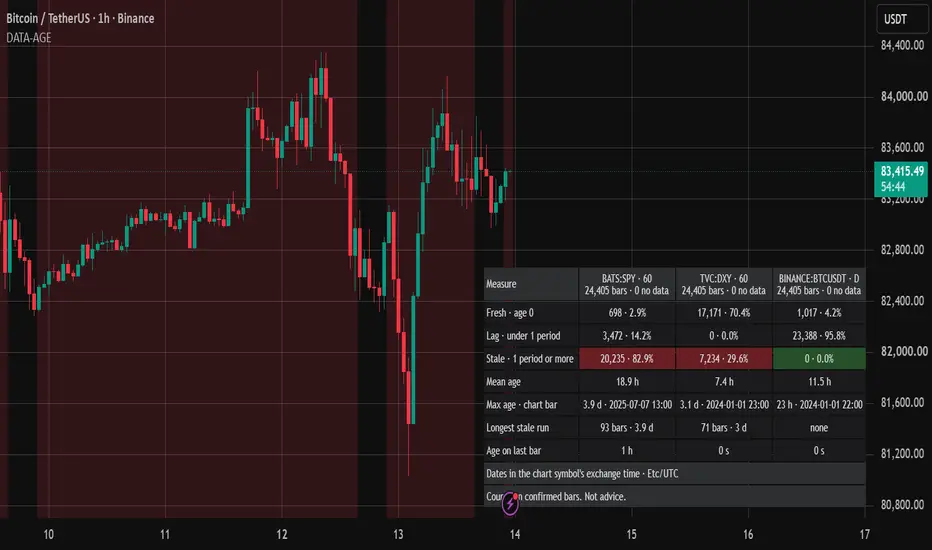
WHAT IT DOES
Data Age takes up to three symbol and timeframe pairs and requests each one with request.security at its defaults, gaps = barmerge.gaps_off and lookahead = barmerge.lookahead_off. With gaps off, when the requested symbol prints no bar for a chart bar, the function repeats the last value it has: market closed, weekend, holiday, illiquid symbol, or requested bars that do not line up with the chart's. The repeated number looks like any other, so a ratio, a spread or a correlation that mixes symbols can compute on old prices without any sign of it. The indicator measures, on every confirmed chart bar, how old the returned value is, and counts the result per request.
WHAT IS ORIGINAL HERE
It does not request a price. It requests the close time of the bar that request.security returns, so the value itself says which bar came back. That age falls into three classes. Fresh: the returned bar closed together with the chart bar. Lag: it closed less than one period earlier, as a higher timeframe does by design while its bar forms, or when the requested bars open at :30 against a chart whose bars open at :00. Stale: it closed one full period or more earlier, so the requested symbol printed no bar and the value was carried forward. Keeping lag and stale apart separates the delay a request has by construction from the one the gaps setting hides. The longest stale run shows how far a carried value reaches: a stock on a 24/7 chart stays stale from Friday's close to Monday's first in-session bar.
HOW THE AGE IS MEASURED
- One request.security call per request, at global scope, with gaps off, lookahead off and ignore_invalid_symbol on, requesting the bar's time_close.
- On every confirmed chart bar: no returned value counts as "no data"; otherwise the age is the chart bar's time_close minus the returned time_close, clamped at 0.
- The period is the longer of the requested and the chart timeframe, from timeframe.in_seconds; an empty timeframe means the chart's. Fresh is age 0, lag is above 0 and below one period, stale is one period or more.
- Per request: bars and share per class over the bars with data, mean age, maximum age with its chart bar, longest run of stale bars in bars and as a time span, and the age on the last confirmed bar.
- Counters move only on confirmed bars; the table is drawn on the last bar. No look-ahead, no other request.* call. Charts without time-based bars show a note instead. The shading of request 1's stale bars is drawn on every bar, including the realtime one.
HOW TO USE IT
1. Open a time-based chart. The defaults suit a 24/7 chart such as BINANCE:BTCUSDT on 1 hour: BATS:SPY on 60 shows stock hours against it, TVC:DXY on 60 FX hours, BINANCE:BTCUSDT on D an ordinary higher-timeframe request.
2. Replace the three requests with the symbols and timeframes your own script requests, on the chart it runs on.
3. Read the Stale row. Red means at least one confirmed bar received a carried value; the longest stale run says for how long and the shading shows where.
4. Control: request the chart symbol on the chart timeframe. Every bar must be fresh.
HOW TO READ THE TABLE
Header: symbol and timeframe of each request, bars with a value and bars with none.
Fresh, Lag, Stale: bars per class and their share of the bars with data. Stale is red with at least one stale bar, green with none.
Mean age and Max age: over the bars with data; the maximum names its chart bar, in the chart symbol's exchange time.
Longest stale run: consecutive stale bars, in bars and as a time span.
Age on last bar: the age on the last confirmed bar.
LIMITATIONS
- It shows what these requests return on this chart; it does not read the code of any other script.
- A plain symbol string requests its regular session; extended hours need a ticker built with ticker.new.
- On the realtime bar, request.security returns the requested series' forming bar, whose close lies in the future; the age is clamped at 0, so a bar fresh in realtime can read as lag once the chart is reloaded. The historical counts are the record.
- The period comes from timeframe.in_seconds, so a daily request counts 24 hours even for a symbol whose daily bar covers a shorter session.
- Ages are measured in whole bars from close times; nothing inside a bar is seen.
- Only loaded bars are counted, so history depth, symbol and timeframe change every number. Counts, not a trading rule. Not financial advice.
The chart shows BINANCE:BTCUSDT on the 1 hour timeframe with the default settings. The table is in the bottom right.
Data Age takes up to three symbol and timeframe pairs and requests each one with request.security at its defaults, gaps = barmerge.gaps_off and lookahead = barmerge.lookahead_off. With gaps off, when the requested symbol prints no bar for a chart bar, the function repeats the last value it has: market closed, weekend, holiday, illiquid symbol, or requested bars that do not line up with the chart's. The repeated number looks like any other, so a ratio, a spread or a correlation that mixes symbols can compute on old prices without any sign of it. The indicator measures, on every confirmed chart bar, how old the returned value is, and counts the result per request.
WHAT IS ORIGINAL HERE
It does not request a price. It requests the close time of the bar that request.security returns, so the value itself says which bar came back. That age falls into three classes. Fresh: the returned bar closed together with the chart bar. Lag: it closed less than one period earlier, as a higher timeframe does by design while its bar forms, or when the requested bars open at :30 against a chart whose bars open at :00. Stale: it closed one full period or more earlier, so the requested symbol printed no bar and the value was carried forward. Keeping lag and stale apart separates the delay a request has by construction from the one the gaps setting hides. The longest stale run shows how far a carried value reaches: a stock on a 24/7 chart stays stale from Friday's close to Monday's first in-session bar.
HOW THE AGE IS MEASURED
- One request.security call per request, at global scope, with gaps off, lookahead off and ignore_invalid_symbol on, requesting the bar's time_close.
- On every confirmed chart bar: no returned value counts as "no data"; otherwise the age is the chart bar's time_close minus the returned time_close, clamped at 0.
- The period is the longer of the requested and the chart timeframe, from timeframe.in_seconds; an empty timeframe means the chart's. Fresh is age 0, lag is above 0 and below one period, stale is one period or more.
- Per request: bars and share per class over the bars with data, mean age, maximum age with its chart bar, longest run of stale bars in bars and as a time span, and the age on the last confirmed bar.
- Counters move only on confirmed bars; the table is drawn on the last bar. No look-ahead, no other request.* call. Charts without time-based bars show a note instead. The shading of request 1's stale bars is drawn on every bar, including the realtime one.
HOW TO USE IT
1. Open a time-based chart. The defaults suit a 24/7 chart such as BINANCE:BTCUSDT on 1 hour: BATS:SPY on 60 shows stock hours against it, TVC:DXY on 60 FX hours, BINANCE:BTCUSDT on D an ordinary higher-timeframe request.
2. Replace the three requests with the symbols and timeframes your own script requests, on the chart it runs on.
3. Read the Stale row. Red means at least one confirmed bar received a carried value; the longest stale run says for how long and the shading shows where.
4. Control: request the chart symbol on the chart timeframe. Every bar must be fresh.
HOW TO READ THE TABLE
Header: symbol and timeframe of each request, bars with a value and bars with none.
Fresh, Lag, Stale: bars per class and their share of the bars with data. Stale is red with at least one stale bar, green with none.
Mean age and Max age: over the bars with data; the maximum names its chart bar, in the chart symbol's exchange time.
Longest stale run: consecutive stale bars, in bars and as a time span.
Age on last bar: the age on the last confirmed bar.
LIMITATIONS
- It shows what these requests return on this chart; it does not read the code of any other script.
- A plain symbol string requests its regular session; extended hours need a ticker built with ticker.new.
- On the realtime bar, request.security returns the requested series' forming bar, whose close lies in the future; the age is clamped at 0, so a bar fresh in realtime can read as lag once the chart is reloaded. The historical counts are the record.
- The period comes from timeframe.in_seconds, so a daily request counts 24 hours even for a symbol whose daily bar covers a shorter session.
- Ages are measured in whole bars from close times; nothing inside a bar is seen.
- Only loaded bars are counted, so history depth, symbol and timeframe change every number. Counts, not a trading rule. Not financial advice.
The chart shows BINANCE:BTCUSDT on the 1 hour timeframe with the default settings. The table is in the bottom right.

Custom Pine Script v6: indicators, strategies, alerts, with look-ahead and repaint checks. Backtest audits in Python.
Hire me on Upwork: upwork.com/freelancers/~01fa3c5136b53674c8
Proofs on GitHub: github.com/guillemustafa-ux
Hire me on Upwork: upwork.com/freelancers/~01fa3c5136b53674c8
Proofs on GitHub: github.com/guillemustafa-ux
Exención de responsabilidad
La información y las publicaciones no constituyen, ni deben considerarse como, asesoramiento o recomendaciones financieras, de inversión, de trading u otro tipo, proporcionadas o respaldadas por TradingView. Obtenga más información en Condiciones de uso.
Custom Pine Script v6: indicators, strategies, alerts, with look-ahead and repaint checks. Backtest audits in Python.
Hire me on Upwork: upwork.com/freelancers/~01fa3c5136b53674c8
Proofs on GitHub: github.com/guillemustafa-ux
Hire me on Upwork: upwork.com/freelancers/~01fa3c5136b53674c8
Proofs on GitHub: github.com/guillemustafa-ux
Exención de responsabilidad
La información y las publicaciones no constituyen, ni deben considerarse como, asesoramiento o recomendaciones financieras, de inversión, de trading u otro tipo, proporcionadas o respaldadas por TradingView. Obtenga más información en Condiciones de uso.