Actualizado
Auto Structural AVWAP [1D]
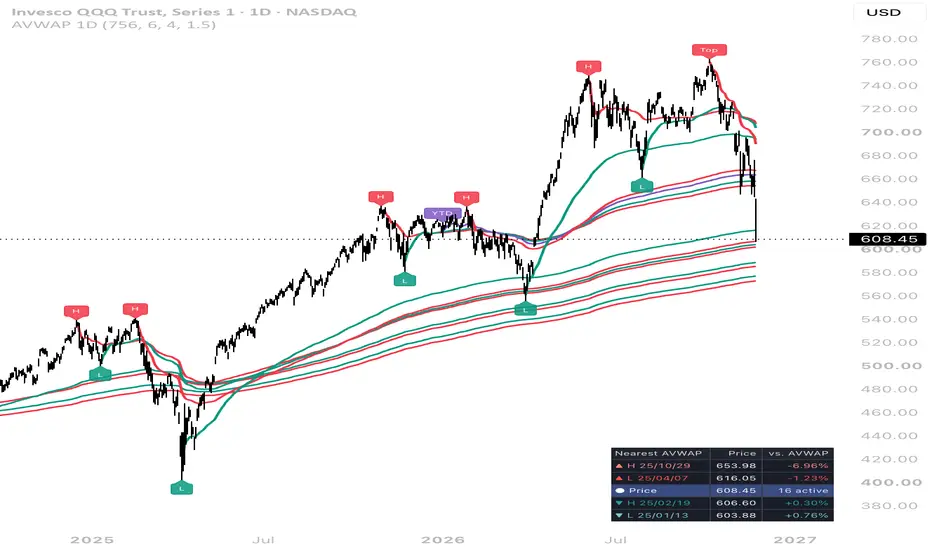
Overview
Auto Structural AVWAP [1D] automatically plots continuous Anchored VWAP (AVWAP) curves from major structural turning points — plus optional volume-climax and earnings-gap events — on Daily (1D) standard charts.
Inspired by Brian Shannon's Anchored VWAP methodology (Maximum Trading Gains With Anchored VWAP, CMT Association 2023), this indicator is built as a discretionary market-structure analysis tool. It replicates the clean, uninterrupted lines you would place manually with TradingView's native Anchored VWAP drawing tool, without the broken historical stubs or short-term pivot clutter common in plot()-based auto-VWAP scripts.
How It Works
1. Weekly Structural Pivots -> Exact Daily Extreme Anchoring
2. Validated Lookback High & Low (Top / Btm)
3. Calendar & IPO Anchors (YTD, QTD, MTD, IPO)
4. Optional Event Anchors — High-Volume Climax (Vol) & Earnings Gaps (Earn)
5. Performance, Visual Clarity & Alerts
How to Read & Use
Key Settings
Scope & Important Notes
Auto Structural AVWAP [1D] automatically plots continuous Anchored VWAP (AVWAP) curves from major structural turning points — plus optional volume-climax and earnings-gap events — on Daily (1D) standard charts.
Inspired by Brian Shannon's Anchored VWAP methodology (Maximum Trading Gains With Anchored VWAP, CMT Association 2023), this indicator is built as a discretionary market-structure analysis tool. It replicates the clean, uninterrupted lines you would place manually with TradingView's native Anchored VWAP drawing tool, without the broken historical stubs or short-term pivot clutter common in plot()-based auto-VWAP scripts.
How It Works
1. Weekly Structural Pivots -> Exact Daily Extreme Anchoring
- Most auto-AVWAP scripts run short daily pivots, causing minor 3-5 day pullbacks to overwrite major peaks and troughs.
- Instead, this script groups daily bars directly into true calendar weeks (1W) without request.security(), identifies major multi-week structural highs and lows (Left Weeks / Right Weeks, excluding incomplete current weeks), validates unbroken post-pivot reversal prominence against a Wilder 14-week ATR (with optional both-side range filtering), and anchors each AVWAP to the exact daily high/low candle inside that pivot week.
- Because each curve accumulates daily HLC3 (default) directly from its exact origin bar, values align 1:1 with TradingView's native Anchored VWAP drawing tool.
2. Validated Lookback High & Low (Top / Btm)
- Anchors the true lookback period highest high and lowest low once validated as genuine extremes (omitted if exceeded just prior to the lookback left edge, avoiding artificial cutoff artifacts).
3. Calendar & IPO Anchors (YTD, QTD, MTD, IPO)
- YTD is enabled by default alongside structural swings for a clean institutional baseline; QTD, MTD, and IPO (for symbols within 3,500 trading days / ~14 years) can be toggled on independently.
- Reverse-scans the buffer so active calendar anchors persist even under shorter lookback windows.
4. Optional Event Anchors — High-Volume Climax (Vol) & Earnings Gaps (Earn)
- Both are disabled by default to keep the default chart uncluttered and focused on pure structural swings, and can be enabled independently in Settings whenever you want event-driven levels:
- High-Volume Climax (Vol) — works on Stocks, Futures & Crypto. Compares daily volume against the preceding 20-day average (ta.sma(volume, 20)[1]), filters out low True Range mechanical spikes (0.75 x Daily ATR(14), including overnight gaps), and merges nearby spike days around the single highest-volume climax bar.
- Earnings Gap (Earn) — Stocks & ADRs. Evaluates opening gaps on both the EPS report date (T) and the next trading day (T+1) to handle BMO and AMC releases cleanly, preserves all qualifying quarters inside the lookback window, and displays signed gap direction (+/-%) in hover tooltips.
5. Performance, Visual Clarity & Alerts
- Confirmed-History Caching: Builds polylines once on confirmed history and updates live realtime ticks in O(M) time via a single-bar tail line per anchor.
- Priority-Preserving Cap: If extreme settings exceed TradingView's 100-polyline cap, major structural anchors (Top/Btm > IPO > Calendar > Weekly Swings > Recent > Earnings > Volume) are preserved first.
- Nearest AVWAP Summary Table: Configurable corner table (Bottom Right by default) showing the 2 closest resistance AVWAPs above price and 2 closest support AVWAPs below price with real-time % vs. AVWAP distance and yy/MM/dd anchor dates.
- Data Window & Alerts: Exposes Nearest Resistance AVWAP and Nearest Support AVWAP via display.data_window plots so you can inspect exact levels or set price-crossing alerts without cluttering the chart or status line.
- Hover Tooltips: Hover any anchor tag to inspect anchor date, bars elapsed, current AVWAP value, % vs. AVWAP, buyer/seller control, signed earnings gap, and volume multiple.
How to Read & Use
- Buyers vs. Sellers in Control: Price trading above an AVWAP indicates the average participant since that turning point is in profit (buyers in control — potential support on pullbacks); price below indicates trapped supply overhead (sellers in control — potential resistance on rallies).
- Confluence Zones: Areas where multiple structural AVWAPs (e.g., a prior Swing High, Swing Low, and YTD) converge tightly often act as high-probability inflection zones.
- Pinch / Regime Shift: Watching price compress between an overhead Swing High AVWAP (red) and a rising Swing Low AVWAP (green) highlights key volatility contraction and breakout decision points.
- Adapting to Market Regimes: Keep Require Both-Side Reversal enabled to filter out mid-range chop; disable it if you also want anchors on breakout bases emerging from flat consolidations.
Key Settings
- Lookback Window (Trading Days): Default 756 (~3 years). Adjust from 30 to 3,000.
- Pivot Left / Right Weeks & Min Weekly ATR: Increase for macro-only turning points; decrease for tighter intermediate swings.
- Show Recent Unconfirmed Swings (Dashed): Optional helper to preview prominent swings inside the unconfirmed right-edge window.
- Event Anchors (Optional): Independently enable High-Volume Climax and/or Earnings Gap AVWAPs.
- Line Color Mode & Display: By Role (default: Red = Highs, Green = Lows, Orange = Events, Purple = Calendar/IPO) or Single Color (classic uniform blue lines), configurable Summary Table Position, and optional Right-Edge Labels with auto-staggered dotted connectors.
Scope & Important Notes
- Designed specifically for Daily (1D) standard candle/bar charts as a visual market-structure analysis tool (not an automated trading signal or backtesting strategy).
- Weekly pivots confirm after Right Weeks completed calendar weeks, and request.earnings() timing depends on exchange/provider coverage (best suited for US equities & ADRs).
Notas de prensa
v1.1 — Confirmation Transparency, Lookback-Independent ATR & Same-Anchor Crossing Alerts- True Same-Anchor Crossing Alerts: Added dedicated alertcondition() triggers (AVWAP Cross Up / Down / Any) and bar-close alert() messages that compare prior-day and current-day closes against the exact same pre-existing anchor (anchors already visible on the prior bar). The Data Window Nearest Resistance / Support AVWAP plots are now clearly scoped as readouts only, since dynamically switching nearest levels cannot fire reliable crossing alerts.
- First Visible Date in Tooltips: Every anchor tooltip now displays both Anchor Date and First Visible date so you can verify exactly when a weekly swing pivot first satisfied both the minimum Right Weeks hold and the Weekly ATR prominence threshold.
- Lookback-Independent Weekly ATR: Weekly Wilder 14-week ATR is now accumulated globally from bar 0 without request.security(), so changing Lookback Window or Pivot Left Weeks no longer shifts ATR initialization or flips borderline pivot eligibility.
- Exchange-Agnostic Weekly Close Detection: Replaced hardcoded weekday checks (Friday/Saturday/Sunday) with time_close("1W")-based week completion (with a 12-hour tolerance for holiday early closes such as Black Friday, while full-day Friday holidays resolve cleanly at the next week's first trading day).
- Clarified Description Language: Refined confluence phrasing to reflect objective observation ("areas where several structural AVWAPs converge") rather than probabilistic claims.

Exención de responsabilidad
La información y las publicaciones no constituyen, ni deben considerarse como, asesoramiento o recomendaciones financieras, de inversión, de trading u otro tipo, proporcionadas o respaldadas por TradingView. Obtenga más información en Condiciones de uso.
Exención de responsabilidad
La información y las publicaciones no constituyen, ni deben considerarse como, asesoramiento o recomendaciones financieras, de inversión, de trading u otro tipo, proporcionadas o respaldadas por TradingView. Obtenga más información en Condiciones de uso.