Actualizado
Universal Trade Manager Template ATR Trailing SL TP with Alerts
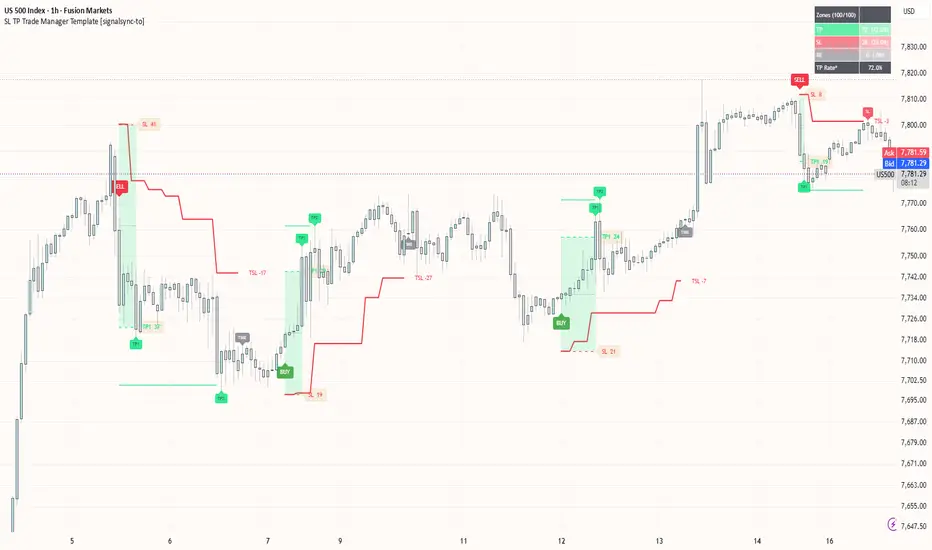
A modular, signal-agnostic trade management engine. This template does not generate trade entries itself. Instead, it takes a Long/Short trigger from any compatible TradingView indicator and handles everything downstream — initial stop-loss placement, ATR-based trailing, TP1/TP2 tracking, trade timeouts, and webhook-ready JSON alerts for automated execution.
It is designed as a reusable management layer: connect the same tested trade-management logic to different signal-generating indicators without duplicating the underlying code.
HOW IT WORKS
Connect any signal source Point the Long Trigger and Short Trigger inputs to the corresponding alert conditions from your signal indicator.
Controlled entry timing By default, the template applies a one-bar offset: a signal confirmed on bar N triggers the entry on the open of bar N+1. This follows standard non-repainting execution. The offset can be disabled when the connected indicator generates its trigger after bar close.
Flexible initial stop-loss Set the initial SL using an ATR multiple, or pull it from an external structural level such as a swing high/low or FVG edge. An optional opposite-level input can widen the stop to a structural floor/ceiling, but will never tighten it.
A third Initial SL Mode, Last Pivot High/Low, is also available: instead of only ATR-based or external-source stops, the stop can be set to the highest high (shorts) / lowest low (longs) over a lookback window. At 1x multiplier it sits exactly on that level, with the multiplier available to tighten or widen from there. Falls back to the ATR stop if the lookback window isn't fully available yet.
Two trailing modes Choose between:
Continuous: re-evaluates the trailing stop on every eligible bar after the configured delay.
Stepped: updates only at fixed bar intervals, useful for reducing SL-update noise in choppy markets. Stepped trailing now has its own configurable alert, with a message ready to use with platforms that can consume webhook signals to execute orders on your broker or prop account.
VISUALS
Entry Zone Displays the initial SL/TP1 range at the moment of entry. The zone remains frozen even when the trailing stop subsequently moves.
Live trade status Entry zones are color-coded:
Zone Stats Table Tracks the results of the most recent entry zones, including TP, SL and neutral/BE outcomes, together with the hit rate. This provides a quick view of how the connected signal is performing without relying on the Strategy Tester.
Live management levels Separate trailing SL, TP1 and TP2 lines are plotted on the chart, with pip-distance labels for both the entry zone and current trailing stop, plus a display label for the trailing stop itself.
ALERTS & AUTOMATION
The template provides seven alert conditions:
Each alert includes a pre-built JSON payload with TradingView placeholders, capturing the relevant values at the exact moment the alert fires.
The payload is designed as a starting point for integration with platforms which can consume webhook signals to execute orders on your broker or prop account. Fields such as traderIdKey, tradeSide, relativeTakeProfit, and relativeStopLoss can be adapted to match the configuration and credentials required by your chosen platform.
This allows the trade-management layer to send automated execution instructions directly from TradingView to your broker or prop firm account, without any manual order entry.
NON-REPAINTING DESIGN
All internal trade-management logic uses confirmed-bar data and proper offsetting.
There is no lookahead in the entry/exit logic, and the alert payload captures values when the event actually occurs rather than relying on values that may change later as the chart updates.
IMPORTANT
This is a trade-management layer, not a signal generator.
It will not produce entries or plot trade-management levels until it is connected to a compatible indicator source through input.source().
For educational and informational purposes only. This template is not financial advice. Test thoroughly in TradingView and on a demo account before connecting it to any live automated execution system.
It is designed as a reusable management layer: connect the same tested trade-management logic to different signal-generating indicators without duplicating the underlying code.
HOW IT WORKS
Connect any signal source Point the Long Trigger and Short Trigger inputs to the corresponding alert conditions from your signal indicator.
Controlled entry timing By default, the template applies a one-bar offset: a signal confirmed on bar N triggers the entry on the open of bar N+1. This follows standard non-repainting execution. The offset can be disabled when the connected indicator generates its trigger after bar close.
Flexible initial stop-loss Set the initial SL using an ATR multiple, or pull it from an external structural level such as a swing high/low or FVG edge. An optional opposite-level input can widen the stop to a structural floor/ceiling, but will never tighten it.
A third Initial SL Mode, Last Pivot High/Low, is also available: instead of only ATR-based or external-source stops, the stop can be set to the highest high (shorts) / lowest low (longs) over a lookback window. At 1x multiplier it sits exactly on that level, with the multiplier available to tighten or widen from there. Falls back to the ATR stop if the lookback window isn't fully available yet.
Two trailing modes Choose between:
Continuous: re-evaluates the trailing stop on every eligible bar after the configured delay.
Stepped: updates only at fixed bar intervals, useful for reducing SL-update noise in choppy markets. Stepped trailing now has its own configurable alert, with a message ready to use with platforms that can consume webhook signals to execute orders on your broker or prop account.
VISUALS
Entry Zone Displays the initial SL/TP1 range at the moment of entry. The zone remains frozen even when the trailing stop subsequently moves.
Live trade status Entry zones are color-coded:
- Gray — trade still open or closed BE
- Green — TP1 reached
- Red — initial SL breached
Zone Stats Table Tracks the results of the most recent entry zones, including TP, SL and neutral/BE outcomes, together with the hit rate. This provides a quick view of how the connected signal is performing without relying on the Strategy Tester.
Live management levels Separate trailing SL, TP1 and TP2 lines are plotted on the chart, with pip-distance labels for both the entry zone and current trailing stop, plus a display label for the trailing stop itself.
ALERTS & AUTOMATION
The template provides seven alert conditions:
- Long Entry
- Short Entry
- Stop Loss Update
- Stop Loss Hit
- TP1 Hit
- TP2 Hit
- Timeout Exit
Each alert includes a pre-built JSON payload with TradingView placeholders, capturing the relevant values at the exact moment the alert fires.
The payload is designed as a starting point for integration with platforms which can consume webhook signals to execute orders on your broker or prop account. Fields such as traderIdKey, tradeSide, relativeTakeProfit, and relativeStopLoss can be adapted to match the configuration and credentials required by your chosen platform.
This allows the trade-management layer to send automated execution instructions directly from TradingView to your broker or prop firm account, without any manual order entry.
NON-REPAINTING DESIGN
All internal trade-management logic uses confirmed-bar data and proper offsetting.
There is no lookahead in the entry/exit logic, and the alert payload captures values when the event actually occurs rather than relying on values that may change later as the chart updates.
IMPORTANT
This is a trade-management layer, not a signal generator.
It will not produce entries or plot trade-management levels until it is connected to a compatible indicator source through input.source().
For educational and informational purposes only. This template is not financial advice. Test thoroughly in TradingView and on a demo account before connecting it to any live automated execution system.
Notas de prensa
The script now supports pyramiding, allowing additional entries while a trade is already open. Without pyramiding, new trade entries are blocked until the current trade is closed - either by hitting SL or by triggering the configured Auto Flatten Stale Trade after the specified number of bars.The script also now lets you choose whether to flatten the trade when TP1 or TP2 is reached.
BTW, I also found that Auto Flatten does improve the win rate. In my testing, the best results came with a setting between 18 and 28 bars.

Exención de responsabilidad
La información y las publicaciones no constituyen, ni deben considerarse como, asesoramiento o recomendaciones financieras, de inversión, de trading u otro tipo, proporcionadas o respaldadas por TradingView. Obtenga más información en Condiciones de uso.
Exención de responsabilidad
La información y las publicaciones no constituyen, ni deben considerarse como, asesoramiento o recomendaciones financieras, de inversión, de trading u otro tipo, proporcionadas o respaldadas por TradingView. Obtenga más información en Condiciones de uso.