Risk & Reward Position Planner
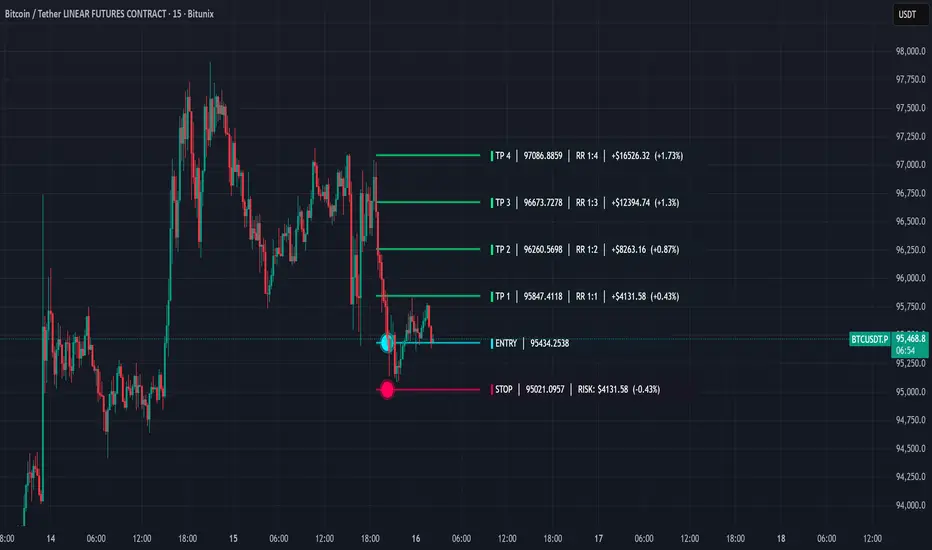
Description
This script is a trade architecture tool designed to help traders calculate position sizes and visualize risk-reward ratios dynamically on the chart. It focuses on functional precision and clean aesthetics, offering two distinct visual styles: "Cyber" for modern high-tech charts and "Classic" for a traditional look.
Key Features
Interactive Setup: Upon adding the script or resetting, it prompts you to click directly on the chart to set your Entry and Stop Loss levels.
Dynamic Position Sizing: Calculates the total risk in currency (USD) based on your custom unit size.
Multi-Target Planning: Visualizes four customizable Take Profit targets based on specific RR ratios.
Cyber UI Aesthetics: Full control over colors, neon glow effects, and horizontal alignment to fit any chart layout.
Comprehensive Data: Displays price, percentage distance, currency risk, and RR ratios at a single glance.
User Guide (How to use)
To ensure the most efficient workflow, here are the essential steps for operating the tool:
Setting a New Trade (Resetting)
If you change your symbol or want to plan a completely new trade, you can clear the current setup and trigger the interactive selection again:
Right-click on the indicator in the chart OR click the three dots (...) next to the indicator name in the legend.
Select "Reset Points".
The indicator will prompt you to click two new points on the chart: first for the Entry, then for the Stop Loss.
Moving Entry and Stop Loss
Move the mouse over the line of the Entry or the StopLoss and grab the grip of the line to move it up or down. Drop it to the price you want to set.
This script is a trade architecture tool designed to help traders calculate position sizes and visualize risk-reward ratios dynamically on the chart. It focuses on functional precision and clean aesthetics, offering two distinct visual styles: "Cyber" for modern high-tech charts and "Classic" for a traditional look.
Key Features
Interactive Setup: Upon adding the script or resetting, it prompts you to click directly on the chart to set your Entry and Stop Loss levels.
Dynamic Position Sizing: Calculates the total risk in currency (USD) based on your custom unit size.
Multi-Target Planning: Visualizes four customizable Take Profit targets based on specific RR ratios.
Cyber UI Aesthetics: Full control over colors, neon glow effects, and horizontal alignment to fit any chart layout.
Comprehensive Data: Displays price, percentage distance, currency risk, and RR ratios at a single glance.
User Guide (How to use)
To ensure the most efficient workflow, here are the essential steps for operating the tool:
Setting a New Trade (Resetting)
If you change your symbol or want to plan a completely new trade, you can clear the current setup and trigger the interactive selection again:
Right-click on the indicator in the chart OR click the three dots (...) next to the indicator name in the legend.
Select "Reset Points".
The indicator will prompt you to click two new points on the chart: first for the Entry, then for the Stop Loss.
Moving Entry and Stop Loss
Move the mouse over the line of the Entry or the StopLoss and grab the grip of the line to move it up or down. Drop it to the price you want to set.

Exención de responsabilidad
La información y las publicaciones no constituyen, ni deben considerarse como, asesoramiento o recomendaciones financieras, de inversión, de trading u otro tipo, proporcionadas o respaldadas por TradingView. Obtenga más información en Condiciones de uso.
Exención de responsabilidad
La información y las publicaciones no constituyen, ni deben considerarse como, asesoramiento o recomendaciones financieras, de inversión, de trading u otro tipo, proporcionadas o respaldadas por TradingView. Obtenga más información en Condiciones de uso.