
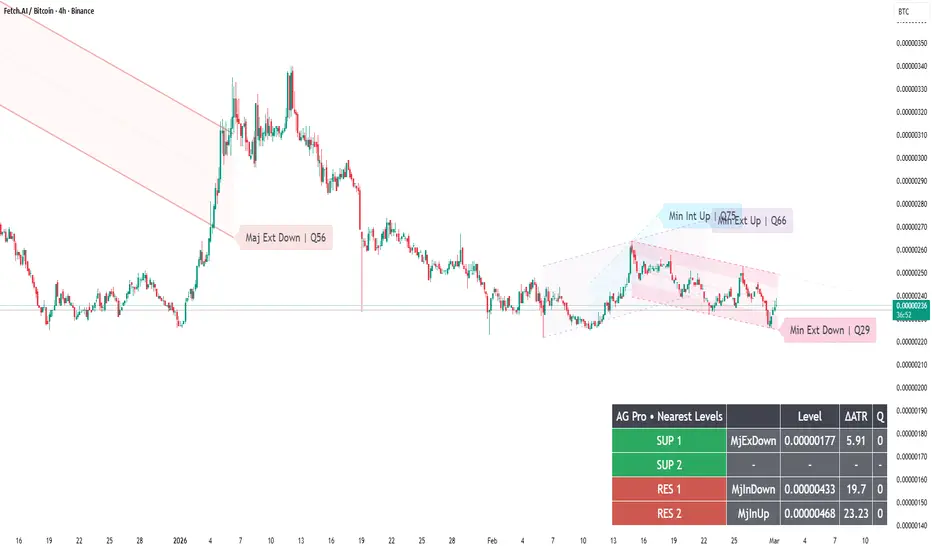
Compact Labels & Major‑Only Text — How to Make Your Structure Charts Shareable and Usable
A structure tool should work in two environments:
- live execution (where you need clarity),
- and sharing/review (where you need readable explanation).
Dynamic Channels Elite provides label controls that help both:
- Compact Labels (badge style)
- Label font sizing
- Major-only labels (reduce noise)
- Optional panel summaries (nearest levels)
A practical “shareable chart” recipe:
1) Visual Preset = Clean
2) Compact Labels = ON
3) Labels = Major only (or disable minors)
4) Projection = OFF (reduces narrative bias for readers)
5) Broken channels = faded or auto-hidden (keeps chart clean)
Why this matters:
If your labels overlap, your audience will not understand the structure.
If your labels are too big, you lose price visibility.
A professional structure chart reads like a map:
primary corridors are obvious, secondary rails are subtle.
Execution variant:
- Keep labels smaller
- Keep only what you actively use
- Prefer fewer, higher-quality channels (use Q and de‑clutter)
Limitations:
Label readability depends on zoom and timeframe. You may need to adjust font size when switching between intraday and higher TF charts.
Risk disclosure:
Educational content only. Not financial advice.
A structure tool should work in two environments:
- live execution (where you need clarity),
- and sharing/review (where you need readable explanation).
Dynamic Channels Elite provides label controls that help both:
- Compact Labels (badge style)
- Label font sizing
- Major-only labels (reduce noise)
- Optional panel summaries (nearest levels)
A practical “shareable chart” recipe:
1) Visual Preset = Clean
2) Compact Labels = ON
3) Labels = Major only (or disable minors)
4) Projection = OFF (reduces narrative bias for readers)
5) Broken channels = faded or auto-hidden (keeps chart clean)
Why this matters:
If your labels overlap, your audience will not understand the structure.
If your labels are too big, you lose price visibility.
A professional structure chart reads like a map:
primary corridors are obvious, secondary rails are subtle.
Execution variant:
- Keep labels smaller
- Keep only what you actively use
- Prefer fewer, higher-quality channels (use Q and de‑clutter)
Limitations:
Label readability depends on zoom and timeframe. You may need to adjust font size when switching between intraday and higher TF charts.
Risk disclosure:
Educational content only. Not financial advice.

🧠 Trading Suite - Flagship Workflow
tradingview.com/script/XJmX3p98-Trading-Suite-AGPro-Series/
🔷 Crypto Setup Planner - Multi-Symbol Planner
tradingview.com/script/LgVRo7Ql-Crypto-Setup-Planner-AGPro-Series/
tradingview.com/script/XJmX3p98-Trading-Suite-AGPro-Series/
🔷 Crypto Setup Planner - Multi-Symbol Planner
tradingview.com/script/LgVRo7Ql-Crypto-Setup-Planner-AGPro-Series/
Clause de non-responsabilité
Les informations et publications ne sont pas destinées à être, et ne constituent pas, des conseils ou recommandations financiers, d'investissement, de trading ou autres fournis ou approuvés par TradingView. Pour en savoir plus, consultez les Conditions d'utilisation.
🧠 Trading Suite - Flagship Workflow
tradingview.com/script/XJmX3p98-Trading-Suite-AGPro-Series/
🔷 Crypto Setup Planner - Multi-Symbol Planner
tradingview.com/script/LgVRo7Ql-Crypto-Setup-Planner-AGPro-Series/
tradingview.com/script/XJmX3p98-Trading-Suite-AGPro-Series/
🔷 Crypto Setup Planner - Multi-Symbol Planner
tradingview.com/script/LgVRo7Ql-Crypto-Setup-Planner-AGPro-Series/
Clause de non-responsabilité
Les informations et publications ne sont pas destinées à être, et ne constituent pas, des conseils ou recommandations financiers, d'investissement, de trading ou autres fournis ou approuvés par TradingView. Pour en savoir plus, consultez les Conditions d'utilisation.