Battleship game
🎮 Game Objective
Your mission is to find and sink the entire hidden enemy fleet before you run out of ammunition. Beware of hidden naval mines!
⚙️ How to Play (Step-by-Step)
1. Open the Command Center
Hover over the indicator name on your TradingView chart and click the Settings (gear) icon to open the inputs menu.
2. Fire Your Weapons
Look for the "Targets" input box.
To shoot, type the coordinates of the grid where you think a ship is hiding.
The grid uses Letters (A-J) for columns and Numbers (0-9) for rows.
Example: Type A0 to fire at the top-left corner.
To fire multiple shots, separate each coordinate with a space: A0 B5 C9 J2.
3. Check the Results
Click "OK" or click outside the settings box to apply your shots. The table on your chart will update to show whether you hit a ship, hit a mine, or missed into the open ocean.
📜 Game Rules & Mechanics
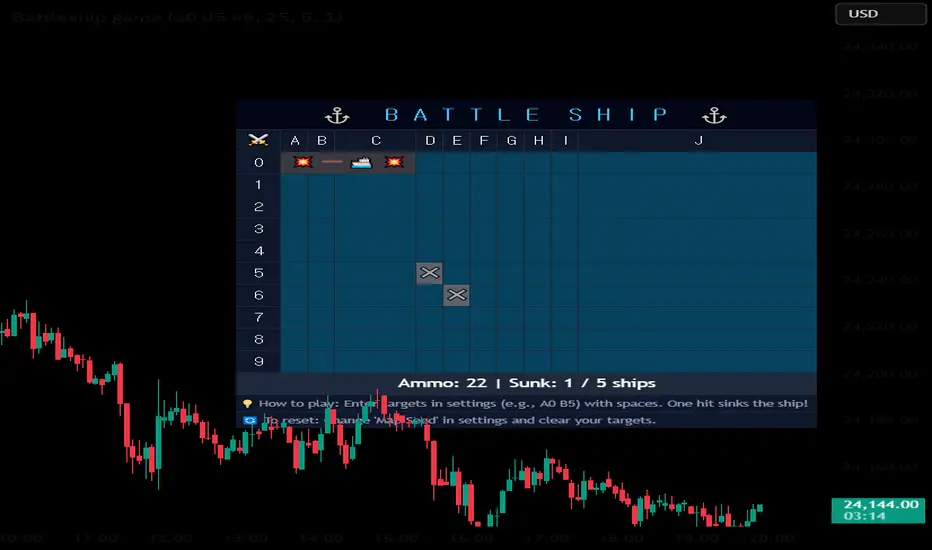
One-Hit Kills: You only need to hit one section of an enemy ship to sink the entire vessel.
Ammunition: You start with a limited amount of ammo (default is 25). Every coordinate you enter costs 1 ammo.
Naval Mines: There are 7 hidden mines on the board. If you hit a mine, it will explode and destroy 2 extra ammo from your reserves!
Victory: Sink all enemy ships before your ammo counter hits zero.
Defeat: Run out of ammo before the fleet is destroyed.
🗺️ Understanding the Radar (Map Legend)
💥 (Red Background): Direct hit! You struck and sank an enemy ship.
☠️ (Black Background): Mine detonated! You hit a mine and lost extra ammo.
✖️ (Gray Background): Miss! Your shot landed in empty water.
💣 (Dark Blue Background): Unexploded mine (These are only revealed when the game is over).
🚢 (Gray/Red Ships): The actual layout of the ships. (These are only revealed when a ship is sunk, or when the game ends).
🔄 How to Start a New Game
When the game is over (Victory or Defeat), you can easily reset the board for a new round:
Open the Indicator Settings again.
Delete everything in your "Targets" input box.
Scroll down to "Map Seed" and change the number to anything else (e.g., change 1 to 2 or 99).
The ships and mines will be completely randomized in a new layout, and your ammo will be refilled!
Your mission is to find and sink the entire hidden enemy fleet before you run out of ammunition. Beware of hidden naval mines!
⚙️ How to Play (Step-by-Step)
1. Open the Command Center
Hover over the indicator name on your TradingView chart and click the Settings (gear) icon to open the inputs menu.
2. Fire Your Weapons
Look for the "Targets" input box.
To shoot, type the coordinates of the grid where you think a ship is hiding.
The grid uses Letters (A-J) for columns and Numbers (0-9) for rows.
Example: Type A0 to fire at the top-left corner.
To fire multiple shots, separate each coordinate with a space: A0 B5 C9 J2.
3. Check the Results
Click "OK" or click outside the settings box to apply your shots. The table on your chart will update to show whether you hit a ship, hit a mine, or missed into the open ocean.
📜 Game Rules & Mechanics
One-Hit Kills: You only need to hit one section of an enemy ship to sink the entire vessel.
Ammunition: You start with a limited amount of ammo (default is 25). Every coordinate you enter costs 1 ammo.
Naval Mines: There are 7 hidden mines on the board. If you hit a mine, it will explode and destroy 2 extra ammo from your reserves!
Victory: Sink all enemy ships before your ammo counter hits zero.
Defeat: Run out of ammo before the fleet is destroyed.
🗺️ Understanding the Radar (Map Legend)
💥 (Red Background): Direct hit! You struck and sank an enemy ship.
☠️ (Black Background): Mine detonated! You hit a mine and lost extra ammo.
✖️ (Gray Background): Miss! Your shot landed in empty water.
💣 (Dark Blue Background): Unexploded mine (These are only revealed when the game is over).
🚢 (Gray/Red Ships): The actual layout of the ships. (These are only revealed when a ship is sunk, or when the game ends).
🔄 How to Start a New Game
When the game is over (Victory or Defeat), you can easily reset the board for a new round:
Open the Indicator Settings again.
Delete everything in your "Targets" input box.
Scroll down to "Map Seed" and change the number to anything else (e.g., change 1 to 2 or 99).
The ships and mines will be completely randomized in a new layout, and your ammo will be refilled!

Clause de non-responsabilité
Les informations et publications ne sont pas destinées à être, et ne constituent pas, des conseils ou recommandations financiers, d'investissement, de trading ou autres fournis ou approuvés par TradingView. Pour en savoir plus, consultez les Conditions d'utilisation.
Clause de non-responsabilité
Les informations et publications ne sont pas destinées à être, et ne constituent pas, des conseils ou recommandations financiers, d'investissement, de trading ou autres fournis ou approuvés par TradingView. Pour en savoir plus, consultez les Conditions d'utilisation.