OPEN-SOURCE SCRIPT
Mis à jour Decision zone V2
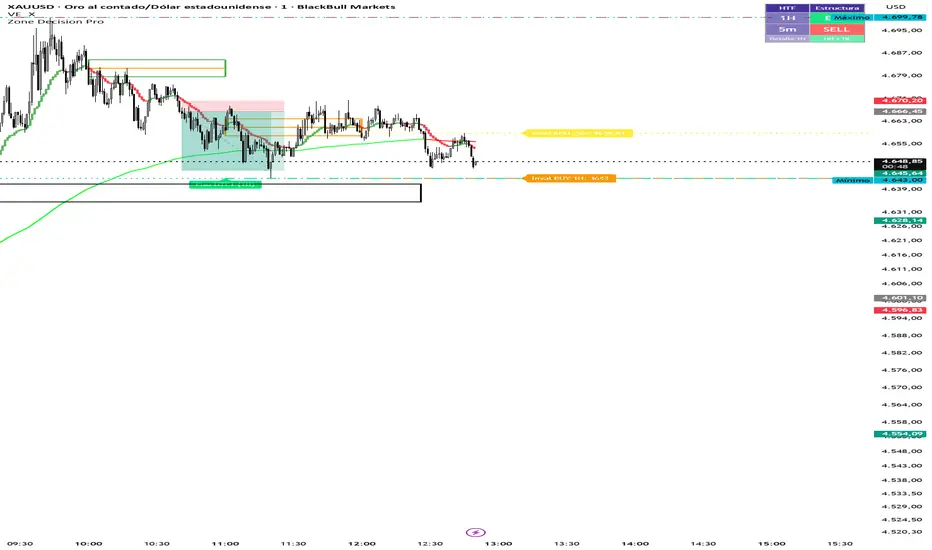
Multi Cuadros PRO + HTF Levels is a trading indicator that plots configurable time-based boxes with midlines, along with the latest higher timeframe (HTF) support and resistance levels using pivot detection. It is fully customizable in size, style, and timing, designed to identify key market zones efficiently
Notes de version
Multi Cuadros PRO + HTF Levels is a trading indicator that plots configurable time-based boxes with midlines, along with the latest higher timeframe (HTF) support and resistance levels using pivot detection. It is fully customizable in size, style, and timing, designed to identify key market zones efficientlyNotes de version
Multi Cuadros PRO + HTF Levels is a trading indicator that plots configurable time-based boxes with midlines, along with the latest higher timeframe (HTF) support and resistance levels using pivot detection. It is fully customizable in size, style, and timing, designed to identify key market zones efficiently.Notes de version
Evaluates market structure (HH/HL vs LH/LL) across two configurable timeframes and displays a BUY/SELL/NEUTRAL panel in the corner of the chart. Includes invalidation lines.Notes de version
Zone Decision Pro — Update Summary (April 2026)1. HTF Pisos y Techos — Group Renaming (Modules 2 & 3)
Groups renamed to ━━ HTF 1 — Pisos y Techos and ━━ HTF 2 — Pisos y Techos for clarity.
Settings compacted using inline rows: timeframe + ON toggle on one row, pivot bars + visibility on the next, colors + style on the last.
Bug fix: added h2Level / l2Level tracking to Module 3 so lines correctly disappear when price touches them.
2. HTF Structure Bias — Settings Compacted (Module 4)
Former separate groups gBiasPanel, gInval1, gInval2 eliminated.
━━ Bias — Configuración now holds the direction mode and the three BUY / SELL / NEUTRAL colors in a single inline row.
━━ Bias HTF 1 and ━━ Bias HTF 2 each consolidate their timeframe, pivot bars, invalidation toggle, color, weight, and style into one single row per group.
HTF 2 includes its own ON/OFF toggle at the start of the row.
3. Time-Based Alerts & Icons Per Box (Module 1)
Each of the 8 boxes received a new inline row (c1d … c8d) with three fields:
Script open-source
Dans l'esprit TradingView, le créateur de ce script l'a rendu open source afin que les traders puissent examiner et vérifier ses fonctionnalités. Bravo à l'auteur! Bien que vous puissiez l'utiliser gratuitement, n'oubliez pas que la republication du code est soumise à nos Règles.

Clause de non-responsabilité
Les informations et publications ne sont pas destinées à être, et ne constituent pas, des conseils ou recommandations financiers, d'investissement, de trading ou autres fournis ou approuvés par TradingView. Pour en savoir plus, consultez les Conditions d'utilisation.
Script open-source
Dans l'esprit TradingView, le créateur de ce script l'a rendu open source afin que les traders puissent examiner et vérifier ses fonctionnalités. Bravo à l'auteur! Bien que vous puissiez l'utiliser gratuitement, n'oubliez pas que la republication du code est soumise à nos Règles.
Clause de non-responsabilité
Les informations et publications ne sont pas destinées à être, et ne constituent pas, des conseils ou recommandations financiers, d'investissement, de trading ou autres fournis ou approuvés par TradingView. Pour en savoir plus, consultez les Conditions d'utilisation.