Adaptive Trend Filter [QuantAlgo]
🟢 Overview
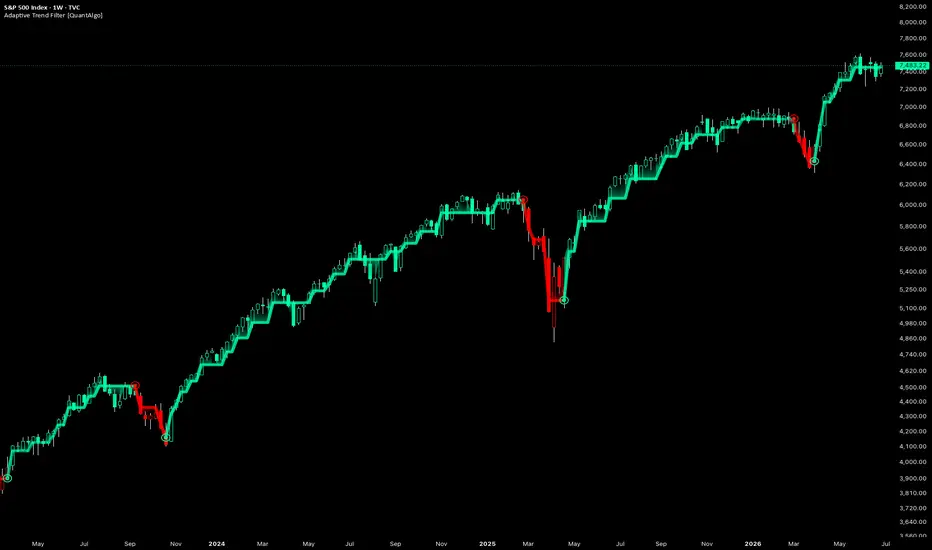
The Adaptive Trend Filter identifies sustained directional shifts by holding its trend read steady until price clears a volatility-scaled reversal barrier, but unlike a fixed-threshold system that barrier is not constant. It reads how strongly the market is trending and reshapes itself in response, widening through directionless conditions to absorb chop and tightening back down when a real trend is underway. The trend line follows price directly with no moving average in the path, so there is no smoothing lag between a confirmed shift and what appears on the chart. Each state change therefore reflects a genuine regime transition rather than a temporary fluctuation, and the indicator carries across instruments and timeframes.

🟢 How It Works
The filter is built around adaptive hysteresis, the idea that a trend should not flip on marginal moves but only once price has displaced far enough to overcome a defined barrier. What sets it apart is that the barrier is conditioned on the prevailing regime rather than held fixed, so the same tool behaves differently in a trend than it does in a range.
Volatility is measured as the rolling standard deviation of the selected source over a configurable lookback window, then scaled by the Volatility Coefficient to determine the base barrier width.
A trend-strength gauge then adjusts this barrier dynamically. When directional conviction falls below the specified threshold, the market is treated as ranging and the barrier widens in proportion to the weakness of the trend, increasing resistance to whipsaws. As conviction recovers to or exceeds the threshold, including during a sharp but genuine trend reversal, the barrier contracts back to its base width, allowing the indicator to respond quickly once a new trend is confirmed.

🟢 How to Use It
▶ Bullish Trend (Long Colour): When the trend line flips to the bullish colour (green by default), the filter has confirmed an upward regime and holds it until price clears the reversal barrier to the downside. This is the environment for long setups or holding existing longs, and a marker prints where the trend flipped up.
▶ Bearish Trend (Short Colour): When the line flips to the bearish colour (red by default), price has broken through the reversal barrier to the downside and the filter is in a confirmed downward regime. This favours short positioning or trimming long risk, with a marker where the trend flipped down.

🟢 Features
▶ Preconfigured Presets: Three parameter sets tailor the filter to different horizons, and every input stays editable on top of them. Default balances noise filtering and responsiveness for swing trading on 4H and daily charts. Fast Response tightens the coefficient, shortens the volatility window and eases the conditioning for intraday work on 5min to 1H charts, catching turns earlier at the cost of more frequent flips. Smooth Trend widens the coefficient, extends the window and strengthens the conditioning for position trading on daily and weekly charts, confirming only sustained shifts.

▶ Built-in Alerts: Three conditions support hands-off monitoring. Bullish Trend Signal fires on a confirmed upward state, Bearish Trend Signal on a confirmed downward state, and Any Trend Change folds both into a single alert for traders who want every regime transition through one setup.

▶ Visual Customisation: Six colour presets (Classic, Aqua, Cosmic, Cyber, Neon and Custom) coordinate the trend line, its gradient fill and its reversal markers to any chart theme. An optional fill spans the gap between line and price to show how far price has extended, optional bar colouring tints price bars with the active trend colour, and optional background tinting shades the full panel.

🟢 Pro Tips for Trading and Investing
▶ Confirm flips against higher-timeframe structure before acting. The conditioning is built to keep you out of chop, but no trend tool thrives in a dead range. Look for higher highs and higher lows behind a bullish state, or lower highs and lower lows behind a bearish one, and when the line is faded and drifting, treat fresh signals with more caution until it firms up and separates from price.
▶ Tune the barrier to the instrument, not just the timeframe. On choppy, mean-reverting markets raise the Reversal Damping so shallow counter-moves cannot flip the state; on cleanly trending ones ease it back so genuine turns are caught quickly. If the filter reverses too readily on a symbol, widen the Trend-Strength Window for a steadier regime read before touching the volatility inputs.
▶ Use this indicator as a backbone, not a standalone trigger. State changes on expanding volume or at major structural levels carry more weight than those in open space, and pairing it with momentum, mean-reversion or breadth tools from the QuantAlgo suite can further validate directional bias before entry.
The Adaptive Trend Filter identifies sustained directional shifts by holding its trend read steady until price clears a volatility-scaled reversal barrier, but unlike a fixed-threshold system that barrier is not constant. It reads how strongly the market is trending and reshapes itself in response, widening through directionless conditions to absorb chop and tightening back down when a real trend is underway. The trend line follows price directly with no moving average in the path, so there is no smoothing lag between a confirmed shift and what appears on the chart. Each state change therefore reflects a genuine regime transition rather than a temporary fluctuation, and the indicator carries across instruments and timeframes.
🟢 How It Works
The filter is built around adaptive hysteresis, the idea that a trend should not flip on marginal moves but only once price has displaced far enough to overcome a defined barrier. What sets it apart is that the barrier is conditioned on the prevailing regime rather than held fixed, so the same tool behaves differently in a trend than it does in a range.
Volatility is measured as the rolling standard deviation of the selected source over a configurable lookback window, then scaled by the Volatility Coefficient to determine the base barrier width.
A trend-strength gauge then adjusts this barrier dynamically. When directional conviction falls below the specified threshold, the market is treated as ranging and the barrier widens in proportion to the weakness of the trend, increasing resistance to whipsaws. As conviction recovers to or exceeds the threshold, including during a sharp but genuine trend reversal, the barrier contracts back to its base width, allowing the indicator to respond quickly once a new trend is confirmed.
🟢 How to Use It
▶ Bullish Trend (Long Colour): When the trend line flips to the bullish colour (green by default), the filter has confirmed an upward regime and holds it until price clears the reversal barrier to the downside. This is the environment for long setups or holding existing longs, and a marker prints where the trend flipped up.
▶ Bearish Trend (Short Colour): When the line flips to the bearish colour (red by default), price has broken through the reversal barrier to the downside and the filter is in a confirmed downward regime. This favours short positioning or trimming long risk, with a marker where the trend flipped down.
🟢 Features
▶ Preconfigured Presets: Three parameter sets tailor the filter to different horizons, and every input stays editable on top of them. Default balances noise filtering and responsiveness for swing trading on 4H and daily charts. Fast Response tightens the coefficient, shortens the volatility window and eases the conditioning for intraday work on 5min to 1H charts, catching turns earlier at the cost of more frequent flips. Smooth Trend widens the coefficient, extends the window and strengthens the conditioning for position trading on daily and weekly charts, confirming only sustained shifts.
▶ Built-in Alerts: Three conditions support hands-off monitoring. Bullish Trend Signal fires on a confirmed upward state, Bearish Trend Signal on a confirmed downward state, and Any Trend Change folds both into a single alert for traders who want every regime transition through one setup.
▶ Visual Customisation: Six colour presets (Classic, Aqua, Cosmic, Cyber, Neon and Custom) coordinate the trend line, its gradient fill and its reversal markers to any chart theme. An optional fill spans the gap between line and price to show how far price has extended, optional bar colouring tints price bars with the active trend colour, and optional background tinting shades the full panel.
🟢 Pro Tips for Trading and Investing
▶ Confirm flips against higher-timeframe structure before acting. The conditioning is built to keep you out of chop, but no trend tool thrives in a dead range. Look for higher highs and higher lows behind a bullish state, or lower highs and lower lows behind a bearish one, and when the line is faded and drifting, treat fresh signals with more caution until it firms up and separates from price.
▶ Tune the barrier to the instrument, not just the timeframe. On choppy, mean-reverting markets raise the Reversal Damping so shallow counter-moves cannot flip the state; on cleanly trending ones ease it back so genuine turns are caught quickly. If the filter reverses too readily on a symbol, widen the Trend-Strength Window for a steadier regime read before touching the volatility inputs.
▶ Use this indicator as a backbone, not a standalone trigger. State changes on expanding volume or at major structural levels carry more weight than those in open space, and pairing it with momentum, mean-reversion or breadth tools from the QuantAlgo suite can further validate directional bias before entry.
Disponible dans l'espace payant
Cet indicateur n'est disponible que pour les abonnés QuantAlgo Essential. Abonnez-vous pour accéder à ce script et à d'autres de QuantAlgo.

🟢 Access our best trading & investing tools: joinquantalgo.com/plans
🟢 Free Special Edition indicators: joinquantalgo.com/special-editions
🟢 Discord: discord.gg/hJaFyGEAyX
🟢 Free Special Edition indicators: joinquantalgo.com/special-editions
🟢 Discord: discord.gg/hJaFyGEAyX
Clause de non-responsabilité
Les informations et publications ne sont pas destinées à être, et ne constituent pas, des conseils ou recommandations financiers, d'investissement, de trading ou autres fournis ou approuvés par TradingView. Pour en savoir plus, consultez les Conditions d'utilisation.
Disponible dans l'espace payant
Cet indicateur n'est disponible que pour les abonnés QuantAlgo Essential. Abonnez-vous pour accéder à ce script et à d'autres de QuantAlgo.
🟢 Access our best trading & investing tools: joinquantalgo.com/plans
🟢 Free Special Edition indicators: joinquantalgo.com/special-editions
🟢 Discord: discord.gg/hJaFyGEAyX
🟢 Free Special Edition indicators: joinquantalgo.com/special-editions
🟢 Discord: discord.gg/hJaFyGEAyX
Clause de non-responsabilité
Les informations et publications ne sont pas destinées à être, et ne constituent pas, des conseils ou recommandations financiers, d'investissement, de trading ou autres fournis ou approuvés par TradingView. Pour en savoir plus, consultez les Conditions d'utilisation.