Mis à jour
Trend Tracker Trade Planner [Nick789]
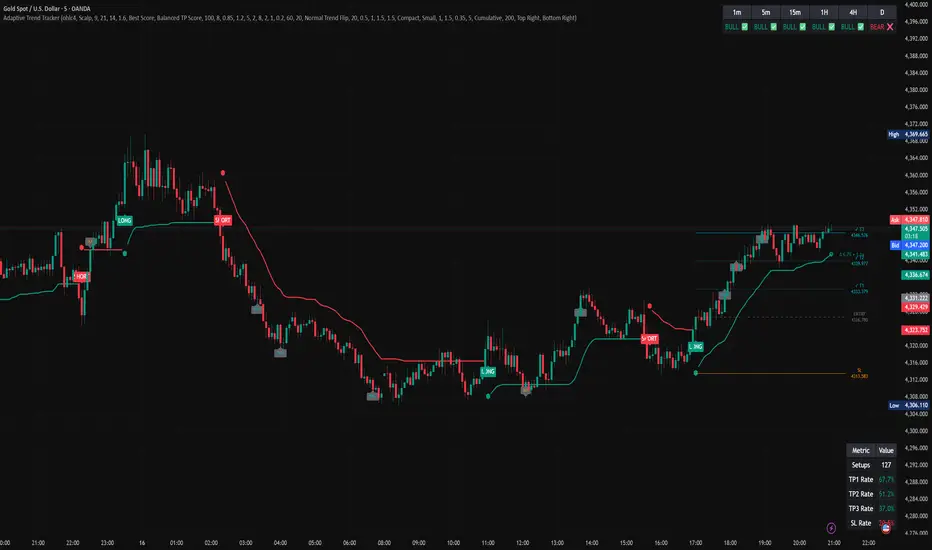
Trend Tracker Trade Planner [Nick789]
Overview
The Trend Tracker Trade Planner is a complete trend-following and trade-planning tool designed to deliver clear trend flips, automatic TP/SL mapping, multi-timeframe confirmation, and live performance tracking in one clean workflow.
It is built for traders who want more than just a trend line. The script not only identifies directional changes, but also helps structure each trade with entry, stop loss, take-profit targets, higher-timeframe context, and ongoing setup statistics.
Whether you prefer fast reaction entries or smoother trend continuation, the tracker can adapt to both styles through its dual operating modes.
Core Engine: Adaptive Trend Tracker
At the center of the script is a custom EMA + ATR-based Trend Tracker that follows price from below in bullish conditions and from above in bearish conditions.
The tracker uses ATR-based upper and lower bands to determine when direction shifts, then maintains a dynamic tracker line that updates with price behavior. This creates a clean trend bias while filtering more noise than a simple moving-average crossover.
Two Operating Modes
Scalp Mode
Scalp Mode is designed for faster reaction.
It uses quicker EMA behavior to respond more aggressively to short-term price movement, making it more suitable for lower timeframes and active intraday trading.
Trend Mode
Trend Mode is designed for smoother tracking.
It blends slower EMA values to reduce market noise and stay aligned with broader directional movement.
This gives the script flexibility across different trading conditions, from fast execution charts to cleaner swing-style trend following.
MTF Confluence Filter
The script includes an optional Multi-Timeframe Confluence Filter.
When enabled, LONG and SHORT flip signals will only appear if the trend on the selected higher timeframe agrees with the flip direction on the current chart. This helps reduce counter-trend entries and improves top-down alignment.
Filter timeframe options:
1 minute
5 minute
15 minute
1 hour
4 hour
Daily
This makes it easier to focus only on signals that are working with broader market direction.
Automated Trade Planner
When a valid bull or bear flip appears, the indicator automatically builds a live setup box for the latest signal.
Each setup includes:
Entry level at the close of the flip candle
Stop loss level
Three take-profit targets
Reward and risk zones
Dynamic target and stop labels
Optional TP/SL hit markers
This turns each new trend flip into an immediate on-chart trade plan without needing manual calculation.
Flexible Risk Management
The setup planner supports multiple stop-loss styles.
1. Fixed ATR Stop
Use a standard ATR-based stop with a custom ATR multiplier.
2. Tracker-Based Stop
Use the Trend Tracker itself as the risk base, so stop distance is anchored to the tracker line rather than a fixed ATR amount.
3. Optional Trailing Stop with Tracker Line
The script also supports trailing the stop loss with the Tracker Line.
When enabled, the SL level in the setup box will actively follow the tracker as it moves in your favor. This gives the setup a more dynamic structure-based management style.
Three Take-Profit Targets
The indicator automatically calculates three custom take-profit levels from the setup’s initial risk.
Default values are:
TP1 = 0.5R
TP2 = 1.0R
TP3 = 1.5R
These can be customized in settings to match different execution styles.
As price reaches each level, the script updates the labels and can print on-chart hit markers such as TP1✓, TP2✓, TP3✓, and SLX.
Clean Trend Visuals
A key visual feature of this version is the split bull/bear tracker display.
Instead of using a single line that visually bridges through flip points, the script draws the bullish and bearish tracker states separately. This helps avoid the unwanted connected look on lower timeframes and keeps the flip diamonds visually independent from the tracker line.
Visual Features
The script includes several optional chart elements so you can keep the layout minimal or more data-rich.
Included visual tools:
Trend Tracker Line
Trend Star (✪) on the latest bar
Flip Diamonds
Optional LONG / SHORT labels
Optional Basis line
Optional ATR bands
Optional bar coloring
Optional background trend tint
Optional TP/SL hit labels
These controls let you shape the chart around your own workflow while keeping the core logic intact.
Intelligence Dashboards
MTF Trend Table
The built-in MTF Trend Table displays the current Bull/Bear tracker state across 6 fixed timeframes:
1m
5m
15m
1H
4H
D
This allows you to check higher-timeframe alignment quickly without changing charts.
Performance Stats Table
The script also includes an internal stats dashboard that tracks how setups perform directly on the chart.
It displays:
Total number of setups
TP1 hit rate
TP2 hit rate
TP3 hit rate
SL hit rate
This gives a quick performance snapshot of how the current configuration is behaving.
Stats Calculation Modes
The stats engine supports two calculation styles.
Cumulative Mode
Tracks all qualifying setups over the full loaded chart history.
Last X Bars Mode
Restricts stats to a recent lookback window so you can evaluate how the script has been performing under more current market conditions.
This is useful when older market data may no longer reflect present volatility or trend behavior.
Alerts
The script includes a full suite of built-in alerts for both signal events and trade-management events.
Available alerts:
Bull Trend Flip
Bear Trend Flip
TP1 Hit
TP2 Hit
TP3 Hit
SL Hit
Bull Trend Active
Bear Trend Active
This makes the tool suitable for both visual chart reading and alert-based workflows.
How to Use
1. Check higher-timeframe context
Start by reading the MTF Trend Table and identify whether the current chart is aligned with the broader trend.
2. Enable the MTF filter if desired
Turn on the MTF Confluence Filter if you want LONG and SHORT signals to appear only when higher-timeframe direction agrees.
3. Wait for a trend flip
A new flip marks the beginning of a fresh setup.
When a signal appears, the script automatically draws the latest trade-planning box.
4. Use the setup box
Monitor the trade visually with:
entry
stop loss
TP1
TP2
TP3
5. Choose the stop style
Use either:
fixed ATR stop
tracker-based stop
trailing tracker stop
6. Review current performance
Use the stats dashboard in either Cumulative or Last X Bars mode to evaluate how the current settings are performing.
Best Use Case
This script is best suited for traders who want:
a clean trend-following framework
automatic trade planning on trend flips
optional higher-timeframe filtering
dynamic TP/SL visualization
on-chart performance feedback
cleaner tracker visuals on lower timeframes
flexible stop management with optional trailing behavior
It can be used for scalping, intraday chart work, or broader directional tracking depending on the selected settings.
Disclaimer
This indicator is provided for educational and informational purposes only and does not constitute financial advice, investment advice, trading advice, or a recommendation to buy or sell any instrument.
Trading and investing involve risk, and past performance does not guarantee future results. No indicator can predict market direction with certainty. Users are responsible for their own decisions, risk management, and trade execution.
The built-in statistics and on-chart setup planning tools are intended as visual aids only and should not be treated as a guarantee of profitability or as a substitute for proper testing, personal judgment, and independent analysis.
Always test on historical data and in a simulated environment before using any script in live market conditions.
Overview
The Trend Tracker Trade Planner is a complete trend-following and trade-planning tool designed to deliver clear trend flips, automatic TP/SL mapping, multi-timeframe confirmation, and live performance tracking in one clean workflow.
It is built for traders who want more than just a trend line. The script not only identifies directional changes, but also helps structure each trade with entry, stop loss, take-profit targets, higher-timeframe context, and ongoing setup statistics.
Whether you prefer fast reaction entries or smoother trend continuation, the tracker can adapt to both styles through its dual operating modes.
Core Engine: Adaptive Trend Tracker
At the center of the script is a custom EMA + ATR-based Trend Tracker that follows price from below in bullish conditions and from above in bearish conditions.
The tracker uses ATR-based upper and lower bands to determine when direction shifts, then maintains a dynamic tracker line that updates with price behavior. This creates a clean trend bias while filtering more noise than a simple moving-average crossover.
Two Operating Modes
Scalp Mode
Scalp Mode is designed for faster reaction.
It uses quicker EMA behavior to respond more aggressively to short-term price movement, making it more suitable for lower timeframes and active intraday trading.
Trend Mode
Trend Mode is designed for smoother tracking.
It blends slower EMA values to reduce market noise and stay aligned with broader directional movement.
This gives the script flexibility across different trading conditions, from fast execution charts to cleaner swing-style trend following.
MTF Confluence Filter
The script includes an optional Multi-Timeframe Confluence Filter.
When enabled, LONG and SHORT flip signals will only appear if the trend on the selected higher timeframe agrees with the flip direction on the current chart. This helps reduce counter-trend entries and improves top-down alignment.
Filter timeframe options:
1 minute
5 minute
15 minute
1 hour
4 hour
Daily
This makes it easier to focus only on signals that are working with broader market direction.
Automated Trade Planner
When a valid bull or bear flip appears, the indicator automatically builds a live setup box for the latest signal.
Each setup includes:
Entry level at the close of the flip candle
Stop loss level
Three take-profit targets
Reward and risk zones
Dynamic target and stop labels
Optional TP/SL hit markers
This turns each new trend flip into an immediate on-chart trade plan without needing manual calculation.
Flexible Risk Management
The setup planner supports multiple stop-loss styles.
1. Fixed ATR Stop
Use a standard ATR-based stop with a custom ATR multiplier.
2. Tracker-Based Stop
Use the Trend Tracker itself as the risk base, so stop distance is anchored to the tracker line rather than a fixed ATR amount.
3. Optional Trailing Stop with Tracker Line
The script also supports trailing the stop loss with the Tracker Line.
When enabled, the SL level in the setup box will actively follow the tracker as it moves in your favor. This gives the setup a more dynamic structure-based management style.
Three Take-Profit Targets
The indicator automatically calculates three custom take-profit levels from the setup’s initial risk.
Default values are:
TP1 = 0.5R
TP2 = 1.0R
TP3 = 1.5R
These can be customized in settings to match different execution styles.
As price reaches each level, the script updates the labels and can print on-chart hit markers such as TP1✓, TP2✓, TP3✓, and SLX.
Clean Trend Visuals
A key visual feature of this version is the split bull/bear tracker display.
Instead of using a single line that visually bridges through flip points, the script draws the bullish and bearish tracker states separately. This helps avoid the unwanted connected look on lower timeframes and keeps the flip diamonds visually independent from the tracker line.
Visual Features
The script includes several optional chart elements so you can keep the layout minimal or more data-rich.
Included visual tools:
Trend Tracker Line
Trend Star (✪) on the latest bar
Flip Diamonds
Optional LONG / SHORT labels
Optional Basis line
Optional ATR bands
Optional bar coloring
Optional background trend tint
Optional TP/SL hit labels
These controls let you shape the chart around your own workflow while keeping the core logic intact.
Intelligence Dashboards
MTF Trend Table
The built-in MTF Trend Table displays the current Bull/Bear tracker state across 6 fixed timeframes:
1m
5m
15m
1H
4H
D
This allows you to check higher-timeframe alignment quickly without changing charts.
Performance Stats Table
The script also includes an internal stats dashboard that tracks how setups perform directly on the chart.
It displays:
Total number of setups
TP1 hit rate
TP2 hit rate
TP3 hit rate
SL hit rate
This gives a quick performance snapshot of how the current configuration is behaving.
Stats Calculation Modes
The stats engine supports two calculation styles.
Cumulative Mode
Tracks all qualifying setups over the full loaded chart history.
Last X Bars Mode
Restricts stats to a recent lookback window so you can evaluate how the script has been performing under more current market conditions.
This is useful when older market data may no longer reflect present volatility or trend behavior.
Alerts
The script includes a full suite of built-in alerts for both signal events and trade-management events.
Available alerts:
Bull Trend Flip
Bear Trend Flip
TP1 Hit
TP2 Hit
TP3 Hit
SL Hit
Bull Trend Active
Bear Trend Active
This makes the tool suitable for both visual chart reading and alert-based workflows.
How to Use
1. Check higher-timeframe context
Start by reading the MTF Trend Table and identify whether the current chart is aligned with the broader trend.
2. Enable the MTF filter if desired
Turn on the MTF Confluence Filter if you want LONG and SHORT signals to appear only when higher-timeframe direction agrees.
3. Wait for a trend flip
A new flip marks the beginning of a fresh setup.
When a signal appears, the script automatically draws the latest trade-planning box.
4. Use the setup box
Monitor the trade visually with:
entry
stop loss
TP1
TP2
TP3
5. Choose the stop style
Use either:
fixed ATR stop
tracker-based stop
trailing tracker stop
6. Review current performance
Use the stats dashboard in either Cumulative or Last X Bars mode to evaluate how the current settings are performing.
Best Use Case
This script is best suited for traders who want:
a clean trend-following framework
automatic trade planning on trend flips
optional higher-timeframe filtering
dynamic TP/SL visualization
on-chart performance feedback
cleaner tracker visuals on lower timeframes
flexible stop management with optional trailing behavior
It can be used for scalping, intraday chart work, or broader directional tracking depending on the selected settings.
Disclaimer
This indicator is provided for educational and informational purposes only and does not constitute financial advice, investment advice, trading advice, or a recommendation to buy or sell any instrument.
Trading and investing involve risk, and past performance does not guarantee future results. No indicator can predict market direction with certainty. Users are responsible for their own decisions, risk management, and trade execution.
The built-in statistics and on-chart setup planning tools are intended as visual aids only and should not be treated as a guarantee of profitability or as a substitute for proper testing, personal judgment, and independent analysis.
Always test on historical data and in a simulated environment before using any script in live market conditions.
Notes de version
What’s New:This update improves the MTF confluence system by solving a missed-opportunity issue. Previously, if a local trend flip happened before the selected higher timeframe aligned, the signal was blocked permanently. Now, blocked flips can be held as pending and re-triggered later as a delayed HTF re-entry once higher timeframe alignment confirms, provided the local trend remains valid.
Included in this update:
- HTF delayed re-entry system
- Pending blocked signal memory
- Re-entry timeout control
- Pending signal invalidation on trend failure or opposite flip
- Separate RE-LONG / RE-SHORT labels
- New alertconditions for re-entry and final entry signals
- Boolean state handling fix for cleaner Pine compilation
Notes de version
Update:Added optional Delta Confirm mode and a new Master Alert system.
Normal Trend Flip keeps the original setup-box behaviour.
Delta Confirm waits for trend-volume pressure to support the active tracker direction before creating the setup box. A live delta status label shows WAIT FLOW, CONFIRMED, or EXPIRED and is positioned near the flip diamond/tracker point for cleaner chart alignment.
Also added Delta Star Text modes: Off, Compact, Default, and Full.
Alerts have been simplified into one “Any Master Alert” condition. Users can now choose which events trigger that master alert from the script settings.
Notes de version
Added price values to the latest active setup box for ENTRY, TP1, TP2, TP3, and SL.This improves readability for the current trade plan while keeping the original signal logic, historical hit labels, stats table, alerts, and SL Rate calculation unchanged.
Notes de version
Updated the Delta HUD display.Notes de version
Added Delta Reversal Dots and improved the Live Flow HUD.This update keeps the original Trend Tracker logic the same while adding cleaner reversal warnings, live B/S/Delta flow stats, and extra alert options.
Reversal dots are warning markers only — use them with the tracker, setup box, MTF table, and market context.
Notes de version
updated reversal logicNotes de version
bug fix Notes de version
New clean display option added.You can now turn off the setup box fill and show only the trade level lines for ENTRY, TP, and SL. Cleaner chart, same trade plan.
Notes de version
v2 Adaptive UpgradeThis update adds a new Adaptive Optimizer to Trend Tracker Trade Planner.
The script can now scan multiple Fast Length, ATR Length, and ATR Multiplier combinations, then select either the strongest scoring setting or a smoother Stable Zone setting to reduce overfitting.
Adaptive mode is now connected to the main tracker, MTF dashboard, and MTF confirmation filter, so the chart direction and multi-timeframe readings stay aligned when adaptive settings are active.
The TP stats table has also been cleaned up. When Adaptive mode is OFF, the table keeps the original compact layout with only the core setup and TP/SL stats. When Adaptive mode is ON, the table expands to show the active adaptive status, selected Fast Length, ATR Length, ATR Multiplier, and optimizer score.
Added / improved:
* Adaptive Best Settings mode
* Stable Zone and Best Score selection
* Multiple optimizer metrics
* Adaptive MTF dashboard alignment
* Adaptive MTF confirmation filter alignment
* Cleaner TP stats table behaviour
* Adaptive rows only appear when Adaptive mode is active
* Original manual mode remains available
* Cleaner publish-ready script wording
This version keeps the original trade-planning workflow while adding an optional adaptive layer for users who want the tracker to adjust to recent chart behaviour.
Notes de version
fix some debug
Clause de non-responsabilité
Les informations et publications ne sont pas destinées à être, et ne constituent pas, des conseils ou recommandations financiers, d'investissement, de trading ou autres fournis ou approuvés par TradingView. Pour en savoir plus, consultez les Conditions d'utilisation.
Clause de non-responsabilité
Les informations et publications ne sont pas destinées à être, et ne constituent pas, des conseils ou recommandations financiers, d'investissement, de trading ou autres fournis ou approuvés par TradingView. Pour en savoir plus, consultez les Conditions d'utilisation.