OPEN-SOURCE SCRIPT
Mis à jour Simple Buy/Sell Indicator
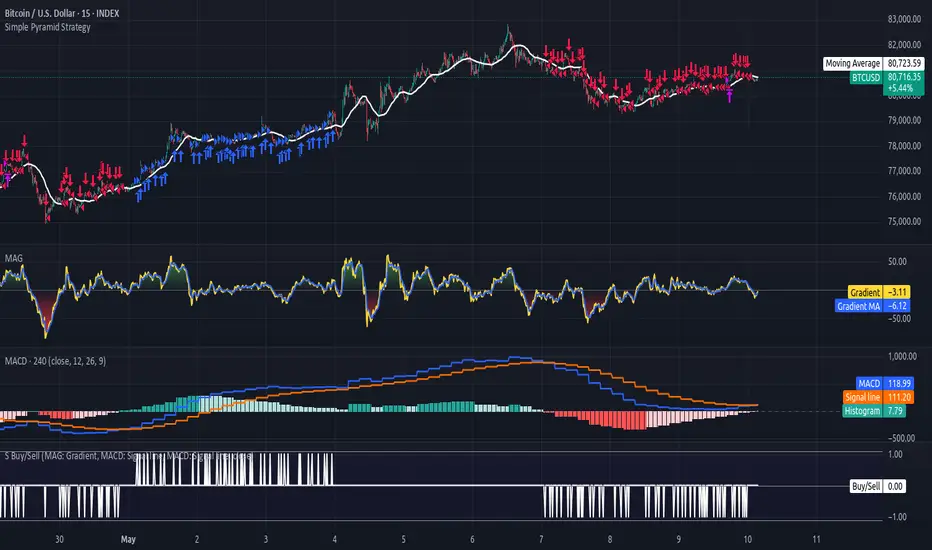
Create you own custom strategies using this 'Simple Buy/Sell Indicator'. It allows other indicators to be combined together into a BUY/SELL strategy, using up to four separate rules.
The output is:
1 = BUY
0 = None
-1 = SELL
This can then be used as an input to my 'Simple Pyramid Strategy' or my (coming soon - watch this space) 'Complex Single Trade Strategy'.
Each rule compares two values with [< > =]:
Value 1) A source value, or change in that value.
Value 2) An actual value, a percentage of the price of the chart asset, or another source input.
'Bars Back' can be specified if you don't want the latest value. So 1 bar back will give the latest confirmed value.
When the first value is a change, this specifies how far back to test the change for. If the change input is from a higher timeframe, make sure to use the correct value for bars back.
e.g. If the chart is 15 min, but the input change is from an indicator on the 4 hour, bars back needs to be 240 / 15 = 16 bars back.
Inverse rules can optionally be created as well. This means that a BUY strategy will automatically create a SELL strategy, or vice versa, with all the same rules inverted.
When a rule is inverted, the second value is often negated. So x > 4 becomes x < -4. This negation is ALWAYS applied when the first value is a change, but optionally for values.
For comparing two levels, like the price with a moving average, you don't want negation. So price > average, becomes price < average.
However, if the first value is an oscillator, like a MACD signal, you most likely will need negation. So x > 60 becomes x < -60.
For oscillators not zero centred, they will also need an offset to work with negation.
e.g. RSI [0 to 100] can be zero centred with an offset of -50 to make it [-50 to +50]
So instead of testing for overbought and oversold with > 70 and < 30, you would offset by -50. Then you would test for > 20 (overbought), which becomes < -20 (oversold) when inverted.
Notes de version
Update: 10 May 2026 - I've added 'crossover', 'crossunder' and 'cross' to the list of operators or comparisons.So now you can get a signal from a source input crossing over a static level, or over another source input.
You can even test for a change in a source input crossing over. e.g. Crossing over 0, so from negative to positive, a negative change meaning falling, crossing over to a positive change meaning rising, which is a bullish reversal.
Likewise, crossing under works in the same way, as does cross, which is both directions.
These crosses also work seamlessly with the rule inversions as well.
Script open-source
Dans l'esprit TradingView, le créateur de ce script l'a rendu open source afin que les traders puissent examiner et vérifier ses fonctionnalités. Bravo à l'auteur! Bien que vous puissiez l'utiliser gratuitement, n'oubliez pas que la republication du code est soumise à nos Règles.

Clause de non-responsabilité
Les informations et publications ne sont pas destinées à être, et ne constituent pas, des conseils ou recommandations financiers, d'investissement, de trading ou autres fournis ou approuvés par TradingView. Pour en savoir plus, consultez les Conditions d'utilisation.
Script open-source
Dans l'esprit TradingView, le créateur de ce script l'a rendu open source afin que les traders puissent examiner et vérifier ses fonctionnalités. Bravo à l'auteur! Bien que vous puissiez l'utiliser gratuitement, n'oubliez pas que la republication du code est soumise à nos Règles.
Clause de non-responsabilité
Les informations et publications ne sont pas destinées à être, et ne constituent pas, des conseils ou recommandations financiers, d'investissement, de trading ou autres fournis ou approuvés par TradingView. Pour en savoir plus, consultez les Conditions d'utilisation.