PROTECTED SOURCE SCRIPT
Anas CCI & MACD
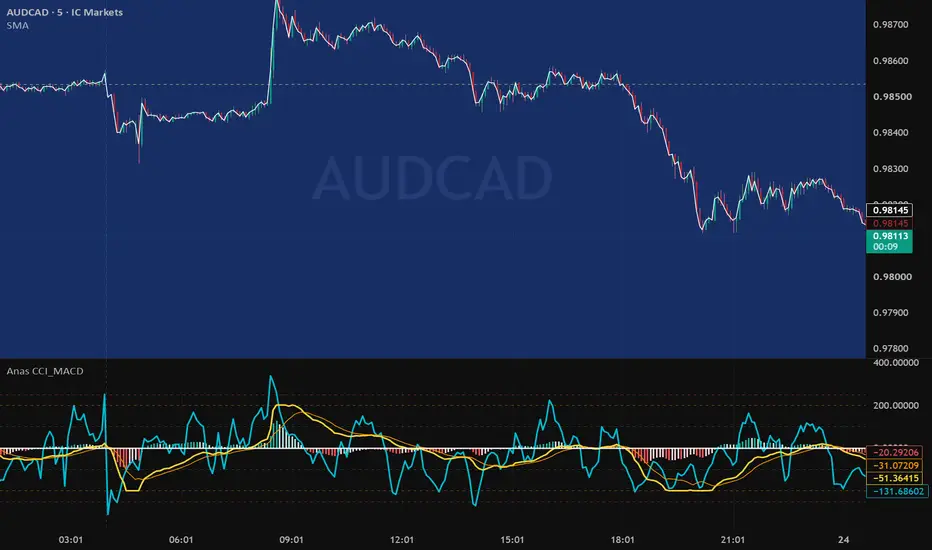
Anas CCI & MACD Overlay is a dual-momentum indicator designed to combine the Commodity Channel Index (CCI) and the Moving Average Convergence Divergence (MACD) into a single, clean pane while maintaining a shared zero-level reference.
Key Features:
Zero-Level Synchronization: Both CCI and MACD share the exact same 0-level axis for instant visual alignment of trend and momentum momentum.
Adaptive Scaling Engine: Built-in dynamic normalization automatically scales the MACD line and histogram proportional to the CCI levels (-250 to +250) across Forex, Gold, Crypto, and Stocks without manual adjustment.
Full Customization: Adjust fast/slow EMAs, signal length, and CCI period easily from the inputs panel.
Native Visuals: Features 4-color gradient histogram modeling for real-time momentum strength tracking.
How to Hide MACD Scale
How to Hide the MACD Scale (Keep Only CCI Scale Visible):
Apply the indicator to your chart.
Right-click on the indicator pane or click the Settings (gear icon) on the indicator status line.
Go to the Style tab.
Look for the Scale settings at the bottom of the dialog box (or right-click the axis numbers on the chart).
Set the scale output to Pin to Right for CCI, or simply select No Scale for the MACD lines if you prefer a single unified right-hand axis display.
Key Features:
Zero-Level Synchronization: Both CCI and MACD share the exact same 0-level axis for instant visual alignment of trend and momentum momentum.
Adaptive Scaling Engine: Built-in dynamic normalization automatically scales the MACD line and histogram proportional to the CCI levels (-250 to +250) across Forex, Gold, Crypto, and Stocks without manual adjustment.
Full Customization: Adjust fast/slow EMAs, signal length, and CCI period easily from the inputs panel.
Native Visuals: Features 4-color gradient histogram modeling for real-time momentum strength tracking.
How to Hide MACD Scale
How to Hide the MACD Scale (Keep Only CCI Scale Visible):
Apply the indicator to your chart.
Right-click on the indicator pane or click the Settings (gear icon) on the indicator status line.
Go to the Style tab.
Look for the Scale settings at the bottom of the dialog box (or right-click the axis numbers on the chart).
Set the scale output to Pin to Right for CCI, or simply select No Scale for the MACD lines if you prefer a single unified right-hand axis display.
Script protégé
Ce script est publié en source fermée. Cependant, vous pouvez l'utiliser librement et sans aucune restriction – pour en savoir plus, cliquez ici.

Clause de non-responsabilité
Les informations et publications ne sont pas destinées à être, et ne constituent pas, des conseils ou recommandations financiers, d'investissement, de trading ou autres fournis ou approuvés par TradingView. Pour en savoir plus, consultez les Conditions d'utilisation.
Script protégé
Ce script est publié en source fermée. Cependant, vous pouvez l'utiliser librement et sans aucune restriction – pour en savoir plus, cliquez ici.
Clause de non-responsabilité
Les informations et publications ne sont pas destinées à être, et ne constituent pas, des conseils ou recommandations financiers, d'investissement, de trading ou autres fournis ou approuvés par TradingView. Pour en savoir plus, consultez les Conditions d'utilisation.