Mis à jour
Sigma Heatmap
 NQ1!
 ES1!
 QQQ
 SPY NDX SPX VXN
 VIX
Sigma Heatmap
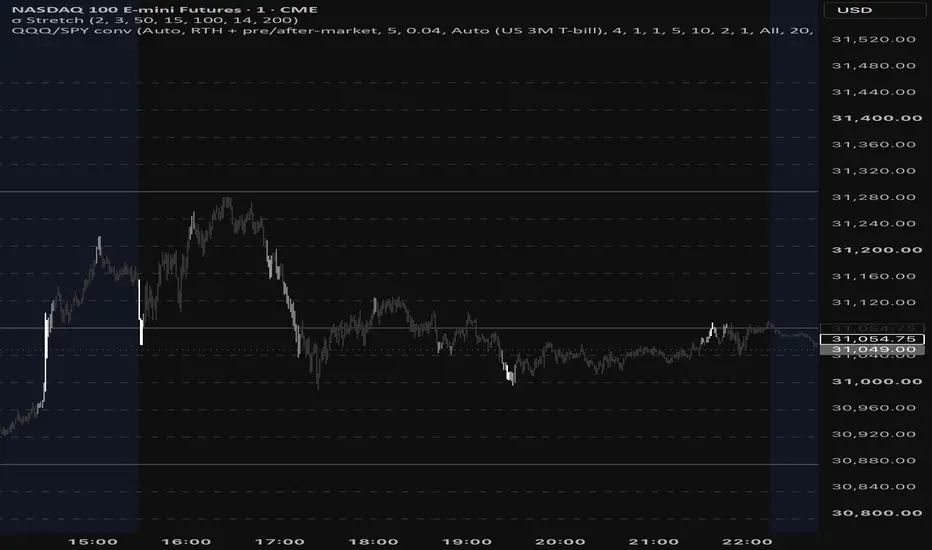
Colours each candle by how far price (ohlc4) is stretched from its rolling mean, measured in standard deviations (σ).
• Grey – within 2σ (normal)
• Light grey – between 2σ and 3σ (stretched)
• White – beyond 3σ (statistical extreme)
The lookback adapts to volatility: 50 bars in a normal ATR regime, shorter when ATR (14) runs above its 200-bar average, longer when it runs below (clamped 15–100). σ is always calculated from 24h (ETH) back-adjusted data, so the colours are the same on RTH and ETH charts. Levels, colours and window settings are adjustable. The current σ value is shown in the Data Window.
This is a visual context tool, not a buy/sell signal.
Notes de version
Simplified settings: Inputs now contains only Levels (Sigma 2 and Sigma 3) and Colors (Neutral, Sigma 2 and Sigma 3). Adaptive window parameters are fixed at the previous defaults: base 50, minimum 15, maximum 100, ATR 14 and ATR average 200. Candle styling overrides are disabled. The sigma calculation and default heatmap colors are unchanged.Notes de version
IMPORTANT — CHART SETUPAfter adding Sigma Heatmap, open TradingView’s Object Tree and drag Sigma Heatmap (shown on the chart as “σ Stretch”) to the very top, above the main price series and other indicators.
This step is required for the heatmap candles to be visible. If the indicator is underneath the main price series, the chart’s regular candles can cover its colors, making the heatmap appear invisible.
Only Colors and Levels are adjustable in the indicator’s Inputs. This update adds setup instructions; the calculation is unchanged.
Notes de version
Added a permanent, read-only setup reminder directly below Levels and Colors in the indicator settings.IMPORTANT: Open Object Tree and move Sigma Heatmap (σ Stretch) to the very top, above the main price series, so the chart candles do not cover the heatmap colors.
Only Levels and Colors remain adjustable. The calculation is unchanged.

Clause de non-responsabilité
Les informations et publications ne sont pas destinées à être, et ne constituent pas, des conseils ou recommandations financiers, d'investissement, de trading ou autres fournis ou approuvés par TradingView. Pour en savoir plus, consultez les Conditions d'utilisation.
Clause de non-responsabilité
Les informations et publications ne sont pas destinées à être, et ne constituent pas, des conseils ou recommandations financiers, d'investissement, de trading ou autres fournis ou approuvés par TradingView. Pour en savoir plus, consultez les Conditions d'utilisation.