OPEN-SOURCE SCRIPT
Aggregated Liquidations WW [BLZRtek]
Aggregated Liquidations WW [BLZRtek]
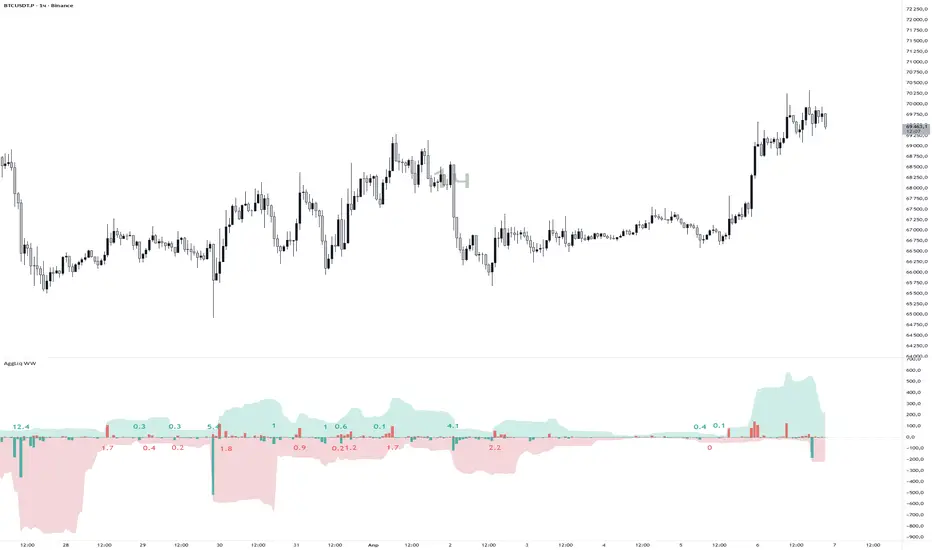
This indicator aggregates perpetual futures liquidation data from six major exchanges into a single histogram panel, and overlays wave liquidation labels — showing cumulative forced-close volume at each structural wave pivot.
What it shows
🔴 Red columns — long liquidations (longs getting stopped out / price moving up through stops)
🟢 Green columns — short liquidations (shorts getting squeezed / price moving down through stops)
Wave labels — total liquidation volume accumulated during each completed wave, placed directly on the histogram
Supported Exchanges
Exchange Contract Type Margin
Binance Linear + Inverse USDT + USD
Bybit Linear + Inverse USDT + USD
OKX Linear USDT + USDC
BitMEX Inverse USD
Deribit Linear + Inverse USDC + USD
HTX Linear USDT (tick volume)
All exchanges can be toggled individually. Inverse (USD-margined) contracts are automatically converted to base currency using the bar’s open price for accuracy on volatile moves.
Two Wave Detection Modes
WWVN (default) — ATR-Renko
Fires immediately when price moves more than one ATR from the last Renko level. No confirmation delay. Labels mark the last bar of each completed wave. Best for: active monitoring, frequent wave structure.
HHLL — Structural Pivot Waves (Variant B)
Uses ta.pivothigh / ta.pivotlow to detect confirmed structural highs and lows. Key feature: liquidation totals are calculated between the real pivot bars, not between confirmation bars. When a pivot is confirmed at bar N (after Right Bars bars), the actual accumulation window ends at bar N − Right Bars.
The calculation uses running cumulative sums:
wave_volume = runningSum[Right Bars] − previousPivotBaseline
This gives an exact liquidation total between two actual market structure points — not a delayed approximation.
Wave Label Features
Auto Color: label color automatically matches the Short / Long column color. Change the histogram color → labels update instantly.
Label on Peak Liq. Bar: when enabled, the label moves to the bar with the highest single-bar liquidation spike inside the wave, rather than the last/pivot bar. Useful for identifying exact flush points.
Label Offset: adjustable vertical spacing from the zero line to prevent overlap with tall columns.
Scale Down Factor: displays large numbers as 12.5K or 1.2M for readability.
Settings Overview
Timeframe & Accumulation
Custom timeframe for data source (default: chart timeframe)
Accumulation window in bars (for smoother histogram)
Currency Mode: Base (native coin units) or Quote (USDT equivalent)
Exchanges
Toggle each of the six exchanges on/off independently.
Display
Column colors, accumulation cloud (with separate window and color settings).
Thresholds
Two configurable horizontal levels on the panel (set to 0 to hide).
Wave Volume
Full wave label configuration: mode, ATR period, pivot bars, scale, color, size, offset, peak bar mode.
Notes
Requires Pine Script® v6
dynamic_requests enabled for series-string symbol construction
max_labels_count = 500, max_bars_back = 500
Zigzag filter in HHLL mode ensures strictly alternating pivot highs and lows
The label placement block executes before the accumulator reset on each bar — ensuring labels always reference the just-completed wave, not the incoming one
© BLZRtek — MPL-2.0
This indicator aggregates perpetual futures liquidation data from six major exchanges into a single histogram panel, and overlays wave liquidation labels — showing cumulative forced-close volume at each structural wave pivot.
What it shows
🔴 Red columns — long liquidations (longs getting stopped out / price moving up through stops)
🟢 Green columns — short liquidations (shorts getting squeezed / price moving down through stops)
Wave labels — total liquidation volume accumulated during each completed wave, placed directly on the histogram
Supported Exchanges
Exchange Contract Type Margin
Binance Linear + Inverse USDT + USD
Bybit Linear + Inverse USDT + USD
OKX Linear USDT + USDC
BitMEX Inverse USD
Deribit Linear + Inverse USDC + USD
HTX Linear USDT (tick volume)
All exchanges can be toggled individually. Inverse (USD-margined) contracts are automatically converted to base currency using the bar’s open price for accuracy on volatile moves.
Two Wave Detection Modes
WWVN (default) — ATR-Renko
Fires immediately when price moves more than one ATR from the last Renko level. No confirmation delay. Labels mark the last bar of each completed wave. Best for: active monitoring, frequent wave structure.
HHLL — Structural Pivot Waves (Variant B)
Uses ta.pivothigh / ta.pivotlow to detect confirmed structural highs and lows. Key feature: liquidation totals are calculated between the real pivot bars, not between confirmation bars. When a pivot is confirmed at bar N (after Right Bars bars), the actual accumulation window ends at bar N − Right Bars.
The calculation uses running cumulative sums:
wave_volume = runningSum[Right Bars] − previousPivotBaseline
This gives an exact liquidation total between two actual market structure points — not a delayed approximation.
Wave Label Features
Auto Color: label color automatically matches the Short / Long column color. Change the histogram color → labels update instantly.
Label on Peak Liq. Bar: when enabled, the label moves to the bar with the highest single-bar liquidation spike inside the wave, rather than the last/pivot bar. Useful for identifying exact flush points.
Label Offset: adjustable vertical spacing from the zero line to prevent overlap with tall columns.
Scale Down Factor: displays large numbers as 12.5K or 1.2M for readability.
Settings Overview
Timeframe & Accumulation
Custom timeframe for data source (default: chart timeframe)
Accumulation window in bars (for smoother histogram)
Currency Mode: Base (native coin units) or Quote (USDT equivalent)
Exchanges
Toggle each of the six exchanges on/off independently.
Display
Column colors, accumulation cloud (with separate window and color settings).
Thresholds
Two configurable horizontal levels on the panel (set to 0 to hide).
Wave Volume
Full wave label configuration: mode, ATR period, pivot bars, scale, color, size, offset, peak bar mode.
Notes
Requires Pine Script® v6
dynamic_requests enabled for series-string symbol construction
max_labels_count = 500, max_bars_back = 500
Zigzag filter in HHLL mode ensures strictly alternating pivot highs and lows
The label placement block executes before the accumulator reset on each bar — ensuring labels always reference the just-completed wave, not the incoming one
© BLZRtek — MPL-2.0
Script open-source
Dans l'esprit TradingView, le créateur de ce script l'a rendu open source afin que les traders puissent examiner et vérifier ses fonctionnalités. Bravo à l'auteur! Bien que vous puissiez l'utiliser gratuitement, n'oubliez pas que la republication du code est soumise à nos Règles.

Clause de non-responsabilité
Les informations et publications ne sont pas destinées à être, et ne constituent pas, des conseils ou recommandations financiers, d'investissement, de trading ou autres fournis ou approuvés par TradingView. Pour en savoir plus, consultez les Conditions d'utilisation.
Script open-source
Dans l'esprit TradingView, le créateur de ce script l'a rendu open source afin que les traders puissent examiner et vérifier ses fonctionnalités. Bravo à l'auteur! Bien que vous puissiez l'utiliser gratuitement, n'oubliez pas que la republication du code est soumise à nos Règles.
Clause de non-responsabilité
Les informations et publications ne sont pas destinées à être, et ne constituent pas, des conseils ou recommandations financiers, d'investissement, de trading ou autres fournis ou approuvés par TradingView. Pour en savoir plus, consultez les Conditions d'utilisation.