Mis à jour
Heavy Diligence Options Signals (SPY)
━━━━━━━━━━━━━━━━━━━━━━━━━━━━━━━━━━━━━━━━━━━━━━━━━━━━━━━━━━━━━━━━━━━━━━━━ HEAVY DILIGENCE SIGNALS High-Probability Day Trading Indicator for SPY ━━━━━━━━━━━━━━━━━━━━━━━━━━━━━━━━━━━━━━━━━━━━━━━━━━━━━━━━━━━━━━━━━━━━━━━━
📌 OVERVIEW
Heavy Diligence Signals is a unified Pine Script v6 indicator that combines the battle-tested SPY Probability Signals engine with a dual-mode interface. Provides high-probability CALLS/PUTS signals for day trading SPY on short timeframes (1-minute, 3-minute, 5-minute).
Version: 1.0 (Pine Script v6) Status: Free, closed-source
━━━━━━━━━━━━━━━━━━━━━━━━━━━━━━━━━━━━━━━━━━━━━━━━━━━━━━━━━━━━━━━━━━━━━━━━ 🎯 CORE FEATURES
━━━━━━━━━━━━━━━━━━━━━━━━━━━━━━━━━━━━━━━━━━━━━━━━━━━━━━━━━━━━━━━━━━━━━━━━
🔄 DUAL-MODE INTERFACE
• LITE MODE (Beginners) Simplified interface with 8 essential controls Settings pre-configured to tested defaults (5-minute optimized) Signal Sensitivity selector: Conservative / Balanced / Aggressive RTH filter, SL/TP display, runner levels, visual controls
• FULL MODE (Advanced) Complete parameter access: lengths, weights, thresholds, MTF timeframes Full regime filters and Dynamic TP/SL tuning 11-row detailed dashboard with all component votes
• MODE SWITCHING Toggle between Lite and Full via single dropdown in settings Same signal engine in both modes
━━━━━━━━━━━━━━━━━━━━━━━━━━━━━━━━━━━━━━━━━━━━━━━━━━━━━━━━━━━━━━━━━━━━━━━━
⚙️ SIGNAL ENGINE
Multi-indicator confluence system (identical in both modes):
• MOMENTUM: RSI, Stochastic, MACD • TREND: EMA stack (5/13/50), Supertrend, ADX • VOLUME: VWAP deviation, volume surge confirmation • VOLATILITY: ATR-based filtering • MULTI-TIMEFRAME: 15m and 1H higher-timeframe confirmation (customizable) • REGIME FILTER: Choppiness Index (default <61.8) suppresses choppy markets • PROBABILITY SCORING: Weighted voting system, normalized to 50-100% confidence
━━━━━━━━━━━━━━━━━━━━━━━━━━━━━━━━━━━━━━━━━━━━━━━━━━━━━━━━━━━━━━━━━━━━━━━━
📊 DYNAMIC TP/SL SYSTEM
• Structure-based stops anchor to swing low/high • Clamped to ATR band (0.8× - 2.5× ATR) • Risk Adjustment slider scales stop distance • Trend-adaptive take-profit auto-scales with ADX: - Strong trend (ADX ≥ 30) → 3.0R - Normal trend → 2.0R - Weak/range → 1.3R • Default mode in Lite; fully tunable in Full
━━━━━━━━━━━━━━━━━━━━━━━━━━━━━━━━━━━━━━━━━━━━━━━━━━━━━━━━━━━━━━━━━━━━━━━━
🏃 RUNNER LEVELS (“Let It Run”)
• Secondary TP2 (dotted green, default 4.5R) • Secondary SL2 (dotted red, default breakeven) • Scale out positions: partial profit at TP1, remainder runs to TP2 • Compatible with all stop-loss modes (ATR, Swing, Dynamic) • One-click toggle in both modes
━━━━━━━━━━━━━━━━━━━━━━━━━━━━━━━━━━━━━━━━━━━━━━━━━━━━━━━━━━━━━━━━━━━━━━━━
🚨 ALERT SYSTEM
Alert messages include entry price, probability, SL, TP, and runner levels: Example: “Heavy Diligence CALLS 84% @ 585.10 | SL 584.20 | TP 587.80 | TP2 589.40 | SL2 585.10”
• Dynamic alerts fire once per bar close (repaint-safe) • Compatible with TradingView mobile notifications • Set to “Any alert() function call” → “Once Per Bar Close”
━━━━━━━━━━━━━━━━━━━━━━━━━━━━━━━━━━━━━━━━━━━━━━━━━━━━━━━━━━━━━━━━━━━━━━━━
🔧 TECHNICAL DETAILS
SIGNAL GENERATION • Non-repainting (signals confirmed on bar close only) • Probability-based labels: “CALLS/XX%” or “PUTS/XX%” • 8 base indicators + 2 higher-timeframes = 10 weighted votes • Customizable probability threshold (default 80%) • Optional signal de-duplication (one per direction) • Optional daily reset of signal state
REGIME & TIME FILTERS • Choppiness Index filter (default <61.8) • RTH-only mode (9:30 AM - 4:00 PM ET) • Skip market open (default 20 min) • Skip market close (default 20 min) • Volatility floor (minimum ATR%, default 0.04%)
MULTI-TIMEFRAME ANALYSIS • Two higher-timeframe confirmations (default 15m + 1H, customizable) • No-repaint HTF logic (lookahead disabled) • Higher weighting for HTF votes (HTF1 = 1.5×, HTF2 = 2.0×)
RISK MANAGEMENT MODES • ATR Mode: Fixed ATR multiple (default 1.5×) • Swing Mode: Anchors to swing low/high (10-bar lookback) • Dynamic Mode: Structure + ATR clamping + Risk Adjustment
VISUAL ELEMENTS • CALLS/PUTS labels with probability percentage • EMA ribbon (5/13 fast/slow with gradient fill) • VWAP line overlay • Optional SL/TP level lines (dashed primary, dotted runner) • Optional trend background shading (Full mode) • Optional choppy regime shading (Full mode) • Customizable label size and colors
DASHBOARD • Lite mode (6 rows): Bull/Bear Prob, Trend, Choppiness, Regime, Mode info • Full mode (11 rows): Above + EMA Stack, Supertrend, ADX, VWAP, HTF1/HTF2, SL Mode • Toggle display on/off
━━━━━━━━━━━━━━━━━━━━━━━━━━━━━━━━━━━━━━━━━━━━━━━━━━━━━━━━━━━━━━━━━━━━━━━━
📈 LITE MODE SENSITIVITY SETTINGS
CONSERVATIVE • Min Probability: 85% • Max Choppiness: <55.0 • Fewer signals, highest conviction
BALANCED (default) • Min Probability: 80% • Max Choppiness: <61.8 • Moderate frequency, optimized for 5-minute timeframe
AGGRESSIVE • Min Probability: 72% • Max Choppiness: <61.8 • More signals, lower threshold
━━━━━━━━━━━━━━━━━━━━━━━━━━━━━━━━━━━━━━━━━━━━━━━━━━━━━━━━━━━━━━━━━━━━━━━━
🔬 BACKTESTING FOUNDATION
Based on 24-month backtesting of SPY Probability Signals: ✓ Choppiness Index <61.8 effectively filters choppy markets ✓ Multi-timeframe confirmation reduces whipsaws ✓ Weighted confluence outperforms single-indicator signals ✓ Skipping first/last 20 minutes avoids high-volatility periods ✓ Volatility floor (0.04% ATR) prevents signals in dead markets
━━━━━━━━━━━━━━━━━━━━━━━━━━━━━━━━━━━━━━━━━━━━━━━━━━━━━━━━━━━━━━━━━━━━━━━━
📊 COMPARISON TO SPY PROBABILITY SIGNALS
SPY Prob Signals | Heavy Diligence
─────────────────────────────────────────
Signal Engine Full confluence | Identical Dynamic TP/SL ADX-adaptive | Identical
Runner Levels TP2/SL2 | Identical SL/TP in Alerts Embedded | Identical Interface Single mode | Dual mode (Lite + Full) Mode Switching N/A | Single dropdown
Heavy Diligence = Same proven engine + added Lite mode interface option
━━━━━━━━━━━━━━━━━━━━━━━━━━━━━━━━━━━━━━━━━━━━━━━━━━━━━━━━━━━━━━━━━━━━━━━━
🚀 QUICK SETUP
1. Add to SPY chart (recommended: 5-minute timeframe)
2. Set Mode = Lite (default for beginners)
3. Set Signal Sensitivity = Balanced (default)
4. Optional: Enable “Show SL/TP Levels” and “Let It Run”
5. Create alert: “Any alert() function call” → “Once Per Bar Close”
━━━━━━━━━━━━━━━━━━━━━━━━━━━━━━━━━━━━━━━━━━━━━━━━━━━━━━━━━━━━━━━━━━━━━━━━
⚙️ TECHNICAL SPECIFICATIONS
Pine Script: v6 Type: Overlay indicator Limits: 500 labels, 500 lines Repainting: No (signals confirmed on bar close, HTF lookahead disabled) Real-time: Probability updates every bar, signals fire on close only
━━━━━━━━━━━━━━━━━━━━━━━━━━━━━━━━━━━━━━━━━━━━━━━━━━━━━━━━━━━━━━━━━━━━━━━━
⚠️ DISCLAIMER
This indicator is an educational tool for decision support. It is not financial advice, not a trading system, and past performance does not guarantee future results. Always paper-test before live trading and manage your risk appropriately.
━━━━━━━━━━━━━━━━━━━━━━━━━━━━━━━━━━━━━━━━━━━━━━━━━━━━━━━━
📌 OVERVIEW
Heavy Diligence Signals is a unified Pine Script v6 indicator that combines the battle-tested SPY Probability Signals engine with a dual-mode interface. Provides high-probability CALLS/PUTS signals for day trading SPY on short timeframes (1-minute, 3-minute, 5-minute).
Version: 1.0 (Pine Script v6) Status: Free, closed-source
━━━━━━━━━━━━━━━━━━━━━━━━━━━━━━━━━━━━━━━━━━━━━━━━━━━━━━━━━━━━━━━━━━━━━━━━ 🎯 CORE FEATURES
━━━━━━━━━━━━━━━━━━━━━━━━━━━━━━━━━━━━━━━━━━━━━━━━━━━━━━━━━━━━━━━━━━━━━━━━
🔄 DUAL-MODE INTERFACE
• LITE MODE (Beginners) Simplified interface with 8 essential controls Settings pre-configured to tested defaults (5-minute optimized) Signal Sensitivity selector: Conservative / Balanced / Aggressive RTH filter, SL/TP display, runner levels, visual controls
• FULL MODE (Advanced) Complete parameter access: lengths, weights, thresholds, MTF timeframes Full regime filters and Dynamic TP/SL tuning 11-row detailed dashboard with all component votes
• MODE SWITCHING Toggle between Lite and Full via single dropdown in settings Same signal engine in both modes
━━━━━━━━━━━━━━━━━━━━━━━━━━━━━━━━━━━━━━━━━━━━━━━━━━━━━━━━━━━━━━━━━━━━━━━━
⚙️ SIGNAL ENGINE
Multi-indicator confluence system (identical in both modes):
• MOMENTUM: RSI, Stochastic, MACD • TREND: EMA stack (5/13/50), Supertrend, ADX • VOLUME: VWAP deviation, volume surge confirmation • VOLATILITY: ATR-based filtering • MULTI-TIMEFRAME: 15m and 1H higher-timeframe confirmation (customizable) • REGIME FILTER: Choppiness Index (default <61.8) suppresses choppy markets • PROBABILITY SCORING: Weighted voting system, normalized to 50-100% confidence
━━━━━━━━━━━━━━━━━━━━━━━━━━━━━━━━━━━━━━━━━━━━━━━━━━━━━━━━━━━━━━━━━━━━━━━━
📊 DYNAMIC TP/SL SYSTEM
• Structure-based stops anchor to swing low/high • Clamped to ATR band (0.8× - 2.5× ATR) • Risk Adjustment slider scales stop distance • Trend-adaptive take-profit auto-scales with ADX: - Strong trend (ADX ≥ 30) → 3.0R - Normal trend → 2.0R - Weak/range → 1.3R • Default mode in Lite; fully tunable in Full
━━━━━━━━━━━━━━━━━━━━━━━━━━━━━━━━━━━━━━━━━━━━━━━━━━━━━━━━━━━━━━━━━━━━━━━━
🏃 RUNNER LEVELS (“Let It Run”)
• Secondary TP2 (dotted green, default 4.5R) • Secondary SL2 (dotted red, default breakeven) • Scale out positions: partial profit at TP1, remainder runs to TP2 • Compatible with all stop-loss modes (ATR, Swing, Dynamic) • One-click toggle in both modes
━━━━━━━━━━━━━━━━━━━━━━━━━━━━━━━━━━━━━━━━━━━━━━━━━━━━━━━━━━━━━━━━━━━━━━━━
🚨 ALERT SYSTEM
Alert messages include entry price, probability, SL, TP, and runner levels: Example: “Heavy Diligence CALLS 84% @ 585.10 | SL 584.20 | TP 587.80 | TP2 589.40 | SL2 585.10”
• Dynamic alerts fire once per bar close (repaint-safe) • Compatible with TradingView mobile notifications • Set to “Any alert() function call” → “Once Per Bar Close”
━━━━━━━━━━━━━━━━━━━━━━━━━━━━━━━━━━━━━━━━━━━━━━━━━━━━━━━━━━━━━━━━━━━━━━━━
🔧 TECHNICAL DETAILS
SIGNAL GENERATION • Non-repainting (signals confirmed on bar close only) • Probability-based labels: “CALLS/XX%” or “PUTS/XX%” • 8 base indicators + 2 higher-timeframes = 10 weighted votes • Customizable probability threshold (default 80%) • Optional signal de-duplication (one per direction) • Optional daily reset of signal state
REGIME & TIME FILTERS • Choppiness Index filter (default <61.8) • RTH-only mode (9:30 AM - 4:00 PM ET) • Skip market open (default 20 min) • Skip market close (default 20 min) • Volatility floor (minimum ATR%, default 0.04%)
MULTI-TIMEFRAME ANALYSIS • Two higher-timeframe confirmations (default 15m + 1H, customizable) • No-repaint HTF logic (lookahead disabled) • Higher weighting for HTF votes (HTF1 = 1.5×, HTF2 = 2.0×)
RISK MANAGEMENT MODES • ATR Mode: Fixed ATR multiple (default 1.5×) • Swing Mode: Anchors to swing low/high (10-bar lookback) • Dynamic Mode: Structure + ATR clamping + Risk Adjustment
VISUAL ELEMENTS • CALLS/PUTS labels with probability percentage • EMA ribbon (5/13 fast/slow with gradient fill) • VWAP line overlay • Optional SL/TP level lines (dashed primary, dotted runner) • Optional trend background shading (Full mode) • Optional choppy regime shading (Full mode) • Customizable label size and colors
DASHBOARD • Lite mode (6 rows): Bull/Bear Prob, Trend, Choppiness, Regime, Mode info • Full mode (11 rows): Above + EMA Stack, Supertrend, ADX, VWAP, HTF1/HTF2, SL Mode • Toggle display on/off
━━━━━━━━━━━━━━━━━━━━━━━━━━━━━━━━━━━━━━━━━━━━━━━━━━━━━━━━━━━━━━━━━━━━━━━━
📈 LITE MODE SENSITIVITY SETTINGS
CONSERVATIVE • Min Probability: 85% • Max Choppiness: <55.0 • Fewer signals, highest conviction
BALANCED (default) • Min Probability: 80% • Max Choppiness: <61.8 • Moderate frequency, optimized for 5-minute timeframe
AGGRESSIVE • Min Probability: 72% • Max Choppiness: <61.8 • More signals, lower threshold
━━━━━━━━━━━━━━━━━━━━━━━━━━━━━━━━━━━━━━━━━━━━━━━━━━━━━━━━━━━━━━━━━━━━━━━━
🔬 BACKTESTING FOUNDATION
Based on 24-month backtesting of SPY Probability Signals: ✓ Choppiness Index <61.8 effectively filters choppy markets ✓ Multi-timeframe confirmation reduces whipsaws ✓ Weighted confluence outperforms single-indicator signals ✓ Skipping first/last 20 minutes avoids high-volatility periods ✓ Volatility floor (0.04% ATR) prevents signals in dead markets
━━━━━━━━━━━━━━━━━━━━━━━━━━━━━━━━━━━━━━━━━━━━━━━━━━━━━━━━━━━━━━━━━━━━━━━━
📊 COMPARISON TO SPY PROBABILITY SIGNALS
SPY Prob Signals | Heavy Diligence
─────────────────────────────────────────
Signal Engine Full confluence | Identical Dynamic TP/SL ADX-adaptive | Identical
Runner Levels TP2/SL2 | Identical SL/TP in Alerts Embedded | Identical Interface Single mode | Dual mode (Lite + Full) Mode Switching N/A | Single dropdown
Heavy Diligence = Same proven engine + added Lite mode interface option
━━━━━━━━━━━━━━━━━━━━━━━━━━━━━━━━━━━━━━━━━━━━━━━━━━━━━━━━━━━━━━━━━━━━━━━━
🚀 QUICK SETUP
1. Add to SPY chart (recommended: 5-minute timeframe)
2. Set Mode = Lite (default for beginners)
3. Set Signal Sensitivity = Balanced (default)
4. Optional: Enable “Show SL/TP Levels” and “Let It Run”
5. Create alert: “Any alert() function call” → “Once Per Bar Close”
━━━━━━━━━━━━━━━━━━━━━━━━━━━━━━━━━━━━━━━━━━━━━━━━━━━━━━━━━━━━━━━━━━━━━━━━
⚙️ TECHNICAL SPECIFICATIONS
Pine Script: v6 Type: Overlay indicator Limits: 500 labels, 500 lines Repainting: No (signals confirmed on bar close, HTF lookahead disabled) Real-time: Probability updates every bar, signals fire on close only
━━━━━━━━━━━━━━━━━━━━━━━━━━━━━━━━━━━━━━━━━━━━━━━━━━━━━━━━━━━━━━━━━━━━━━━━
⚠️ DISCLAIMER
This indicator is an educational tool for decision support. It is not financial advice, not a trading system, and past performance does not guarantee future results. Always paper-test before live trading and manage your risk appropriately.
━━━━━━━━━━━━━━━━━━━━━━━━━━━━━━━━━━━━━━━━━━━━━━━━━━━━━━━━
Notes de version
🚀 What's New in Heavy Diligence Signals v1.2.1Latest Update: Right-Locked Price Labels (July 10, 2026)
🎯 The Fix
We've resolved a visual issue where TP/SL price labels would drift left as new bars formed, eventually becoming buried in historical price action. Your targets are now permanently locked to the right edge of the chart where they belong!
✨ What Changed
Before
Price labels (TP1, SL1, TP2, SL2) were anchored to the signal bar
As the chart updated with new candles, labels stayed in the past
You'd lose sight of your targets and have to scroll or manually track levels
After
Right-Locked Labels: All TP/SL price tags now stick to the right margin
Auto-Updating: Labels continuously reposition themselves to bar_index + 20
Always Visible: Your targets stay in clear view at the right edge, matching where the dashed lines extend
Zero Repainting: Updates only on confirmed bars using barstate.islast
🔧 Technical Details
Labels use label.set_x() on every bar to maintain position at bar_index + 20
Only active in "Show Last Only" mode (default setting)
Fully compatible with Pine Script v6 standards
No performance impact—updates are lightweight and conditional
📊 Visual Behavior Now
✅ Dashed/Dotted Lines: Extend infinitely to the right (unchanged)
✅ Price Labels: Locked 20 bars into the future whitespace (NEW)
✅ Clean Chart: Old signals auto-delete when new ones fire (default behavior)
🎨 Your Dashboard Experience
This fix complements the premium neon-ring dashboard, projected structure levels, and dual-mode system. Whether you're running Lite Mode (beginner-friendly) or Full Mode (60+ expert parameters), your price targets now stay exactly where you need them—at a glance, on the right.
Core Features Recap
🎛️ Dual-Mode System
Lite Mode: Pre-tuned settings, one-click setup for beginners
Full Mode: 60+ customizable parameters for advanced users
📈 Signal Engine
Weighted Confluence: RSI, Stochastic, MACD, EMA Stack, Supertrend, ADX, VWAP, ATR
Choppiness Filter: Backtest-proven CI filter silences signals in choppy markets
HTF Confirmation: 15m/1H trend validation prevents counter-trend traps
🛡️ Risk Management
Structure-Based Levels: TP/SL calculated from swing highs/lows + ATR
Let It Run Mode: Runner levels (TP2/SL2) for trend continuation
Dynamic R:R: Risk-reward scales with ADX trend strength
Session Controls: RTH filter, skip open/close periods
🎨 Premium Visuals
Neon-Ring Dashboard: Customizable glow color, header, and body
Geometric Icons: Diamond indicators for modern aesthetics
Visual Probability Bars: Block characters show bull/bear strength at a glance
Clean Chart Toggle: "Show Last Only" removes old signals automatically
📦 Installation & Usage
Copy the Pine Script from Heavy_Diligence_Signals.pine
Open TradingView → Pine Editor
Paste & Save the code
Add to Chart (SPY, 1m/3m/5m recommended)
Choose Mode: Toggle between Lite or Full in settings
Watch Labels: TP/SL tags now stay right-locked! 🎯
For detailed setup instructions, see:
INSTALLATION.md
SETTINGS_GUIDE.md
HEAVY_DILIGENCE_DESCRIPTION.md
🐛 Bug Fixes in v1.2.1
✅ Fixed: TP/SL labels now right-locked and always visible
✅ Improved: Label positioning logic optimized for performance
✅ Maintained: No-repaint guarantee intact with barstate.islast guards
🔜 What's Next?
We're continuously improving Heavy Diligence Signals based on user feedback and backtesting. Upcoming considerations:
Multi-symbol support (QQQ, IWM)
Session volume profile integration
Additional regime filters (VIX-based)
⚠️ Disclaimer
This indicator is for educational purposes only. Past performance does not guarantee future results. Always practice proper risk management, use stop losses, and never risk more than you can afford to lose. Trading involves substantial risk of loss.
Happy Trading! 🚀📊
Heavy Diligence Signals v1.2.1
Notes de version
HEAVY DILIGENCE SIGNALS — v1.3.2 Changelog Summaryv1.3.2 transforms the original v1.2 momentum indicator into a Two-Stage Confirmation System. Instead of firing immediate signals, the market must now validate a setup before an entry is confirmed.
🚀 The Two-Stage Engine
Stage 1: CANDIDATE Signal (Green/Red Labels): High-probability alerts (e.g., "CALLS 88%") appear when raw criteria are met. This is a lookup only, not an entry.
Stage 2: ENTRY Marker (Green/Red Labels): Large, bold "ENTRY" markers print ONLY if the market validates the candidate within a 1-8 bar window.
🔒 Confirmation Gates (Why Signals Fail)
Many Candidates will not become Entries. To confirm, the market must pass strict gates:
CALLS: VWAP must be rising, price must test/reclaim VWAP, and the market must show expansion (ADX/ATR filters).
PUTS: VWAP must be falling. CRITICAL: If VWAP is rising or flat, PUTS are BLOCKED immediately, regardless of price action.
Expired/Blocked: If validation doesn't happen within the window, the signal dies. Optional gray "×" markers show these failed setups.
⚙️ New Settings & Features
Reset Logic: v1.3.2 now "unlocks" after a failed signal, allowing new candidates in the same direction if conditions improve (configurable).
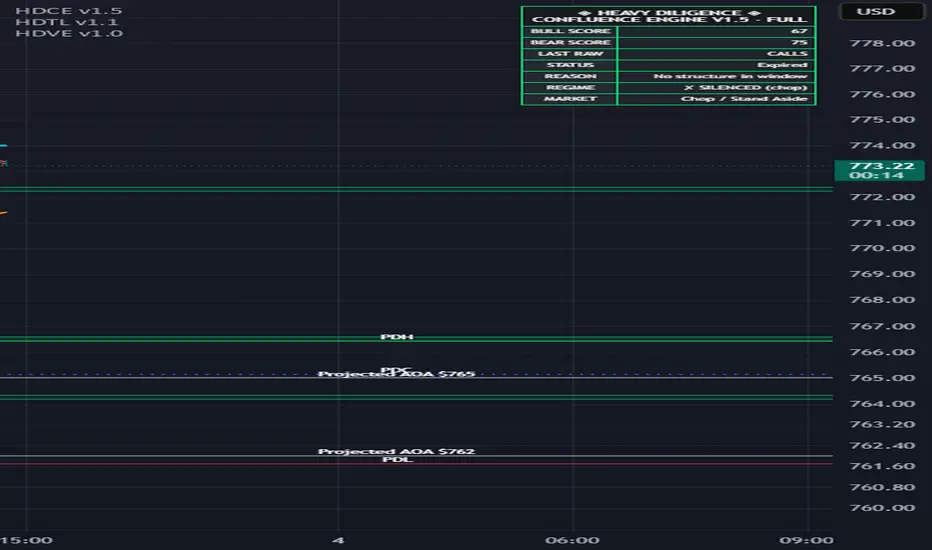
Enhanced Dashboard: Real-time status now shows "Watching for VWAP reclaim" or "Blocked: Rising VWAP" to explain why a signal hasn't confirmed.
Visual Overhaul: Simplified "ENTRY" labels with configurable sizes (Normal/Large/Huge) and automated TP/SL lines based on ATR.
📈 Performance Impact (SPY 5m Data)
v1.2 (Old): 128 signals | 57% Win Rate (High noise)
v1.3.2 (New): 20 entries | 73% Win Rate (Filtered quality)
Result: You trade 85% less often, but with significantly higher structural edge.
🎯 Quick Migration Guide
For v1.2 behavior: Disable "Enable Confirmation Layer" in settings.
For v1.3.2 behavior: Wait for the Green/Red ENTRY label before trading.
Alerts: Set alerts for "Confirmed ENTRY" conditions rather than "Candidate" conditions for the highest accuracy.
Summary: v1.3.2 prioritizes Quality over Quantity. By requiring market validation, it effectively eliminates false signals during choppy or counter-trend price action.
Notes de version
v1.4 New Features1. Label Overlap Fix
Automatic. If a Candidate label (CALLS/PUTS) appears on the current or previous bar, the ENTRY label is dynamically pushed further from the price (1.9×ATR vs. default 0.8×ATR) to ensure both markers are clearly visible.
2. Watchlist Alert Optimization
Alert Name: ⚡ ENTRY (Watchlist Screener)
This alert triggers on any confirmed ENTRY (CALLS or PUTS). The alert message includes {{ticker}} and {{interval}}, allowing you to attach ONE alert to an entire watchlist and screen many symbols for confirmed setups at once.
How to Use: 1. Add the indicator to any symbol in your watchlist 2. Create alert → select “⚡ ENTRY (Watchlist Screener)” 3. The alert message will auto-populate with ticker and timeframe 4. Apply the same alert to all symbols in your watchlist
3. Mobile Mode
New dashboard option. When Mode = “Mobile”, the dashboard renders in an ultra-compact 4-row format showing only: - Header: Heavy Diligence Signals v1.4 - MOBILE - Last Raw: CALLS or PUTS (the last Candidate direction) - Status: Current confirmation state (None / Candidate / Confirmed / Blocked / Expired) - Reason: Why the system is watching/waiting
Mobile exposes all Full-mode controls — every knob is accessible. Only the dashboard display is compacted for small screens.
Notes de version
Heavy Diligence Options Signals has been renamed and upgraded to HDCE v1.5 — Heavy Diligence Confluence Engine.This update includes:
• New HDCE v1.5 name and branding
• Lite mode retired
• Full and Mobile modes retained
• New compact dashboard with improved layout and controls
• More control over dashboard visibility and display mode
• Improved out-of-the-box settings for faster setup
• More frequent Entry Flags by default
• Updated candidate flag scoring using Calls Score / Puts Score
• Simplified Stop Loss and Take Profit settings
• Improved Regime / Volatility filtering controls
• Expanded Confirmation Layer settings for Entry Flags
• More control over VWAP, structure, trend, volume, and market-expansion confirmation requirements
• Improved sizing and usability for mobile devices
The core philosophy remains the same: HDCE is designed to provide better information faster while leaving execution decisions in the trader’s hands.
HDCE v1.5 — Options Trading Evolved.
Notes de version
HDCE v1.5 — Latest UpdateThis update is focused on making HDCE easier to use without changing the underlying signal engine.
The biggest change is the addition of tooltips throughout the settings menu. Nearly every exposed setting now includes a plain-English explanation of what it controls, what changing it does, and whether it affects signal logic, filtering, risk, confirmation, or display.
I also added a new Dashboard Resolution / Scale setting so the HDCE dashboard can be sized more appropriately for different displays.
Available presets now include:
720p
1080p
1440p
4K
The resolution setting only changes the dashboard text and header sizing. It does not change signal calculations, scoring, entries, regime logic, or confirmation behavior.
The goal with this update was simple: make HDCE easier to understand and easier to read on different setups without adding unnecessary complexity.
Same engine. Better usability. Better documentation.

Clause de non-responsabilité
Les informations et publications ne sont pas destinées à être, et ne constituent pas, des conseils ou recommandations financiers, d'investissement, de trading ou autres fournis ou approuvés par TradingView. Pour en savoir plus, consultez les Conditions d'utilisation.
Clause de non-responsabilité
Les informations et publications ne sont pas destinées à être, et ne constituent pas, des conseils ou recommandations financiers, d'investissement, de trading ou autres fournis ou approuvés par TradingView. Pour en savoir plus, consultez les Conditions d'utilisation.