Kalman Trend & Signal Filter
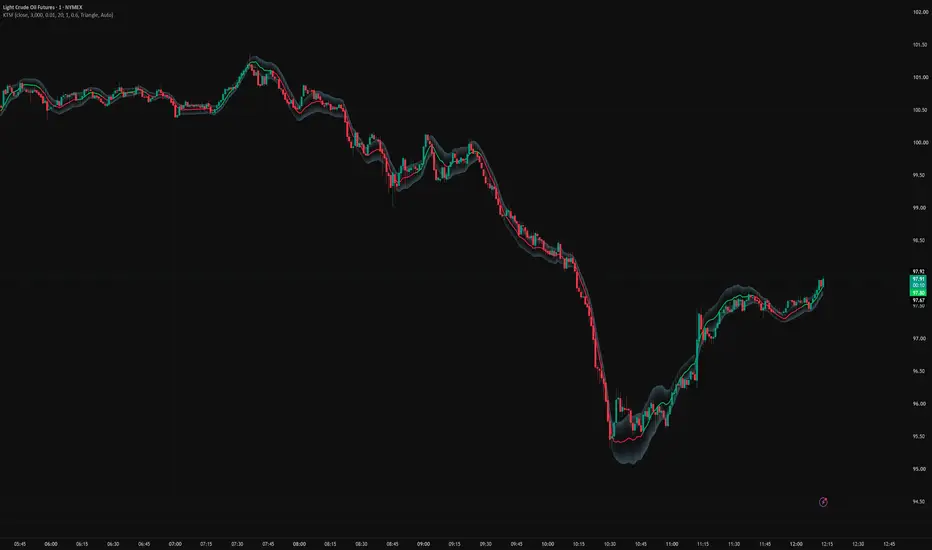
Kalman Trend & Signal Filter (KTSF)
A trend direction filter I built for CL, though it should work on any futures contract. I have not tested it for equities.
What it is
This is a trend following tool built on a three state Kalman filter. The three states it tracks are level (price), velocity (the rate price is changing), and acceleration (the rate that velocity itself is changing). Tracking acceleration as its own state is what lets the filter notice a trend speeding up or slowing down directly, rather than waiting for that to show up in velocity first.
How it works
Each bar, the filter takes one input, the price (close by default, though the source can be changed). From the current state it predicts what price, velocity, and acceleration should be on the next bar. When the next bar's price comes in, it compares that prediction to the actual price and corrects all three estimates based on the difference. How much weight goes to the new price versus the filter's own prediction is controlled by the noise settings described below.
The filter also measures how much real time has passed between bars rather than assuming every bar is the same length. That keeps it behaving consistently on a normal time based chart, including right after a gap, and on a range or tick based chart where bars can form in seconds during a fast stretch and take much longer during a quiet one.
Outputs: level, velocity, and acceleration are all estimated every bar. Level is plotted as the line on the chart. Velocity sets the line's color (green when rising, red when falling) and drives the entry and exit signals. Acceleration isn't plotted on its own, but it's what lets the line and the signals adjust quickly when a trend is actually turning.
What it shows
The line is the filter's smoothed estimate of price, not the raw price itself. The cloud around the line measures how far price has actually been deviating from the line recently. It's a read on current volatility, not a support or resistance zone and not a channel to trade bounces off. A wide cloud means choppy conditions, a narrow cloud means calm ones.
The markers are the actual signal. When the trend's slope clears a threshold, measured against the width of the cloud so it adjusts automatically with volatility, I get an entry marker in full color, and later an exit marker in a faded version of the same shape. A small B or S label also shows right at the bar for a quick visual check. (NOTE: These appear to be broken. I may end up removing them entirely.)
What it does not do
It does not give price targets, stop levels, or any read on how far a move might run. It is a trend direction tool, not a complete trading system. I treat every signal as the trend has turned, not as an exact entry or exit price, and I never use it on its own without the rest of what I'm seeing on the chart.
Settings
Measurement Noise. How much the filter distrusts each new price print. Higher means a smoother, slower line. What actually matters is the ratio between this and the two process noise settings below, not the size of any one of them on its own.
Acceleration Process Noise. How freely the filter lets curvature change. This is what lets the line track price closely through a turn. Raise it for a line that bends more readily with price, lower it for a smoother but slower line.
Velocity Process Noise. How freely the filter lets velocity change on its own. This is what keeps the line's color and the trade signal responsive. Too low and the color or signal can lag behind an actual turn even while the line itself is tracking fine. Too high and I get more whipsaw.
Band Lookback. How many bars go into measuring typical price deviation. This sets both the width of the cloud and the scale the signal threshold is measured against. Shorter settles faster to current volatility, longer is steadier but slower to adjust.
Slope Threshold. My conviction dial for signals. How far the trend has to lean, in cloud widths per bar, before a long or short signal fires. Raise it for fewer, higher conviction signals, lower it for more frequent and choppier ones.
Marker Position. On Line places the marker at the filter's own price level. On Bar anchors it to the actual candle instead. I pick whichever is easier for me to read at a glance.
Marker Shape, Marker Size, Show B/S Labels, and the color settings. All cosmetic, no effect on the signal itself. I set these to whatever is easiest on my eyes.
A trend direction filter I built for CL, though it should work on any futures contract. I have not tested it for equities.
What it is
This is a trend following tool built on a three state Kalman filter. The three states it tracks are level (price), velocity (the rate price is changing), and acceleration (the rate that velocity itself is changing). Tracking acceleration as its own state is what lets the filter notice a trend speeding up or slowing down directly, rather than waiting for that to show up in velocity first.
How it works
Each bar, the filter takes one input, the price (close by default, though the source can be changed). From the current state it predicts what price, velocity, and acceleration should be on the next bar. When the next bar's price comes in, it compares that prediction to the actual price and corrects all three estimates based on the difference. How much weight goes to the new price versus the filter's own prediction is controlled by the noise settings described below.
The filter also measures how much real time has passed between bars rather than assuming every bar is the same length. That keeps it behaving consistently on a normal time based chart, including right after a gap, and on a range or tick based chart where bars can form in seconds during a fast stretch and take much longer during a quiet one.
Outputs: level, velocity, and acceleration are all estimated every bar. Level is plotted as the line on the chart. Velocity sets the line's color (green when rising, red when falling) and drives the entry and exit signals. Acceleration isn't plotted on its own, but it's what lets the line and the signals adjust quickly when a trend is actually turning.
What it shows
The line is the filter's smoothed estimate of price, not the raw price itself. The cloud around the line measures how far price has actually been deviating from the line recently. It's a read on current volatility, not a support or resistance zone and not a channel to trade bounces off. A wide cloud means choppy conditions, a narrow cloud means calm ones.
The markers are the actual signal. When the trend's slope clears a threshold, measured against the width of the cloud so it adjusts automatically with volatility, I get an entry marker in full color, and later an exit marker in a faded version of the same shape. A small B or S label also shows right at the bar for a quick visual check. (NOTE: These appear to be broken. I may end up removing them entirely.)
What it does not do
It does not give price targets, stop levels, or any read on how far a move might run. It is a trend direction tool, not a complete trading system. I treat every signal as the trend has turned, not as an exact entry or exit price, and I never use it on its own without the rest of what I'm seeing on the chart.
Settings
Measurement Noise. How much the filter distrusts each new price print. Higher means a smoother, slower line. What actually matters is the ratio between this and the two process noise settings below, not the size of any one of them on its own.
Acceleration Process Noise. How freely the filter lets curvature change. This is what lets the line track price closely through a turn. Raise it for a line that bends more readily with price, lower it for a smoother but slower line.
Velocity Process Noise. How freely the filter lets velocity change on its own. This is what keeps the line's color and the trade signal responsive. Too low and the color or signal can lag behind an actual turn even while the line itself is tracking fine. Too high and I get more whipsaw.
Band Lookback. How many bars go into measuring typical price deviation. This sets both the width of the cloud and the scale the signal threshold is measured against. Shorter settles faster to current volatility, longer is steadier but slower to adjust.
Slope Threshold. My conviction dial for signals. How far the trend has to lean, in cloud widths per bar, before a long or short signal fires. Raise it for fewer, higher conviction signals, lower it for more frequent and choppier ones.
Marker Position. On Line places the marker at the filter's own price level. On Bar anchors it to the actual candle instead. I pick whichever is easier for me to read at a glance.
Marker Shape, Marker Size, Show B/S Labels, and the color settings. All cosmetic, no effect on the signal itself. I set these to whatever is easiest on my eyes.

Clause de non-responsabilité
Les informations et publications ne sont pas destinées à être, et ne constituent pas, des conseils ou recommandations financiers, d'investissement, de trading ou autres fournis ou approuvés par TradingView. Pour en savoir plus, consultez les Conditions d'utilisation.
Clause de non-responsabilité
Les informations et publications ne sont pas destinées à être, et ne constituent pas, des conseils ou recommandations financiers, d'investissement, de trading ou autres fournis ou approuvés par TradingView. Pour en savoir plus, consultez les Conditions d'utilisation.