Prop Firm Guard: Contract Sizing & Flatten Countdown
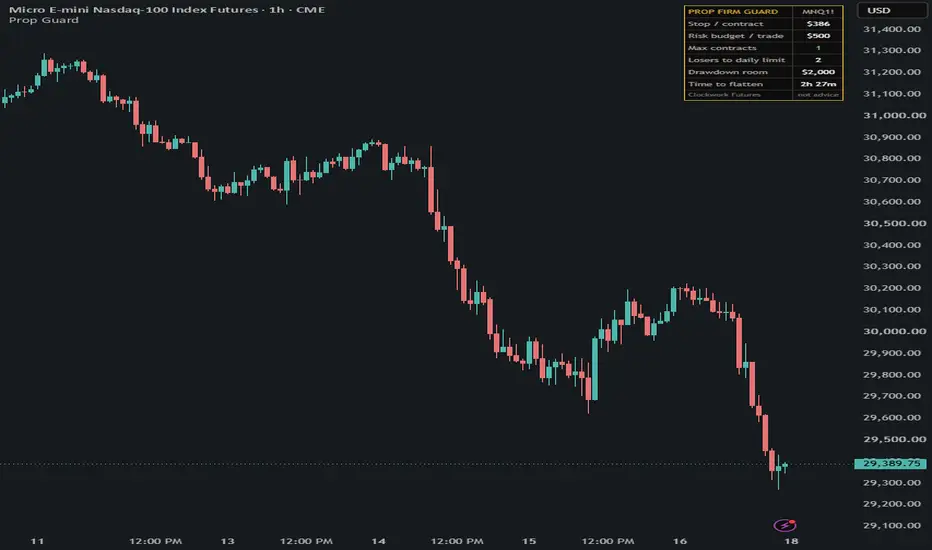
Prop Firm Guard is a risk panel for traders on funded / prop-firm evaluation accounts. It answers two questions before every trade: how many contracts can my stop afford under my firm's rules, and how much time is left before my firm force flattens positions.
WHAT IT SHOWS
A small panel on the chart with:
- Stop / contract: the dollar cost of your stop for one contract, from either a daily ATR based stop (ATR x multiplier) or a fixed stop in ticks. Uses the symbol's point value, so it works on any futures contract (MNQ, NQ, MES, ES, MGC, GC, CL, 6E, 6J and others).
- Risk budget / trade: the share of your daily loss limit you allow one losing trade to use (or of your drawdown room if your account has no daily limit).
- Max contracts: the most contracts that fit inside that budget, capped at your firm's contract limit. Shows "0 - stop too wide" in red when even one contract is too much.
- Losers to daily limit: how many full-stop losses at that size before the daily limit is hit.
- Drawdown room: your remaining distance to the trailing / end of day drawdown floor (you enter it).
- Time to flatten: a countdown to your firm's flatten time. Turns orange inside the warning window and shows PAST FLATTEN after it.
The chart is shaded orange in the warning window before the flatten time and red just after it, so open positions near the close stand out. An alert condition, "Flatten warning", fires inside the warning window.
HOW TO USE
1. Open the inputs and enter your firm's numbers: daily loss limit (0 if none), current drawdown room, max contracts allowed, and the % of the daily limit you will risk per trade.
2. Choose the stop method: ATR (default: 20-day ATR x 0.4) or a fixed number of ticks.
3. Set your firm's flatten time and time zone (default 16:45 New York) and how many minutes of warning you want.
4. Optional: create an alert on "Flatten warning" to get notified before the close.
NOTES
- Drawdown room is not read from your broker, update it as your balance changes.
- The ATR stop is a sizing reference, not a trade signal. The script places no orders and gives no entries or exits.
- Flatten times differ between firms and products. Check your own firm's rules.
Open source. Educational tool only, not financial advice.
WHAT IT SHOWS
A small panel on the chart with:
- Stop / contract: the dollar cost of your stop for one contract, from either a daily ATR based stop (ATR x multiplier) or a fixed stop in ticks. Uses the symbol's point value, so it works on any futures contract (MNQ, NQ, MES, ES, MGC, GC, CL, 6E, 6J and others).
- Risk budget / trade: the share of your daily loss limit you allow one losing trade to use (or of your drawdown room if your account has no daily limit).
- Max contracts: the most contracts that fit inside that budget, capped at your firm's contract limit. Shows "0 - stop too wide" in red when even one contract is too much.
- Losers to daily limit: how many full-stop losses at that size before the daily limit is hit.
- Drawdown room: your remaining distance to the trailing / end of day drawdown floor (you enter it).
- Time to flatten: a countdown to your firm's flatten time. Turns orange inside the warning window and shows PAST FLATTEN after it.
The chart is shaded orange in the warning window before the flatten time and red just after it, so open positions near the close stand out. An alert condition, "Flatten warning", fires inside the warning window.
HOW TO USE
1. Open the inputs and enter your firm's numbers: daily loss limit (0 if none), current drawdown room, max contracts allowed, and the % of the daily limit you will risk per trade.
2. Choose the stop method: ATR (default: 20-day ATR x 0.4) or a fixed number of ticks.
3. Set your firm's flatten time and time zone (default 16:45 New York) and how many minutes of warning you want.
4. Optional: create an alert on "Flatten warning" to get notified before the close.
NOTES
- Drawdown room is not read from your broker, update it as your balance changes.
- The ATR stop is a sizing reference, not a trade signal. The script places no orders and gives no entries or exits.
- Flatten times differ between firms and products. Check your own firm's rules.
Open source. Educational tool only, not financial advice.

Clockwork Futures. Questions or access requests: contact@clockworkfutures.com or DM @cwfutures on X. Tested log: clockworkfutures.com/?utm_source=tradingview
Clause de non-responsabilité
Les informations et publications ne sont pas destinées à être, et ne constituent pas, des conseils ou recommandations financiers, d'investissement, de trading ou autres fournis ou approuvés par TradingView. Pour en savoir plus, consultez les Conditions d'utilisation.
Clockwork Futures. Questions or access requests: contact@clockworkfutures.com or DM @cwfutures on X. Tested log: clockworkfutures.com/?utm_source=tradingview
Clause de non-responsabilité
Les informations et publications ne sont pas destinées à être, et ne constituent pas, des conseils ou recommandations financiers, d'investissement, de trading ou autres fournis ou approuvés par TradingView. Pour en savoir plus, consultez les Conditions d'utilisation.