Mis à jour
Adaptive MTF Trend Following [bitpunk]
Adaptive Trend Following MTF Panel [bitpunk]
A confirmed trend track with live price position and multi-timeframe context
1. WHAT THIS IS
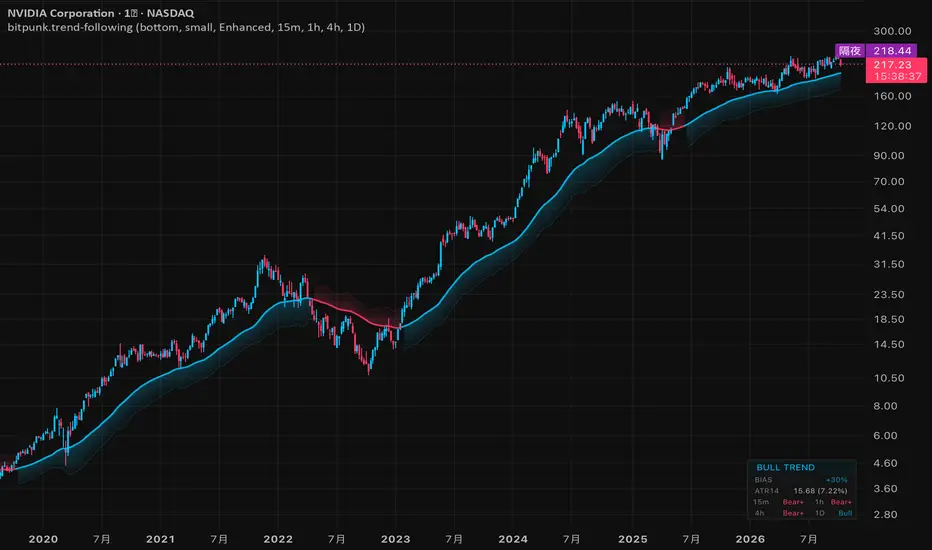
Adaptive Trend Following MTF Panel [bitpunk] combines an EMA50-centred trend track with a panel showing live BIAS, ATR14 and four timeframe states. Its volatility envelope widens immediately as range expands, then contracts gradually as exceptional volatility fades.
The default view: EMA50, one active edge and the Trend Panel.
2. READING THE TRACK AND PANEL 📈
2.1 Confirmed track
A confirmed close crossing above the upper envelope edge establishes bull direction; a close crossing below the lower edge establishes bear direction. Direction persists until an opposing close-confirmed crossing.
A close-confirmed crossing changes direction and switches the visible edge.
2.2 Trend Panel
The panel separates confirmed direction from current price position:
BIAS uses the same icons for live location: Bull/Bear means above/below EMA50, Strong Bull/Strong Bear means beyond the upper/lower edge, and Neutral means exactly at EMA50. It can disagree with confirmed track direction during a pullback.
Live BIAS and ATR14 above four timeframe states that need not agree.
3. USE AND SETTINGS 🧭
3.1 Reading workflow
Read the track direction, compare it with live BIAS, then check the MTF row for agreement or different phases across horizons. Use ATR14 to understand current range; choose entries, invalidation and position size separately.
3.2 Settings
Preset timeframes
4. REALTIME AND MULTI-TIMEFRAME 🕒
Track direction changes only on a confirmed close. BIAS, ATR14 and the envelope lines can move while the chart bar is open.
MTF cells use the local state for the chart timeframe, the previous confirmed state for a higher timeframe, and the latest completed intrabar available for a lower timeframe. A higher-timeframe cell therefore waits for that larger bar to close; missing lower-timeframe data can show n/a.
5. WHAT IT ISN'T ℹ️
This is a visual trend reference, with no alerts or automated execution. Track states are observations, and the active edge is a conditional reference rather than an assured support, resistance or protective stop. BIAS measures distance, not confidence or expected return. Use standard candlestick charts and interpret unavailable history separately from Neutral.
For informational and educational use only. Trading involves risk; execution and risk management remain with the user.
A confirmed trend track with live price position and multi-timeframe context
1. WHAT THIS IS
Adaptive Trend Following MTF Panel [bitpunk] combines an EMA50-centred trend track with a panel showing live BIAS, ATR14 and four timeframe states. Its volatility envelope widens immediately as range expands, then contracts gradually as exceptional volatility fades.
The default view: EMA50, one active edge and the Trend Panel.
2. READING THE TRACK AND PANEL 📈
2.1 Confirmed track
A confirmed close crossing above the upper envelope edge establishes bull direction; a close crossing below the lower edge establishes bear direction. Direction persists until an opposing close-confirmed crossing.
- Bull track — EMA50 and the lower edge.
- Bear track — EMA50 and the upper edge.
- Neutral — only EMA50, before a direction is established.
A close-confirmed crossing changes direction and switches the visible edge.
2.2 Trend Panel
The panel separates confirmed direction from current price position:
- BIAS — live distance from EMA50 relative to the envelope width. Positive is above EMA50; negative is below. EMA50 is 0%, one envelope width is ±50%, and two widths reach the ±100% display cap.
- ATR14 — current Average True Range in price units and as a percentage of price.
- MTF row — track states on four preset timeframes: 🚀 Strong Bull, 🐂 Bull, 😐 Neutral, 🐻 Bear, 👻 Strong Bear. Strong states mean the established direction agrees with price beyond its corresponding outer edge. Neutral means no confirmed direction yet; n/a means unavailable data or history.
BIAS uses the same icons for live location: Bull/Bear means above/below EMA50, Strong Bull/Strong Bear means beyond the upper/lower edge, and Neutral means exactly at EMA50. It can disagree with confirmed track direction during a pullback.
Live BIAS and ATR14 above four timeframe states that need not agree.
3. USE AND SETTINGS 🧭
3.1 Reading workflow
Read the track direction, compare it with live BIAS, then check the MTF row for agreement or different phases across horizons. Use ATR14 to understand current range; choose entries, invalidation and position size separately.
3.2 Settings
- Language — English by default; Simplified Chinese is also available.
- Theme Colors — change bull and bear colours.
- Trend Panel Position — bottom-right by default; top-right or none to hide it.
- Trend Panel Size — small by default; medium and large are available.
- MTF Trend Following Preset — swing by default. Select none to hide only the MTF row, keeping BIAS and ATR14.
Preset timeframes
- Scalping: 1m / 5m / 15m / 1h
- Intraday: 5m / 15m / 1h / 4h
- Swing: 15m / 1h / 4h / 1D
- Trend: 1h / 4h / 1D / 1W
4. REALTIME AND MULTI-TIMEFRAME 🕒
Track direction changes only on a confirmed close. BIAS, ATR14 and the envelope lines can move while the chart bar is open.
MTF cells use the local state for the chart timeframe, the previous confirmed state for a higher timeframe, and the latest completed intrabar available for a lower timeframe. A higher-timeframe cell therefore waits for that larger bar to close; missing lower-timeframe data can show n/a.
5. WHAT IT ISN'T ℹ️
This is a visual trend reference, with no alerts or automated execution. Track states are observations, and the active edge is a conditional reference rather than an assured support, resistance or protective stop. BIAS measures distance, not confidence or expected return. Use standard candlestick charts and interpret unavailable history separately from Neutral.
For informational and educational use only. Trading involves risk; execution and risk management remain with the user.
Notes de version
Replaced the fixed MTF preset with 4 individual pulldown box (none, 5m, 15m, 30m, 1h, 2h, 4h, 1D, 1W, 1M). Notes de version
Updated chart on display page. Notes de version
Updated short tittlle. Notes de version
Updated chart subtittle. Notes de version
Updated visual display effect. Notes de version
Updated indicator tittle. 
Open research and indicators on stocks and crypto. Explore the work at bitpunk.io
Clause de non-responsabilité
Les informations et publications ne sont pas destinées à être, et ne constituent pas, des conseils ou recommandations financiers, d'investissement, de trading ou autres fournis ou approuvés par TradingView. Pour en savoir plus, consultez les Conditions d'utilisation.
Open research and indicators on stocks and crypto. Explore the work at bitpunk.io
Clause de non-responsabilité
Les informations et publications ne sont pas destinées à être, et ne constituent pas, des conseils ou recommandations financiers, d'investissement, de trading ou autres fournis ou approuvés par TradingView. Pour en savoir plus, consultez les Conditions d'utilisation.