OPEN-SOURCE SCRIPT
Mis à jour Easy Trend Direction
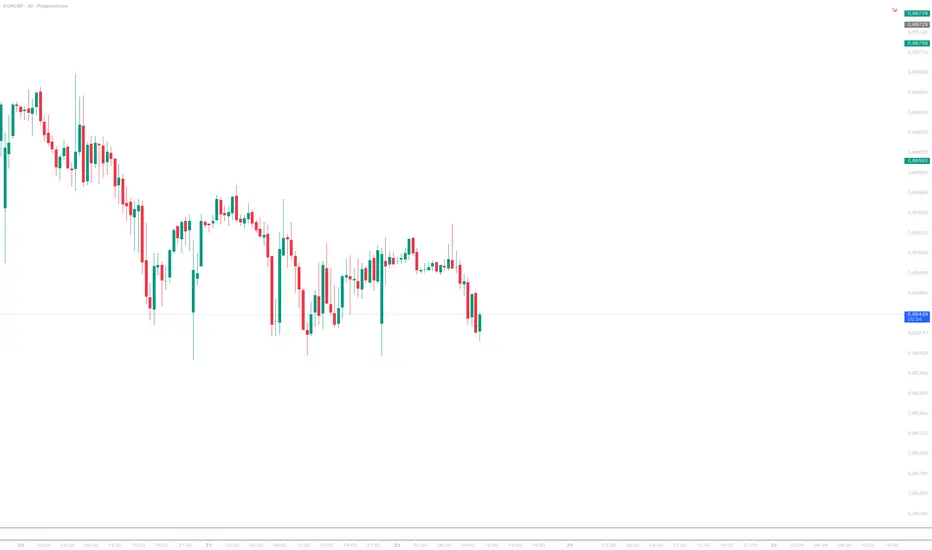
Easy Trend Direction (ETD) – Smart UI Arrow
Keep your charts completely clean! Easy Trend Direction (ETD) places a dynamic trend arrow directly in the top right corner of your chart, giving you instant, distraction-free visual feedback on the current market structure and momentum.
Instead of cluttering your workspace with multiple moving averages and oscillators, ETD combines the logic of structural EMAs and RSI momentum into one single, elegant UI element.
How it Works
The indicator analyzes two key technical factors to dynamically update the symbol, angle, and color of the arrow in real-time:
Key Features
ETD is the perfect confluence filter for daytraders and swing traders who want to stay aligned with the trend at a single glance. Add it to your favorites and never lose sight of the market direction again!
Keep your charts completely clean! Easy Trend Direction (ETD) places a dynamic trend arrow directly in the top right corner of your chart, giving you instant, distraction-free visual feedback on the current market structure and momentum.
Instead of cluttering your workspace with multiple moving averages and oscillators, ETD combines the logic of structural EMAs and RSI momentum into one single, elegant UI element.
How it Works
The indicator analyzes two key technical factors to dynamically update the symbol, angle, and color of the arrow in real-time:
- Trend Structure (Direction): The script calculates the relationship between a Fast EMA (default 50) and a Slow EMA (default 200).
Fast EMA > Slow EMA = Bullish (Green)
Fast EMA < Slow EMA = Bearish (Red)
If both EMAs are extremely close to each other (defined by the customizable "Neutral Zone"), the market is consolidating, resulting in a Neutral state (Gray, horizontal arrow). - Momentum (Strength): Once a trend direction is established, the script uses the RSI (default 14) to determine the angle of the arrow.
High momentum (RSI hitting extreme thresholds like 70 or 30) points the arrow straight up or down.
Normal momentum results in a diagonal arrow, indicating a steady, healthy trend.
Key Features
- Zero Chart Clutter: Designed for minimalists. The UI table sits quietly in the top right corner, leaving your candles and price action fully visible.
- Customizable Arrow Styles: Use the dropdown menu in the settings to choose between three clean, built-in design sets: "Classic Line", "Heavy Blocks", or "Simple Triangles".
- Fully Adjustable Logic: Tweak the EMA lengths, RSI momentum thresholds, and the percentage-based "Neutral Zone" to perfectly fit your preferred asset and timeframe.
- Theme Integration: Personalize the Bullish, Bearish, and Neutral colors to match your specific chart setup.
ETD is the perfect confluence filter for daytraders and swing traders who want to stay aligned with the trend at a single glance. Add it to your favorites and never lose sight of the market direction again!
Notes de version
v2Notes de version
v3Script open-source
Dans l'esprit TradingView, le créateur de ce script l'a rendu open source afin que les traders puissent examiner et vérifier ses fonctionnalités. Bravo à l'auteur! Bien que vous puissiez l'utiliser gratuitement, n'oubliez pas que la republication du code est soumise à nos Règles.

Clause de non-responsabilité
Les informations et publications ne sont pas destinées à être, et ne constituent pas, des conseils ou recommandations financiers, d'investissement, de trading ou autres fournis ou approuvés par TradingView. Pour en savoir plus, consultez les Conditions d'utilisation.
Script open-source
Dans l'esprit TradingView, le créateur de ce script l'a rendu open source afin que les traders puissent examiner et vérifier ses fonctionnalités. Bravo à l'auteur! Bien que vous puissiez l'utiliser gratuitement, n'oubliez pas que la republication du code est soumise à nos Règles.
Clause de non-responsabilité
Les informations et publications ne sont pas destinées à être, et ne constituent pas, des conseils ou recommandations financiers, d'investissement, de trading ou autres fournis ou approuvés par TradingView. Pour en savoir plus, consultez les Conditions d'utilisation.