Position Size Calculator
Title for publish:
Position Size Calculator - Auto Drag & Drop Risk Manager
Short Description:
Auto position size calculator for Futures. Set your $ risk, drag Entry & SL lines, get exact contracts.
Full Description:
📊 Stop guessing your position size.
This tool does the math for you. You define how much you are willing to risk in dollars, drag two lines on the chart, and it tells you exactly how many contracts to trade. No more manual calculators, no more mistakes.
💰 Why Proper Risk Management Is Everything
Most traders don't fail because of a bad strategy, they fail because of bad risk management. If you risk 10% on one trade, you need 11% just to get back to breakeven.
Professional trading means fixed risk per trade. You decide upfront: "I will risk $300 on this trade" - and this indicator calculates the position size so you never risk more than that. This is how you protect your account long-term.
🎯 How It Works
The formula is simple: Contracts = Risk Amount ($) / (Distance between Entry and SL * Point Value)
You don't need to remember it. The indicator calculates it live for you.
Example: You risk $300. Distance is 10 points on MNQ which is $2 per point. Risk per contract is $20. The indicator will show you 15 contracts.
📌 How To Use It The First Time - Important!
Add the indicator to your chart.
Leave Entry Line and Stop Loss on 0 in the settings.
On the first load, it goes into AUTO mode: It takes the current Close price as Entry and places the SL 0.5% below it. You can change that % in settings.
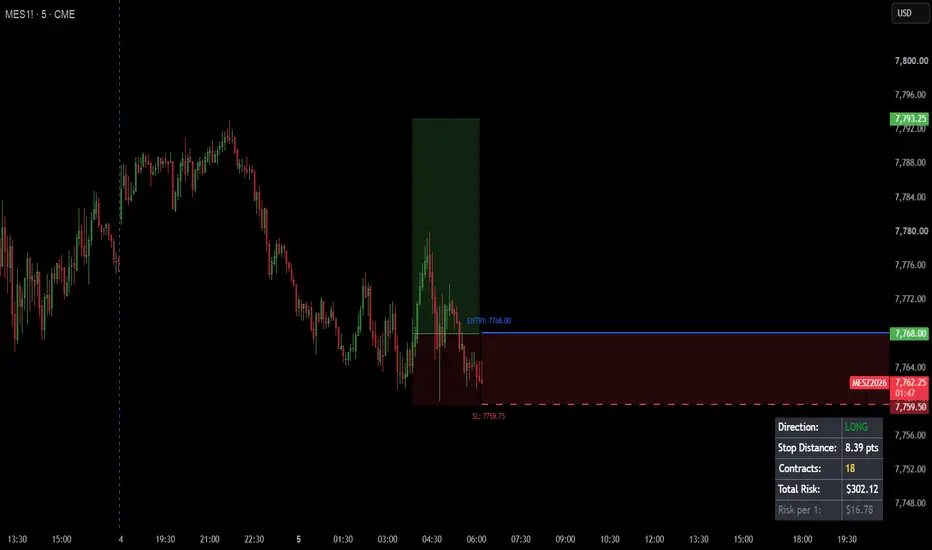
Now just drag and drop the Blue solid line and the Red dashed line [SL] to your desired levels. The table updates instantly.[Entry]
Smart logic: The lines are drawn only to the right extend.right, so they never clutter your chart history. And the AUTO is stored only once, so it won't jump around.
⚙️ Settings Explained
Risk Settings:
Risk Amount ($): Your max loss if SL is hit. This is the core of the calculation.
Instrument Point Value: The dollar value per point. Presets ready for: MNQ ($2), MES ($5), NQ ($20), ES ($50), MGC ($10). You can also use Auto (Chart) to take it from TradingView or set a Custom value.
Trade Levels:
Entry / SL: Always work with drag & drop. 0 = AUTO mode on current price.
AUTO Offset %: How far the SL will be from Entry in AUTO mode.
Table Settings:
Table Position & Size: Move the info panel anywhere - Top Right, Bottom Left, etc. - and change its size so it never blocks your candles.
What You See In The Table:
Direction: Auto-detects LONG / SHORT based on line positions
Stop Distance: Distance in points
Contracts: The number you need - how many contracts to buy/sell
Total Risk & Risk per 1: Your actual total risk and risk for a single contract
Built for Futures traders who want to trade like professionals. Define your stop before you enter!
Disclaimer: This is a utility tool for calculation only and not financial advice.
Position Size Calculator - Auto Drag & Drop Risk Manager
Short Description:
Auto position size calculator for Futures. Set your $ risk, drag Entry & SL lines, get exact contracts.
Full Description:
📊 Stop guessing your position size.
This tool does the math for you. You define how much you are willing to risk in dollars, drag two lines on the chart, and it tells you exactly how many contracts to trade. No more manual calculators, no more mistakes.
💰 Why Proper Risk Management Is Everything
Most traders don't fail because of a bad strategy, they fail because of bad risk management. If you risk 10% on one trade, you need 11% just to get back to breakeven.
Professional trading means fixed risk per trade. You decide upfront: "I will risk $300 on this trade" - and this indicator calculates the position size so you never risk more than that. This is how you protect your account long-term.
🎯 How It Works
The formula is simple: Contracts = Risk Amount ($) / (Distance between Entry and SL * Point Value)
You don't need to remember it. The indicator calculates it live for you.
Example: You risk $300. Distance is 10 points on MNQ which is $2 per point. Risk per contract is $20. The indicator will show you 15 contracts.
📌 How To Use It The First Time - Important!
Add the indicator to your chart.
Leave Entry Line and Stop Loss on 0 in the settings.
On the first load, it goes into AUTO mode: It takes the current Close price as Entry and places the SL 0.5% below it. You can change that % in settings.
Now just drag and drop the Blue solid line and the Red dashed line [SL] to your desired levels. The table updates instantly.[Entry]
Smart logic: The lines are drawn only to the right extend.right, so they never clutter your chart history. And the AUTO is stored only once, so it won't jump around.
⚙️ Settings Explained
Risk Settings:
Risk Amount ($): Your max loss if SL is hit. This is the core of the calculation.
Instrument Point Value: The dollar value per point. Presets ready for: MNQ ($2), MES ($5), NQ ($20), ES ($50), MGC ($10). You can also use Auto (Chart) to take it from TradingView or set a Custom value.
Trade Levels:
Entry / SL: Always work with drag & drop. 0 = AUTO mode on current price.
AUTO Offset %: How far the SL will be from Entry in AUTO mode.
Table Settings:
Table Position & Size: Move the info panel anywhere - Top Right, Bottom Left, etc. - and change its size so it never blocks your candles.
What You See In The Table:
Direction: Auto-detects LONG / SHORT based on line positions
Stop Distance: Distance in points
Contracts: The number you need - how many contracts to buy/sell
Total Risk & Risk per 1: Your actual total risk and risk for a single contract
Built for Futures traders who want to trade like professionals. Define your stop before you enter!
Disclaimer: This is a utility tool for calculation only and not financial advice.

Clause de non-responsabilité
Les informations et publications ne sont pas destinées à être, et ne constituent pas, des conseils ou recommandations financiers, d'investissement, de trading ou autres fournis ou approuvés par TradingView. Pour en savoir plus, consultez les Conditions d'utilisation.
Clause de non-responsabilité
Les informations et publications ne sont pas destinées à être, et ne constituent pas, des conseils ou recommandations financiers, d'investissement, de trading ou autres fournis ou approuvés par TradingView. Pour en savoir plus, consultez les Conditions d'utilisation.