iNaka 3-Bar Sequence
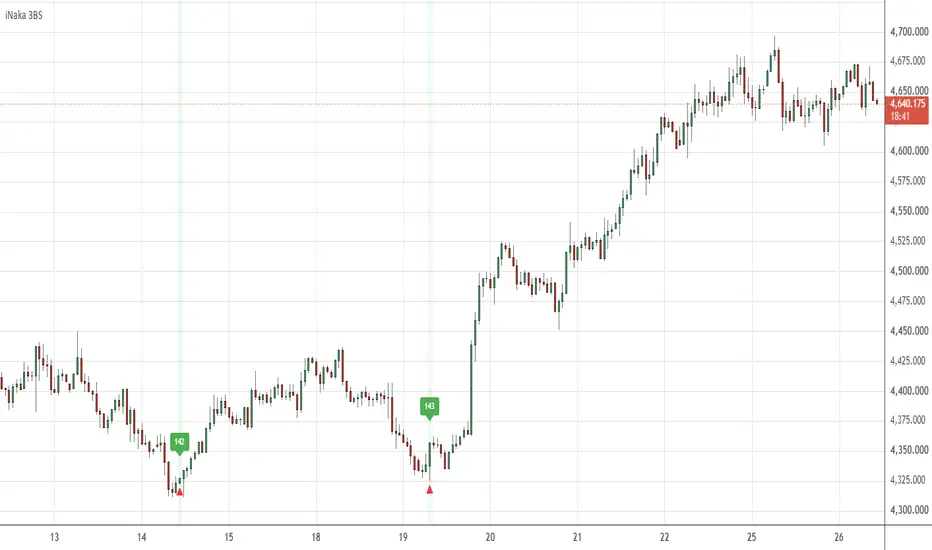
iNaka 3-Bar Sequence marks every place a three-bar candlestick sequence that YOU define completes. You set what the 1st, 2nd and 3rd bar must each be - Bull Bar, Bear Bar, Hammer, Shooting Star, Doji, or Any Bar for "I do not care what shape this one is" - and the script marks the bar that finishes that sequence. Around it sit six optional gates that decide whether a completed sequence counts here.
Two things here are uncommon, and they are the reason it exists. The sequence is defined ACROSS ALL THREE POSITIONS independently, with an Any Bar wildcard on each, so the same script expresses a two-bar pair, a three-bar reversal or a single candlestick without changing anything but the dropdowns. And the RSI test is a SEPARATE BAND PER POSITION rather than one reading at the signal bar - momentum is checked as a shape running through the sequence, not as a threshold at the end of it.
WHY THIS IS ONE TOOL AND NOT A PILE OF INDICATORS
The three-bar sequence is the only thing the six gates can fire. Bollinger Bands, the two moving averages, RSI, the price window and the time window produce no signal of their own: none of them plots a cross, an arrow or an alert, and none of them can trigger anything by itself. They are AND-gates on the same event, and each answers a different question about the SAME three bars:
- RSI, read separately at each of the three bar positions: what momentum was doing THROUGH the sequence. This is not "RSI is overbought" - it is a band per bar, so you can say "already extended two bars ago, more extended one bar ago, still up here" and reject the same candlestick shape when it appears with flat momentum.
- Bollinger band width: was the market wide enough for a three-bar sequence to mean anything. The same three candles inside a dead flat band are noise.
- Bollinger band touch: did the sequence complete AT an extreme rather than in the middle of the range.
- Fast and slow moving average: did it complete with the prevailing trend or against it.
- Price window: is price in the area you are willing to trade at all.
- Time window: is the bar inside the date range you are testing.
Every gate is off by default, so the script starts as a plain pattern detector and you add context one gate at a time. That is the design: a candlestick shape is not a setup until you have said where and when it counts, and each gate is one clause of that sentence.
WHAT IT DRAWS
- A red triangle above every bar that completes the sequence, plus a green background tint on that bar.
- A green numbered label above the bar each time an alert is allowed through. The number is a running count of alerts on the chart. With Silent Minutes left at 0 every detection is numbered.
- A red numbered label below the bar where a Silent-Minutes mute window ended, carrying the number of the alert that started it - so a muted stretch reads as a matched green/red pair.
- Optionally the Bollinger Bands, the two moving averages, and the New High / New Low lines. All three are off by default. Drawing the bands or the moving averages changes nothing at all; the New High / New Low toggle also arms that pair of alerts, which is described in its own section below.
HOW A BAR IS CLASSIFIED
- Bull Bar: close above open, with an optional minimum body size in POINTS (1 point = 1 tick, so the value follows the feed's precision: on a 2-decimal XAUUSD feed 100 points = $1.00, on a 3-decimal one 1000 points = $1.00). Bear Bar is the mirror.
- Hammer: lower shadow longer than Hammer Shadow % of the bar's high-low range, upper shadow no more than (1 - Hammer Body %) of it, and body no more than Hammer Body % of it.
- Shooting Star: the same test with the shadows swapped, using its own body and shadow percentages.
- Doji: body no more than Doji Body % of the range.
- Any Bar: no bar-type constraint at this position. Its RSI band and bar-comparison rule, if you enabled them, still apply.
HOW THE SEQUENCE IS TESTED
The 1st bar is two bars back, the 2nd is one bar back, and the 3rd is the current bar. All three are tested on every bar, so the sequence is reported the moment its last bar completes it. On top of the type test, two optional rules can be attached:
- Bar Comparison, separately for the 2nd and the 3rd bar: require that bar's close to be higher or lower than the open, high, low or close of a bar a chosen number of bars before it. This is how you turn "Bull, Bull, Shooting Star" into "Bull, Bull that closed above the bar before it, Shooting Star".
- The RSI band for that position, if RSI detection is on.
THREE THINGS THAT WILL SURPRISE YOU IF NOBODY SAYS THEM
1. Any Bar switches off the bar-TYPE test for that position and nothing else. Its RSI band and its Bar Comparison rule, if you enabled them, still apply. That is the point: "any shape here, but momentum had to be in this range" is a setup you can actually express.
2. If you tick both Near Upper BB and Near Lower BB, Near Upper wins and Near Lower is ignored. The same applies to Detect Above MA and Detect Below MA: ticking both is treated as Above.
3. Use MA Detection with NEITHER Above nor Below ticked blocks every signal. That is deliberate rather than an oversight - the gate is on and you have not told it which side - but it looks like the script has stopped working, so it is worth knowing.
SETTINGS
Sequence - the master switch and the three bar types. Bar Definitions - what each type means: minimum bull/bear body in points, and the body and shadow percentages for Hammer, Shooting Star and Doji. Bar Comparison - the optional higher/lower rules for the 2nd and 3rd bars. Momentum (RSI) - one RSI length, then a min/max band for each of the three positions. Bollinger Context - length, basis MA type, source, standard deviation; whether to draw the bands; the width filter in points; and the Near Upper / Near Lower band-touch gate. Trend (Moving Averages) - fast and slow type and length, which side to require, and whether to draw them. Price & Time Window - an absolute price range and a date range. Note the price range defaults to 0-100, which blocks everything on any instrument priced above 100, so set it before switching it on. New High / New Low - a separate pair of alerts, described below. Alerts & Display - the triangle and highlight toggles and their colours, Silent Minutes, and the numbered markers.
NEW HIGH / NEW LOW - READ WHAT IT ACTUALLY TESTS
This is an independent pair of alerts, not part of the sequence and not a gate on it. New High fires when the close is at or above the highest high of the last N bars including the current one. Because a bar's close can never exceed its own high, that can only be true when the bar closes exactly at its high AND that high is the highest of the window. It is therefore a good deal stricter than "price made a new high", and on most instruments it fires rarely. New Low is the mirror.
Why it ships in this script rather than as a separate one: the sequence engine describes SHAPES, and this is the one piece of context a shape cannot express - the moment price closes at the extreme of the last N bars. It shares the same Silent Minutes throttle and the same numbered labels, so one alert stream covers both, and a sequence alert on the same bar takes precedence over it. Leave Use New High / New Low switched off and it draws nothing and fires nothing.
SILENT MINUTES
After an alert is allowed through, all further alerts from the script are suppressed for this many minutes. Detection is never suppressed: the triangles and the highlight keep appearing, so the chart still shows you everything that happened while the alerts were muted. 0 disables it.
HOW TO USE IT
- Start with the pattern alone, every gate off, on the timeframe you actually trade. Find out how often your shape occurs before you start filtering it.
- Add ONE gate at a time and watch what it removes. If a gate removes nothing, it is not doing work; if it removes everything, it is the wrong gate for that market.
- Add the RSI bands last, and set them from what you observe on the chart rather than from the usual 70/30 habits. The three bands are a shape, not a threshold.
- If you use this for alerts on a fast timeframe, set Silent Minutes rather than tightening the pattern: you keep seeing every occurrence on the chart and stop getting told about each one.
LIMITATIONS, WHICH YOU SHOULD READ BEFORE USING IT
- The 3rd bar of the sequence is the CURRENT bar. The triangle, the background tint and the alert condition are evaluated on a bar that is still forming, so they can appear and disappear until it closes. Closed bars never change. Set every alert to "Once Per Bar Close". The numbered labels are drawn only on confirmed bars and never repaint. The New High / New Low lines, if you switch them on, also move while the current bar forms.
- Apart from the RSI bands, which are read at each bar's own position, the gates read the CURRENT bar's state. The band-touch gate compares all three bars against the current bar's Bollinger Bands, and the band-width, MA, price and time gates are all evaluated on the bar that completes the sequence.
- Candlestick classification is threshold arithmetic on one bar's four prices. It has no notion of context, and the same shape on a 1-minute chart and a daily chart is not the same event.
- Only the most recent 500 numbered labels are kept. Scroll back far enough and the older ones have been deleted; the triangles and the highlight are not affected and go back as far as the chart data.
- The default percentages for Hammer, Shooting Star and Doji are conventional starting values, not optimised or validated ones. Every instrument has its own shadow distribution and you should expect to change them.
- This is a detection tool. It does not generate entries or exits, does not size or manage a position, and makes no claim about profitability.
ALERTS
Three conditions: "3-Bar Sequence Detected", "New High" and "New Low". All three respect Silent Minutes. Set them to "Once Per Bar Close".
The chart above is not on default settings. The sequence is set to 1st Bar = Bear Bar, 2nd Bar = Bear Bar, 3rd Bar = Bull Bar. Use Bar Comparison for 3rd Bar is on, so the closing bar must also close above the OPEN of the first bar of the sequence (Comparison Type = Higher, Compare Against = Open, Lookback Period = 2). Use RSI Detection is on with a different band at each position - 1st Bar 1-30, 2nd Bar 1-40, 3rd Bar 1-50. Read together that is: two down bars completing from deeply oversold, reclaimed by an up bar that closes back above where the move began, with the momentum requirement widening one step at a time across the three bars. Everything else is at its default.
Published open-source under the Mozilla Public License 2.0.
Two things here are uncommon, and they are the reason it exists. The sequence is defined ACROSS ALL THREE POSITIONS independently, with an Any Bar wildcard on each, so the same script expresses a two-bar pair, a three-bar reversal or a single candlestick without changing anything but the dropdowns. And the RSI test is a SEPARATE BAND PER POSITION rather than one reading at the signal bar - momentum is checked as a shape running through the sequence, not as a threshold at the end of it.
WHY THIS IS ONE TOOL AND NOT A PILE OF INDICATORS
The three-bar sequence is the only thing the six gates can fire. Bollinger Bands, the two moving averages, RSI, the price window and the time window produce no signal of their own: none of them plots a cross, an arrow or an alert, and none of them can trigger anything by itself. They are AND-gates on the same event, and each answers a different question about the SAME three bars:
- RSI, read separately at each of the three bar positions: what momentum was doing THROUGH the sequence. This is not "RSI is overbought" - it is a band per bar, so you can say "already extended two bars ago, more extended one bar ago, still up here" and reject the same candlestick shape when it appears with flat momentum.
- Bollinger band width: was the market wide enough for a three-bar sequence to mean anything. The same three candles inside a dead flat band are noise.
- Bollinger band touch: did the sequence complete AT an extreme rather than in the middle of the range.
- Fast and slow moving average: did it complete with the prevailing trend or against it.
- Price window: is price in the area you are willing to trade at all.
- Time window: is the bar inside the date range you are testing.
Every gate is off by default, so the script starts as a plain pattern detector and you add context one gate at a time. That is the design: a candlestick shape is not a setup until you have said where and when it counts, and each gate is one clause of that sentence.
WHAT IT DRAWS
- A red triangle above every bar that completes the sequence, plus a green background tint on that bar.
- A green numbered label above the bar each time an alert is allowed through. The number is a running count of alerts on the chart. With Silent Minutes left at 0 every detection is numbered.
- A red numbered label below the bar where a Silent-Minutes mute window ended, carrying the number of the alert that started it - so a muted stretch reads as a matched green/red pair.
- Optionally the Bollinger Bands, the two moving averages, and the New High / New Low lines. All three are off by default. Drawing the bands or the moving averages changes nothing at all; the New High / New Low toggle also arms that pair of alerts, which is described in its own section below.
HOW A BAR IS CLASSIFIED
- Bull Bar: close above open, with an optional minimum body size in POINTS (1 point = 1 tick, so the value follows the feed's precision: on a 2-decimal XAUUSD feed 100 points = $1.00, on a 3-decimal one 1000 points = $1.00). Bear Bar is the mirror.
- Hammer: lower shadow longer than Hammer Shadow % of the bar's high-low range, upper shadow no more than (1 - Hammer Body %) of it, and body no more than Hammer Body % of it.
- Shooting Star: the same test with the shadows swapped, using its own body and shadow percentages.
- Doji: body no more than Doji Body % of the range.
- Any Bar: no bar-type constraint at this position. Its RSI band and bar-comparison rule, if you enabled them, still apply.
HOW THE SEQUENCE IS TESTED
The 1st bar is two bars back, the 2nd is one bar back, and the 3rd is the current bar. All three are tested on every bar, so the sequence is reported the moment its last bar completes it. On top of the type test, two optional rules can be attached:
- Bar Comparison, separately for the 2nd and the 3rd bar: require that bar's close to be higher or lower than the open, high, low or close of a bar a chosen number of bars before it. This is how you turn "Bull, Bull, Shooting Star" into "Bull, Bull that closed above the bar before it, Shooting Star".
- The RSI band for that position, if RSI detection is on.
THREE THINGS THAT WILL SURPRISE YOU IF NOBODY SAYS THEM
1. Any Bar switches off the bar-TYPE test for that position and nothing else. Its RSI band and its Bar Comparison rule, if you enabled them, still apply. That is the point: "any shape here, but momentum had to be in this range" is a setup you can actually express.
2. If you tick both Near Upper BB and Near Lower BB, Near Upper wins and Near Lower is ignored. The same applies to Detect Above MA and Detect Below MA: ticking both is treated as Above.
3. Use MA Detection with NEITHER Above nor Below ticked blocks every signal. That is deliberate rather than an oversight - the gate is on and you have not told it which side - but it looks like the script has stopped working, so it is worth knowing.
SETTINGS
Sequence - the master switch and the three bar types. Bar Definitions - what each type means: minimum bull/bear body in points, and the body and shadow percentages for Hammer, Shooting Star and Doji. Bar Comparison - the optional higher/lower rules for the 2nd and 3rd bars. Momentum (RSI) - one RSI length, then a min/max band for each of the three positions. Bollinger Context - length, basis MA type, source, standard deviation; whether to draw the bands; the width filter in points; and the Near Upper / Near Lower band-touch gate. Trend (Moving Averages) - fast and slow type and length, which side to require, and whether to draw them. Price & Time Window - an absolute price range and a date range. Note the price range defaults to 0-100, which blocks everything on any instrument priced above 100, so set it before switching it on. New High / New Low - a separate pair of alerts, described below. Alerts & Display - the triangle and highlight toggles and their colours, Silent Minutes, and the numbered markers.
NEW HIGH / NEW LOW - READ WHAT IT ACTUALLY TESTS
This is an independent pair of alerts, not part of the sequence and not a gate on it. New High fires when the close is at or above the highest high of the last N bars including the current one. Because a bar's close can never exceed its own high, that can only be true when the bar closes exactly at its high AND that high is the highest of the window. It is therefore a good deal stricter than "price made a new high", and on most instruments it fires rarely. New Low is the mirror.
Why it ships in this script rather than as a separate one: the sequence engine describes SHAPES, and this is the one piece of context a shape cannot express - the moment price closes at the extreme of the last N bars. It shares the same Silent Minutes throttle and the same numbered labels, so one alert stream covers both, and a sequence alert on the same bar takes precedence over it. Leave Use New High / New Low switched off and it draws nothing and fires nothing.
SILENT MINUTES
After an alert is allowed through, all further alerts from the script are suppressed for this many minutes. Detection is never suppressed: the triangles and the highlight keep appearing, so the chart still shows you everything that happened while the alerts were muted. 0 disables it.
HOW TO USE IT
- Start with the pattern alone, every gate off, on the timeframe you actually trade. Find out how often your shape occurs before you start filtering it.
- Add ONE gate at a time and watch what it removes. If a gate removes nothing, it is not doing work; if it removes everything, it is the wrong gate for that market.
- Add the RSI bands last, and set them from what you observe on the chart rather than from the usual 70/30 habits. The three bands are a shape, not a threshold.
- If you use this for alerts on a fast timeframe, set Silent Minutes rather than tightening the pattern: you keep seeing every occurrence on the chart and stop getting told about each one.
LIMITATIONS, WHICH YOU SHOULD READ BEFORE USING IT
- The 3rd bar of the sequence is the CURRENT bar. The triangle, the background tint and the alert condition are evaluated on a bar that is still forming, so they can appear and disappear until it closes. Closed bars never change. Set every alert to "Once Per Bar Close". The numbered labels are drawn only on confirmed bars and never repaint. The New High / New Low lines, if you switch them on, also move while the current bar forms.
- Apart from the RSI bands, which are read at each bar's own position, the gates read the CURRENT bar's state. The band-touch gate compares all three bars against the current bar's Bollinger Bands, and the band-width, MA, price and time gates are all evaluated on the bar that completes the sequence.
- Candlestick classification is threshold arithmetic on one bar's four prices. It has no notion of context, and the same shape on a 1-minute chart and a daily chart is not the same event.
- Only the most recent 500 numbered labels are kept. Scroll back far enough and the older ones have been deleted; the triangles and the highlight are not affected and go back as far as the chart data.
- The default percentages for Hammer, Shooting Star and Doji are conventional starting values, not optimised or validated ones. Every instrument has its own shadow distribution and you should expect to change them.
- This is a detection tool. It does not generate entries or exits, does not size or manage a position, and makes no claim about profitability.
ALERTS
Three conditions: "3-Bar Sequence Detected", "New High" and "New Low". All three respect Silent Minutes. Set them to "Once Per Bar Close".
The chart above is not on default settings. The sequence is set to 1st Bar = Bear Bar, 2nd Bar = Bear Bar, 3rd Bar = Bull Bar. Use Bar Comparison for 3rd Bar is on, so the closing bar must also close above the OPEN of the first bar of the sequence (Comparison Type = Higher, Compare Against = Open, Lookback Period = 2). Use RSI Detection is on with a different band at each position - 1st Bar 1-30, 2nd Bar 1-40, 3rd Bar 1-50. Read together that is: two down bars completing from deeply oversold, reclaimed by an up bar that closes back above where the move began, with the momentum requirement widening one step at a time across the three bars. Everything else is at its default.
Published open-source under the Mozilla Public License 2.0.

Clause de non-responsabilité
Les informations et publications ne sont pas destinées à être, et ne constituent pas, des conseils ou recommandations financiers, d'investissement, de trading ou autres fournis ou approuvés par TradingView. Pour en savoir plus, consultez les Conditions d'utilisation.
Clause de non-responsabilité
Les informations et publications ne sont pas destinées à être, et ne constituent pas, des conseils ou recommandations financiers, d'investissement, de trading ou autres fournis ou approuvés par TradingView. Pour en savoir plus, consultez les Conditions d'utilisation.